avatarAvi Kotzer

Free AI web copilot to create summaries, insights and extended knowledge, download it at here

5534

Abstract

ime.datetime.now()), <span class="hljs-string">'price'</span>: price, <span class="hljs-string">'item'</span>: item, <span class="hljs-string">'discount'</span>: discount }</pre></div><p id="7bae">In our case, the output is:</p><div id="477f"><pre>{ 'date': '<span class="hljs-number">2018-05-13</span> 13:37:21.<span class="hljs-number">414342</span>', 'price': '169.99', 'item': 'Dyson AM08 Bladeless Pedestal Fan | White/Silver | Refurbished', 'discount': '399.99 | 57% off' }</pre></div><h1 id="8e42">Step 2: Saving to S3</h1><p id="f971">To save our result to S3, we use <a href="https://boto3.readthedocs.io/en/latest/index.html">Boto 3</a>, the AWS SDK for Python. First we get a reference to S3. Then we create an <code>object</code> with given <code>bucket</code> and <code>file_name</code>(the bucket was created beforehand though this can be done programmatically). Finally, we convert our data to <code>json</code> and write our <code>data</code> into the object.</p><div id="acf2"><pre><span class="hljs-keyword">import</span> boto3 <span class="hljs-keyword">import</span> json</pre></div><div id="34fd"><pre>def <span class="hljs-built_in">save_file_to_s3</span>(bucket, file_name, data): s3 = boto3.<span class="hljs-built_in">resource</span>(<span class="hljs-string">'s3'</span>) obj = s3.<span class="hljs-built_in">Object</span>(bucket, file_name) obj.<span class="hljs-built_in">put</span>(Body=json.<span class="hljs-built_in">dumps</span>(data))</pre></div><p id="1bfc">We will package this utility function in the handler file where we house the actual function Lambda will call. More on this in the following steps.</p><p id="5919">Incidentally, if saving tabular data as in our example, we might choose a database instead of S3. We illustrate S3 here as it is also a good choice for documents, we are also frequently scraped items.</p><h1 id="dd59">Step 3: The Handler Function</h1><p id="6f6c">A Lambda function needs a <a href="https://docs.aws.amazon.com/lambda/latest/dg/python-programming-model-handler-types.html">handler function</a>, which is the function Lambda will execute when it gets called. We will put the handler function, along with our Python dependencies, in a sub-directory called <code>ebay_deal_scraper</code>. This will allow us to separate the files which will be part of the Lambda package, and ancillary project files such as the Serverless config file discussed in later steps.</p><p id="2abf">We name our handler function <code>scrape</code> and give it the signature required by Lambda. We don’t use the <code>event</code> or <code>context</code> parameters, but if you needed to pass data into your Lambda function, they are what you would use.</p><div id="2ee8"><pre><span class="hljs-title">def</span> scrape(event, context): <span class="hljs-class"><span class="hljs-keyword">data</span> = deal_scrape()</span> file_name = f<span class="hljs-string">"deals-{data['date']}"</span> save_file_to_s3('ebay_daily_deals', file_name, <span class="hljs-class"><span class="hljs-keyword">data</span>)</span></pre></div><p id="c7da">Our handler calls our <code>deal_scrape()</code> function, then writes the returned data to S3 under a file name based on the date.</p><h1 id="6b1f">Step 4: Packaging our Function</h1><p id="8815">Our custom code is ready to go, but Lambda also requires you include your dependencies in the package you upload to AWS. In our case this means <code>pip installing</code> our Python packages locally. In the <code>ebay_deal_scrapper</code> directory, we run:</p><div id="bc42"><pre>pip3 <span class="hljs-keyword">install </span>requests <span class="hljs-keyword">bs4 </span>-t .</pre></div><p id="2ef0">(if you have any problems, see this <a href="https://stackoverflow.com/questions/24257803/distutilsoptionerror-must-supply-either-home-or-prefix-exec-prefix-not-both">Stack Overflow issue</a>)</p><p id="8621">This will install the <code>requests</code> and <code>beatiful soup</code> packages in our directory. Lamdba has<code>boto3</code> pre-installed, so you don’t need to include it.</p><p id="bea3">Incidentally, including dependencies can be quite hairy if you require platform-dependent C/C++ libraries like <a href="https://www.boost.org/">Boost</a>, and may require you to use Docker to bundle everything together under the Amazon Linux OS that Lambda requires. But that’s the topic of another blog post.</p><p id="8188">When you have dependencies, you probably want to use a zip file to package everything up. We give ours the generic name of <code>package.zip</code>:</p><div id="f3ce"><pre><span class="hljs-built_in">zip</span> -r package.<span class="hljs-built_in">zip</span> *</pre></div><h1 id="b305">Step 5: Deploying to Lambda</h1><p id="6f52">We will use the Serverless framework to deploy to AWS. Serverless offers a set of command line tools which make it very easy to deploy to the major serverless cloud providers including AWS. You can install it using <code>npm</code>:</p><p id="8fc7"><code>npm install -g serverless</code></p><p id="110d">You specify Serverless deployment instructions in a file called <code>serverless.yml</code>. If you want to generate a boilerplate file, you can run:</p><div id="4295"><pre>serverless <span class="hljs-built_in">create</span> <span class="hljs-comment">--template aws-python</span></pre></div><p id="d62a">This will also create a boilerplate<code>handler.py</code> file, but all we need there is the function which we specify i

Options

n the <code>serverless.yml</code> config file under the <code>functions</code> section.</p><div id="7831"><pre><span class="hljs-symbol">service:</span> ebay-deal-scraper <span class="hljs-symbol"> provider:</span> <span class="hljs-symbol"> name:</span> aws <span class="hljs-symbol"> runtime:</span> python3<span class="hljs-number">.6</span> <span class="hljs-symbol"> package:</span> <span class="hljs-symbol"> artifact:</span> ebay_deal_scraper/package.zip <span class="hljs-symbol"> functions:</span> <span class="hljs-symbol"> ebay_scrape:</span> <span class="hljs-symbol"> handler:</span> handler.scrape</pre></div><p id="8b75">The <code>provider</code> section tells Serverless we’re deploying to AWS and that we’re using <code>python 3.6</code>.</p><p id="5fec">The <code>package</code> section is where we specify the zip file we created in the last step.</p><p id="5313">We are ready to deploy!</p><p id="273c">From the top directory of your project run:</p><div id="d1ed"><pre><span class="hljs-attribute">serverless deploy</span></pre></div><p id="c024">If you have multiple AWS profiles (such as work and personal), you can specify a profile:</p><div id="981f"><pre>serverless <span class="hljs-keyword">deploy</span> <span class="hljs-params">--aws-profile</span> profile_i_want_to_use</pre></div><p id="eed1">If all goes well, you should get the following output:</p><div id="4f5e"><pre>➜ ebay<span class="hljs-params">-deals</span><span class="hljs-params">-scrape</span> git:(master) ✗ sd -<span class="hljs-params">-aws</span><span class="hljs-params">-profile</span> michael Serverless: Packaging service<span class="hljs-params">...</span> Serverless: Uploading CloudFormation file <span class="hljs-keyword">to</span> S3<span class="hljs-params">...</span> Serverless: Uploading artifacts<span class="hljs-params">...</span> Serverless: Validating template<span class="hljs-params">...</span> Serverless: Updating <span class="hljs-built_in">Stack</span><span class="hljs-params">...</span> Serverless: Checking <span class="hljs-built_in">Stack</span> update progress<span class="hljs-params">...</span> <span class="hljs-params">...</span><span class="hljs-params">...</span><span class="hljs-params">...</span> Serverless: <span class="hljs-built_in">Stack</span> update finished<span class="hljs-params">...</span> Service Information service: ebay<span class="hljs-params">-deal</span><span class="hljs-params">-scraper</span> stage: dev region: us<span class="hljs-params">-east</span><span class="hljs-number">-1</span> <span class="hljs-built_in">stack</span>: ebay<span class="hljs-params">-deal</span><span class="hljs-params">-scraper</span><span class="hljs-params">-dev</span> api keys: <span class="hljs-literal">None</span> endpoints: <span class="hljs-literal">None</span> functions: ebay_scrape: ebay<span class="hljs-params">-deal</span><span class="hljs-params">-scraper</span><span class="hljs-params">-dev</span><span class="hljs-params">-ebay_scrape</span> Serverless: Removing old service versions<span class="hljs-params">...</span></pre></div><p id="d320">You can now try to invoke your function with:</p><div id="b911"><pre>serverless<span class="hljs-built_in"> invoke </span>-f ebay_scrape <span class="hljs-comment"># --aws_profile profile_name </span></pre></div><p id="4385">This will result in an AccessDenied error. To fix this, you need to add permission to your Lambda function’s role (this gets created together with the function).</p><h1 id="da14">Step 6: Giving Lambda S3 Privileges</h1><p id="b13d">Go to the Roles page in the IAM section of the AWS dashboard. Find the role for your Lambda function, in our case <code>ebay-deal-scraper-dev-us-east-1-lambdaRole</code> and add a policy which allows it to access S3. <code>AmazonS3FullAccess</code> will work for our demo, though in production you may want to create a new policy which is more restrictive.</p><p id="e0d1">Once your function is deployed you should also be able to view and test it from the AWS console.</p><figure id="dc68"><img src="https://cdn-images-1.readmedium.com/v2/resize:fit:800/1*A1uCWEB2Hb-YS7lMEiXCww.png"><figcaption></figcaption></figure><h1 id="6080">Step 7: Scheduling the Lambda Function Using CloudWatch</h1><p id="8cd3">Final step! Go to the CloudWatch Management Page and click the<code>Rules</code> tab. Under Event Source, select <code>Schedule</code> and fill in a cron expression. We set ours to run every day at 6PM GMT, or afternoon in US Eastern Time. Next, in the <code>Targets</code> section, choose <code>Lambda function</code> in the select and then your Lambda function from the list in the <code>Function</code> select. You’re done!</p><figure id="1595"><img src="https://cdn-images-1.readmedium.com/v2/resize:fit:800/1*amgaVqAlsAl0pQdYaAP_PA.png"><figcaption></figcaption></figure><p id="eb37">That’s the whirlwind tour of scraping the serverless way. I hope this gives a taste of the technologies involved, though each of them could be the subject of many, many blog posts.</p><p id="f860">As far as scraping goes, with the rise of big data/machine learning, data acquisition is becoming more and more important. And if, for instance, you wanted to do something like feed your machine learning model with data to <a href="https://www.dataquest.io/blog/machine-learning-tutorial/">make price predictions for AirBnB</a>, scraping might be your only option. The serverless architecture exemplified here offers an efficient way to do this.</p></article></body>

Balboa

Yo, Adrian, what’s the exchange rate today?
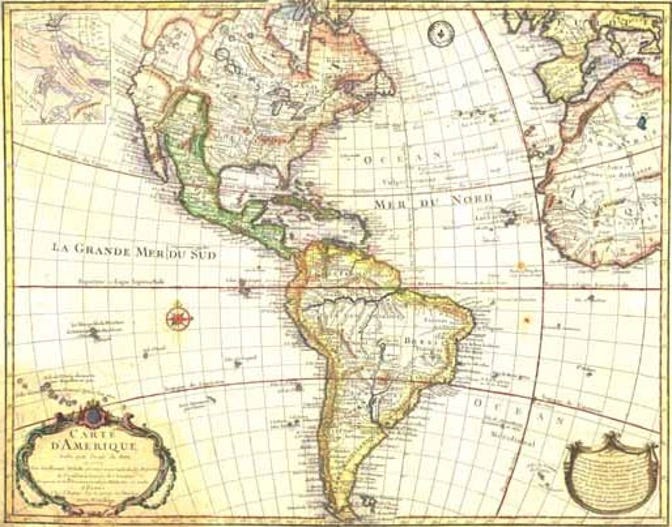
Credit: wikicommons

Today’s New York Times Spelling Bee letters:
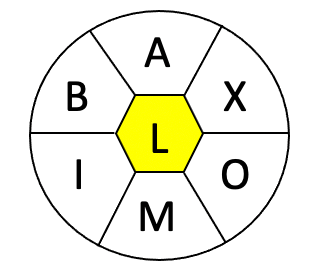
Art: Iva Reztok

A, B, I, M, O, X, and center L (all words must include L).

Merriam-Webster says…
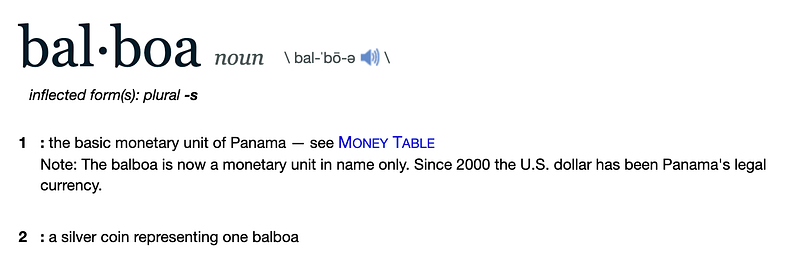
Credit: merriam-webster.com

Silly little dictionary! Don’t you know balboa can’t possibly be a word if the New York Times says it ain’t?

For further fascinating facts, check out the Spelling Bee Master.

What’s your favorite g.n.a.w. from today’s puzzle?

My Two Cents

I’ve been waiting for this one for a couple of years now, maybe more. Ever since I started playing the Spelling Bee game, the word balboa has come up as an option with any combination of seven letters that includes A, B, L, and O (and with one of the four in the middle, of course).

It was a valid word the first time I saw it, and it still wasn’t a valid word today.

Perhaps this column might change that. (Yeah, right…)

Dollar is accepted in any puzzle that contains its letters. So is peso, if I remember correctly. So why is balboa not?

Balboa is a currency, just like peso and dollar. It appears in the dictionary and is spelled in lowercase with no initial capital letter.

What gives, Sam Ezersky editors? You really need to explain this one to me.

To honor an a-hole

Vasco Núñez de Balboa was a Spanish explorer, governor, and conquistador. His claim to fame is crossing the Isthmus of Panama (that skinny part where the canal now lies) and becoming the first European to see the Pacific Ocean. And of course, getting his profile stamped on Panamanian currency around 400 years later.

He arrived in the New World in 1500 and first settled on the island of Hispaniola, today know as the piece of land Haiti and the Dominican Republic share. He went to Colombia 10 years later and founded the settlement of Santa María la Antigua del Darién, the first permanent European settlement on the mainland of either of the Americas.

This involved, as it usually did back then, killing a bunch of natives. Balboa earned the respect of his peers and ended up getting rid of the current mayor and declaring himself the new boss of the city. Not content with that, he also kicked out a governor who challenged him later on, and declared himself the new governor.

Umm… there seems to be a pattern here, right? It gets worse.

The Italian historian Peter Martyr d’Anghiera wrote that Balboa got upset with some of the indigenous people whom he thought were too “effeminate”. As a result, he fed forty of them to his dogs.

Credit: wikicommons

His cruelty and sadism continued unabated until a crueler and more sadist guy named Pedrarias Dávila tricked Balboa, arrested and tried him, and had him beheaded.
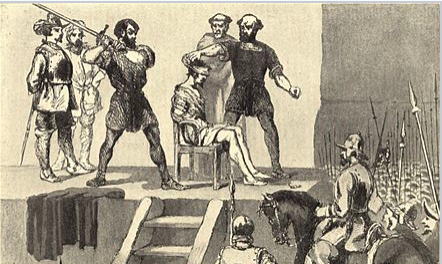
Credit: wikicommons

Still not enough to make up for feeding people who dressed “too girly” to a bunch of dogs, in my opinion.

So, how did Panama chose to address this guys brutal history? Simple. The country decided to name their national currency after him.

When Panama became independent from Colombia, they decided to replace the peso with a new coin in 1904. They tied the balboa to the U.S. dollar at an exchange rate of 1:1, which is how it has operated for most of the 117 years since.

The balboa coins have been issued as coins of 1 balboa; 50 céntesimos (hundredths); 25 centésimos; 10 centésimos; 5 centésimos; and, interestingly, 2 1/2 and 1/2 centésimos. Yeah, two and one-half cents. One day I’ll write about the Venezuelan locha, a coin worth 12.5 cents that existed when I was a kid.

It was only in 1941 that the government started issuing balboas in paper money.

The seventh greatest

The other balboa that’s been swirling around in your mind since you read the title of this article is, of course, soccer star Marcelo Balboa. No?

How about Rocky Balboa, voted the 7th greatest movie hero by the American Film Institute when they came out with the 100 Years… 100 Heroes and Villains list in 2003.

“Wait a second!” you cry out indignantly. “There are six movie heroes greater than Rocky Balboa? How is that possible?”

It’s true. I’m sorry. To see who they are, read through to the end. Or you could just skip the rest of this article, scroll down, and find out. If you do, please promise me you’ll scroll really slowly.

How incredible has Rocky Balboa’s fictional life been? Well…

  • In the 1980s the Rocky statue that Stallone commissioned for the third installment of the series found a permanent home at the steps of The Philadelphia Museum of Art.
  • In 2013, a poll of former heavyweight champions and boxing writers ranked Balboa as the best boxer among all the fighters in the film series.
  • In 2014, Rocky Balboa was the Inaugural Induction to the Fictitious Athlete Hall of Fame.

To top it off, his achievements even rubbed off on his creator, Sylvester Stallone. In 2011, the actor was inducted into the International Boxing Hall of Fame for his work on the films.

Maybe Panama should change their currency to honor this Balboa. They don’t even need to switch names.

What currency, you ask? The one that the editors of the New York Times Spelling Bee saw and said: “Gee, Not A Word”.

Okay, as promised, here they are. The six fictional heroes who beat out Rocky Balboa in the poll (with the movies in parentheses).

  1. Atticus Finch (To Kill a Mockingbird)
  2. Indiana Jones (Raider of the Lost Ark and other movies series)
  3. James Bond (umm, just the MC of a bunch of spy movies in the past six decades and counting)
  4. Rick Blain (Casablanca). I know what you’re thinking: “Play it again, Sam”. Blain never said it.
  5. Marshall Will Kane (High Noon). This one I found surprising.
  6. Clarice Starling (The Silence of the Lambs). I know what you’re thinking: “Hello, Clarice”. Lecter never said it.

Now that I’ve rewarded you, please check out my previous entry on words that g.n.a.w. at you:

Education
History
Movies
Spelling Bee
Economics
Recommended from ReadMedium