Azure Message Brokers patterns for Data Applications

I have previously written how pub/sub patterns could be helpful to put machine learning models into production, but message brokers in data application has a wider use than just Machine Learning. On Azure, there is two main messages brokers, Service Bus and Event Hub. Knowing what these message brokers can do, how they should be used for developing data applications and which ones are more suitable for a certain type of use case is primordial in order to get the most out of them.
Service bus and Event Hub
According to the Azure documentation, service bus is meant for high value messaging while Event hub is meant for big data pipelines. Now, both message brokers service have a use in analytics applications, but the key is to understand the specificities of each system.
Service-Bus
Some of the key feature from Service Bus include, include duplicate detection, transaction processing and routing.
Duplicate detection:
Service Bus checks the particular MessageId for topics having the “requiresDuplicateDetection” property set to true.
It looks back the history of messages that have passed through the topic based on a duplicateDetectionHistoryTimeWindow. An example ARM template would incorporate the deduplication mechanism is shown below:
{
  "$schema": "https://schema.management.azure.com/schemas/2015-01-01/deploymentTemplate.json#",
  "contentVersion": "1.0.0.0",
  "parameters": {
  },
  "variables": { },
  "resources": [
    {
      "apiVersion": "2017-04-01",
      "name": "my_sb_namespace",
      "type": "Microsoft.ServiceBus/namespaces",
      "location": "West Europe",
      "properties": {
      },
      "resources": [
        {
          "apiVersion": "2017-04-01",
          "name": "my_serviceBusTopicName",
          "type": "topics",
          "dependsOn": [
            "[concat('Microsoft.ServiceBus/namespaces/', 'my_sb_namespace')]"
          ],
          "properties": {
            "requiresDuplicateDetection": "true",
            "duplicateDetectionHistoryTimeWindow": "PT10M",
            "path": "my_serviceBusTopicName",
            "lockDuration": "PT5M",
          },
          "resources": []
        }
      ]
    }
  ],
  "outputs": {}
}
This property of service bus can be for instance leveraged in application capturing orders information from tracking script and wanting to ensure that no duplicate information is flowing in downstream systems from occurrences such as a page refresh on a thank you page.

One example of this type of application is shown above:
- A tracking script generates an http call to an API end point
- The API pushes the message to a Service bus topic with duplicate detection enabled
- An analytics ingestor application, reads the messages in a topic subscription and pushes the data to Google Analytics using the measurement protocol
Peek / Lock:
Azure Service Bus offers two way to handle messages, one destructive on every message read, one non-destructive using a peek /lock mechanism.
Setting up the non-destructive read, only requires setting up one parameter in the receiving function:
The peek / lock mechanism allows to implement transactions using ASB. Messages can be deleted on success and otherwise can be either abandoned explicitly or through the lock time expiring. Abandoning the message, allows for it to be put back into the queue for further processing attempts.
Being able to handle transactions mechanism is particularly important, when dealing with issue of compliance, such as revenue recognition, or that have a direct downstream impact for example a request for delivery of inventory that needs to be planned.
Both the lock and destructive read mechanism, enable receiver scaling.
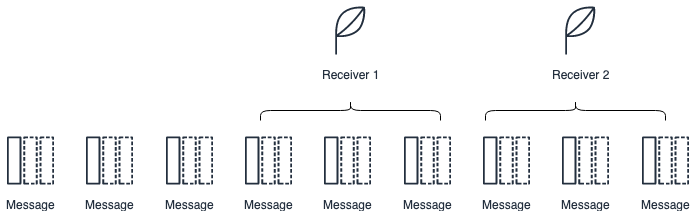
In the example above, each receiver are locking a set of messages. When that happens the messages become invisible to the other receivers. This type of mechanism allows for scaling the downstream ingestion of the messages without the risk of ingesting the same message multiple times.
Routing:
Routing is enabled using topic filters rules on subscription. There are three kind of potential filters that can be applied to subscription, boolean, sql and correlation filters. These can leverage the data present in system and (customer) user properties.
For instance, if I wanted to filter only the messages intended on a specific topic by country, and {‘country’: ‘GB’} had been set in the message custom properties, the following azure command line command would create the necessary filter on the subscription.
az servicebus topic subscription rule create \
  --resource-group ${AZURE_RESOURCE_GROUP}\
  --namespace-name ${SB_NAMESPACE_NAME} \
  --topic-name ${TOPIC_NAME} \
  --subscription-name ${SUBSCRIPTION_NAME}\
  --name ${FILTER_NAME}\
  --filter-sql-expression "user.country='${COUNTRY}'"'
An example of how this kind of routing mechanism could be useful is described below.
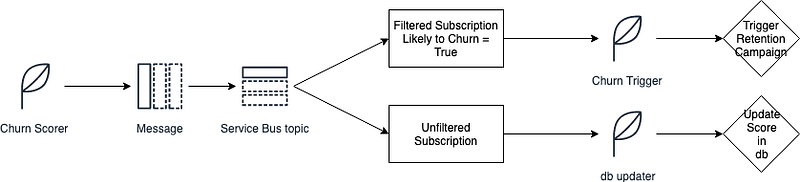
A churn scoring applications could publish messages to a service bus topic, containing two subscriptions, one that would only consider customers likely to churn and one generic that would contain all customers. Based on these topic subscriptions two applications could then naively consume the message, one for instance to trigger a retention campaign, the other to simply update the score of every consumer in the database.
EventHub
EventHub is known for its low latency and high scalability, making it particularly well suited to handle real-time data and big data. Lesser known are its replay and data capture functionalities as well as its Kafka integration.
Partition ownership and Checkpoints
While Azure Service Bus uses the concept of message locks to handle being able to use multiple consumers, Azure Event Hub relies on the concept of partition ownership.
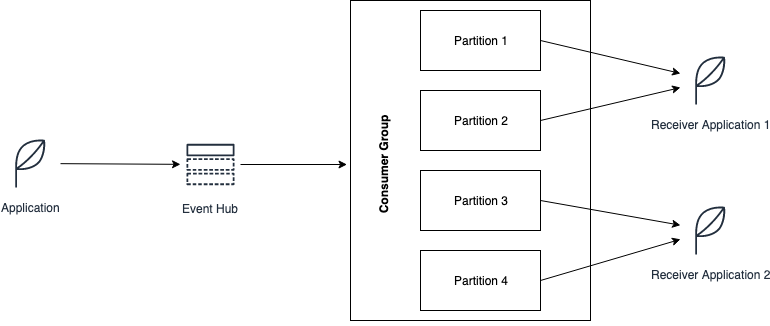
Partitions for a given consumer group get assigned to a receiver application for processing purpose. In the example above the receiver application get assigned partition 1 and 2, while the receiver application 2, gets assigned partitions 3 and 4. It is best practice to only have one active receiver application by consumer group / partition.
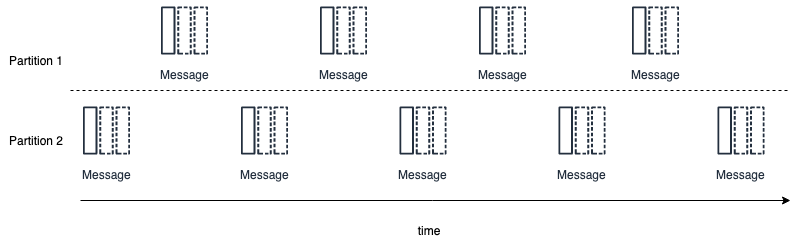
Instead of locks and deletion, event hub uses the concept of check-points to understand what event have been processed. Once the events have been processed, the position of the event across (ingestion) time is check-pointed within a partition, to indicate that the receiver should process the messages from this point onward.
Since the events are kept within the EventHub for the duration of the retention period, this approach makes it possible to “replay” the data. This can be useful, when needing to train Machine Learning models and see how they behave on past historical data.
Data Ingestion
EventHub offers the possibility to export the ingested data directly onto a blob storage or Azure Data Lake directly, through its’ capture functionality.
Once in a Data Lake/Blob Storage , you can leverage Azure Data Lake Analytics, or computation engines such as Presto or Apache Drill to directly query this data.
Kafka
Event hub offers a Kafka interface, this notably enables an integration with Apache Spark. Spark offers a straight-forward way to deal with streams, and notably offers a way to perform windowed operations, this is particularly useful in doing real-time aggregations. The following post from data-bricks, explains how this time aggregation works.
More from me on Hacking Analytics:


