
Azure — Application Security Group (ASG) Overview
Introduction to Application Security Group (ASG) in Azure — What is ASG?
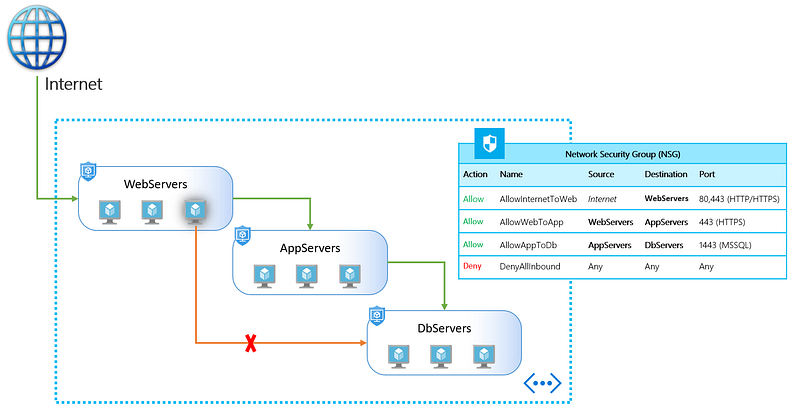
TL;DR:
Application Security Groups helps to manage the security of Virtual Machines by grouping them according the applications that runs on them. It is a feature that allows the application-centric use of Network Security Groups.
This approach allows for the grouping of Virtual Machines logically, irrespective of their IP address or subnet assignment within a Virtual Network.
What is ASG?
Normally when you deploy a network security group (NSG) it is either assigned to a NIC or a subnet (preferred). If you deploy that NSG to a subnet then the rules apply to all of the NICs, or virtual machines, in that subnet. This is OK when you’re deploying a new system where you can easily place virtual machines into subnets, and treat each subnet as its own security zone. But in the real world, things aren’t always that clean, and you might need something that allows a more dynamic or flexible means of assigning rules to some machines in a subnet.
ASGs are used within a NSG to apply a network security rule to a specific workload or group of VMs — defined by ASG worked as being the “network object” & explicit IP addresses are added to this object. This provides the capability to group VMs into associated groups or workloads, simplifying the NSG rule definition process. Another great use of this is for scalability, creating the virtual machine and assigning the newly created virtual machine to its ASG will provide it with all the NSG rules in place for that specific ASG — zero distribution to your service!
ASG Key Points
- Azure Security Groups allow us to define fine-grained network security policies based on workloads, centralized on applications, instead of explicit IP addresses.
- ASGs provide the capability of grouping the VMs with monikers and secure our applications by filtering traffic.
- By implementing granular security traffic controls, we can improve isolation of workloads and can protect them individually.
- If a breach occurs, this method limits the potential impact of lateral exploration of our networks from hackers.
- The security definition is simplified when using the ASGs.
- We can define application groups by providing a moniker descriptive name that fits our architecture.
- We can use it the way we want i.e. for applications, systems, environments, workload types, tiers or even any kind of roles.
- We can define a single collection of rules using ASGs and NSGs. We just have to apply a single NSG to our entire virtual network on all subnets.
- This way by defining a single NSG gives us the full visibility on all traffic policies and a single place for management. Hence, it reduces the tedious job.
Benefits of using ASGs:
- We can scale at our own pace. While deploying the VMs, we can make them members of the appropriate ASGs.
- If the VM is running more than one workloads, we can simply assign multiple ASGs.
- The access is always granted based on workloads.
- We don’t have to worry about security definition ever again.
- The most important point to be noted is that we can implement a zero-trust model. Meaning, we can limit access to the application flows that are explicitly permitted.
- ASGs introduce the ability to deploy multiple applications within the same subnet and also isolate traffic based on ASGs.
- With the use of Azure Security Groups, you can reduce the number of Network Security Groups in our subscription.
- In some cases, it gets so helpful that you can use a single NSG for multiple subnets of your virtual network.
Associate Virtual Machines

An application security group is a logical collection of virtual machines (NICs). You join virtual machines to the application security group, and then use the application security group as a source or destination in NSG rules.
The Networking blade of virtual machine properties has a new button called Configure The Application Security Groups for each NIC in the virtual machine. If you click this button, a pop-up blade will appear and you can select which (none, one, many) application security groups that this NIC should join, and then click Save to commit the change.
A Virtual Machine can be attached to more than one Application Security Group. This helps in cases of multi-application servers.
The following requirements apply to the creation and use of ASGs:
- All network interfaces used in an ASG must be within the same VNet
- If ASGs are used in the source and destination, they must be within the same VNet
Creating NSG Rules

You now can open an NSG and create inbound or outbound rules that use the application security group as a source or destination, and thus uses the associated virtual machine NICs as sources and destinations. Source and Destination in the new rule blade allow you to select any application security group in the same region.
As virtual machines are added, removed or updated the management overhead that is required to maintain the NSG may become quite considerable. This is where ASGs come in to play to simplify the NSG rule creation, and continued maintenance of the rule. Instead of defining IP prefixes, you create an ASG and use the it within the NSG rule. The Azure platform takes care of the rest by determining the IPs that are covered within the ASG.
As network interfaces of VMs are added to the ASG, the effective network security rules are applied without the need to update the NSG rule itself.
Summary
Application security groups make it easy to control Layer-4 security using NSGs for flat networks. You can quickly and easily join/remove NICs (virtual machines) to/from an application security group and dynamically apply/remove rules to those NICs. This should be very useful in lift-and-shift and DR scenarios in Azure.
View more from Awesome Azure
- Difference between Traffic Manager and Front Door Service
- Difference between Azure Load Balancer and Application Gateway
- Difference between Azure Private Links and Azure Service Endpoints
- Difference between Azure Blob Storage and Azure Data Lake Storage (ADLS)
- Difference between Azure SQL Database and Azure SQL Managed Instance
- Difference between Azure Storage Queue and Service Bus Queue
Happy Clouding!!!