
Azure — Difference between Traffic Manager and Front Door Service
Comparison: Traffic Manager vs Front Door in Azure.
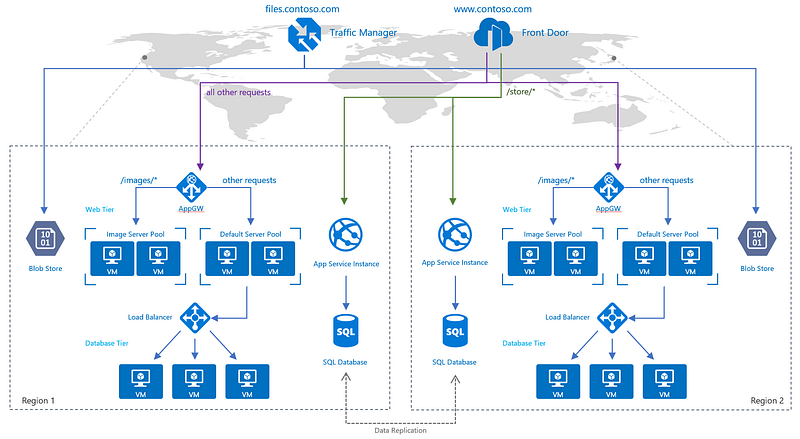
TL;DR:
When choosing a global load balancer between Traffic Manager and Azure Front Door for global routing, you should consider what’s similar and what’s different about the two services. Both services provide
- Multi-geo redundancy: If one region goes down, traffic seamlessly routes to the closest region without any intervention from the application owner.
- Closest region routing: Traffic is automatically routed to the closest region.
Traffic Manager: It uses DNS to redirect requests to an appropriate geographical location endpoint. Traffic Manager does not see the traffic passing between client and service. It simply redirects request based on most appropriate endpoints.
Front Door: It offers a single global entry point for customers accessing web apps, APIs, content and cloud services. Through a single pane of glass and global infrastructure, It enables Azure customers to build, manage and secure their global applications and content. It also enhance performance.
Key Differences
Protocol
Traffic Manager — Any protocol: Because Traffic Manager works at the DNS layer, you can route any type of network traffic; HTTP, TCP, UDP, etc.
Front Door — HTTP acceleration: With Front Door traffic is proxied at the Edge of Microsoft’s network. Because of this, HTTP(S) requests see latency and throughput improvements reducing latency for SSL negotiation and using hot connections from AFD to your application.
Routing
Traffic Manager — On-premises routing: With routing at a DNS layer, traffic always goes from point to point. Routing from your branch office to your on premises datacenter can take a direct path; even on your own network using Traffic Manager.
Front Door — Independent scalability: Because Front Door works with the HTTP request, requests to different URL paths can be routed to different backend / regional service pools (microservices) based on rules and the health of each application microservice.
Billing
Traffic Manager — Billing format: DNS-based billing scales with your users and for services with more users, plateaus to reduce cost at higher usage.
Front Door — Inline security: Front Door enables rules such as rate limiting and IP ACL-ing to let you protect your backends before traffic reaches your application.
Summary
Because of the performance, operability and security benefits to HTTP workloads with Front Door, we recommend customers use Front Door for their HTTP workloads. Traffic Manager and Front Door can be used in parallel to serve all traffic for your application.
View more from Awesome Azure
- Difference between Azure Blob Storage and Azure Data Lake Storage (ADLS)
- Difference between Azure Load Balancer and Application Gateway
- Difference between Azure Private Links and Azure Service Endpoints
- Difference between Azure SQL Database and Azure SQL Managed Instance (SQL MI)
- Difference between Azure SQL Database and SQL Server on VM
- Difference between Azure Storage Queue and Service Bus Queue
Happy Clouding!!!


