
AWS — WAF (Web Application Firewall) Overview
Introduction to AWS WAF — What is Amazon WAF?
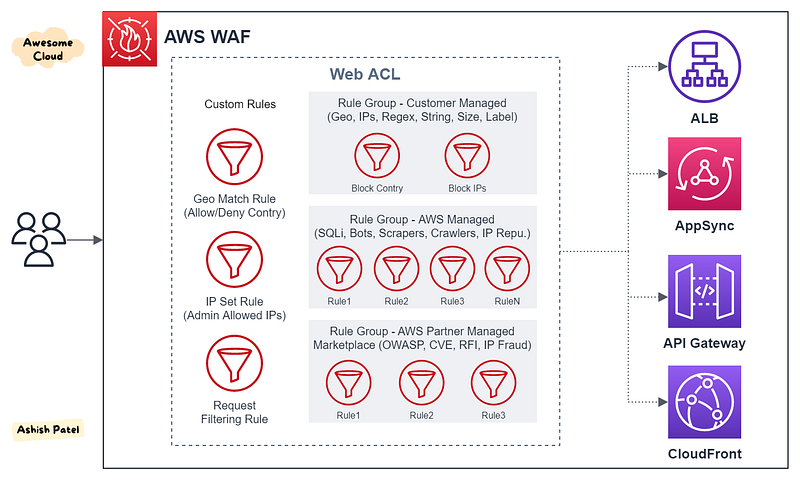
TL;DR
AWS WAF is a managed web application firewall service that helps you protect your web applications at the application layer from common web exploits that could affect application availability, compromise security, and/or consume excessive resources. It lets you control access to your content by configuring rules that allow, block or monitor (count) web requests based on web security rules that you specify.
WAF can be natively applied on
- CloudFront
- Application Load Balancer
- API Gateway
- AppSync
WAF Components
Web ACL
You use a web access control list (ACL) to protect a set of AWS resources.
- You create a Web ACL and define its protection strategy by adding rules.
- You can add the rules and rule groups that you want to use to filter web requests.
- You can attach multiple Rules Groups and multiple Custom Rules to Web ACL.
- You can associate Web ACL with one or more AWS resources.
- You can specify a default action for the web ACL, either
BlockorAllow. This is the action that WAF takes when a web request doesn’t match any of the rules.
Web ACL Capacity Units (WCU): to calculate and control the operating resources that are required to run your rules, rule groups, and web ACLs. WCUs don’t affect how AWS WAF inspects web traffic.
Rule Groups
A rule group is a reusable set of rules that you can add to a Web ACL. You can use rules individually or in reusable rule groups.
- The rules that are defined inside a rule group have their actions defined inside the rule group.
- You can reuse a single rule group in multiple web ACLs by adding a rule group reference statement to each web ACL.
- You don’t directly associate a rule group with an AWS resource. To protect resources using a rule group, you use the rule group in a web ACL.
Rule groups fall into two main categories:
- Managed Rule groups: Created and maintained by AWS and AWS Marketplace sellers.
- Customer (Self Managed) Rule groups: You can define your own rule groups, which you create and maintain.
Rules
In every rule group and web ACL, rules define how to inspect web requests and what to do when a web request matches the inspection criteria.
- Each rule requires one top-level statement, which might contain nested statements at any depth, depending on the rule and statement type.
- Rules don’t exist in AWS WAF on their own. They aren’t AWS resources, and they don’t have Amazon Resource Names (ARNs). You can access a rule by name in the rule group or web ACL where it’s defined.
Each rule contains a statement that defines the inspection criteria, and an action to take if a web request meets the criteria.
- For each rule, you specify whether you want to block matching web requests or allow them.
- You can also use rules just to count matching requests.
Rule Statements/Conditions Rule statements are the part of a rule that tells AWS WAF how to inspect a web request.
- When AWS WAF finds the inspection criteria in a web request, we say that the web request matches the statement.
- Every rule statement specifies what to look for and how, according to the statement type.
- You could have a statement that combines many other statements with logical
AND,OR, andNOTstatements. - AWS WAF supports nesting for many rule statements, but not for all.
- Options for the part of the request to inspect:
Header,HTTP method,Query string,Single/all query parameter,URI path,Body,JSON body.
Key Points
- WAF monitors traffic at the application layer (Layer-7) of the OSI model.
- With WAF, you control ingress traffic to your application, not egress traffic.
- WAF helps protect applications and can inspect web requests transmitted over HTTP or HTTPS.
- WAF support for IPv6 which allow to inspect HTTP/S requests coming from both IPv6 and IPv4 addresses.
- AWS WAF provides flexible options for implementing protections via managed rules, partner provided rules, and custom rules that you can write yourself.
- Rules are executed in the order that they are listed within a Web ACL.
- Unlike traditional appliance-based WAFs, there is no need to deploy and manage infrastructure, or plan for capacity.
- AWS WAF is PCI DSS 3.2 certified. AWS has expanded its HIPAA compliance program to include AWS WAF as a HIPAA eligible service.
- WAF charges based on the number of web access control lists, the number of rules added per web ACL and number of web requests that it receive.
Use Cases
You can use AWS WAF to protect against attacks such as
- Cross-site request forgery (CSRF).
- Cross-site scripting (XSS).
- SQL injection (SQLi).
- CVE, RFI, Bad Bots, Scrapers, Crawlers.
- File inclusion.
- Other threats in the OWASP Top 10.
Summary
Depending on your application’s requirements, you must decide where to deploy AWS WAF. If you are delivering web content, then you should implement the AWS WAF service as an additional layer of security. Implementing WAF is a huge asset to your web application architecture.
View more from Awesome Cloud
- Difference between SQS and SNS
- Difference between Application load balancer and Network load balancer
- Difference between Security Groups and NACL
- Difference between Amazon Aurora and Amazon RDS
- Difference between Secrets Manager and Parameter Store
- Difference between Internet Gateway and NAT Gateway
Happy Clouding!!!


