
AWS — Difference between Application load balancer (ALB) and Network load balancer (NLB)
Comparisons: ALB vs NLB in AWS — Application load balancer vs Network load balancer.
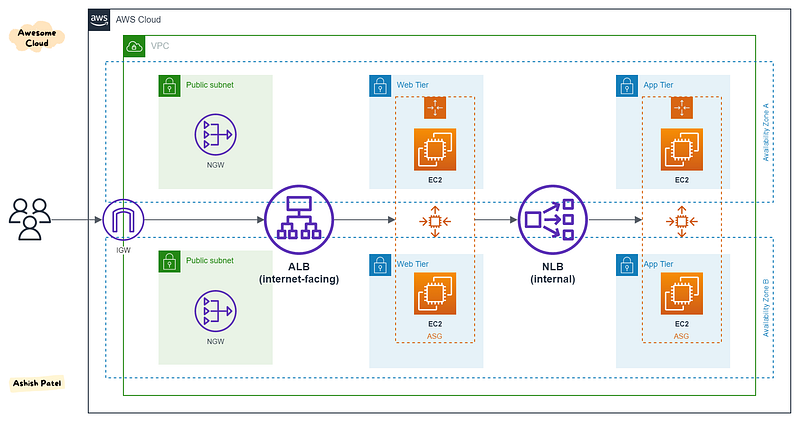
TL;DR:
ALB — Layer 7 (HTTP/HTTPS traffic), Flexible. NLB — Layer 4 (TLS/TCP/UDP traffic), Static IPs. CLB — Layer 4/7 (HTTP/TCP/SSL traffic), Legacy, Avoid.
Both Application Load Balancer and Network Load Balancer are designed from the ground up for the modern paradigm of dynamic port configurations as commonly seen in containerized deployments. Picking which load balancer is right for you will depend on the specific needs of your application, such as whether or not network traffic is HTTP, whether you need end-to-end SSL/TLS encryption, and whether or not you want host and path-based traffic routing.
If you are deploying docker containers and using a load balancer to send network traffic to them EC2 Container Service provides tight integration with ALB and NLB so you can keep your load balancers in sync as you start, update, and stop containers across your fleet.
Application Load Balancer (ALB)
This is the distribution of requests based on multiple variables, from the network layer to the application layer. It is context-aware and can direct requests based on any single variable as easily as it can a combination of variables. Applications are load balanced based on their peculiar behavior and not solely on server (operating system or virtualization layer) information.
This is a feature filled Layer-7 load balancer, HTTP, and HTTPS listeners only. Provides the ability to route HTTP and HTTPS traffic based upon rules, host-based or path based. Like an NLB, each Target can be on different ports. Even supports HTTP/2. Configurable range of health check status codes (CLB only supports 200 OK for HTTP health checks).
Protocols: HTTP, HTTPS
Protocol versions: HTTP/1.1, HTTP/2, gRPC
Target Types: Instance, IP, Lambda
With ALB, it is a requirement that you enable at least two or more Availability Zones.
Network Load Balancer (NLB)
This is the distribution of traffic based on network variables, such as IP address and destination ports. It is Layer 4 (TCP) and below and is not designed to take into consideration anything at the application layer such as content type, cookie data, custom headers, user location, or the application behavior. It is context-less, caring only about the network-layer information contained within the packets it is directing this way and that.
This is a TCP Load Balancer only that does some NAT magic at the VPC level. It uses EIPs, so it has a static endpoint unlike ALB and CLBs (by default). Each Target can be on different ports.
Protocols: TLS, TCP, UDP, TCP_UDP
Protocol versions: TLS, TCP, UDP, TCP_UDP
Target Types: Instance, IP, ALB
With NLB, Elastic Load Balancing creates a network interface for each Availability Zone that you enable.
Key Differences: ALB vs NLB
- OSI Layer: Application Load Balancer (as the name implies) works at the Application Layer (Layer 7 of the OSI model, Request level). Network Load Balancer works at the Transport layer (Layer 4 of the OSI model, Connection level).
- Routing: NLB just forward requests whereas ALB examines the contents of the HTTP request header to determine where to route the request. So, an ALB support advanced request (content-based) routing.
- Static IP: ALB doesn’t provide support for static IP addresses whereas NLB provides support for zonal static IP addresses (in each AZ).
- PrivateLink (Endpoint services): NLB provides support for PrivateLink with VPC Endpoints Service integration whereas ALB doesn’t support PrivateLink. Only NLB can be used directly as PrivateLink. Elastic Load Balancing now supports forwarding traffic directly from NLB to ALB. With this feature, you can now use AWS PrivateLink and expose static IP addresses for applications built on ALB.
- AWS Load Balancer Controller for Kubernetes: controller provisions ALB when you create a Kubernetes
Ingressand NLB when you create a Kubernetesserviceof typeLoadBalancer. - Application availability: NLB cannot assure the availability of the application. This is because it bases its decisions solely on a network and TCP-layer variables and has no awareness of the application at all. Generally, NLB determines availability based on the ability of a server to respond to ICMP ping or to correctly complete the three-way TCP handshake. ALB goes much deeper and is capable of determining availability based on not only a successful HTTP GET of a particular page but also the verification that the content is as was expected based on the input parameters.
- When considering the deployment of multiple applications on the same host sharing IP addresses (virtual hosts), NLB will not differentiate between Application-A and Application-B when checking availability (indeed it cannot unless ports are different) but ALB will differentiate between two applications by examining the application layer data available to it. This difference means that NLB may end up sending requests to an application that has crashed or is offline, but ALB will never make that same mistake.
- Security: ALB and NLB, both support Security Groups. (Updates on Aug 10, 2023, Network Load Balancer now supports security groups)
Use Cases
Choose ALB if:
- Application Load Balancer is best suited for load balancing of HTTP and HTTPS traffic and provides advanced request routing targeted at the delivery of modern application architectures, including microservices and containers.
- Applications need advanced routing (host-based, URL-based, query string based).
- Run multiple services (microservices) behind a single load balancer.
Choose NLB if:
- Network Load Balancer is best suited for load balancing of TCP traffic where extreme performance is required. It is capable of handling millions of requests per second while maintaining ultra-low latencies, and it is optimized to handle sudden and volatile traffic patterns.
- You want to share/expose your services (e.g. SaaS services) to other consumers in different VPCs using PrivateLink VPC Endpoint.
- You need a static IP address that can be used by applications as the front-end IP of the load balancer.
View more from Awesome Cloud
- Difference between SQS and SNS
- Difference between Amazon Aurora and Amazon RDS
- Difference between Security Groups and NACL
- Difference between Internet Gateway and NAT Gateway
- Difference between Secrets Manager and Parameter Store
- Difference between EKS and ECS
Happy Clouding!!!


