
AWS — Network Load Balancer (NLB) Overview
Introduction to AWS Network Load Balancer — What is NLB?
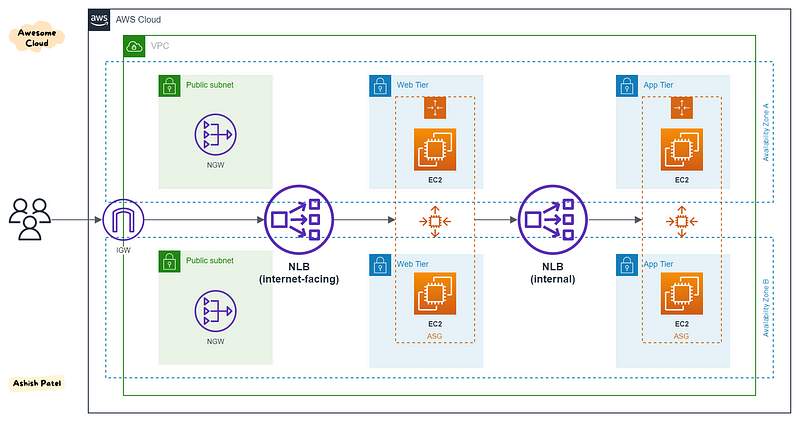
TL;DR
Network Load Balancer (NLB) works at the Layer-4 (Transport layer - Connection level) of the OSI model. NLB supports load balancing of applications using TCP, UDP, and TCP_UDP listeners, as well as TLS listeners.
NLB is specifically designed for high performance traffic that is not conventional web traffic. NLB is capable of handling millions of requests per second while maintaining ultra-low latencies.
Read about Elastic Load Balancer (ELB) Overview.
Features
- Layer 4 (Connection-based) Load Balancing — You can load balance both TCP and UDP traffic, routing connections to targets - EC2 instances, microservices, and containers.
- Low Latency — NLB offers extremely low latencies for latency-sensitive applications. NLB has ability to handle volatile workloads and scale to millions of requests per second and provide the best throughput.
- TLS Offloading — NLB supports client TLS session termination (encryption and decryption). This enables you to offload TLS termination tasks to the load balancer, while preserving the source IP address for your back-end applications.
- Preserve source IP address — NLB preserves the client side source IP allowing the back-end to see the IP address of the client. This can then be used by applications for further processing.
- Static IP support — NLB automatically provides a static IP per Availability Zone (subnet) that can be used by applications as the front-end IP of the load balancer.
- Elastic IP support — NLB also allows you the option to assign an Elastic IP per Availability Zone (subnet) thereby providing your own fixed IP.
- Sticky Sessions — Sticky sessions (source IP affinity) are a mechanism to route requests from the same client to the same target. Stickiness is defined at the target group level.
- Long-lived TCP Connections — NLB supports long-lived TCP connections that are ideal for WebSocket type of applications.
- Zonal Isolation — NLB can be enabled in a single Availability Zone to support architectures that require zonal isolation. NLB is designed for application architectures in a single zone. However, It is recommend to configure the load balancer and targets in multiple AZs for achieving high availability.
- DNS Fail-over — If there are no healthy targets registered with the NLB or if the NLB nodes in a given zone are unhealthy, then Amazon Route 53 will direct traffic to load balancer nodes in other Availability Zones.
- Integration with Route 53 — In the event that your NLB is unresponsive, integration with Route 53 will remove the unavailable load balancer IP address from service and direct traffic to an alternate NLB in another region.
- Integration with AWS Services — NLB is integrated with other AWS services such as Auto Scaling, Elastic Container Service (ECS), Elastic BeanStalk, AWS Certificate Manager (ACM), CloudWatch, Config, CloudTrail, CodeDeploy, and CloudFormation.
- Central API Support — NLB uses the same API as Application Load Balancer (ALB). This will enable you to work with target groups, health checks, and load balance across multiple ports on the same EC2 instance to support containerized applications.
Key Points
- NLB operates at connection level.
- You can associate Security Groups with NLB. (Updates on Aug 10, 2023, Network Load Balancer now supports security groups)
- You can select only one subnet per Availability Zone.
- NLB is more expensive as compare to other AWS Load balancers.
- Both Classic LB and ALB use connection multiplexing, but NLB don’t.
- NLB support for registering targets by IP address, including targets outside the VPC for the load balancer.
- NLB support for routing requests to multiple applications on a single EC2 instance. User can register each instance or IP address with the same target group using multiple ports.
- NLB with TCP and TLS Listeners can be used to setup PrivateLink. You cannot setup PrivateLink with UDP listeners on NLB.
- You can use Route 53 health checking and DNS failover features to enhance the availability of the applications running behind NLB’s.
- You can monitor and analyze traffic patterns & troubleshoot issues with CloudWatch metrics, VPC Flow Logs, Access logs & CloudTrail logs.
- For TCP traffic, the NLB selects a target using a flow hash algorithm based on the protocol, source IP address, source port, destination IP address, destination port & TCP sequence number.
- To support both TCP and UDP on the same port, create a TCP_UDP listener. The target groups for a TCP_UDP listener must use the TCP_UDP protocol.
Use Cases
- When you need to seamlessly support spiky or high-volume inbound TCP requests without pre-warming.
- When you need support of a static or elastic IP address.
- When you want to support for routing requests to multiple applications on a single EC2 instance. NLB is well suited to ECS.
- When you need to support an IP address or an IP target outside of the VPC.
View more from Awesome Cloud
- Difference between SQS and SNS
- Difference between Application load balancer and Network load balancer
- Difference between Security Groups and NACL
- Difference between Secrets Manager and Parameter Store
- Difference between Internet Gateway and NAT Gateway
Happy Clouding!!!
Reference: AWS NLB


