
AWS PrivateLink and VPC Endpoints
ACM.75 An alternative to NATs and Internet Gateways
Part of my series on Automating Cybersecurity Metrics and Network Security. The Code.
Free Content on Jobs in Cybersecurity | Sign up for the Email List
In the last post I covered DNS and NTP on AWS — it’s always DNS.
Now let’s take a closer look at the design of our AWS Lamba networking.
We looked at adding a VPC configuration for our Lambda function in an earlier post in this series where I demonstrated how a Lambda function that had Internet access may be abused. I also mentioned two options for allowing resources without direct Internet access to access Internet resources (or resources in other networks): NATs or PrivateLink with VPC Endpoints.
We covered how we might use VPC endpoints in our last couple of posts for our batch job architecture but first let’s look at the service in a bit more detail.
What is PrivateLink?
Rather than reword everything I’ll just refer you to the AWS documentation to answer that question:
AWS PrivateLink is a highly available, scalable technology that enables you to privately connect your VPC to services as if they were in your VPC. You do not need to use an internet gateway, NAT device, public IP address, AWS Direct Connect connection, or AWS Site-to-Site VPN connection to allow communication with the service from your private subnets. Therefore, you control the specific API endpoints, sites, and services that are reachable from your VPC.
You can create your own service and host it on AWS and allow people to access via PrivateLink. That way you could offer the ability for people in other AWS accounts to create a private connection that stays on the AWS network (as opposed to traversing the Internet) to access your service. From the AWS documentation above, you would construct your service with a load balancer and a defined endpoint that your users or customers would access.
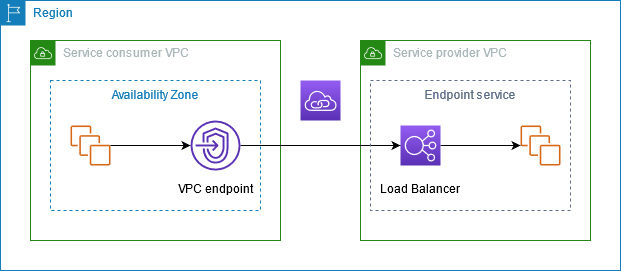
AWS has set up many of their own services to work this way. You can create a VPC endpoint in your account to allow your resources to access a particular AWS Service.
What is a VPC Endpoint?
A VPC Endpoint is essentially a configuration that allows your services in your VPC to access a service made available to you via PrivateLink. Depending on the requirements of the service to which you are connecting, your VPC endpoint will leverage a network interface, load balancer, or gateway to access the service. The configuration of your VPC endpoint specifies the type of endpoint you are creating.
I am going to look at these endpoints in more detail in upcoming blog posts so we can understand exactly how they work and how to inspect traffic related to these endpoints.
How does it work?
The answer to this Stack Exchange question has a nice explanation of how AWS PrivateLink and VPC endpoints work. The answer is provided by Chris Williams who is an AWS Solution Architect so it seems to be a reliable source and the answer provides more clarity than some of the documentation at the time of this writing.
It does a good job distinguishing between routing and the fact that you end up with a network interface associated with your subnet when you create a VPC endpoint. There’s also a link to a great video from AWS re:Invent which covers the underlying mechanism of how it works under the hood in more detail.
When you have a network interface associated with a subnet in your VPC, you should be able to inspect traffic to and from that interface using VPC Flow Logs. I explained what VPC Flow Logs are and why they are important here (anyone that works in incident response or performs threat hunting already knows this):
I’ve heard people say you don’t need to inspect network traffic if you’re using a VPC endpoint because you can just use CloudTrail. CloudTrail won’t give you visibility into traffic beyond HTTP requests. Any traffic that is not an HTTP request or that gets accepted or rejected on another port will not be visible in CloudTrail.
Examples:
- DNS queries, tunnels, and exfiltration
- ICMP traffic and ICMP tunnels such as those used in the Target Breach.
- An attacker scanning all the network interfaces in your account.
- A network attack where an attacker is inserting bits in OSI layers below the application layer.
Just because your endpoint is only supposed to allow HTTP traffic doesn’t mean that is what it is doing. You need to monitor it for a possible misconfiguration. Additionally, if you see someone hitting that endpoint on other ports and protocols, you may have an attacker in your cloud network who is scanning for vulnerabilities. You won’t know that if you are not inspecting those logs. When I perform a penetration test I evaluate the security of all network interfaces in the account.
Additionally, as I explained already in a post on Lambda networking, attacks are possible in layers prior to the application layer, where HTTP operates. Network logs can be captured at a lower layer in the network stack to obtain visibility into headers stripped off before getting to the application layer. On the other hand, the logs at the application layer can show you things that can’t be detected at lower layers by appliances that don’t piece your requests back together. You need both.
This is a big topic unto itself and not the main purpose of why I’m writing this post. It’s just that people keep coming up with this idea that they don’t need network logs or networking at all so I continue to address it to some degree. Hopefully I can provide more insight into this as we progress through the series but really, I just wanted to get this code implemented so I can use it!
AWS Services that work with PrivateLink
AWS provides a list of their own services work with PrivateLink on here:
We are going to try out PrivateLink in our public and private VPCs in the upcoming posts and take a look at some network traffic.
PrivateLink Pricing
The costs for AWS PrivateLink vary by the type of endpoint you need to create:
At the moment the cost in us-west-2 is .01/hour for an Interface endpoint.

Data Transfer:

For a gateway endpoint per hour per AZ (you’ll generally want two):

Data transfer:

As you can see the Gateway option costs a lot more than the Interface option for data transfer and the option you can use depends on the service to which you are connecting and what it requires.
NAT Pricing
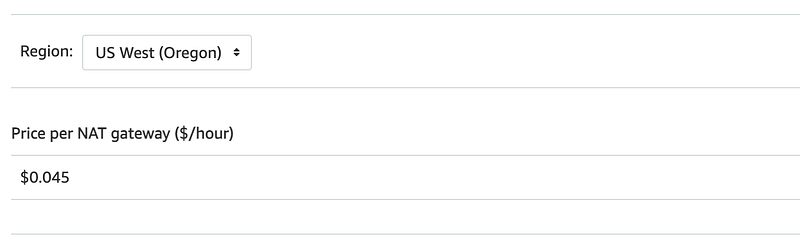
As you can see the hourly charge for a NAT is 4.5 times higher for hourly alone. But then you’ll need to consider if you are only using one PrivateLink or multiple to different services and how much it adds up.
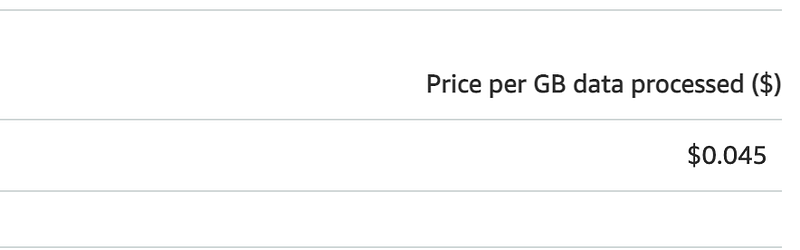
Per GB pricing is slightly higher than the Gateway PrivateLink option.
Which one is really cheaper?
What if you need to use PrivateLink for multiple AWS services. Do you pay or each service you use? The documentation says:
There is no cost to the number of endpoints you are deploying for PrivateLink.
So it sounds like you just pay one hourly rate plus whatever data you send but of course you will want to verify any assumptions with a beta test or POC.
https://aws.amazon.com/privatelink/faqs/
For the other factors the NAT is generally more expensive so it seems like any way you look at it AWS PrivateLink should be cheaper.
Throughput
Of course cost is not the only consideration. Some companies will need certain throughput or in other words they need to send a whole bunch of data all at once through the pipe while other organizations just send a smaller amount of data constantly over time. You’ll need to consider how much data each option can send at once.
PrivateLink — From the AWS documentation:
By default, each interface endpoint can support a bandwidth of up to 10 Gbps per Availability Zone and automatically scales up to 100 Gbps. If your application needs higher throughput, contact AWS support.
NAT Gateway
A NAT gateway supports 5 Gbps of bandwidth and automatically scales up to 100 Gbps. If you require more bandwidth, you can split your resources into multiple subnets and create a NAT gateway in each subnet.
So it seems like a NAT Gateway can support higher bandwidth needs out of the gate but maybe you can get more from PrivateLink from AWS Support. If you have that high of bandwidth needs you probably should be talking to an AWS TAM (account manager) anyway who may connect you with AWS solutions architects and possibly product managers to discuss your needs in more detail.
Performance
With a NAT your performance may rely in part again on your design:
A NAT gateway can process one million packets per second and automatically scales up to ten million packets per second. Beyond this limit, a NAT gateway will drop packets. To prevent packet loss, split your resources into multiple subnets and create a separate NAT gateway for each subnet.
A NAT gateway can support up to 55,000 simultaneous connections to each unique destination. This limit also applies if you create approximately 900 connections per second to a single destination (about 55,000 connections per minute).
You’ll want to read all the requirements here and more importantly — beta test any solution. That is the beauty of the cloud. You can try something out for a while and turn it off when you’re done and stop paying for it.
I couldn’t find many specifics with a quick search for PrivateLink but I presume with less appliances to traverse, PrivateLink will be faster. It’s touted as being “fast” but without specifics as compared to a NAT. It’s always best to test this out anyway with your specific architecture.
I did find this note in relation to using an NLB with Private Link:
Port allocation errors connecting through AWS PrivateLink
If your Network Load Balancer is associated with a VPC endpoint service, it supports 55,000 simultaneous connections or about 55,000 connections per minute to each unique target (IP address and port). If you exceed these connections, there is an increased chance of port allocation errors. Port allocation errors can be tracked using the
PortAllocationErrorCountmetric. To fix port allocation errors, add more targets to the target group.
You also want to make sure your architecture works with whatever solution you choose if you are using Direct Connect, Peering, a Transit Gateway, hybrid or multi-cloud connectivity. Also, ensure that you will not bump into any quotas or limits. Definitely talk to AWS if you do to see if they can accommodate.
What about security?
Both options say they will keep traffic off the Internet but are both options equally secure? What later in the OSI model does each operate at? Can you capture packets on a PrivateLink? Will we be able to see the outbound logs for a Lambda function that were missing in our last test for a Lambda associated with a VPC but no NAT?
The best thing to do in this case — is test things out and make sure we get what we need from a particular implementation. That’s what we’ll do in some upcoming posts. But before we get to those, we need to think about our architecture a bit more and implement a few additional resources we’ll need for testing purposes.
If you want to jump head check out this post on deploying a VPC Endpoint for use with CloudFormation and the subsequent posts where I test it to validate that the traffic is actually using a private route.
Also, validate your connections are actually going to the private endpoint.
Follow for updates.
Teri Radichel | © 2nd Sight Lab 2023
The best way to support this blog is to sign up for the email list and clap for stories you like. If you are interested in IANS Decision Support services so you can schedule security consulting calls with myself and other IANS faculty, please reach out on LinkedIn via the link below. Thank you!
About Teri Radichel:
~~~~~~~~~~~~~~~~~~~~
Author: Cybersecurity for Executives in the Age of Cloud
Presentations: Presentations by Teri Radichel
Recognition: SANS Difference Makers Award, AWS Security Hero, IANS Faculty
Certifications: SANS
Education: BA Business, Master of Software Engineering, Master of Infosec
Company: Cloud Penetration Tests, Assessments, Training ~ 2nd Sight Lab
Like this story? Use the options below to help me write more!
~~~~~~~~~~~~~~~~~~~~~~~~~~~~~~~~~~~~~~~~~~~~~~~~~~~~~~~~~~~~~
❤️ Clap
❤️ Referrals
❤️ Medium: Teri Radichel
❤️ Email List: Teri Radichel
❤️ Twitter: @teriradichel
❤️ Mastodon: @[email protected]
❤️ Facebook: 2nd Sight Lab
❤️ Threads: @teriradichel
❤️ Bluesky: @teriradichel
❤️ YouTube: @2ndsightlab
❤️ Buy a Book: Teri Radichel on Amazon
❤️ Request a penetration test, assessment, or training
via LinkedIn: Teri Radichel
❤️ Schedule a consulting call with me through IANS ResearchMy Cybersecurity Book: Cybersecurity for Executives in the Age of Cloud



