
AWS — Organizations Overview
What is AWS Organization? — Introduction to AWS Organizations, Benefits, Use Cases and Best Practices.
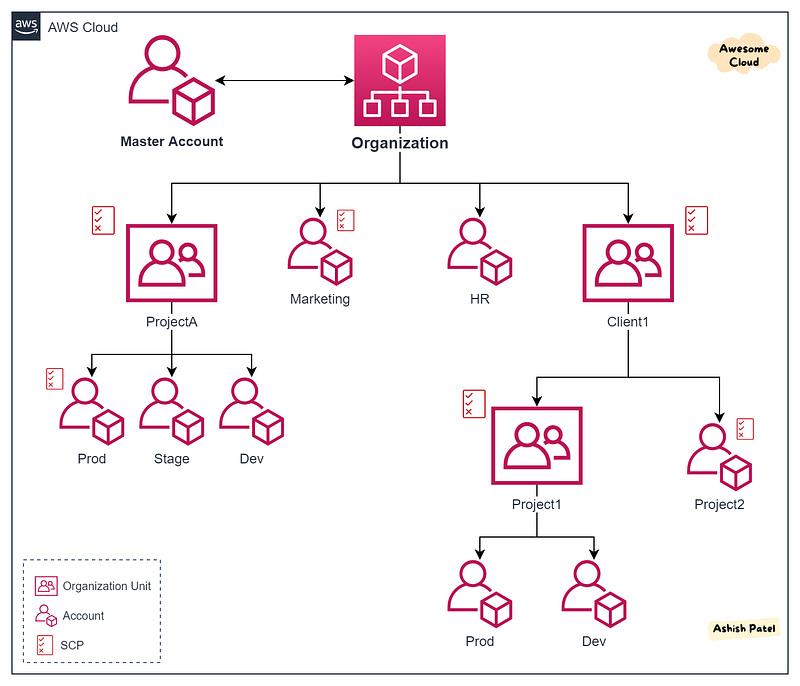
TL;DR
AWS Organizations is an account management service which allows to manage multiple AWS accounts centrally.
AWS Organizations helps you to centrally manage billing, control access, compliance, security, and share resources across your AWS accounts. It is very easy setup and available to all AWS customers at no additional charge.
AWS Organizations has two feature sets:
- Consolidated billing — It provides basic management tools that you can use to centrally manage the accounts in your organization.
- All features — It provides all the consolidated billing features, plus a set of advanced features such as service control policies.
AWS Organizations Components
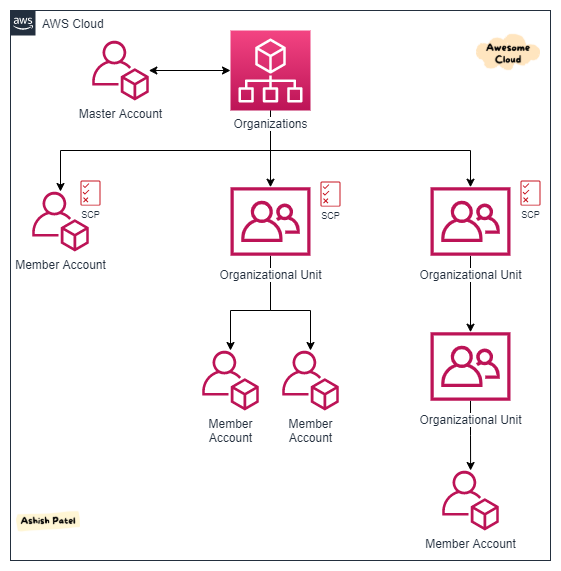
Master Account
- A master account is the AWS account you use to create your organization.
- This can be an account designated for managing AWS accounts. It is the central management and governance hub.
- Using master account, you can create other accounts in your organization and invite other accounts to join your organization, and remove accounts from your organization.
- There is only one master/root account.
Member Account
- A member account is an AWS account, other than the master account in the organization.
- New AWS account can be directly added to the Organization.
- Existing AWS account can be added (invited) to the Organization. Root user of account must have to accept invitation.
Organization Unit (OU)
- An organizational unit is a group of AWS accounts within an organization.
- An OU can also contain other OUs enabling you to create a hierarchy. This enables to reflects company’s structure.
- An account can be added under single OU. One account cannot be added under two different OUs.
- Hierarchy can be five levels deep including root and AWS accounts created in the lowest OUs.
Service Control Policy (SCP)
- SCP is a document that describes controls to be attached to the entire organization, OUs, or individual AWS accounts.
- Policy defines the services and actions that users or a role can perform.
- Policies inherited through hierarchical connections in an organization.
- Policies can be assigned at different points in the hierarchy.
AWS Organizations Benefits
Central management and Improved governance
- AWS Organizations allows you to manage multiple AWS accounts at once. It helps to create a better control on the AWS environments by forming groups of accounts and then attaching the correct policies to the groups.
- It allows you effectively manage different servers, storage, and other cloud resources across multiple account.
- It ensures the correct usage of actions and services allowed in account.
- It allows you create an organizational structure in AWS account.
Simplify Access control
- You can create groups of accounts, and then attach Service Control Policies (SCPs) to a group to ensure the correct policies are applied across the accounts.
- You can specifically Allow or Deny individual AWS Services.
Consolidated Billing
- AWS Organizations enables you to set up a single payment method for all the AWS accounts in your organization through consolidated billing.
- You can see a combined view of charges incurred by all your accounts. Also, you can track account individually and the cost data can be downloaded in a separate file.
- You can manage and audit your expenses of all the accounts from one dashboard.
Centralized security and auditing
- You can audit all events from accounts using AWS CloudTrail.
- You can centrally define your recommended configuration criteria across resources, AWS Regions, and accounts with AWS Config.
- You can use AWS Control Tower to establish cross-account security audits, or manage and view policies applied across accounts.
- You can protect your resources by centrally managing security services like GuardDuty, Firewall Manager, IAM Access Analyzer, etc.
Manage costs and optimize usage
- AWS Organizations enables you to simplify costs and take advantage of quantity discounts with a single bill.
- You take advantage of pricing benefits from aggregated usage, such as volume discounts for Amazon EC2 and Amazon S3.
Automate AWS Account Creation/Quickly scale your workloads
- You can automate the creation and management of new AWS accounts.
- The Organizations APIs enable you to create new accounts programmatically, and to add the new accounts to a group. The policies attached to the group are automatically applied to the new account.
AWS Organizations Use Cases
- Group multiple AWS accounts.
- Get consolidated billing of multiple AWS Accounts and simplify cost reporting.
- Get cost visibility with single payer account.
- Limit AWS service access with SCPs.
- Apply common policies to multiple AWS accounts (or entire organization).
- Easy compliance across multiple AWS accounts.
- Get quantity discounts on combined usage with a single bill.
- Get Reserved Instances (RI) and Savings Plans discount sharing.
- Easy to manage and cleanup sandbox accounts on regular basis.
AWS Organizations Best Practices
- Create separate AWS Accounts/OUs for each Customer.
- Create separate AWS Accounts/OUs for each Project.
- Create separate AWS account for different Environments (e.g. Dev, Stage, Prod).
- Create separate AWS accounts for all the various Departments with independent roles and access to all the users.
Summary
AWS Organizations can be a valuable service to large enterprises that need to manage multiple applications and/or customers, and isolate their environments on AWS. It makes the management and governance of multiple AWS Accounts very easy.
View more from Awesome Cloud
- Difference between SQS and SNS
- Difference between Application load balancer and Network load balancer
- Difference between Security Groups and NACL
- Difference between Secrets Manager and Parameter Store
- Difference between Internet Gateway and NAT Gateway
Happy Clouding!!!


