
AWS IAM Permission Boundaries
ACM.132 An underused and underrated IAM feature that can help prevent privilege escalation on AWS
~~~~~~~~~~~~~~~~~~~~~~~~~~~~~~~~~~~~~~~~~~~~~~~~~~~~~~~~~~~
⚙️ Check out my series on Automating Cybersecurity Metrics. The Code.
🔒 Related Stories: Cloud Governance | IAM | AWS Security
💻 Free Content on Jobs in Cybersecurity | ✉️ Sign up for the Email List
~~~~~~~~~~~~~~~~~~~~~~~~~~~~~~~~~~~~~~~~~~~~~~~~~~~~~~~~~~~
In the last post we looked at one way to prevent users with IAM Privileges from editing their own policies.
Next we’ll explore a way to enforce a boundary on creation of new users and roles to limit how much permission an IAM administrator can grant to new users.
Permissions boundaries has been a topic and lab in my cloud security class since 2018. Even though it has been around for a while I am surprised how often people on calls with me through IANS Research have never heard about it. This AWS feature is a great way to limit privilege escalation in your AWS account through IAM permissions granted to a user. We’ll take a look at using it to limit permissions for our IAM administrators in this post.
If you want to understand how IAM administrators (or an attacker who obtains access to their credentials or session token) might abuse their privileges check out this post, which outlines possible escalations via IAM permissions at the end.
Let’s see how permission boundaries can help us limit the ability for an IAM user to create a new user or compute resource that can change IAM Policies and then use that resource to change their own permissions.
What is a Permission Boundary?
Here’s how AWS defines permission boundaries:
A permissions boundary is an advanced feature for using a managed policy to set the maximum permissions that an identity-based policy can grant to an IAM entity. An entity’s permissions boundary allows it to perform only the actions that are allowed by both its identity-based policies and its permissions boundaries.
Let’s break that down in plain English.
A permission boundary is a managed IAM policy.
To create a permission boundary you start by creating a managed policy with the maximum possible permissions you want a user or role to have when it is created.
Typically the person who creates the permission boundary is not the one who assigns it (or that would defeat the purpose).
Where and how do you set a permission boundary?
You can set a permission boundary on an IAM user in the IAM console or through programmatic means like CloudFormation:
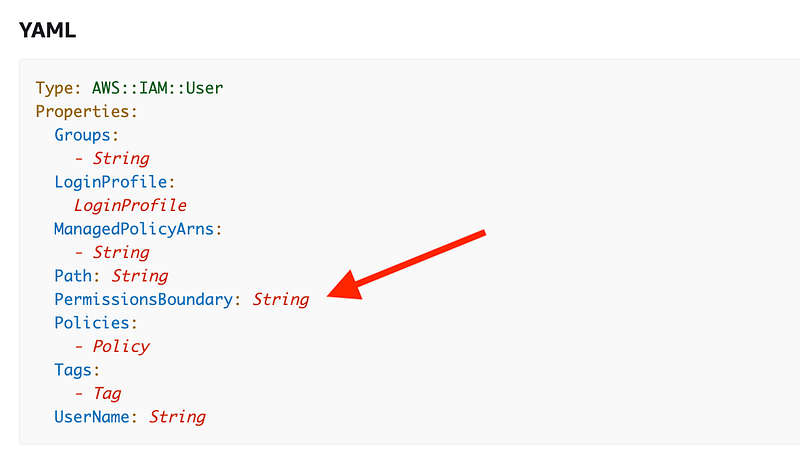
You can also assign a permission boundary to an IAM role:
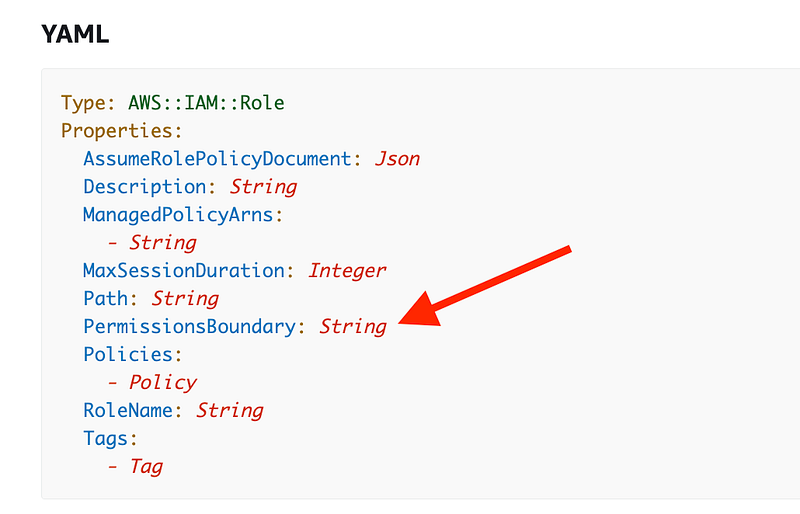
Click on PermissionBoundary. In this description we can see that the value assigned to the permission boundary property is a managed policy.
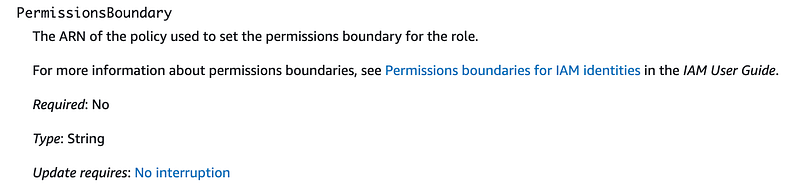
Note that assigning a permission boundary does not grant the permissions in the permission boundary, it only limits the possible permission that a user or role can have. That’s why it’s not very useful if the same person is creating the permission boundary and the assigned permissions. The assigned permissions alone can limit the actions the principal can take.
How do you use a permission boundary?
When you grant permission to an AWS administrator or developer to assign policies and permissions to other principals, you use some method to enforce that a permission boundary must be applied. There are a few methods for enforcing permission boundaries:
- Create the resource in advance and apply the permission boundary and don’t allow the administrator or developer to change it, though they can change the policy assigned to the resource.
- Add a condition in the administrator or developer’s own policy that states that they can only change a resource when a permission boundary is applied to the resource.
It does not appear that you can enforce permission boundaries through a service control policy yet, something I requested at my meetup in Seattle years ago. #awswishlist.
Even more unfortunate is the fact that it does not appear that you can create an SCP using CloudFormation. #awswishlist !!! <<<This wish was granted — YAY! I show you how to do it in other posts.
Perhaps that will be available later. For now we’ll focus on account and principal level controls.
Here are a few examples of how you might use permission boundaries:
Allowing Developers to Create IAM Roles for Applications
Using Permission Boundaries to Limit Permissions of Lambda Functions
We’ll consider how we might use permission boundaries to protect our domains account in the next few posts.
I dug into and tested permission boundaries a bit more in this post. I find the description of Permission Boundaries in the AWS documentation a bit cofusing.
Follow for updates.
Teri Radichel | © 2nd Sight Lab 2023
About Teri Radichel:
~~~~~~~~~~~~~~~~~~~~
⭐️ Author: Cybersecurity Books
⭐️ Presentations: Presentations by Teri Radichel
⭐️ Recognition: SANS Award, AWS Security Hero, IANS Faculty
⭐️ Certifications: SANS ~ GSE 240
⭐️ Education: BA Business, Master of Software Engineering, Master of Infosec
⭐️ Company: Penetration Tests, Assessments, Phone Consulting ~ 2nd Sight Lab
Need Help With Cybersecurity, Cloud, or Application Security?
~~~~~~~~~~~~~~~~~~~~~~~~~~~~~~~~~~~~~~~~~~~~~~~~~~~~~~~~~~~~~
🔒 Request a penetration test or security assessment
🔒 Schedule a consulting call
🔒 Cybersecurity Speaker for PresentationFollow for more stories like this:
~~~~~~~~~~~~~~~~~~~~~~~~~~~~~~~~~~~~~~~~~~~~~~~~~~~~~~~~~~~~~
❤️ Sign Up my Medium Email List
❤️ Twitter: @teriradichel
❤️ LinkedIn: https://www.linkedin.com/in/teriradichel
❤️ Mastodon: @teriradichel@infosec.exchange
❤️ Facebook: 2nd Sight Lab
❤️ YouTube: @2ndsightlab