
AWS — Amazon Aurora Overview
What is Amazon Aurora? — Introduction to Amazon Aurora.
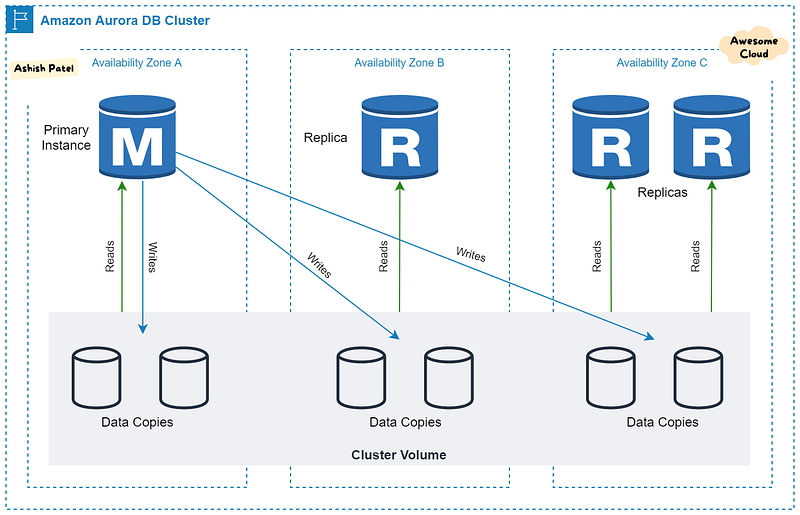
TL;DR
Amazon Aurora is a fully managed MySQL and PostgreSQL-compatible relational database built for the cloud that combines the performance and availability of traditional enterprise databases with the simplicity and cost-effectiveness of open source databases.
Two types of DB instances make up an Aurora DB cluster:
Primary Instance — Supports read and write operations, and performs all of the data modifications to the cluster volume. Each Aurora DB cluster has one primary DB instance.
Replica Instances— Connects to the same storage volume as the primary DB instance and supports only read operations. Each Aurora DB cluster can have up to 15 Aurora Replicas in addition to the primary DB instance.
Key Points
- Amazon Aurora architecture gives separation of storage and compute.
- Automatic failover to reader instance — When a problem affects the primary instance, one of these reader instances takes over as the primary instance.
- Cluster endpoint always represents the current primary instance in the cluster. To use a connection string that stays the same even when a failover promotes a new primary instance, you connect to the cluster endpoint.
- Aurora automates and standardizes database clustering and replication, which are typically among the most challenging aspects of database configuration and administration.
Features
Aurora Global Database
- It is designed for globally distributed applications, allowing a single Amazon Aurora database to span multiple AWS regions.
- It enables low latency global reads and providing fast global disaster recovery and no impact on performance.
- It consists of one primary AWS Region where your data is mastered, and up to five read-only secondary AWS Regions.
Advantages:
- Global reads with local latency.
- Scalable secondary Aurora DB clusters.
- Fast replication from primary to secondary Aurora DB clusters.
- Recovery from Region-wide outages (lower RTO and RPO).
Not supported features:
- Aurora multi-master clusters.
- Aurora Serverless v1.
- Backtracking in Aurora.
- Amazon RDS Proxy.
Amazon Aurora Serverless
- Aurora Serverless gives start up, shut down, and scale up or down capacity based on your application’s needs with Aurora Serverless.
- Aurora Serverless version 1 — is an on-demand auto-scaling configuration for Amazon Aurora and provides a relatively simple, cost-effective option for infrequent, intermittent, or unpredictable workloads.
- Aurora Serverless version 2 (in preview) — you can get optimal cost performance for your database clusters. Capacity is adjusted automatically based on application demand, and you’re charged only for the resources that your DB clusters consume. It has been architected from the ground up to support serverless DB clusters that are instantly scalable.
Use cases:
- Infrequently used applications.
- New applications (when you’re unsure about the instance size you need).
- Variable and unpredictable workloads.
- Development and test databases.
- Multi-tenant applications.
Not supported features:
- Aurora global databases.
- Aurora multi-master clusters.
- Aurora Replicas.
- IAM database authentication.
- Performance Insights.
- Amazon RDS Proxy (only in V2)
Amazon RDS Proxy
- By using Amazon RDS Proxy, you can allow your applications to pool and share database connections to improve their ability to scale.
- It makes applications more resilient to database failures by automatically connecting to a standby DB instance while preserving application connections.
- You can handle unpredictable surges in database traffic that might cause issues due to oversubscribing connections or creating new connections at a fast rate.
Single-master clusters
- Most kinds of Aurora clusters are single-master clusters. It is the default architecture for Aurora clusters.
- For example, provisioned, Aurora Serverless, parallel query, and Global Database clusters are all single-master clusters.
- In a single-master cluster, a single DB instance performs all write operations and any other DB instances are read-only.
- This architecture is appropriate for general-purpose applications. In such applications, a single DB instance can handle all the data manipulation language (DML) and data definition language (DDL) statements.
- If the writer DB instance becomes unavailable, a failover mechanism promotes one of the read-only instances to be the new writer.
Multi-master Cluster
- In a multi-master cluster, all DB instances can perform read/write operations.
- The notions of a single read/write primary instance and multiple read-only Aurora Replicas don’t apply.
- Multi-master cluster doesn’t use the failover mechanism, because it doesn’t need to promote another DB instance to have read/write capability.
Advantages:
- Multi-master clusters improve Aurora’s high availability.
- Multi-master clusters are well-suited to sharded or multi-tenant applications.
- Aurora detects write conflicts immediately, not when the transaction commits.
Use Cases:
- In applications where you can’t afford even brief downtime for database write operations, a multi-master cluster can help to avoid an outage when a writer instance becomes unavailable.
Read Replicas
- Elastically scale out beyond the capacity constraints of a single DB instance for read-heavy database workloads.
- Aurora Replicas connect to the same storage volume as the primary DB instance, but support read operations only.
- Aurora DB cluster with single-master replication has one primary DB instance and up to 15 Aurora Replicas.
Use Cases:
- You use Aurora Replicas to offload read workloads from the primary DB instance.
Babelfish for Aurora PostgreSQL
- Babelfish for Aurora PostgreSQL is a new capability for Amazon Aurora PostgreSQL-Compatible Edition that enables Aurora to understand commands from applications written for Microsoft SQL Server.
- With Babelfish, Aurora PostgreSQL now understands T-SQL, Microsoft SQL Server’s proprietary SQL dialect, and supports the same communications protocol, so your apps that were originally written for SQL Server can now work with Aurora with fewer code changes.
Benefits
- Fully Managed: Amazon Aurora is fully managed by Amazon RDS which automates time-consuming administration tasks like hardware provisioning, database setup, patching, and backups.
- High Performance: Aurora can deliver up to five times the throughput of MySQL and up to three times the throughput of PostgreSQL without requiring changes to most of your existing applications. This performance is on par with commercial databases, at 1/10th the cost.
- Scalability: You can easily scale your database deployment up and down from smaller to larger instance types as your needs change, or let Aurora Serverless handle scaling automatically for you. To scale read capacity and performance, you can add up to 15 low latency read replicas across three Availability Zones. Amazon Aurora automatically grows storage as needed, up to 128TB per database instance.
- High Availability and Durability: Amazon Aurora is designed to offer 99.99% availability, replicating 6 copies of your data across 3 Availability Zones and backing up your data continuously to Amazon S3. Aurora DB cluster is fault tolerant by design. Your DB cluster can tolerate a failure of an Availability Zone without any loss of data and only a brief interruption of service.
- Highly Secure: Amazon Aurora provides multiple levels of security like network isolation using Amazon VPC, encryption at rest using AWS KMS and encryption of data in transit using SSL.
Summary
Amazon Aurora is a fully managed relational database engine that’s compatible with MySQL and PostgreSQL which makes it easier, faster, and cost-effective to manage your data and build scalable, reliable, and high performance applications.
View more from Awesome Cloud
- Difference between SQS and SNS
- Difference between Application load balancer and Network load balancer
- Difference between Security Groups and NACL
- Difference between Internet Gateway and NAT Gateway
- Difference between Secrets Manager and Parameter Store
Happy Clouding!!!


