avatarThe Pareto Investor

Free AI web copilot to create summaries, insights and extended knowledge, download it at here

2398

Abstract

xpertise, often limiting its accessibility.</p><div id="1c5c" class="link-block"> <a href="https://microsoft.github.io/autogen/blog/2023/12/01/AutoGenStudio/"> <div> <div> <h2>AutoGen Studio: Interactively Explore Multi-Agent Workflows | AutoGen</h2> <div><h3>AutoGen Studio Playground View: Solving a task with multiple agents that generate a pdf document with images.</h3></div> <div><p>microsoft.github.io</p></div> </div> <div> <div style="background-image: url(https://miro.readmedium.com/v2/resize:fit:320/0*u9LhzpK6tmTYFKkY)"></div> </div> </div> </a> </div><p id="26cb">However, the latest release of Autogen Studio has changed the game. It offers an intuitive interface and a host of new capabilities, making it easier for users, regardless of their programming background, to harness the power of AI.</p><figure id="265f"><img src="https://cdn-images-1.readmedium.com/v2/resize:fit:800/0*hP25i4yymL9Zvzkc"><figcaption>Pull the stock price info for apple and Microsoft for the last 6 months create a PNG image that shows the chart comparison of the prices and save that PNG to my desktop</figcaption></figure><p id="7c5c" type="7">“The AI completed this task in approximately 45 seconds, incurring a cost of around 14 cents.</p><p id="bb88" type="7">In contrast, I might need 30 to 60 minutes to accomplish the same task, which involves retrieving the stock price information for Apple and Microsoft over the past six months, creating a PNG image to visually compare their stock prices, and saving that image to my desktop.”</p><h1 id="d79a">Capabilities and Features</h1><ul><li>Coding and Research Abilities: Autogen Studio agents can write code, conduct research, and generate written content, significantly reducing the time and effort required for such tasks.</li><li>Customizable Agents: Users can program and customize their agents to perform specific tasks. Whether it’s data analysis, web scraping, or content creation, Autogen Studio’s flexibility caters to a wide range of needs.</li><li>Seamless Integration: The platform supports various AI models, including OpenAI’s GPT-4, and allows integration with different APIs and tools to expand its functionality.</li><li>User-Friendly Interface: The studio’s i

Options

nterface resembles a webpage, making it familiar and easy to navigate. Users can create, manage, and deploy agents with just a few clicks.</li><li>Educational Resources: For those new to AI and programming, Autogen Studio provides comprehensive guides and tutorials, making the learning curve much smoother.</li></ul><h1 id="ec6b">Installation and Setup</h1><p id="ffc5">Setting up Autogen Studio involves a few straightforward steps:</p><ol><li>Installing Python and Anaconda: Python is the programming language predominantly used in AI, and Anaconda simplifies package management and deployment.</li><li>Creating an Anaconda Environment: This isolated environment allows for the installation of specific software versions without affecting the rest of your system.</li><li>Installing Autogen Studio: Through simple command line instructions, users can install Autogen and its dependencies within the Anaconda environment.</li><li>API Integration: For utilizing certain features like OpenAI models, users need to set up API keys, ensuring secure and efficient usage.</li></ol><h1 id="ecb0">Building Your AI Army</h1><p id="1582">Once the setup is complete, users can start building their army of AI agents. This involves:</p><ol><li>Defining Agent Roles: Users can assign specific tasks and roles to each agent, such as data analysis, content creation, or web scraping.</li><li>Workflow Customization: Autogen Studio allows for the creation of customized workflows, enabling agents to collaborate efficiently on complex tasks.</li><li>Skill Development: Users can develop and assign specific skills to agents, enhancing their capabilities and efficiency.</li></ol><h1 id="41af">The Future with Autogen Studio</h1><p id="724f">These exemples above with Autogen Studio are just scratching the surface of what’s possible with AI agent technology. The Autogen ability to automate complex tasks, combined with an intuitive interface, opens up endless possibilities for innovation and efficiency in various fields.</p><p id="c9ef">Now with Autogen Studio, Microsoft is changing the game for automating tasks using AI. With user-friendly interface, combined with powerful capabilities, it makes it an invaluable tool for anyone looking to harness the power of AI agents.</p><p id="c748">Whether you’re a seasoned developer or new to the world of AI, Autogen Studio is worth exploring.</p></article></body>

Autogen 2.0: Building an Army of AI Agents with the New Autogen Studio

NO CODE Plateform — AI Agent Builder (100% Local)

Autogen Studio is revolutionizing the way we approach task automation by allowing users to build their own army of AI agents, each capable of performing a myriad of tasks more efficiently.

Also, to read:

Let’s dive into this transformative technology and explore how you can streamline your workflows and boost productivity.

The Power of Autogen Studio

Autogen Studio simplifies the process of deploying multiple AI agents to work collaboratively on complex tasks.
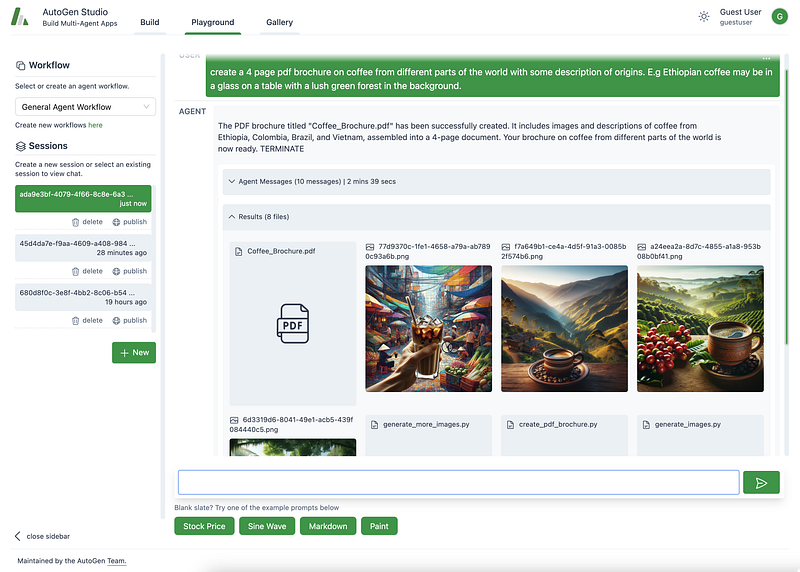
AutoGen Studio Playground View: Agents collaborate, use available skills (ability to generate images) to address a user task (generate pdf’s).

In the past, utilizing AI agents required significant technical expertise, often limiting its accessibility.

However, the latest release of Autogen Studio has changed the game. It offers an intuitive interface and a host of new capabilities, making it easier for users, regardless of their programming background, to harness the power of AI.
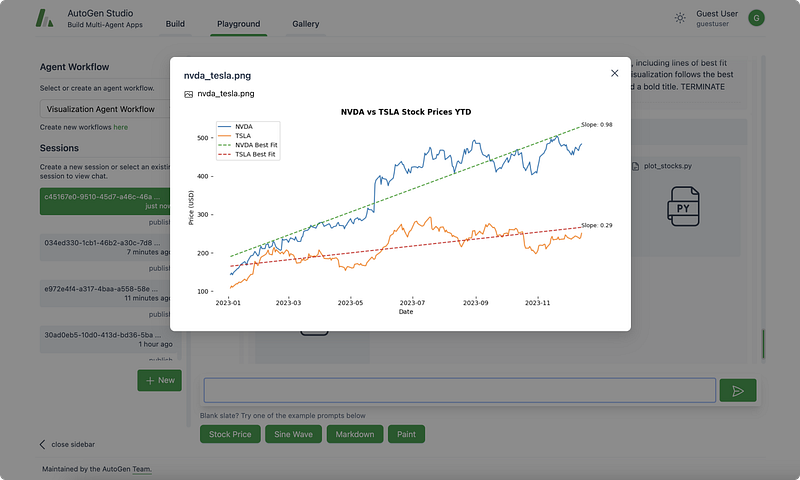
Pull the stock price info for apple and Microsoft for the last 6 months create a PNG image that shows the chart comparison of the prices and save that PNG to my desktop

“The AI completed this task in approximately 45 seconds, incurring a cost of around 14 cents.

In contrast, I might need 30 to 60 minutes to accomplish the same task, which involves retrieving the stock price information for Apple and Microsoft over the past six months, creating a PNG image to visually compare their stock prices, and saving that image to my desktop.”

Capabilities and Features

  • Coding and Research Abilities: Autogen Studio agents can write code, conduct research, and generate written content, significantly reducing the time and effort required for such tasks.
  • Customizable Agents: Users can program and customize their agents to perform specific tasks. Whether it’s data analysis, web scraping, or content creation, Autogen Studio’s flexibility caters to a wide range of needs.
  • Seamless Integration: The platform supports various AI models, including OpenAI’s GPT-4, and allows integration with different APIs and tools to expand its functionality.
  • User-Friendly Interface: The studio’s interface resembles a webpage, making it familiar and easy to navigate. Users can create, manage, and deploy agents with just a few clicks.
  • Educational Resources: For those new to AI and programming, Autogen Studio provides comprehensive guides and tutorials, making the learning curve much smoother.

Installation and Setup

Setting up Autogen Studio involves a few straightforward steps:

  1. Installing Python and Anaconda: Python is the programming language predominantly used in AI, and Anaconda simplifies package management and deployment.
  2. Creating an Anaconda Environment: This isolated environment allows for the installation of specific software versions without affecting the rest of your system.
  3. Installing Autogen Studio: Through simple command line instructions, users can install Autogen and its dependencies within the Anaconda environment.
  4. API Integration: For utilizing certain features like OpenAI models, users need to set up API keys, ensuring secure and efficient usage.

Building Your AI Army

Once the setup is complete, users can start building their army of AI agents. This involves:

  1. Defining Agent Roles: Users can assign specific tasks and roles to each agent, such as data analysis, content creation, or web scraping.
  2. Workflow Customization: Autogen Studio allows for the creation of customized workflows, enabling agents to collaborate efficiently on complex tasks.
  3. Skill Development: Users can develop and assign specific skills to agents, enhancing their capabilities and efficiency.

The Future with Autogen Studio

These exemples above with Autogen Studio are just scratching the surface of what’s possible with AI agent technology. The Autogen ability to automate complex tasks, combined with an intuitive interface, opens up endless possibilities for innovation and efficiency in various fields.

Now with Autogen Studio, Microsoft is changing the game for automating tasks using AI. With user-friendly interface, combined with powerful capabilities, it makes it an invaluable tool for anyone looking to harness the power of AI agents.

Whether you’re a seasoned developer or new to the world of AI, Autogen Studio is worth exploring.

Business
Technology
Money
Artificial Intelligence
Programming
Recommended from ReadMedium