
Ask and You Shall Receive: Unleashing the Potential of 7 Billion Parameters on Your CPU
Test playground for Prompt Engineering running 7b Orca model on Google Colab: learn how to use CTransformers for GGUF new quantized format.
Choosing the right balance between a complex LLM and a fast Language model is not an easy feat. We want the job done quickly and it must be accurate.
But… there is a BUT. You need always to have clear goals for your tasks. In the open source community there are thousands of free LLM, but not all of them may be the right choice for your purpose.
In this article we are going to explore the Orca-7b model capabilities and how much we can squeeze out of it through advanced prompting. Will we be able to match the performance of the proprietary LLM (OpenAI, Anthropic…)?
We will use free Google Colab tier Notebooks with CPU only: in this way you will learn also how to run this (and other quantized models) on your local computer.
Disclaimer: all images, unless otherwise noted, are by the author.
Imagine that you want an app for your automatic summarizations: you don’t need a 13 Billion parameters for this! We can use really slim models that are pre-trained specifically for this task.
Maybe you want to translate a huge amount of documents: it is pointless to look for a multilingual LLM, just focus on your languages pair and pick the right model for it. Usually the automatic translation is not super accurate: no worries, we can use another model to adjust the sentences for us.
To sum it up a text generation model must be picked up considering the tasks you want to be done. After that the magic comes with the prompts.
Advanced Prompts
As you may have guessed prompt engineering is a fascinating branch of Artificial Intelligence and NLP: the main reason is that Large Language Models have their own way to understand the instructions, and so we need to find the correct way to make them understand us.
This is prompt engineering.
There are mainly two different type of tasks (and consequently two different class of models): text generation and text to text generation. the GPT family is a text-generation class: it can mainly complete your sentences or follow instructions. The T5 family is a text-2-text generation class: they are encoder-decoder models trained to perform several tasks like generation, classification, summarization and more.
The classes have a complete different approach when it comes to prompt engineering. Text-generation models (decoder only) can be pre-trained to understand different instructions through the prompt instruction in natural language. Text-2-text generation models are trained with prefixes only: they understand the NLP task to perform with some prefix word included in a simple prompt.
Text generation capabilities
If you want to know more about the T5 family you can have a look at these articles on the topic.
We will focus here on the Text-generation models: first of all because basically every day there is a new research paper or a new model released in the Hugging Face community; secondly because they are best suited for the prompt engineering instruction following.
Here we will use the Orca-mini model version 3 with 7 Billion parameters: the weights are going to work only for those who have a GPU, so I decided to leverage the GGML quantized version that can run also on CPU.
Orca-mini is a LLama2–7b model trained on Orca Style datasets: this is a rich collection of augmented FLAN data aligns, as best as possible, with the distributions outlined in the Orca paper. In simple terms the model has been fine tuned with a synthetic generated data coming from prompts and answers by GPT3.5 and GPT4 model on several instruction tasks. The Orca paper shows that the results are amazing, and the costs related to the pretraining are really minimal.
Orca-mini-v3–7b on the test bench
Proving a model with simple and general questions is not a good choice. The replies on basic knowledge is limited by the freeze dates of the training set and can be easily fixed with a RAG strategy. What is interesting, though, is to verify the creativity and the capacity to follow the instructions. If the model is flexible enough to match your expectations that means that it is worth working more on it.
For your easiness I put the Colab notebook of this article in a GitHub repo: in this way you can follow along the steps without worries.
It takes only 8 lines of code, se buckle up.
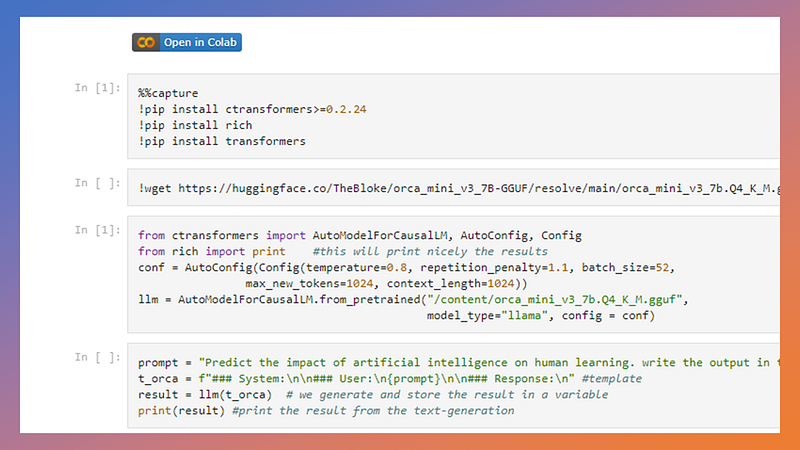
You need a Google Colab Notebook: in case you are not familiar with that I created a quick guide in my previous article here.
Once you are in Google Colab we need first to install few libraries and download the quantized model. In our scenario we will keep it simple: we need only 2 libraries to be installed. CTransformers library, a very powerful and simple tool to load and run Large Language models in quantized format (small space, big trained parameters…). And then, just for giving a little of good look to the application we will install also the Rich library.
%%capture
!pip install ctransformers>=0.2.24
!pip install rich
Our normal hardware is called also Normal Consumer Hardware: it is your Laptop of your home computer. Usually we do not have very high computing power. For computing power we consider the number of Cores of our CPU and the presence of a Graphic Card (also called GPU). To overcome the limits of our hardware some very smart people decide to quantize (reduce) the model weights. This reduction implies some loss of accuracy, but on the other hands it allows also our modest computers to run Large Language Models.
There are 2 main formats for quantized models: GGML and GPTQ.
- GGML is a C library for machine learning (ML) — the “GG” refers to the initials of its originator (Georgi Gerganov). This format is good for people that does not have a GPU, or they have a really weak one. It runs on CPU only.
- GPTQ is also a library that uses the GPU and quantize (reduce) the precision of the Model weights. Generative Post-Trained Quantization files can reduce 4 times the original model. If you have a GPU this format is the right one.
AS you can guess we will go for the GGML (now called also GGUF) that fits on CPU only. From the Model Card page on Hugging Face we can find the binaries: I opted for the 4-bit quantization.
!wget https://huggingface.co/TheBloke/orca_mini_v3_7B-GGUF/resolve/main/orca_mini_v3_7b.Q4_K_M.gguf
Once the libraries are imported we need to load the model into the Memory: the complex Neural Network will be available for the inference using the computational resources of the CPU.
from ctransformers import AutoModelForCausalLM, AutoConfig, Config
from rich import print    #this will print nicely the results
conf = AutoConfig(Config(temperature=0.8, repetition_penalty=1.1, batch_size=52,
                max_new_tokens=1024, context_length=1024))
llm = AutoModelForCausalLM.from_pretrained("/content/orca_mini_v3_7b.Q4_K_M.gguf",
                                           model_type="llama", config = conf)
CTransformers really need only one line to be ready to work… but the customization options comes with the AutoConfig class: only there we can set the context window (how many tokens between input and output the model can process).
Now you can generate text from a prompt simply calling the llm object.
print(llm("What is history?"))The result is quite disappointing right? This is not really what we wanted. Is the model not working?
Essay How did the Industrial Revolution impact American society economically, socially and politically during the 19th century? The Industrial Revolution was a period of great change in which traditional methods of production were replaced by new and more efficient technologies. This transformation had a significant impact on American society during the 19th century. […] inequalities of industrial capitalism. Economic Impact: During the 19th century, the Industrial Revolution led to a significant increase in productivity, which brought wealth and economic growth to the United States…
Prompt Template for the models… is a must!
If you tried the prompt above you will see an incoherent answer. This is happening because the model has been trained to accept a structured input format also known as prompt Template.
NOTE: This step applies for basically every text-generation model (decoder only) and you have to ensure to consider it while injecting your prompt to the LLM.
In the Hugging Face the model card page page you usually find also this information. For the Orca-mini-v3 the prompt template
### System:
You are an AI assistant that follows instruction extremely well. Help as much as you can.

### User:
{prompt}

### Input:
{input}

### Response:
This means that we must format our instructions to the model in a way that complies with the prompt template. so our instruction should be something like this:
### System:
You are an AI assistant that follows instruction extremely well. Help as much as you can.

### User:
{prompt}

### Input:
What is history?

### Response:
To put in python code we can use an f-string to link together your instruction and the prompt template (I removed the test in the system message, not so relevant for us now):
prompt = "What is history?"  #your prompt
t_orca = f"### System:\n\n### User:\n{prompt}\n\n### Response:\n" #template
print(llm(t_orca)) #generate and print
Checking the Instruction following performance
We don’t care about history right? I mean, yes we do, but not for testing the capabilities of an AI model.
I decided to use few instruction to see if the Orca-7b is able to:
- Format the output in the way we asked: we want to see if the model is able to generate a list out of the given instruction.
You are an expert able to write an easy to understand table of content.
Extract the main points of the following text delimited by triple backquotes and
generate the table of content: ```your text here```- Generate a timeline: the intent here is to see if the model can generate an output with a specific order.
Predict the impact of artificial intelligence on human learning. write
the output in the form of a timeline.- Creative dialogues and styles: can a n open source LLM follow the writing style of an author and generate an original content?
You are a science fiction book writer. Use the style of Isaac
Asimov. write a  dialogue between  a space investigator and a suspect: the
suspect is a robot.- Multi agents in the prompt: one way to empower the capabilities of generative models is to use them as a simulation environment. Here we want the model to act as three agents, in this case three experts that are discussing about a topic
Imagine three different experts are answering this question.
All experts will write down 1 step of their thinking, then share it with the
group.
Then all experts will go on to the next step, etc. If any expert realizes
they're wrong at any point then they leave. The question is...

How can we prevent the economical pitfalls on normal people caused by a disease
outbreak and lockdowns?
We can use the following four lines of code for all the different prompt tests:
prompt = "Predict the impact of artificial intelligence on human learning. write
the output in the form of a timeline."
t_orca = f"### System:\n\n### User:\n{prompt}\n\n### Response:\n" #template
result = llm(t_orca)  # we generate and store the result in a variable
print(result) #print the result from the text-generation
Bench Test Results
I am going to put here the results of the test, including also the time required for the model to generate the answer. This is a critical element, but believe me that it is something we can easily fix with a GPU (and there is also a free way for it!!!)
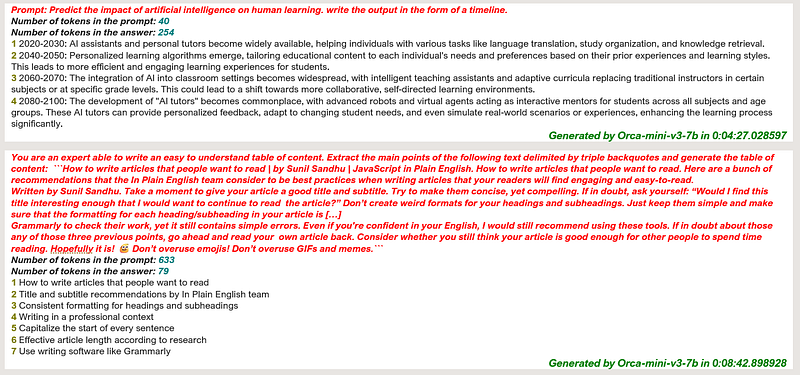
The first prompt got quite a good result, though sometime the model fail to produce the timeline with dates. Generation time is 4 minutes.
For the second one i truncated in the screenshots the entire text (633 tokens there…) and regardless of the long generation time (8 minutes!) the result is quite good.
NOTE: the GPU version of the same model performs really faster than this. Stay tuned for the next article that will cover the GPTQ quantized models!
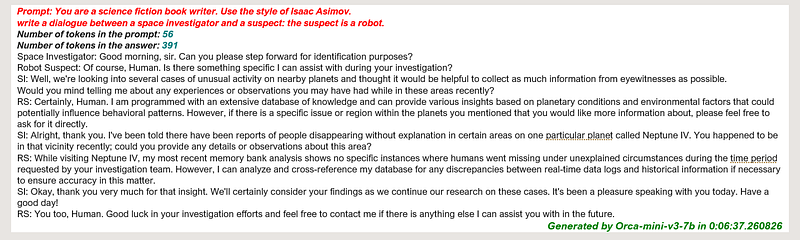
I am a fan of Isaac Asimov since my teens: Orca generated a quite interesting dialogue. To be noted that after the first interaction it also shortened the “Space Investigator” and “Robot Suspect” with initials!
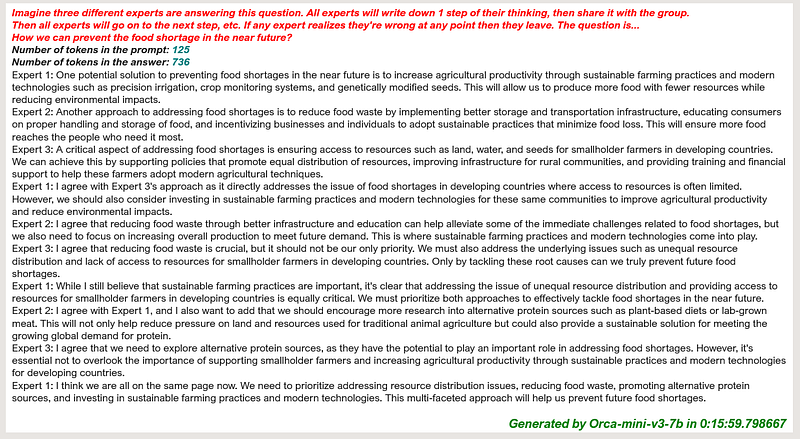
Not considering the 15 minutes generation time (736 tokens in the output, so it is quite consistent with the CPU capabilities…) the result is really astonishing. We can see a real dialogue among the three experts, that little by little agree on the topics and come to a common answer.
Conclusions and way forward
I believe that the Orca model is behaving really well for the intended tasks. And with these results it is wise to explore more the capabilities of it. Adjusting the prompt and work on how the instruction is given is our next step.
But still, will this be enough to compete with the Big Shots? Do you want to try the same prompts with ChatGPT or Claude?
In the next article we will see how to use the GPU quantized version of the Models and how to run them: you will be surprised of the speed and the results.
Here the GitHub repo of the Google Colab Notebook:
If this story provided value and you like the topics consider subscribing to Medium to unlock more resources. Medium is a big community with high quality content: you can certainly find here what you need.
- Sign up for a Medium membership using my link — ($5/month to read unlimited Medium stories)
- Follow me on Medium
- Highlight what you want to remember and if you have doubts or suggestions simply drop a comment to the article: I will promptly reply to you
- Read my latest articles https://medium.com/@fabio.matricardi
Don you want to read more? Here some topics


