avatarGörkem Çetin

Free AI web copilot to create summaries, insights and extended knowledge, download it at here

2692

Abstract

applies its rules to scan. In Fortify jargon you need to complete 3 steps for a proper scan.</p><ul><li>Clean, unique identifier in scans is build id so you need be sure that it is empty and usable. Clean step will provide this.</li></ul><figure id="1d56"><img src="https://cdn-images-1.readmedium.com/v2/resize:fit:800/1*qJYSMd9QJTKjzffnhjGEZg.png"><figcaption>if build id is used before this will make it available again</figcaption></figure><ul><li>Translate, as mentioned above you need to translate your code into an intermediate language in a complete build environment.</li></ul><figure id="7f43"><img src="https://cdn-images-1.readmedium.com/v2/resize:fit:800/1*Gx5kENmuABDzQVdUQF4oWQ.png"><figcaption>as mentioned before you need compiler commands/parameters too</figcaption></figure><ul><li>Scan, regularly updated rules are applied to your code. Output file is generated.</li></ul><figure id="48c2"><img src="https://cdn-images-1.readmedium.com/v2/resize:fit:800/1*SibmHSNsRMj7lwg383zODw.png"><figcaption>scan the id and output the result</figcaption></figure><p id="f230">With respect to separation of duties, build machines and security machines should be maintained by different people. Fortify’s requirement of complete build environment may cause problems at this point because it is almost impossible to maintain all of them in security/scan machines. Also scanning process may require a large amount of hardware resources depending on the structure of your projects so you cannot do the scanning on build machines.</p><p id="d686">With this system I will complete these steps in different machines which is a feature provided by Fortify. With this approach I will simulate a real life organization and take advantage of build environments already maintained by developers (or other roles) in Jenkins nodes. I will complete translation step in Jenkins nodes then do the resource demanding scan process in different machines so I won’t create any burden for software lifecycle.</p><p id="0e4c"><b>Organization of series</b> 1- Introduction (This post)</p><p id="9581">2- <a href="https://readmedium.com/application-security-automation-7e6a51be6315">Installation</a></p><p id="ea21">3- <a href="https://readmedium.com/application-security-automation-part-3-5934b9444144">Configuration</a></p><p id="83d7">4- <a href="https://readmedium.com/application-security-automation-part-4-7c33d4c27540">Scanning</a></p><p id="7ffe">5- <a href="https://readmedium.com/application-security-automation-part-5-d7bb7942f428">Reviewing the findings</a></p><div id="a6f5" class="link-block"> <a href="https://www.linkedin.com/in/g%C3%B6rkem-%C3%A7etin-992419194/"> <div>

Options

         <div>
            <h2>Görkem Çetin - Senior Cyber Security Consultant - Cyberwise | LinkedIn</h2>
            <div><h3>View Görkem Çetin's profile on LinkedIn, the world's largest professional community. Görkem has 8 jobs listed on their…</h3></div>
            <div><p>www.linkedin.com</p></div>
          </div>
          <div>
            <div style="background-image: url(https://miro.readmedium.com/v2/resize:fit:320/0*g34nnsx0jB7IPqe_)"></div>
          </div>
        </div>
      </a>
    </div><h2 id="fc23">More…</h2><div id="e048" class="link-block">
      <a href="https://readmedium.com/key-actions-to-make-better-decisions-for-technology-leaders-2810ea67b0c9">
        <div>
          <div>
            <h2>Key Actions to Make Better Decisions for Technology Leaders</h2>
            <div><h3>This article is about decision-making processes and practices for technology leaders.</h3></div>
            <div><p>medium.com</p></div>
          </div>
          <div>
            <div style="background-image: url(https://miro.readmedium.com/v2/resize:fit:320/0*SU9aFeOccSSCJRGQ)"></div>
          </div>
        </div>
      </a>
    </div><div id="4733" class="link-block">
      <a href="https://readmedium.com/what-are-the-differences-between-data-scientists-that-earn-500-and-225-000-yearly-ea60ccdf03d7">
        <div>
          <div>
            <h2>What Are The Differences Between Data Scientists That Earn 500💲 And 225.000💲 Yearly?</h2>
            <div><h3>This article is about important talents, tools, features of the country, and features of the company for high income in…</h3></div>
            <div><p>medium.com</p></div>
          </div>
          <div>
            <div style="background-image: url(https://miro.readmedium.com/v2/resize:fit:320/1*kigSkk0txLLC_CtuebcVuA.gif)"></div>
          </div>
        </div>
      </a>
    </div><div id="574e" class="link-block">
      <a href="https://readmedium.com/spac-ipo-fast-merge-young-f88cc187dd0d">
        <div>
          <div>
            <h2>SPAC: IPO fast, merge young</h2>
            <div><h3>Special Purpose Acquisition Company (SPAC) is a fascinating and fast way to IPO (initial public offering) one (or…</h3></div>
            <div><p>medium.com</p></div>
          </div>
          <div>
            <div style="background-image: url(https://miro.readmedium.com/v2/resize:fit:320/1*DK-Um6oLa9K1jQqF78PBWQ.jpeg)"></div>
          </div>
        </div>
      </a>
    </div></article></body>

Application Security Automation

Automated Static Code Analysis

Photo by Farzad Nazifi on Unsplash

Introduction

In this series, I will try to explain how to create a basic process of static code analysis which can be placed in secure software development life cycle. Main actor of this process will be Micro Focus Fortify. My focus will be on Fortify elements based on my experience with the product, not just information based on documentation. Micro Focus’ documentation is accessible to everyone. I will explain how to review the vulnerabilities later with a vulnerable project.

Static code analysis aka source code analysis is a crucial part of SDLC. According to OWASP, “Static Code Analysis commonly refers to the running of Static Code Analysis tools that attempt to highlight possible vulnerabilities within ‘static’ (non-running) source code.”

You need a valid Fortify license for this process. Fortify is a family of tools, I will use following parts in this demo.

  • SCA — Static Code Analyzer — Main engine for scanning source code (do not confuse with Software Composition Analysis)
  • SSC — Software Security Center — Web interface with many capabilities
  • Scan Central — Distributed Scan Infrastructure (formerly Cloud Scan)
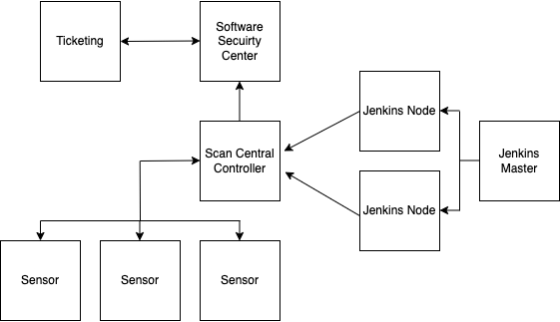
Diagram of the process
  • Ticketing — For managing found vulnerabilities e.g. Jira
  • Software Security Center — Explained above
  • Scan Central Controller — Brain of distributed scans
  • Sensor(s) — Worker SCAs
  • Jenkins — CI/CD tool, client for Fortify, it is possible to use alternative tools such as Bamboo etc.

Fortify requires code to be compiled without errors to complete a proper scan. This is both a strength and a weakness of the tool. You need a complete and maintained build environment, but you can find vulnerabilities other source code analyzers cannot. Fortify works in a two-step approach. First it translates the code to an intermediate language then applies its rules to scan. In Fortify jargon you need to complete 3 steps for a proper scan.

  • Clean, unique identifier in scans is build id so you need be sure that it is empty and usable. Clean step will provide this.
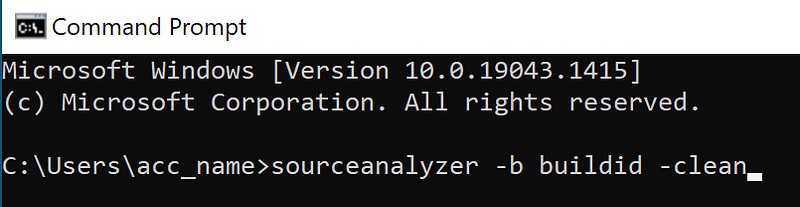
if build id is used before this will make it available again
  • Translate, as mentioned above you need to translate your code into an intermediate language in a complete build environment.
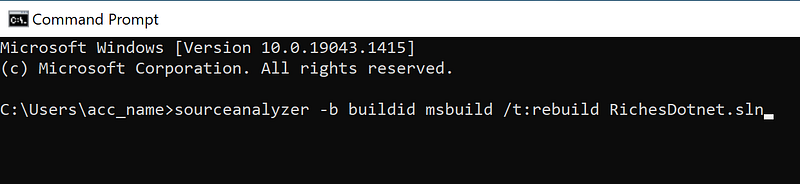
as mentioned before you need compiler commands/parameters too
  • Scan, regularly updated rules are applied to your code. Output file is generated.
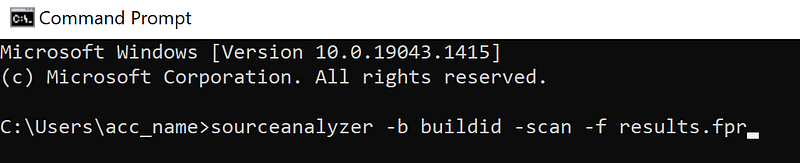
scan the id and output the result

With respect to separation of duties, build machines and security machines should be maintained by different people. Fortify’s requirement of complete build environment may cause problems at this point because it is almost impossible to maintain all of them in security/scan machines. Also scanning process may require a large amount of hardware resources depending on the structure of your projects so you cannot do the scanning on build machines.

With this system I will complete these steps in different machines which is a feature provided by Fortify. With this approach I will simulate a real life organization and take advantage of build environments already maintained by developers (or other roles) in Jenkins nodes. I will complete translation step in Jenkins nodes then do the resource demanding scan process in different machines so I won’t create any burden for software lifecycle.

Organization of series 1- Introduction (This post)

2- Installation

3- Configuration

4- Scanning

5- Reviewing the findings

More…

Cybersecurity
Appsec
Devsecops
Fortify
Recommended from ReadMedium