
TECHNOLLOGY | APPLE | USER EXPERIENCE
Apple’s New macOS Ventura Is A Delight And A Productivity Booster
These are my quick remarks, observations and experiences about the new operating system.
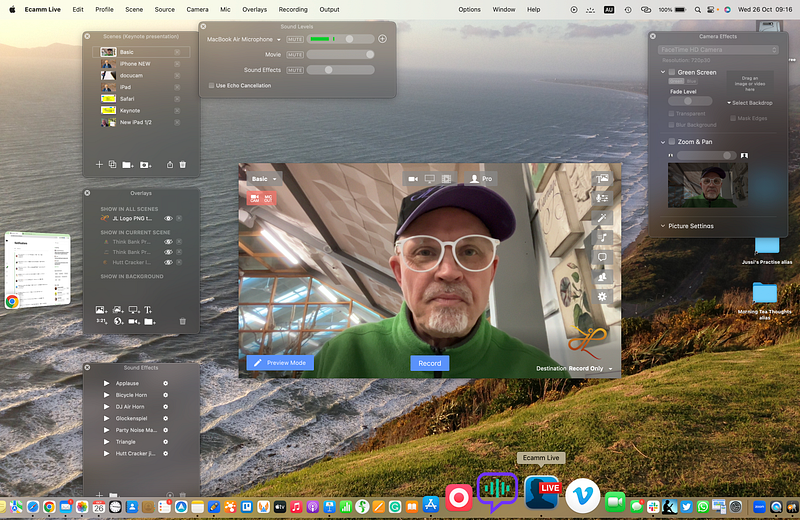
I had a double Christmas yesterday: my new MacBook Air M2 arrived, and at the same time, I could upgrade all my Macs to the new operating system version, Ventura.
I am an ordinary heavy user of technology. I am not deep enough in technical details to write a thorough review with benchmark tests and all. So, these are just user impressions based on years of using the Apple ecosystem.
First things first: the upgrade process is a breeze for a well-prepared one
In the morning, before the MacBook Air arrived, I upgraded my old MacBook 12" and my 27" iMac to Ventura. Again, it was a breeze.
Apple has made it almost seamless to do the updates and upgrades. It happened while I was having my morning tea, and it took less than an hour to complete the process for both Macs.
I have always used the TimeMachine to keep my data backed up, so I knew I could get back everything if something went wrong. And again, all worked well. Fortune favours those who are well-prepared.
If you don’t have local backups and depend solely on iCloud or any other cloud backup, I strongly recommend thinking twice. It’s easier to play safe than regret the lost data if something goes wrong.
First impressions about the new and shiny OS
Apple is a master of incremental excellence. Ventura feels cosy, friendly and smooth — and very familiar.
The new features don’t force you to change your workflow traumatically. Instead, the dramatic suspension comes from small Aha’s, not from sudden and unexpected new methods you must adapt to, if you like or not. The learning curve is not a curve at all but more like a pleasant stroll up a lush hill.
You learn new features as you go, and suddenly, you realise how much broader the horizon is with the unique features — especially with the Stage Manager. But I will come a bit later to that.
How did my old little aunty, MacBook 12", handle the new dresses that Ventura asked her to wear?
I was a bit worried that aunty would be a bit too aged and conservative — with the old Intel heart pulsing slowly under her flat bosom — to put on this fabulous new haute couture.
After all, my aunty is already four years old, and it equals about 85 human years. That’s the age when most PCs have already kicked the bucket or cannot take any new Windows on without painful IT’s ICU.
However, the old lady felt even younger after the upgrade. She is a bit slow but gracefully so. Slow, but without any symptoms of dementia. I wrote an article with it, did some quick edits of a short video, and it all went well.
However, it can no longer edit anything that requires 4K video tools or other power-hungry apps. It is still a perfect tool for essential work like emails, writing, browsing the net, and watching videos.
The iMac behaved like a good old war horse
When I jumped to work on my iMac, the new features of Ventura started to shine. The path went up, and the journey got pleasantly exciting.
Apple implemented the new little tweaks in Mail, Messages, Photos and other new features seamlessly and delightfully.
I almost didn’t realise that I started to use, for example, the new Schedule Send and Remind features in the Mail App without much thinking.
Those minor enhancements in the UI made the work feel smoother and more manageable. And on top of that was the unbelievable useful Stage Manager. But I will come to that a bit later. Yes, I promised to talk about it already earlier, but just wait for a little.
And then came my new queen of queens, the MacBook Air M2 — with all the bells and whistles
Just when I had gotten my head around Ventura and managed to publish my latest article about leadership I wrote with the old aunty, there was a knock on the door.
The smiling, polite and wonderfully witty courier stood at the door with my new MacBook Air. — ‘What is it in you, Apple guys, because every time I deliver something to you, you shine like spotlights?’ asked the guy when I signed the delivery.
We spent a few minutes discussing why Apple makes the users so happy, but I think I didn’t manage to convince the poor courier. He was shaking his head, and I could hear him talking to himself — “weirdos, but luckily for me, harmless ones’.
Unboxing the new MacBook Air and landing on the land of Stage Manager
Now, my dear reader is time to reveal the most significant quantum leap in the macOS for years, the Stage Manager. At least for me, that is.
When I set up my new Apple Silicon wonder, it became evident that this would be my new workhorse and the Intel-based Macs are, at least for me, history from now on.
With its gorgeous 27" screen, an iMac is a fantastic tool, and I will continue to use it, but less and less the more I find out the ways the Stage Manager makes my 13.6" new screen deliver in some ways even more than larger ones.
Apple’s UX team has invented a remarkable new feature that helps all users of smaller screens speed up their workflows significantly.
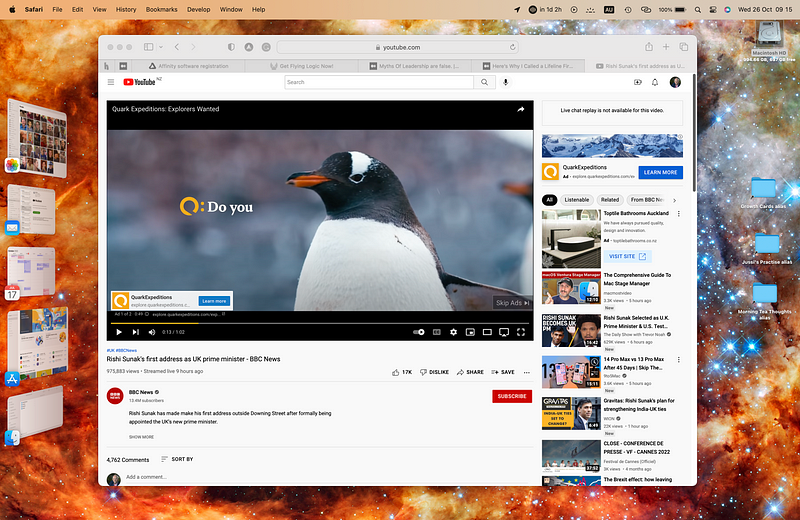
While writing this, I swap between apps and windows with consistency and speed, which makes my work faster than ever. They all sit nicely on the left side of the screen and are not intrusive but eloquently available when I need them.
The Stage Manager shows the items with razor-sharp thumbnails that help my magpie mind fly from one detail to another without losing focus on what I am doing. And as a funny, immensely charming detail, the thumbnails keep playing even the tiny, weeny videos and animations while waiting to be invited back to the stage.
Stage Manager hints about more spatial ways to interact with the content
This little feature is a perfect example of Apple’s attention to detail that can boost productivity in a very subtle but emotionally engaging and rewarding manner.
The stage Manager keeps my attention on the leading players while keeping the other actors ready for me to work with. For example, the references for this article, the dictionary for my poor spelling, photos and some other aids are there, and I can use them effortlessly without searching them from behind windows or apps.
Because of the smaller screen size, a laptop can become a tiresome tool when you must work with several apps simultaneously and create, edit and deliver rich media content. But not anymore, not if you put the Stage Manager to work.
So, there you have it: a totally new way to boost your productivity with the Stage Manager. It works on all spaces and external displays, keeping your screen clean and tidy. It gives your screen unexpected and pleasant depth, almost like inviting your mind’s 3D thinking to reflect on the otherwise flat screen.
I wonder what is Apple’s next step to use this new way of organising visual workflows. It hints at the coming AR/VR paradigm when we move from 2D computing into spatial content flows.
Time will tell, but for now, Apple’s Ventura delivers a pleasant, modern and productive user experience.
I am a curiosity expert; if you want to know how I can help you to become a more curious leader, creative and confident thinker, book a free discovery meeting with me here.
If you enjoy reading stories like these and want to support me as a writer, consider signing up to become a Medium member. It’s $5 a month, giving you unlimited access to stories on Medium. If you sign up using my link, I’ll earn a small commission: click here to join :-)