
TECHNOLOGY
Apple’s New Freeform App Looks Like Someone Phoned It In
There is a lot to like, but also a lot missing here

Apple! I’m a bit disappointed with your Freeform app. If this were a college coding class assignment, I’d insist that you could do better. Yes, it has a lot of nice features, but you completely missed some that I think are quite important!
Oh, back it up, Tony!
Freeform really does have some well done features. Maybe I should give it a B-minus?
The drawing capabilities are well thought-out and quite powerful, as are the built-in shapes and lines tool. Everything is easy to use.
I highly recommend this video to get an overview of the power and ease of use in Freeform. In spite of the gripes I’m about to detail, there is a lot to like about Freeform.
So what didn’t I like?
I don’t have any business use for Freeform, but I did, I think that I might use it as a better communication tool with my wife. What I do now is send her a Messages text every morning before she gets up. That text is to remind her of things coming up today, news she might find interesting, stuff I have to do, stuff we need to do, and so on.
It’s a Spousal Briefing.
The problem with Messages for that is that these texts get mixed in with others, some really not important enough to be in the briefing, and others I think of later.
I thought Freeform might be a nice way to do it. It should be. It could be, but there were some annoyances that stopped me and that I think would be just as annoying in business use.
Dates and time
Lordy, if this is a collaboration app, time stamps seem like an obvious, must-have feature. You should be able to optionally display who added something and when they did it for every object, along with the same information for every edit.
Who did what and when is pretty basic stuff, especially for business use!
Apple says:
Freeform takes advantage of the new collaboration features in Messages, which lets users invite others to a Freeform board by simply dragging it into a Messages thread. All members of that thread will be automatically invited to the boards and can begin collaborating immediately. When someone makes an edit, activity updates will show up at the top of the Messages thread. https://www.apple.com/newsroom/2022/12/apple-launches-freeform-a-powerful-new-app-designed-for-creative-collaboration/
THAT is not the way to do it, Apple! Every edit should be visible and able to be scrolled back or removed. Sure, the notification in Messages isn’t a bad thing, but how can you possibly think that is enough?
Browser links
Yes, Freeform has the ability to insert links, but it’s a double tap to follow a link. People are accustomed to clicking ONCE on links! I realize that you’ve used the single click for editing, but is there truly no better way to do this?
External documents
Freeform has an nice ability to show a Quick Look preview of an external document and then even leave Freeform to use the associated app. This document might be a PDF, an HTML file, or a spreadsheet, for example. You can even put in a link to a Playgrounds file! I wasn’t able to find anything it couldn’t handle.
But again, just like browser links, using the link is a double click — NOT expected behavior!
It shouldn’t be that way. Collaboration is NOT just for creators; plain old users can be part of this, but if you make it hard for them, they won’t like it.
Why both Sticky Notes and Text?
You can create text inside objects, but also you have Sticky Notes and a separate text tool.
Huh? Inside Freeform, I fail to see a great difference between Sticky Notes and Text, yet you can do either. I also suspect quite a few users don’t even know what a Sticky Note is, and I cannot imagine why you’d want one IN Freeform.
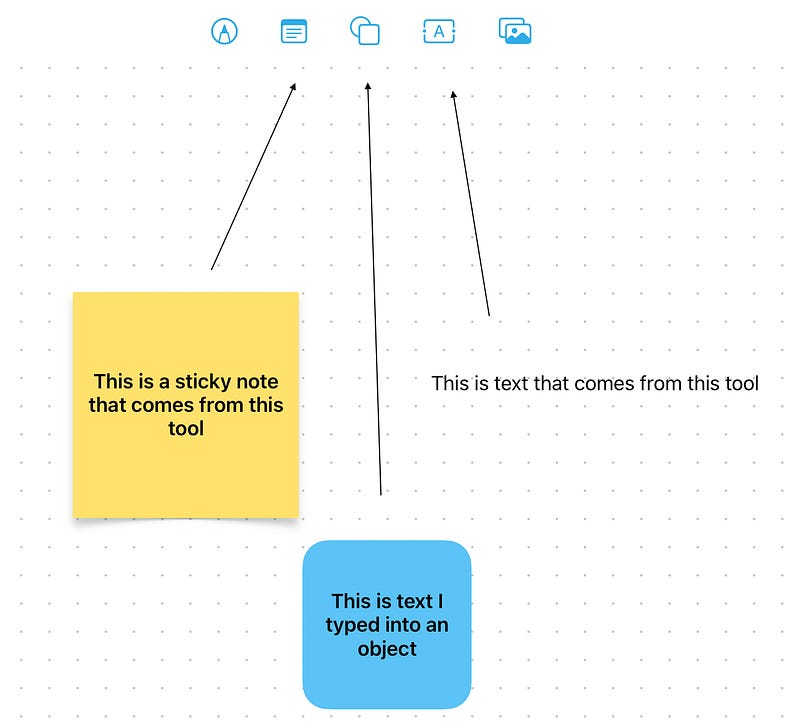
But if I’m missing something there, why not put Sticky Notes in the same place that lets you open external documents?
The Grid
You can toggle an alignment grid on and off. On my M1 iPad Pro, the lines are so faint I have trouble seeing if it’s on or off.
There doesn’t seem to be a snap to grid option! So what’s the grid for? It does show you with an orange line when you have things lined up, but is snap to grid such a bad idea?
Zoom
You can choose zoom levels through a menu or by finger pinch/spread. There’s a Zoom to Fit content in the menu, but it can’t be set to be live; that is, adjusting as you add content. Small thing, but annoying.
Redo
Freeform has an Undo button but lacks a Redo. That’s a pretty important thing to miss! The Drawing tool has Redo; the app itself should have it also, duh!
Thanks to Rick Blaiklock for noticing that HOLDING the Undo tool brings up a menu that offers Undo and Redo. That’s horrible UI design, Apple!
Locking
You can lock an individual object, but not the whole board! This isn’t ideal because changing things is VERY easy with Freeform. That’s a good thing, of course, but can also be annoying.
More annoying: if you lock something that is a link, you can’t double click to get to it! You can click once and use the eye icon, but that is ridiculous!

Final Grade
I am an Apple Fan Boy, but I’m going to grade this overall as a C. You have passed the course, but you could have done better.
Is there nothing I can use this for?
After playing around a bit more, I realized that there may be some handy uses I can make of this.
For example, it’s a nice place to keep website bookmarks because it’s visual, and easy to rearrange. It sucks that using a link is a double click, but otherwise it is useful.
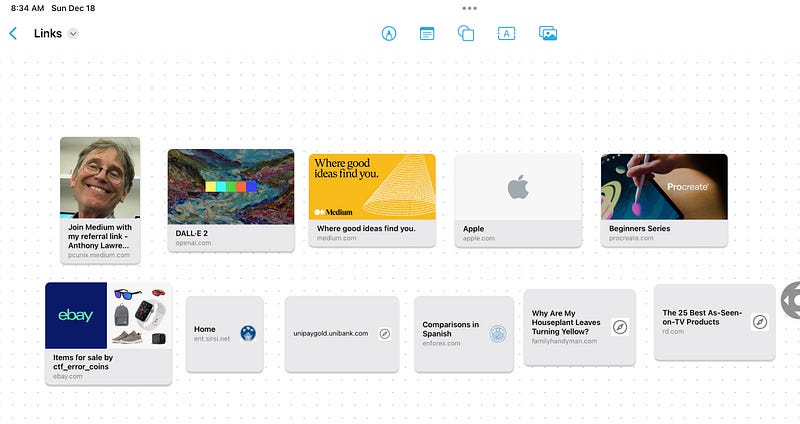
However, that surfaced something else missing: there’s no smart find here. A Command-F can’t find anything in the links or in text displayed by the links. It can only find things typed in text. Freeform would benefit from a smarter search tool. For my use here, it means that I’ll only use it for my most used links and for things I haven’t yet read.
Maybe I’ll think of more uses over time.
Update: and I did!


