
Apple IPs, Domains, and Ports for Firewall Rules
Domain names, IP addresses, and Ports used by Apple devices
~~~~~~~~~~~~~~~~~~~~~~~~~~~~~~~~~~~~~~~~~~~~~~~~~~~~~~~
⚙️ Check out my series on Automating Cybersecurity Metrics | Code.
🔒 Related Stories: Apple Mac Security | Network Security | Data Breaches
💻 Free Content on Jobs in Cybersecurity | ✉️ Sign up for the Email List
~~~~~~~~~~~~~~~~~~~~~~~~~~~~~~~~~~~~~~~~~~~~~~~~~~~~~~~
I have mentioned the noise generated by Apple products before, tried to turn some of it off and ended up blocking some of it. Recently, I’ve been digging into apple push notifications (APN) a bit more. Posts to follow.
That’s when I stumbled across this resource which is much more helpful in terms of defining which domains and IP addresses are doing what on your network. It’s not perfect but it’s better than other sources I’ve read prior to this.
You can set up a separate alias and separate firewall rule if you really want to know to which of all of the above your devices are connecting. Each of these rules on pfSense will log any connection attempts so you can figure out what devices are connecting to what domains.
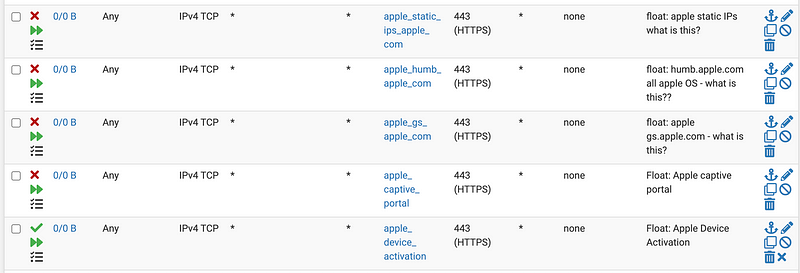
The problem is that some of the items in the list just have a domain name what don’t tell you the purpose of that domain name. Inquiring minds want to know.
To figure this out, you can block and allow things to figure out what is and is not required and dig deeper by tying the domain names to IP addresses in the logs and then see which service on your device is using which IP. So many questions, so little time.
I figured out that humb.apple.com and tbsc.apple.com are used in the activiation of a new laptop. I got an error message without them.
I also see connections to undocumented ports that do not appear to be required.

Ports used by Apple devices:
The other problem is that the push notification service only gives you a domain of *.push.apple.com. You can’t use a wildcard in pfSense firewall rules. Darn.
If you click over ot the APN service documentation you can find some IP addresses.
The IP ranges are quite broad but at least you can distinguish APN connections from everything else. The APN service is important because it can be used by mobile device management systems to control the settings on your machines. I’m really curious how this might be abused. Also, it is used by Apple most likely to do similar things I’m guessing. I haven’t had a lot of time to explore that but hopefully will do more in the future.
The APN service generates a lot of noise and dropping it immediately so it never shows up in my system logs will probably eliminate a lot of the noise I don’t like, though I also may need to enable it in the future. Creating clear logging and rules will help me determine what I need when.
Unfortunately there’s a whole lot of entries you’ll have to make if you want to be that granular and that could slow down your firewall. At some point I put all the things I wasn’t sure I needed into a single alias and blocked it:

I can figure out if I need those things as I realize things are blocked and investigate further.
If you’re not using an MDM (and if you don’t know what that is, you’re not) it may be a good idea to block all the domains under Device management, though I’m still testing this out. After blocking this traffic I’m seeing a whole bunch of denied traffic so I need to figure out what is going on there.

I have just recently been pondering the ability for someone to join your device to an MDM without your knowledge and control it. The other thing is that different Apple domains might resolve to the same IP addresses like Google services, making firewall rules very hard to implement or impossible in some cases.
If you just want to open up all those things you could create a single alias for all the domains that use the same port and create one rule instead of the crazy investigation I’m suggesting here. Depends on how inquiring your mind is. 😉
Follow for updates.
Teri Radichel | © 2nd Sight Lab 2024
About Teri Radichel:
~~~~~~~~~~~~~~~~~~~~
⭐️ Author: Cybersecurity Books
⭐️ Presentations: Presentations by Teri Radichel
⭐️ Recognition: SANS Award, AWS Security Hero, IANS Faculty
⭐️ Certifications: SANS ~ GSE 240
⭐️ Education: BA Business, Master of Software Engineering, Master of Infosec
⭐️ Company: Penetration Tests, Assessments, Phone Consulting ~ 2nd Sight Lab
Need Help With Cybersecurity, Cloud, or Application Security?
~~~~~~~~~~~~~~~~~~~~~~~~~~~~~~~~~~~~~~~~~~~~~~~~~~~~~~~~~~~~~
🔒 Request a penetration test or security assessment
🔒 Schedule a consulting call
🔒 Cybersecurity Speaker for PresentationFollow for more stories like this:
~~~~~~~~~~~~~~~~~~~~~~~~~~~~~~~~~~~~~~~~~~~~~~~~~~~~~~~~~~~~~
❤️ Sign Up my Medium Email List
❤️ Twitter: @teriradichel
❤️ LinkedIn: https://www.linkedin.com/in/teriradichel
❤️ Mastodon: @teriradichel@infosec.exchange
❤️ Facebook: 2nd Sight Lab
❤️ YouTube: @2ndsightlab


