
app.module.ts in Angular
In my latest article titled ‘Creating a New Component in Angular’, I recommended adding the new component to the app.module.ts file within the declarations array. Now, let's look into a detailed discussion about this app.module.ts file.
In Angular, the app.module.ts is the root module of the Angular application. It's where you define the structure, components, services, and other features of your application.
@NgModule decorator
The @NgModule decorator is used to define the metadata for the module. This includes declarations, imports, providers, bootstrap components, and more.
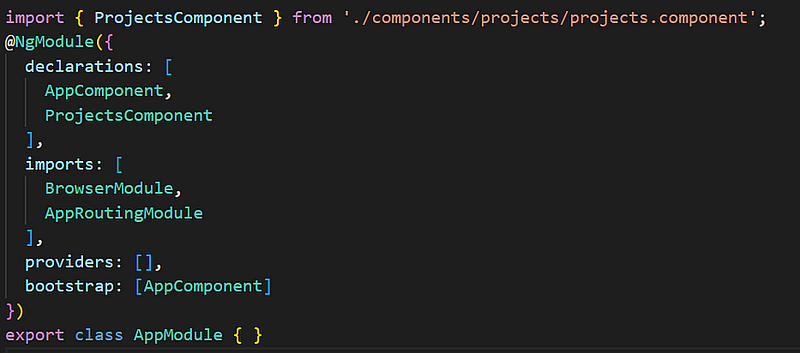
Declarations:
This is the array of components, directives, and pipes that belong to the module. When a new component or directive is created, they are declared in this array letting Angular know where to find them.
Imports:
This array contains modules that your module is dependent on.
Some of the commonly imported modules are BrowserModule, FormsModule, HttpClientModule, etc. These modules are used to launch and run browser, implement forms, perform HTTP requests, etc.
Providers:
This array contains the list of services required by the application. These services are available throughout the application.
Bootstrap:
This array contains the root component, typically AppComponent. Angular bootstraps the root component when the application starts. This is the entry point of the application.
In conclusion, understanding app.module.ts file is important as it contains the configuration of your Angular application. It is important to keep this module clean and structured to ensure that your application is manageable over time.
Follow InterviewPro for more.


