
Web Performance
Angular Performance: 5 OnPush Change Detection Case Studies
Tips on switching from default to OnPush change detection

If you search for “Angular change detection,” you will find a lot of articles that have a lot in common. In this article, we are not going to explain how the zone library works or how the Angular change detection mechanism is implemented under the hood. What we will see are five real-world cases of switching from the default to the OnPush change detection strategy in an Angular app to optimize its performance.
As you may already know, OnPush change detection cannot be used out of the box. You have to consider the immutability of your data structure and adjust the code design and the interaction between your components. To gain a clearer understanding, we will apply this in today’s article by analyzing and adjusting five Angular components designed in different ways.
Case Study 1: Container Component
Container components are smart components. They communicate with services, routers, and stores. They know which services to call and take care of retrieving data from them. Here is an example:
InvoicesContainerComponent reads three properties (two observables and an array) from InvoiceStoreService, then communicates them to a child presentational component (invoices-ui) through data bindings in the template:
displayColumnDefsis areadonlyproperty defined in the store service. We don’t need to worry about detecting a new value from it since it does not change once we initialize it.notification$anddataList$are observables that emit new values depending on the user interaction with the application. We’re subscribing to those two properties in the template using theasyncpipe, which ensures an auto-unsubscription from observables and emits the new values — as objects with new references — into the input properties ofinvoices-ui. This is convenient for the use ofOnPushchange detection in the presentational component.
If, instead of using theasync pipe in invoices-container.component.html, we were subscribing to dataList$ observables as below:
And then passing the new value in the template:
OnPush change detection would not work, and we would face a problem. A way to solve this is to inject ChangeDetectorRef in the constructor of InvoicesContainerComponent and call the markForCheck() method after getting a new invoice list:
“… the
AsyncPipeautomatically works using OnPush change detection strategy. ... The implementation without theAsyncPipedoes not trigger change detection, so we would need to manually calldetectChanges()for each new event that is emitted from the observable.” — Michael Hoffmann
Be careful, though. Calling markForCheck() is perceived as a last resort.
A benefit of applying the container/presenter pattern (or smart and dump components) is not only to instruct Angular to manage the subscription/unsubscription for us by using the async pipe but to have a more ready infrastructure for OnPush change detection as well.
Case Study 2: Presenter Component
Let’s examine the dump presentational component invoices-ui now:
We have used input properties and events to connect this component to its parent container invoices. In such a case, we can easily add changeDetection: ChangeDetection.OnPush to InvoicePresenterComponent’s metadata without any problem since notification and dataList will get new references whenever their values change.
Case Study 3: Custom Autocomplete
Our third case is a custom autocomplete that I’ve implemented in this post. It is a presentational component with the following input properties:
- An array
optionsList: It will change during runtime. - Two
FormControls(valueFormControlandtextFormControl): They will change during runtime. optionSearchConfig: A static object that will not change after initialization.- And the other inputs are primitives, which means they will not represent any challenge for the change detection issue.
Let’s see the TypeScript code:
And here is the template:
Can you guess if we need any refactoring before switching to OnPush change detection?
Let’s break it down:
- The
valueFormControlandtextFormControlinput properties haveFormControl(from@angular/forms) as a type. Angular’s reactive form keeps the data model pure by providing it as an immutable data structure. Each time a change occurs to the form, theFormControlinstance will not update the existing data model. It will return a new one. This means we can switch toOnPushchange detection easily. optionsListgets its value in the custom autocomplete template as follows:
[optionsList]="dataList$ | async"Whenever the observable dataList$ emits a new value, custom-autocomplete receives a new object with a new reference as a value for optionsList. So, the change will be successfully detected and rendered to the user.
Case Study 4: Material Grid
Did you notice the child component (a material table) rendered in an overlay in the previous templatecustom-autocomplete.component.html?
It’s a dynamic presenter reused in multiple components. After the user starts typing a search query, we send a request to the REST API. Then we render the result in the table, as you can see in the following two screenshots:
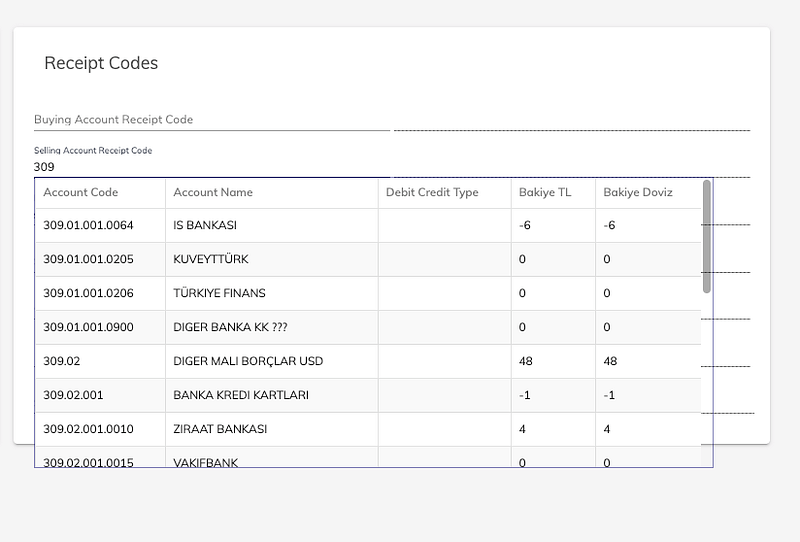
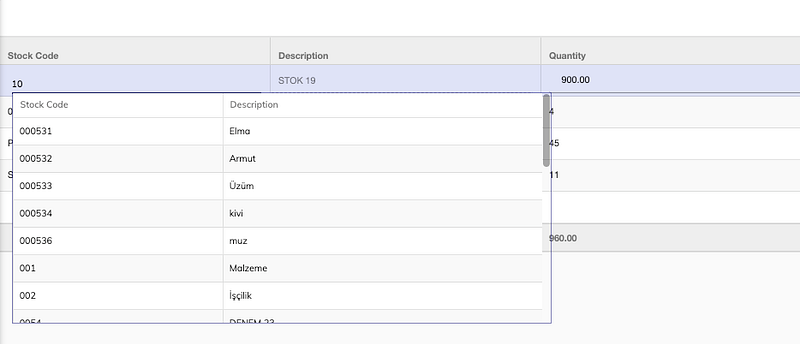
Let’s try to delve into the problem now.
Two of the three input parameters of mat-grid receive static values and there is no change after component initialization:
[displayedColumns]="optionSearchConfig.displayedColumns"
[displayColumnDefs]="optionSearchConfig.displayColumnDefs"
But the first input (dataSource), which has MatTableDataSource<T> as a type, is updated after every new searchQuery. Whenever optionsList changes, dataSource.data gets a new value in the ngOnChanges() hook in the custom-autocomplete component:
With ChangeDetectionStrategy.OnPush, we will perform a referential check. Therefore, the mat-grid component will not detect the new value. The reference to thedataSource object is still the same, so there is no need to take action. To solve this, we will instantiate MatTableDataSource to create a new object instead of updating the data property of the old one:
Case Study 5: context-menu for a Kendo Grid
The following is a component that shows a context-menu whenever the user right-clicks on a row of a kendo-grid. On line 21, we have the subscription to grid.cellClick that calls onCellClick(). This last method takes care of extracting and communicating the position where kendo-popup should be displayed and sets the value of the row — that the user clicked on— in the dataItem property:
At the first glance, everything works fine. But when we switch to OnPush change detection, we notice that no context-menu appears after a right-click on a row.
In the previous four examples, our components needed re-rendering after the inputs changed. Now GridContextMenuComponent needs a re-rendering after an event has fired in the view.
Let’s make a little adjustment in onCellClick() and in the callback for document.click event by calling markForCheck() to explicitly mark the view as changed after the user’s right-click:
Cool! We have now our context-menu as expected again.
Takeaway
“Undoubtedly, you should stick to immutable data structures in Angular applications. Not only does it allow you to improve a runtime performance by using the OnPush change detection strategy, but it also prevents you from getting into troubles of having stale data rendered in the view.” — Wojciech Trawiński
However, if you have a terrible performance just after finishing loading the application — like in the screenshot below—don’t expect OnPush change detection to fix it because it will not:
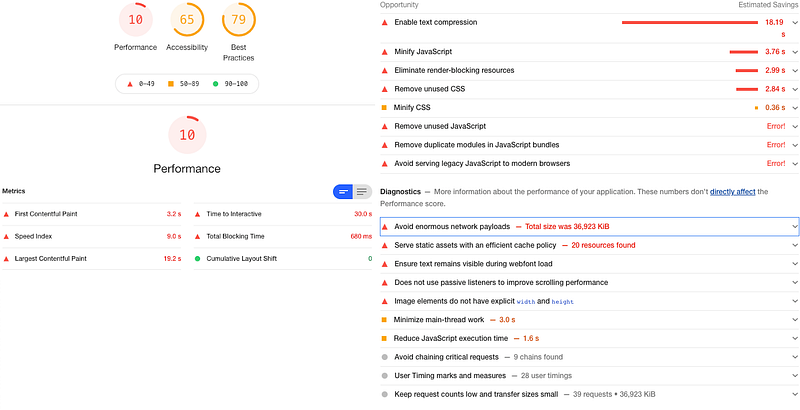
Such a result — measured by Chrome Lighthouse — is a sign that we should take one or more of the following actions:
- Split big components and JavaScript/TypeScript files into smaller ones.
- Remove the unused files and dead code.
- Reduce the number of HTTP requests by using memoization, caching, etc.
- Analyze the bundle with webpack-bundle-analyzer and check if the huge third-party libraries are worth using.
You are probably now wondering why you should care about the change detection strategy then?
Don’t get confused. There are different types of web performance. To make things simple, let’s consider two types: one directly after calling your web app on the browser and one after using it for a long session (runtime performance).
One thing you can be pretty sure about is that OnPush change detection (and unsubscribing from observables) will reduce the time taken and the number of resources consumed in the execution and thus optimize the runtime performance. To see this improvement, you need to compare the performance after interacting and playing with your web app without reloading the page with F5 for a considerable amount of time.
Keeping performance optimal for long sessions is essential and incredibly important in production.
Thanks for reading. If you have some questions, please let me know in the comments and I will get back to you.
🧠💡 I write about engineering, technology, and leadership for a community of smart, curious people. Join my free email newsletter for exclusive access or sign up for Medium here.
You can check my video course on Udemy: How to Identify, Diagnose, and Fix Memory Leaks in Web Apps.


