
Angular 17 and .NET Core 8: ChatGPT and WebAPI Integration
Appendix F

Preface
This is another installment in our comprehensive series, Building a Talent Management SPA with Angular 17 and .NET Core 8. For a broader view of the series and to access other parts, you can refer back to the series’ table of contents, where each segment is meticulously organized to guide you through every stage of building a robust Talent Management SPA.
Introduction
Welcome to Appendix F of this blog series! We’ll be diving deep into integrating ChatGPT into the demo Talent Management application. We will extend Talent Management WebAPI with ChatGPT, taking advantage of Generative AI capability to improve the job description content.
Using ChatGPT for Talent Management job descriptions enhances:
- Grammar and clarity.
- Inclusive tone analysis.
- Skill matching and gap identification.
- Competitive positioning.
- SEO keyword optimization.
- Feedback question generation.
- Unconscious bias detection.
- Technical role simulation for clearer role understanding.
Content
Integrating ChatGPT into an Angular application involves setting up a backend service (NetCore WebAPI) that interfaces with OpenAI’s API (which provides access to ChatGPT) and then connecting the Angular frontend to this service. This blog will cover the following:
Part 1: Integration Overview Describe the interconnectivity between Angular, NetCore WebAPI, and ChatGPT.
Part 2: ChatGPT and NetCore Web API Integration Set up a robust NetCore Web API to connect your Web API with ChatGPT. Create the project, secure your API key, establish communication with OpenAI, and fine-tune responses.
In this blog, I will focus on integrating WebAPI with ChatGPT. Updating Angular to call a new WebAPI endpoint with ChatGPT integration will not be covered in this post. — Fuji Nguyen
Part 1: Integration Overview
In the integrated system, the user interacts with the Angular application, which captures the user’s input and sends it to the NetCore WebAPI via HTTP requests. The WebAPI, having received the request, authenticates and communicates with the ChatGPT API, sending the user’s input and awaiting a response. Once the ChatGPT API processes the input, it generates a text response that is sent back to the NetCore WebAPI. This response is then formatted as required by the application’s business logic and returned to the Angular application, where it is finally presented to the user.
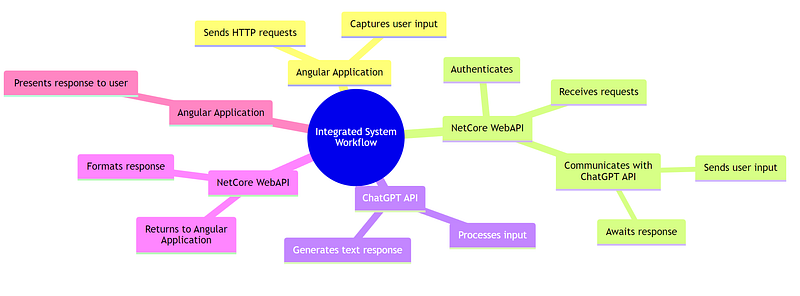
1.1 Angular: The Client-Side Framework
Angular operates as the client-side framework that constructs the user interface of the application. It is responsible for rendering the interactive elements that the user engages with, such as forms and buttons. Within Angular:
- Components encapsulate the logic for processing user inputs and presenting data.
- Services are used to abstract and encapsulate external interactions with data sources, which in this context, is the NetCore WebAPI.
- Modules define the boundaries of related functionalities and serve as containers for a cohesive block of code dedicated to an application domain.
1.2 NetCore WebAPI: The Server-Side Interface
The NetCore WebAPI functions as an intermediary between the Angular front-end and the ChatGPT service. It is tasked with handling HTTP requests from the Angular application, interfacing with the ChatGPT API, and returning the AI-generated responses. Key responsibilities include:
- Request Handling: Accepting and interpreting requests from the Angular client.
- API Key Management: Safeguarding sensitive credentials required to authenticate with the OpenAI API.
- Response Processing: Formatting and relaying the ChatGPT responses back to the Angular application.
1.3 ChatGPT: The AI Model
ChatGPT, provided by OpenAI, is an advanced language model that generates human-like text based on the input it receives. It is accessed via an API which requires secure authentication. The role of ChatGPT in this system is to:
- Receive Prompts: Accept input in the form of prompts via API requests, typically relayed by the NetCore WebAPI.
- Generate Responses: Process these prompts and generate text responses based on the patterns it has learned during its training.
- Return Data: Send these responses back to the NetCore WebAPI, which then passes them on to the Angular front-end.
Part 2: ChatGPT and NetCore Web API Integration
One consideration in integrating ChatGPT into the clean architecture is determining where within the architecture it fits best. The TalentManagement project follows the TemplateOnionAPI structure, comprising five projects organized into three layers: CORE, Infrastructure, and Presentation.
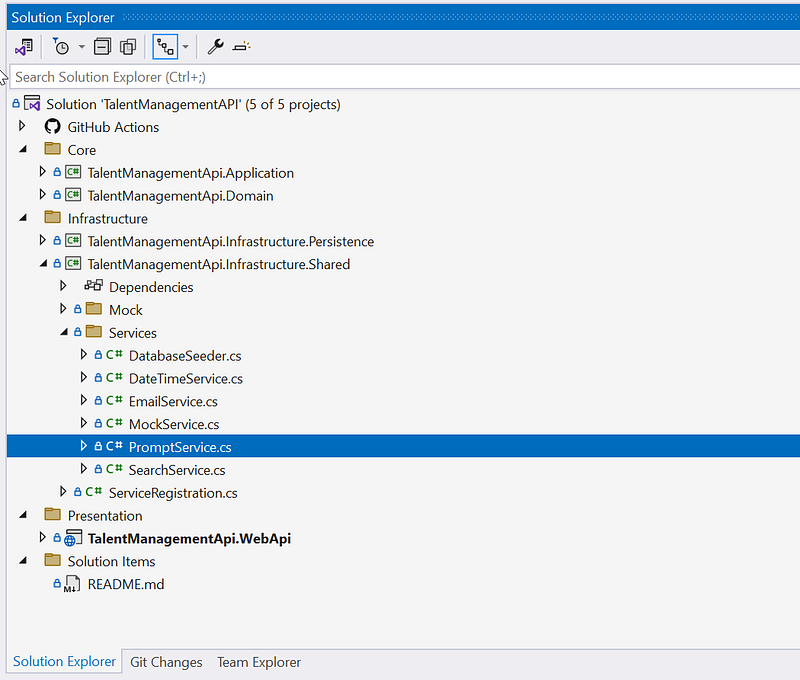
Here are the options for incorporating the ChatGPT code:
- TalentManagementApi.WebApi: Integrate ChatGPT directly into the web API project. This option offers simplicity and direct access to the API endpoints.
- TalentManagementApi.Application and TalentManagementApi.WebApi: Implement ChatGPT within both the application and web API layers. This approach ensures that ChatGPT functionality is accessible both internally within the application and externally via the API.
- TalentManagementApi.Infrastructure.Shared, TalentManagementApi.Application, and TalentManagementApi.WebApi: Utilize shared infrastructure components to integrate ChatGPT across multiple layers. This option promotes code reusability and maintains consistency throughout the architecture.
- Create a new project in the infrastructure folder, TalentManagementApi.Infrastructure.GenerativeAI, and wire it to TalentManagementApi.Application and TalentManagementApi.WebApi: Establish a dedicated infrastructure project specifically for ChatGPT integration. This isolates ChatGPT-related functionality, making it easier to manage and maintain.
Each option offers advantages depending on factors such as project complexity, scalability requirements, and maintenance considerations. Carefully evaluate these factors to determine the most suitable integration approach for your specific use case.
For this blog post, I found myself torn between options 3 and 4. I view ChatGPT akin to a weather service or Google Maps, providing essential functionality. Currently, I’m focused on implementing a straightforward completion prompt thus I go with option 4. However, should I expand to include features like integrating images (DALL·E 3) or videos (Sora), option 4 becomes a more enticing prospect. Looking ahead, when I tackle integration with ElasticSearch, particularly involving CRUD, option 4 will be my preferred choice. — Fuji Nguyen
2.1 Obtaining an OpenAI API key
OpenAI has emerged as a beacon of innovation, offering tools like ChatGPT that have revolutionized how we interact with technology. For developers looking to harness this power within their applications, obtaining an OpenAI API key is the first crucial step. This guide will walk you through the process of acquiring an OpenAI API key and integrating it into a NetCore WebAPI project, paving the way for you to leverage AI capabilities in your applications.
Step 1: Sign Up with OpenAI
Before you can dive into the world of AI, you need to create an account with OpenAI. Visit the OpenAI website and sign up. The registration process is straightforward — fill in the required details, verify your email, and you’re set to explore the OpenAI platform.
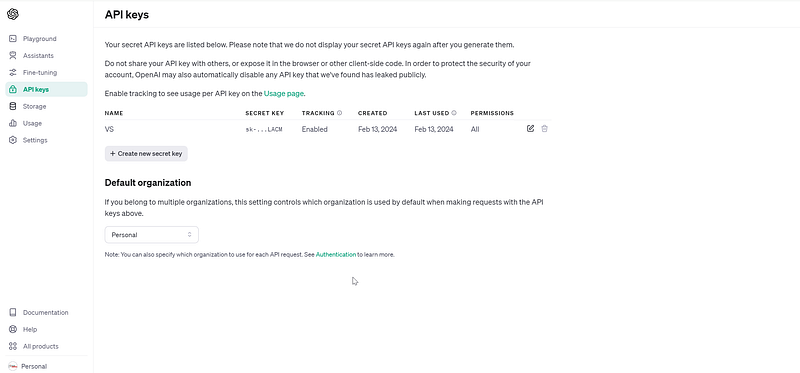
Step 2: Generate Your OpenAI API Key
Once your account is active, navigate to the API section in your dashboard. Here, you’ll find the option to generate a new API key. This key is your passport to accessing OpenAI’s suite of AI tools, so keep it secure. When generated, make sure to copy and store it safely; it’s your unique identifier and should not be shared.
Step 3: Securely Store Your API Key
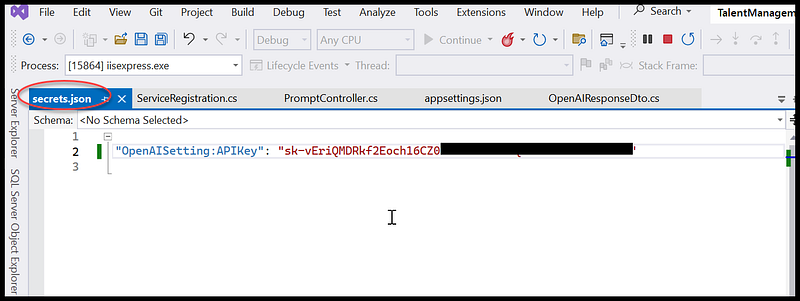
Security is paramount when handling API keys. Instead of hardcoding your key into your application, use environment variables or a secrets manager. For local development, storing the key in Visual Studio Secret Manager is sufficient. On production servers, utilize secure storage solutions like AWS Secrets Manager, Azure Key Vault, or HashiCorp Vault. This approach minimizes the risk of exposing your key in source code or version control systems.
See below for an example of storing the key in Visual Studio Secret Manager during development. This prevents checking the key into GitHub.
2.2 Integrating ChatGPT into your NetCore WebAPI
For ChatGPT integration, I use the .NET library at OpenAI-API-dotnet on GitHub. It simplifies using OpenAI’s AI models like GPT, Codex, and DALL·E in .NET apps. Check out the repo and give it a star! — Fuji Nguyen
Here are the steps to integrate NetCore WebAPI with OpenAI ChatGPT
2.2.1 Set up a NetCore Web API project
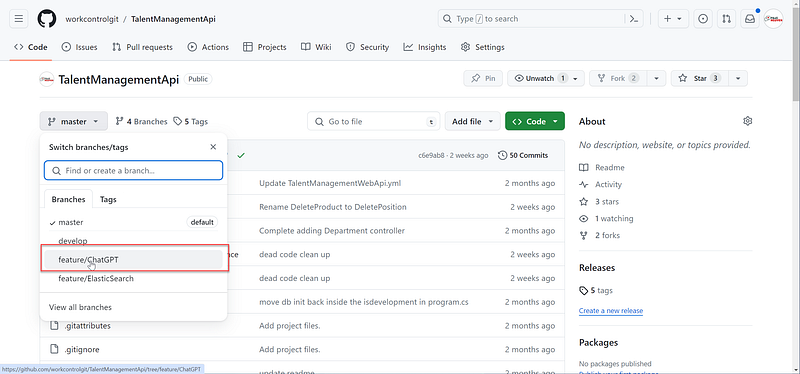
Start with the Talent Management Web API project in .NET Core 8 and create a feature branch ChatGPT. This project will serve as the intermediary between your application’s frontend and OpenAI’s services.
You can find the feature branch ChatGPT on GitHub.
2.2.2 Integrate OpenAI API
To integrate the OpenAI API into your project, create a service class PromptService within your NetCore project that utilizes the HttpClient to make requests to OpenAI. This service will use your securely stored API key to authenticate requests.
Here is the listing of the source code in the PromptService.cs
using Microsoft.Extensions.Configuration;
using OpenAI_API;
using OpenAI_API.Chat;
using OpenAI_API.Models;
using System.Threading.Tasks;
using TalentManagementApi.Application.Interfaces;

namespace PromptAPI.Services
{
    public class PromptService : IPromptService
    {
        public readonly IConfiguration _configuration;

        public PromptService(IConfiguration configuration)
        {
            _configuration = configuration;
        }

        public async Task<string> CreateChatCompletionAsync(string prompt)
        {
            var apiKey = _configuration.GetValue<string>("OpenAISetting:APIKey");

            // https://github.com/OkGoDoIt/OpenAI-API-dotnet/blob/master/README.md
            OpenAIAPI api = new OpenAIAPI(apiKey); // shorthand

            var result = await api.Chat.CreateChatCompletionAsync(new ChatRequest()
            {
                Model = Model.ChatGPTTurbo,
                Temperature = 0.7f,
                MaxTokens = 100,
                Messages = new ChatMessage[] {
            new ChatMessage(ChatMessageRole.User, prompt)
                }
            });

            var reply = result.Choices[0].Message.TextContent;

            return reply;
        }
    }
}
This C# code snippet demonstrates how a .NET application can integrate with the OpenAI API to send prompts and receive responses from the ChatGPT model, specifically using the OpenAI .NET library. The PromptService class is designed to encapsulate the logic required to interact with OpenAI's Chat API. Let's dissect the code:
Namespaces
- Microsoft.Extensions.Configuration: This namespace is used to access application settings, such as the API key needed to authenticate requests to OpenAI’s API.
- OpenAI_API: The main namespace for the OpenAI .NET library, providing access to OpenAI’s services.
- OpenAI_API.Chat: Contains functionality specific to interacting with OpenAI’s chat models.
- OpenAI_API.Models: Includes data models used by the OpenAI API client to structure requests and responses.
- System.Threading.Tasks: Supports asynchronous programming, allowing the service to perform non-blocking API calls.
- TalentManagementApi.Application.Interfaces: Presumably contains the
IPromptServiceinterface, defining the contract thatPromptServiceimplements.
Class and Method Summary
- PromptService: Implements
IPromptService, providing a specific implementation to interact with OpenAI's Chat API. - _configuration: A field holding the
IConfigurationinstance, used for accessing application configurations like the OpenAI API key. - PromptService Constructor: Initializes the service with application configuration data.
- CreateChatCompletionAsync Method: Asynchronously sends a prompt to the OpenAI Chat API and returns the response.
Key Operations
Configuration Access: Retrieves the OpenAI API key from the application’s configuration settings, ensuring sensitive information is not hard-coded.
OpenAIAPI Initialization: Creates an instance of the OpenAIAPI client, using the API key for authentication. This client is the gateway to interacting with OpenAI services.
Chat Request: Constructs a ChatRequest object with specific parameters:
- Model: Sets the model to
Model.ChatGPTTurbo, indicating the use of a particular version of ChatGPT optimized for quick responses. - Temperature: Sets to
0.7f, controlling the randomness of the generated responses. A value of 0 would result in deterministic outputs, whereas higher values encourage more diverse outputs. - MaxTokens: Limits the response to 100 tokens, managing the length of the generated text.
- Messages: Contains the user’s prompt, packaged in a
ChatMessageobject, indicating the message's role (from the user) and content.
API Request: Sends the chat request asynchronously to OpenAI’s API and awaits the response. This is done using api.Chat.CreateChatCompletionAsync, demonstrating the async-await pattern for non-blocking I/O operations.
Response Processing: Extracts the chat response from the first item in the result.Choices array, specifically the content of the message. This assumes the API call was successful and that a response was received.
Return: The method returns the content of the chat response, which is the AI-generated text based on the input prompt.
The PromptService class provides a clear example of how to structure code for calling OpenAI's Chat API within a .NET application, leveraging the OpenAI .NET library. It showcases essential practices like using configuration for API keys, asynchronous programming for API calls, and structured access to API responses. This code snippet can serve as a foundation for developing applications that require interaction with AI-powered text generation services.
2.2.2 OpenAI ChatGPT Completion Endpoint
Create an endpoint in your Web API that accepts requests from your Angular frontend and forwards them to the OpenAI API.
Here is the source code listing of the PromptController.cs
using Microsoft.AspNetCore.Mvc;
using System.Threading.Tasks;
using TalentManagementApi.Application.Features.Prompts.Queries.GetPrompts;
using TalentManagementApi.Application.Interfaces;

namespace TalentManagementApi.WebApi.Controllers.v1
{
    public class PromptController : BaseApiController
    {
        private readonly IPromptService _promptService;

        public PromptController(IPromptService promptService)
        {
            _promptService = promptService;
        }

        [HttpGet]
        public async Task<IActionResult> CreateChatCompletionAsync([FromQuery] string prompt)
        {
            return Ok(await Mediator.Send(new GetPromptQuery { Prompt = prompt }));
        }
    }
}
The provided code is an example of a controller in an ASP.NET Core Web API project, specifically designed for handling requests related to generating chat completions, presumably by interfacing with an AI service like OpenAI’s GPT models. Let’s break down the key components of this code:
Namespace Imports:
Microsoft.AspNetCore.Mvc: Essential for creating controllers in ASP.NET Core. It provides the base controller class, result types, and attributes for routing and model binding.System.Threading.Tasks: Enables asynchronous programming, allowing for non-blocking I/O operations.TalentManagementApi.Application.Features.Prompts.Queries.GetPrompts: Likely contains a CQRS query object that represents a request to get prompts from the application's domain logic.TalentManagementApi.Application.Interfaces: Contains interfaces for the application's service layer, includingIPromptServicewhich the controller depends on to process prompts.
Controller Class:
PromptControllerinherits fromBaseApiController, which might provide shared functionality across all API controllers in the application, such as error handling, response formatting, or common dependencies.- It’s part of a versioned API structure (
v1), indicating the API's version and facilitating future updates with minimal impact on existing clients.
Dependencies:
- A private readonly field
_promptServiceof typeIPromptServiceis declared, following dependency inversion principles. This service is responsible for the business logic related to handling prompts. - The controller’s constructor accepts an
IPromptServiceinstance, which is provided through dependency injection. ASP.NET Core's built-in DI container will resolve and inject this dependency at runtime.
Action Method:
CreateChatCompletionAsync: An asynchronous action method that handles HTTP GET requests. Despite the name implying creation, this method is designed to fetch data based on the provided prompt, which is more typical of a GET operation in RESTful APIs.[HttpGet]attribute without a route template indicates that this method will respond to GET requests made to the controller's base route.[FromQuery] string prompt: The method expects apromptparameter from the query string of the request URL. This parameter is passed to the business logic to generate a chat completion.- The method asynchronously sends a
GetPromptQueryobject, containing theprompt, to some mediator service. This is indicative of the CQRS (Command Query Responsibility Segregation) pattern, whereGetPromptQueryrepresents a query (read operation) in this architecture. await Mediator.Send(...): This line asynchronously waits for the result of processing theGetPromptQuery. TheMediatoris likely a part of the application's CQRS infrastructure, responsible for routing the query to its appropriate handler and awaiting the result.return Ok(...);: Wraps the result in anOkObjectResult, which is an HTTP 200 OK response, and returns it to the client. This encapsulates the chat completion data generated based on the input prompt.
This controller is anl example of an ASP.NET Core API controller designed following modern application architecture principles, including dependency injection, asynchronous programming, and CQRS. It serves as an entry point for clients to interact with the application’s AI-based chat completion features by sending prompts and receiving generated responses.
2.2.3 Implementing CQRS (Command Query Responsibility Segregation)
In the previous section, the GetPromptQuery class was utilized in the controller, following the Mediator pattern. Let’s review the implementation of GetPromptQueryclass. Below is its source code listing in GetPromptQuery.cs
using MediatR;
using System.Threading;
using System.Threading.Tasks;
using TalentManagementApi.Application.Interfaces;
using TalentManagementApi.Application.Wrappers;

namespace TalentManagementApi.Application.Features.Prompts.Queries.GetPrompts
{
    /// <summary>
    /// GetPromptQuery - handles media IRequest BaseRequestParameter
    /// </summary>
    public class GetPromptQuery : IRequest<Response<GetPromptViewModel>>
    {
        public string Prompt { get; set; }

        public class GetPromptQueryHandler : IRequestHandler<GetPromptQuery, Response<GetPromptViewModel>>
        {
            private readonly IPromptService _promptService;

            /// <summary>
            /// Constructor for GetPromptQueryHandler class.
            /// </summary>
            /// <param name="repository">IPromptRepositoryAsync object.</param>
            /// <param name="modelHelper">IModelHelper object.</param>
            /// <returns>GetPromptQueryHandler object.</returns>
            public GetPromptQueryHandler(IPromptService repository)
            {
                _promptService = repository;
            }

            /// <summary>
            /// Handles the GetPromptQuery request and returns a PagedResponse containing the requested data.
            /// </summary>
            /// <param name="request">The GetPromptQuery request.</param>
            /// <param name="cancellationToken">The cancellation token.</param>
            /// <returns>A PagedResponse containing the requested data.</returns>
            public async Task<Response<GetPromptViewModel>> Handle(GetPromptQuery request, CancellationToken cancellationToken)
            {
                var completion = await _promptService.CreateChatCompletionAsync(request.Prompt);
                var response = new GetPromptViewModel();
                response.Completion = completion;
                return new Response<GetPromptViewModel>(response);
            }
        }
    }
}
This C# code snippet utilizes the MediatR library for implementing the CQRS (Command Query Responsibility Segregation) and Mediator patterns. It defines a query operation to retrieve a prompt’s completion from an AI service, OpenAI’s ChatGPT, abstracted through a service layer. Let’s break down the main components and their roles in the application.
Namespaces
MediatR: A library that implements the Mediator pattern, allowing for decoupling of in-process messaging by sending requests to handlers, typically used for organizing business logic in CQRS architectures.System.Threading,System.Threading.Tasks: Namespaces for supporting asynchronous programming, enabling non-blocking operations and concurrent execution.TalentManagementApi.Application.Interfaces: Contains interfaces that define contracts for services and repositories within the application, ensuring decoupling and adherence to SOLID principles.TalentManagementApi.Application.Wrappers: Contains wrapper classes used for standardizing responses from the application layer, such as encapsulating results in a common response format.
GetPromptQuery Class
- Implements
IRequest<Response<GetPromptViewModel>>. This setup indicates thatGetPromptQueryis a request object capable of carrying input parameters (in this case, aPrompt) for MediatR to handle. - The
Promptproperty is what the application user wants to get a completion for from the AI service.
GetPromptQueryHandler Class
- Implements
IRequestHandler<GetPromptQuery, Response<GetPromptViewModel>>, indicating it is the handler responsible for processingGetPromptQueryrequests and returning aResponse<GetPromptViewModel>. - Contains a constructor that accepts an
IPromptServiceimplementation, which abstracts the logic for interacting with the underlying AI or chat service. This service is responsible for generating chat completions based on the prompt.
Constructor
- The
GetPromptQueryHandlerconstructor injects anIPromptService. This follows the Dependency Injection (DI) pattern, promoting loose coupling and making the code more maintainable and testable.
Handle Method
- The
Handlemethod is an asynchronous operation that takes aGetPromptQueryand aCancellationTokenas parameters. This method is where the logic to process the query and generate a response is implemented. - It calls
_promptService.CreateChatCompletionAsync(request.Prompt), asynchronously waiting for the chat completion result from the AI service. - Constructs a
GetPromptViewModeland sets itsCompletionproperty with the result from the AI service. - Wraps the
GetPromptViewModelin aResponse<T>object, standardizing the response format for the client consuming this API or service.
This code snippet showcases an application of the CQRS and Mediator patterns in a .NET Core application using MediatR. It abstracts the process of fetching AI-generated text completions into a query handled by a specific handler, promoting separation of concerns and clean architecture principles. The GetPromptQuery represents the query with its input, while the GetPromptQueryHandler encapsulates the logic to fulfill that query, interfacing with services that interact with AI models to generate responses based on prompts.
Source Code
The source code for this blog post is available in the feature branch ChatGPT on GitHub.
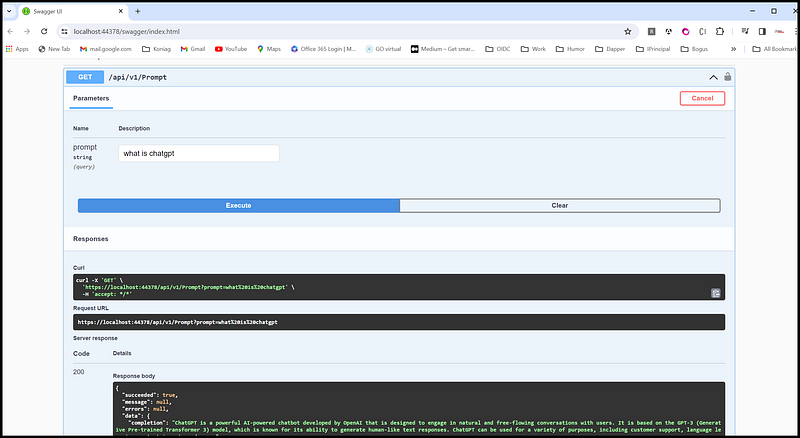
You can download and run the project on localhost. Be sure to update the OpenAI key in the application.json. Once you have the key update, you can run the project and test the prompt via Swagger. See below for an example screenshot of the response for the prompt “What is ChatGPT?”.
Frequently Asked Questions
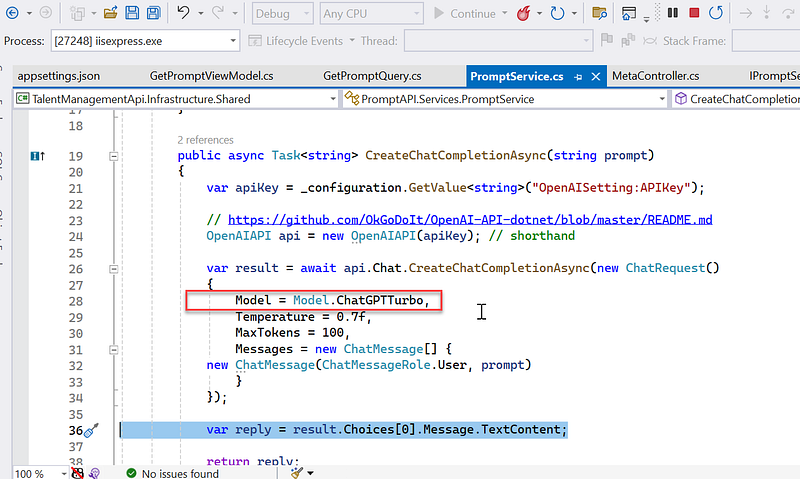
Question 1: How to change the model such as ChatGPT 3 to 4? You can switch the model via the PromptService. Refer to the screenshot below for more details. For more information, see https://github.com/OkGoDoIt/OpenAI-API-dotnet/blob/master/README.md
Question 2: How to view the token count for both prompt and completion? You can see token usage via chat.MostRecentApiResult.Usage.PromptTokens and related properties. Enable debug mode and check the result under “Usage”. Below is a screenshot example for the question “What is ChatGPT?”, showing a total of 89 tokens for both Completion and Prompt.
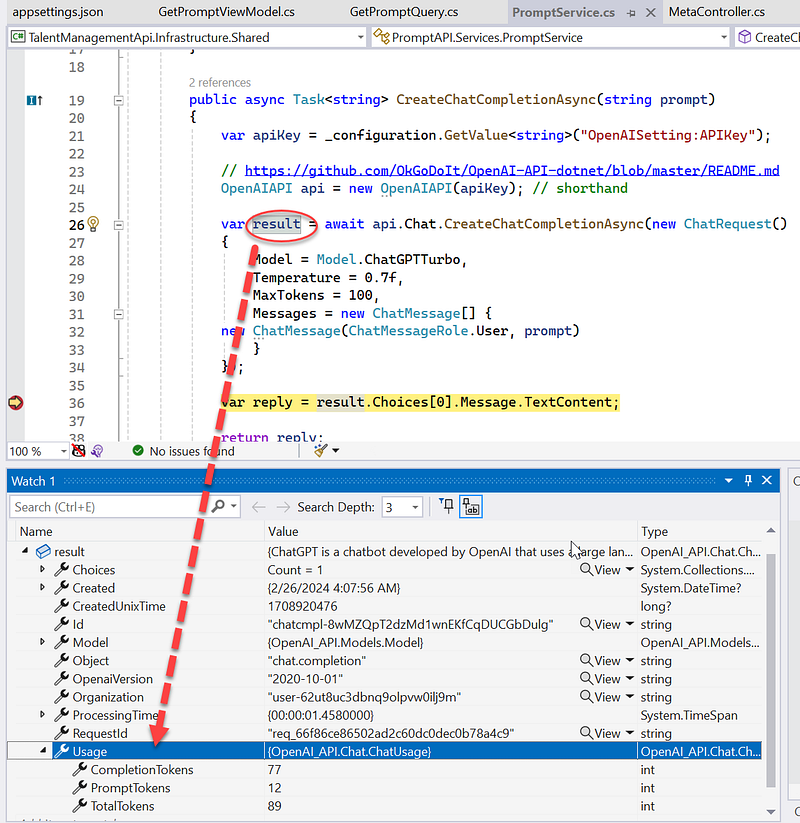
Question 3: What is temperature in OpenAI API? See example code “Temperature = 0.7f” on line 29 in the screenshot above. The temperature parameter controls the randomness of the output. A lower temperature (closer to 0) makes the model’s responses more predictable and conservative. On the flip side, a higher temperature (closer to 1) increases the diversity of the responses, making them more varied and sometimes more creative. It’s a handy knob to tweak depending on whether you’re looking for more stability or creativity in the responses you’re generating.
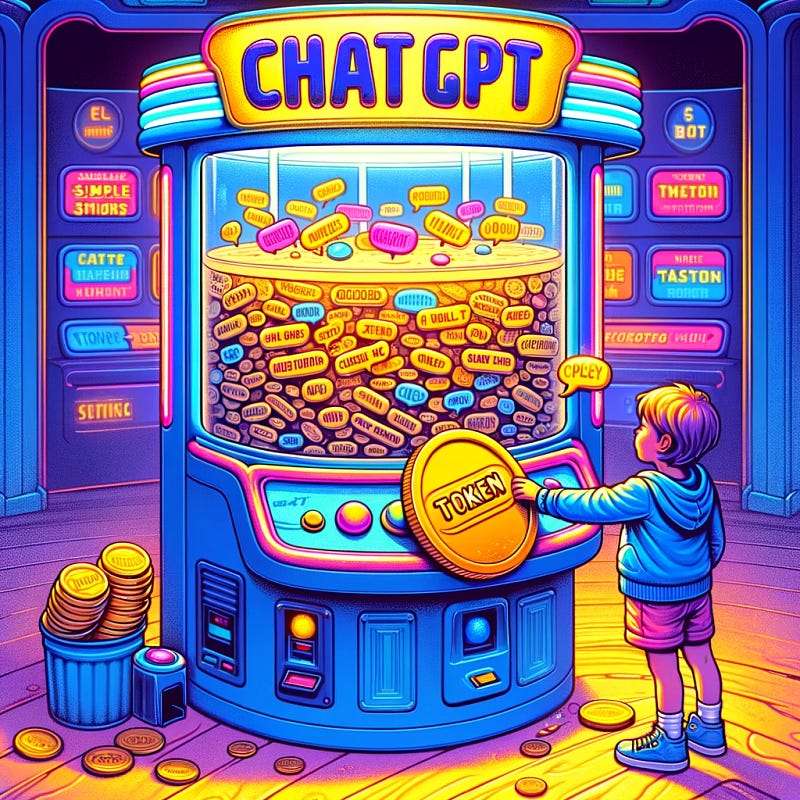
Question 4: What is token? ChatGPT is like an arcade game. You use tokens to play. Each word ChatGPT says costs a bit of a token. Ask simple things, use fewer tokens. Ask big stories, use more tokens. When tokens run out, you need more to keep playing!
Question 5: Can I call ChatGPT directly from Angular? Technically, the answer is yes. However, in doing so, you will expose the API Key in the Angular client application. It’s akin to posting your credit card number on Facebook and hoping nobody finds it.
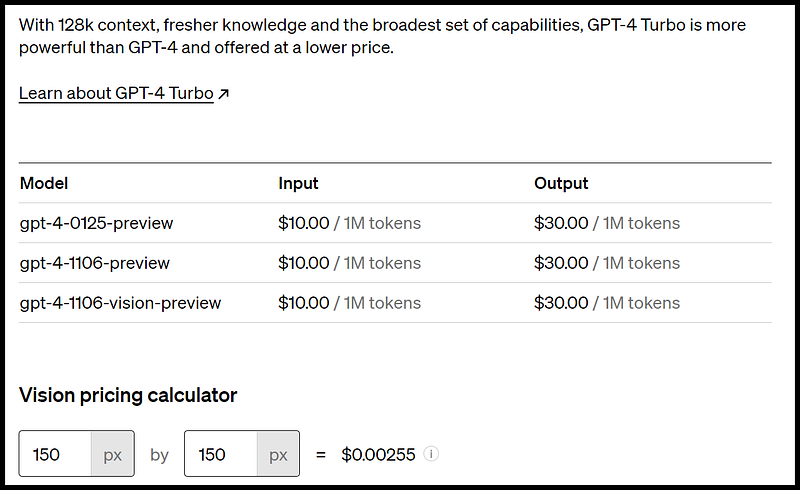
Question 5: What is the price of the ChatGPT token? Multiple models, each with different capabilities and price points. Prices can be viewed in units of either per 1M or 1K tokens. You can think of tokens as pieces of words, where 1,000 tokens is about 750 words. This paragraph is 35 tokens. See this pricing link. Here is an example of pricing for GPT-3-Turbo
Summary
I have used the ChatGPT extension in Visual Studio for coding productivity. I prepaid $20 for ChatGPT tokens, which lasts about 1 year. For more information, see Explore ChatGPT extension in Visual Studio 2022. — Fuji Nguyen
In this blog post, I’ve walked you through the intricacies of integrating ChatGPT with your backend WebAPI. Let’s delve deeper into its potential applications beyond the scope of our current discussion. Imagine seamlessly integrating ChatGPT with your back office products, enhancing productivity and streamlining workflows. For instance, you could employ ChatGPT to assist customer service representatives in responding to inquiries more efficiently or leverage its capabilities to automate routine tasks within your administrative systems.
However, it’s crucial to keep a watchful eye on the usage costs associated with OpenAPI. As you integrate ChatGPT into your backend infrastructure, be mindful of the potential impact on your overall operational expenses. By monitoring and optimizing usage, you can ensure cost-effectiveness while maximizing the benefits of this powerful integration.


