
What is secrets.json in Visual Studio?

In Visual Studio, secrets.json is a configuration file used to store sensitive or private data that is used by the application during development. This file is meant to store sensitive information like connection strings, API keys, passwords, and other secrets that are used by the application but should not be checked into source control.
secrets.json is used in conjunction with the .NET Secret Manager tool, which is a command-line tool that allows developers to manage application secrets during development. The tool provides a way to securely store secrets on the developer's machine and to access those secrets within the application code. The tool uses the secrets.json file to store and manage the secrets.
When a new project is created in Visual Studio, a secrets.json file is automatically created in the project directory. This file is meant to be excluded from source control to prevent sensitive information from being checked into the code repository. Instead, developers can add the secrets to the file using the Secret Manager tool, which encrypts the secrets and stores them securely on the developer's machine.
In Windows, the secret values are stored in a JSON file in the local machine’s user profile folder %APPDATA%\Microsoft\UserSecrets\<user_secrets_id>\secrets.json. In the preceding file paths, replace <user_secrets_id> with the UserSecretsId value specified in the project file. See below for an example of UserSecretsId as a GUID (globally unique identifier):
<Project Sdk="Microsoft.NET.Sdk.Web">

  <PropertyGroup>
    <TargetFramework>net7.0</TargetFramework>
    <Version>1.0.0</Version>
    <UserSecretsId>023ae86a-4bee-4637-b4da-355c6ad1bf91</UserSecretsId>
  </PropertyGroup>
The <UserSecretsId> element specifies a unique identifier for the user secrets configuration file associated with this application.
To access the secrets.json file in Visual Studio, you can use the .NET Secret Manager tool. In the Solution Explorer, right-click on the project and select “Manage User Secrets”. This will open the secrets file in Visual Studio.
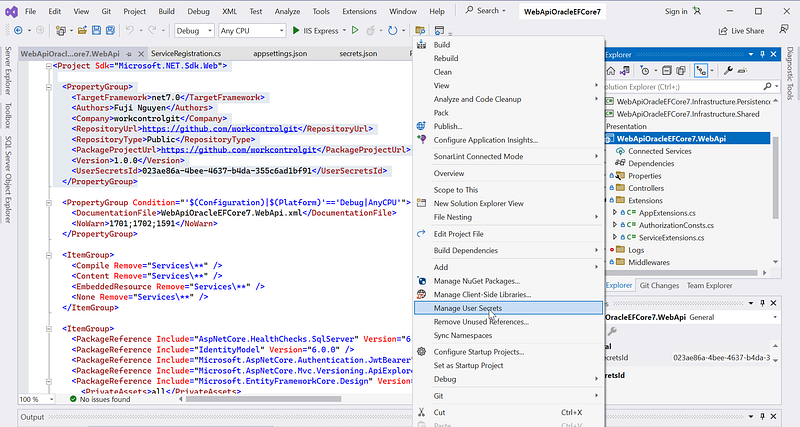
Overall, secrets.json is a helpful tool for managing sensitive information during development, and it is recommended that developers use it to keep sensitive data secure.


