avatarMark Ellis

Free AI web copilot to create summaries, insights and extended knowledge, download it at here

7457

Abstract

ff on either side of the display doesn’t quite do it for me (it results in less than stellar uniformity on white backgrounds), the screen estate it affords makes this an immersive smartphone experience.</p><p id="2416">The only thing I miss from the iPhone is True Tone. If you place a True Toned iPhone next to the S22 Ultra, the latter looks laughably blue. The hilariously named ‘Eye Vision Shield’ setting comes close, but that simply adjusts the warmth of the screen as the day ages — it isn’t quite the clever computational stuff going on within the iPhone.</p><p id="0e34">It’s curious that Samsung hasn’t attempted to match Apple’s awesome screen correction feature, but the brilliance of the S22 Ultra’s screen in every other area more than makes up for it.</p><h2 id="0139">Biometric security</h2><p id="7594">Samsung offers two forms of biometric security on the S22 Ultra. Because, of course it does.</p><p id="3bdd">The first is facial recondition, which works just as well as Face ID, if a little slower at times. The second is a fingerprint sensor buried beneath the screen. You can’t see it or feel it, but it’s there, and it works flawlessly.</p><p id="b68b">You can have both of these forms of biometric security switched on at the same time, and while it isn’t particularly obvious which one the S22 Ultra prioritises, I find myself using the fingerprint sensor more than I thought I would.</p><p id="702b">This is the way the iPhone needs to go, Tim. And I think all signs point to that being an inevitability. As convenient as Face ID is, Apple’s admirable stance on privacy forces them to make the best version of facial recognition possible, which results in that notch.</p><div id="578b" class="link-block"> <a href="https://readmedium.com/i-repeat-the-macbook-pro-notch-doesnt-matter-a13f38d4776e"> <div> <div> <h2>I Repeat: The MacBook Pro Notch Doesn’t Matter</h2> <div><h3>And Apple doesn’t care, either</h3></div> <div><p>medium.com</p></div> </div> <div> <div style="background-image: url(https://miro.readmedium.com/v2/resize:fit:320/1*D4nSwFIZ9Pni-TaX064Xzw.png)"></div> </div> </div> </a> </div><p id="87fe">I’m not a notch hater, but the pinhole camera on the S22 Ultra (and, indeed, most of the iPhone’s competition) reveals how debilitating Apple’s stubbornness can be. If you can’t create a form of facial recognition that meets your high standards without resorting to headline-making compromises, stick an ultrasonic fingerprint reader beneath the screen and be done with it.</p><h2 id="0912">One UI and performance</h2><p id="4633">It turns out that Samsung dishes out different chips for its S line of smartphones, depending on where you live.</p><p id="f8f2">If you’re in North America, Australia, India, and a few other locations, you’ll get the Snapdragon 8 Gen 1 in your S22 Ultra. If, like me, you’re in the UK or Europe, you’ll receive Samsung’s own Exynos 2200 chip.</p><figure id="f6c5"><img src="https://cdn-images-1.readmedium.com/v2/resize:fit:800/0*4YfOCSwf9ikmFRAG.jpg"><figcaption>Image courtesy of author</figcaption></figure><p id="7f0b">I have no idea what the difference is between these two chips or why Samsung deems it fit to distribute different versions of its phones, but I do know that the Exynos is generally considered to be a bit crap compared to the Snapdragon.</p><p id="10e2">I’m not the person to come to for benchmarks or comparisons, I’m afraid, but I can give you my high-level experience of the base spec S22 Ultra with 8GB of RAM.</p><p id="dc2b">It performs perfectly acceptably for normal smartphone tasks. This is aided by the 120Hz screen, but it never really feels like it’s struggling. There’s occasionally a bit of slow down or a judder as you close an app, but it doesn’t really get in the way of the user experience.</p><p id="e75f">If you want a more in-depth look at the performance of this phone, <a href="https://youtu.be/D5tTOuiJYKU">I’d like to hand you over to the brilliant Tom, The Tech Chap</a>.</p><p id="f0c4">One UI is Samsung’s take on Android. It’s a far less butchered version compared to past efforts, but there are some tweaks that threw me, to begin with. They all relate to the way Samsung expects you to navigate the OS, and they’re really frustrating if you’re coming from an iPhone or stock Android experience.</p><p id="741d">Samsung phones still rely on the bottom navigation bar. This used to be three physical buttons (home, back, and app switcher), which is now ever-present on the screen in digital form. Thankfully, you can turn it off and switch on the ability to swipe up to return home and swipe right from the edge of the screen to head backwards.</p><p id="7e6f">That’s pretty much the only frustration I’ve had with One UI, though. The rest of it feels satisfyingly like stock Android, and you can easily delete all of the Samsung apps that are automatically installed in favour of Google’s awesome mobile app suite.</p><p id="36bf">It’s also an enjoyable device to use and customise thanks to tweakability that is hidden well enough so as to not get in the way but made discoverable for anyone who wants to make adjustments.</p><p id="0f6e">There are two wonderful iOS-beating features, though. The first is the swipe-right from the home screen to access the Google News feed, which never fails to give me a relevant list of articles and is a joy to digest on that big, bright screen. The second is the ease with which you can rearrange your home screens.</p><p id="2b21">Jiggle Mode is one of Apple’s greatest failures. It comes close to ruining the iOS experience. Want to rearrange your apps? Get ready for a needless world of hair-pulling frustration.</p><p id="7cfb">Want to rearrange your apps on the S22 Ultra? Enjoy. It’s so easy — cathartic, even.</p><p id="cc1b">Indeed, One UI continues Android’s trend of making iOS look increasingly dated. I’m a big fan.</p><div id="bb01" class="link-block"> <a href="https://readmedium.com/5-things-android-makes-me-want-from-the-iphone-6cdef6cce873"> <div> <div> <h2>5 Things Android Makes Me Want From the iPhone</h2> <div><h3>It’s time to loosen up, Apple</h3></div> <div><p>medium.com</p></div> </div> <div> <div style="background-image: url(https://miro.readmedium.com/v2/resize:fit:320/1*_Xe1CIDnFNWYZurNCIPrvw.jpeg)"></div> </div> </div> </a> </div><h2 id="8047">S22 Ultra battery life</h2><p id="7a9d">It is superb.</p><p id="9db4">Even with the screen set to its maximum sharpness and a fair degree of constant brightness, I managed to sail through the weekend without needing to place it on a charger until late Sunday evening.</p><p id="857c">The 5,000 mAH battery in the S22 ultra is a stellar performer and charges super fast. That’s all you need to know.</p><h2 id="a0f0">The S Pen</h2><p id="c637">One of the main reasons why I’ve always wanted a Galaxy Note is because of the S Pen. The idea of having a stylus with which to write notes and annotate screenshots was quite a pull for this hardened iPhone fan.</p><p id="40c6">In reality, it does feel a bit gimmicky. Don’t get me wrong — the ability to whip it out and quickly

Options

jot down a shopping list or random thought is rather nice, and it performs brilliantly — but I think that’s about all the S Pen is useful for.</p><figure id="921a"><img src="https://cdn-images-1.readmedium.com/v2/resize:fit:800/0*CC9dJSTcsy7W_ATD.jpg"><figcaption>Image courtesy of author</figcaption></figure><p id="47a1">The other issue — for me, at least — is the fact that you need to have pretty decent handwriting skills to make it an enjoyable writing tool. My handwriting is <i>dreadful</i>, therefore having to write with the phone placed in one hand, police officer style, results in some rather messy notes. Certainly, it isn’t going to steal the iPad mini’s crown when it comes to my digital note-taking needs.</p><div id="2de4" class="link-block"> <a href="https://readmedium.com/why-the-ipad-mini-is-the-ultimate-note-taking-device-8383794c6b96"> <div> <div> <h2>Why the iPad mini Is the Ultimate Note-Taking Device</h2> <div><h3>Goodbye, traditional notebooks!</h3></div> <div><p>medium.com</p></div> </div> <div> <div style="background-image: url(https://miro.readmedium.com/v2/resize:fit:320/1*lhlMNeAhCfk-3KXcg3WltA.jpeg)"></div> </div> </div> </a> </div><p id="30ec">I need longer with the S Pen to give it my full appraisal and confirm whether or not Apple is missing a trick, but initial impressions suggest that it might remain stowed away far more regularly than I’d expected.</p><h2 id="d108">S22 Ultra camera performance</h2><p id="0ce0">I’ll be offering a more detailed camera comparison between the S22 Ultra and the iPhone 13 Pro Max in due course, but I do have some initial thoughts and examples.</p><p id="45ed">The S22 Ultra features four lenses. They range from a 22mm, 108-megapixel main camera to a 13mm ultra-wide. It can also shoot 8K footage at 24fps, but it’s worth noting that there is a huge crop factor if you choose that resolution.</p><p id="0525">I decided to shoot a few comparison stills between the S22 Ultra and the iPhone 13 mini. The latter features the best smartphone camera I’ve used, so it’s a fair battle, in my book.</p><p id="675c">The S22 appears to have a better dynamic range at times, although occasionally suffers from noisier shadows. However, personally, I’ll take the latter if it results in an instantly useable photo.</p><figure id="8ad2"><img src="https://cdn-images-1.readmedium.com/v2/resize:fit:800/0*uUD2x-CwgH-WiHIq.png"><figcaption>Image courtesy of author</figcaption></figure><figure id="08a3"><img src="https://cdn-images-1.readmedium.com/v2/resize:fit:800/0*ct5lCVPIM83i5Xhd.png"><figcaption>Image courtesy of author</figcaption></figure><p id="e800">The 40-megapixel selfie camera on the S22 Ultra appears to produce more natural and sharper images, but again, it’s a little noisier than the iPhone.</p><figure id="ce01"><img src="https://cdn-images-1.readmedium.com/v2/resize:fit:800/0*JJahBOdGivmFVyqX.png"><figcaption>Image courtesy of author</figcaption></figure><p id="98fe">Samsung has historically oversaturated its photos, knowing that doing so plays on our innate human instinct to be immediately wowed by such exuberance. But the S22 Ultra reveals a far gentler approach to photography. Indeed, during these initial test shots, Samsung’s flagship seemed to do far better with its white balance and faithful colour reproduction.</p><figure id="e614"><img src="https://cdn-images-1.readmedium.com/v2/resize:fit:800/0*kKATIIvPGz7bva_z.png"><figcaption>Image courtesy of author</figcaption></figure><p id="ed84">It consistently delivers more detail in the highlights, too — check out the sky in the shot below.</p><figure id="60cb"><img src="https://cdn-images-1.readmedium.com/v2/resize:fit:800/0*I0hfLIqqdXILNm6n.png"><figcaption>Image courtesy of author</figcaption></figure><p id="3c89">Things get even worse for the iPhone when pitched against the S22 Ultra’s portrait mode. Check out this comparison with a tricky subject.</p><figure id="b2b7"><img src="https://cdn-images-1.readmedium.com/v2/resize:fit:800/0*IjIZwyR2KoRZjVDO.png"><figcaption>Image courtesy of author</figcaption></figure><p id="65f3">Now, admittedly, the iPhone 13 mini portrait photo is taken without the 3x punch-in offered by the S22 Ultra (you can only do that on the 13 Pro Max), but it’s the edge detection and separation I’m impressed with on the S22 Ultra’s effort. Sure, there’s a questionable lack of focus fall-off on the table compared to the iPhone image, but I can forgive that due to the more natural feeling of the S22 Ultra snap. Just look at how it deals with the rounded edges of those headphone earcups!</p><p id="3c8e">Camera performance is a hugely subjective topic but, once again — and just like my experience with the brilliant Pixel 4a — this Android phone beats the iPhone into a cocked hat when it comes to photography.</p><div id="d61b" class="link-block"> <a href="https://readmedium.com/a-week-with-the-pixel-4a-written-by-an-iphone-owner-1aaaec526b3c"> <div> <div> <h2>A Week With the Pixel 4a (written by an iPhone Owner)</h2> <div><h3>Can Google’s budget smartphone tempt a decade-long iPhone user away from iOS?</h3></div> <div><p>medium.com</p></div> </div> <div> <div style="background-image: url(https://miro.readmedium.com/v2/resize:fit:320/1*Kji1R_jUY_QiE3DRzqBh3A.jpeg)"></div> </div> </div> </a> </div><h2 id="99b0">Conclusion</h2><p id="641d">The Galaxy S22 Ultra is a superb phone. But I knew it would be.</p><p id="37b5">Samsung has upped its game in practically every area to the point where its S line is on par with the iPhone. In some respects, it <i>beats</i> the iPhone, hands down.</p><figure id="22aa"><img src="https://cdn-images-1.readmedium.com/v2/resize:fit:800/0*K6mJQRdt79wsmufL.jpg"><figcaption></figcaption></figure><p id="3b73">The camera performance, no-holds-barred screen, and sensible approach to biometric security make this a serious challenger to the iPhone’s crown for even the most staunch Apple supporter.</p><p id="0c0f">One UI feels far more polished than Samsung’s previous attempts, and the configurability, although at times laughable (does ‘charging information’ really need to be a setting you can turn off?!), is hidden well enough to make it only discoverable by power users.</p><p id="da36">For Samsung fans who want the absolute best, the S22 Ultra is a home run. For iPhone users who, like me, have been keen to make the switch, you’re not going to feel short-changed at all.</p><h2 id="db9f">Before you go</h2><p id="835d"><a href="https://markellisreviews.ck.page/newsletter"><b><i>Join my behind-the-scenes mailing list</i></b></a></p><p id="cad4"><i>If you enjoy my writing, it’s only a snippet of what’s on Medium. I’m a paying member myself and highly recommend joining. <a href="https://markellisreviews.medium.com/membership"><b>Click here to join</b></a> (a portion of your membership fee will be sent my way and therefore directly support my work!).</i></p><p id="3a2f"><i>Originally published at <a href="https://markellisreviews.com/an-iphone-users-samsung-s22-ultra-review/">https://markellisreviews.com</a> on February 28, 2022.</i></p></article></body>

An iPhone Killer? Galaxy S22 Ultra Review

Can it convert this iPhone fan?
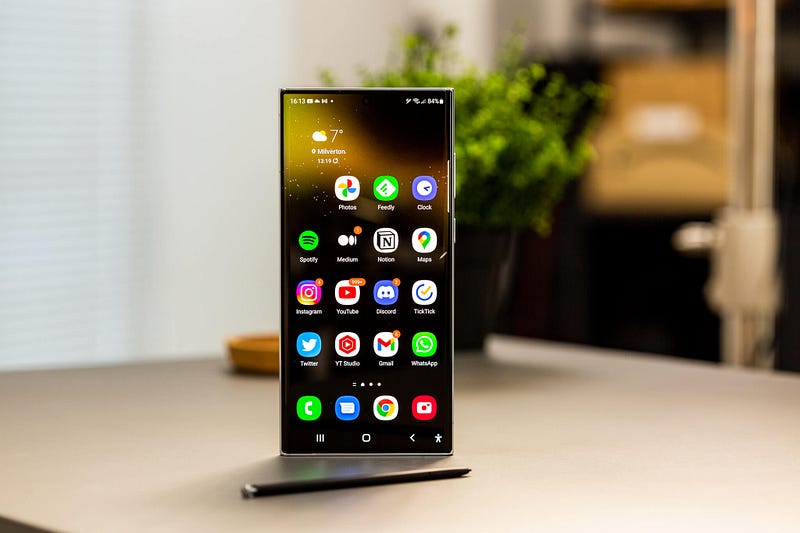
Image courtesy of author

I’ve always wanted a Galaxy Note, but I’ve had to make do with the Galaxy S22 Ultra.

Right, that’s the Note Joke out of the way. Let’s get onto what you came here for.

If you don’t know by now, I’m an iPhone user and have been for many years. I’ve flirted with Android in the past, but it’s never stuck. Samsung phones number among those I’ve tried, and I’ve often admired the supersaturated screens and throw-it-at-the-wall feature sets.

But I’ve never bought one myself.

Until now. And it has been quite the revelation.

This is my Galaxy S22 Ultra review.

The S22 Ultra price (and freebies!)

My S22 Ultra is the base spec version. It’s therefore the ‘cheapest’ you can buy at £1,149, but Samsung are kind enough to chuck in a free pair of Galaxy Buds Pro (which are yet to arrive), and 12 months of Disney+.

So, hat’s off to Apple’s most persistent competitor; it has immediately differentiated itself by giving me some stuff for free — a strategy to which Tim and co. are vehemently opposed.

There’s also a brilliant trade-in programme for the Galaxy line of phones, which offer the chance for owners of even the oldest S series to grab a sizeable discount on their shiny new device.

As a result, this feels like a premium yet far less bank balance destroying buying process compared to the iPhone.

Build quality and design

It is superb. Honestly — hold an S22 Ultra in one hand and an iPhone 13 Pro Max in the other, and they feel identical in terms of components used, rigidity, and satisfying heft.

The S22 Ultra uses a mix of aluminium and Corning Gorilla Glass Victus and features an iPhone Pro-like mirrored finish around the edges. It looks every bit the premium smartphone it is; Samsung really has worked hard on this since I last held one of its devices.
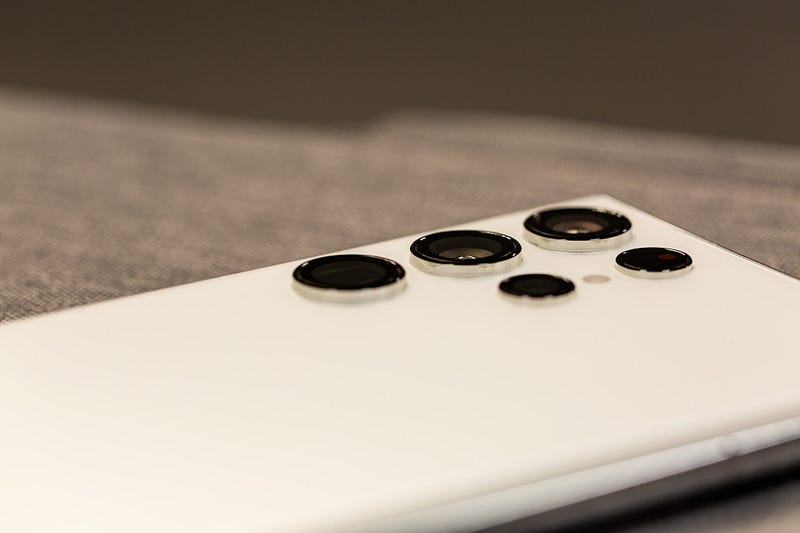
Image courtesy of author

It’s 11 grams lighter than the iPhone 13 Pro Max but it feels like more than that. Indeed the latter is a heavy phone, whereas the S22 Ultra appears to be far lighter on its feet.

The rear of the device has a similar matte feel to the iPhone, but isn’t quite as grippy. In fact, this is an incredibly slippery phone — you’ll want to place it within a case almost immediately. I did.

A quick note on those camera lenses. They look far nicer in real life. Like many people, I wasn’t keen at all when Samsung unveiled the S22 Ultra earlier this month — it looked far more awkward than the sleek, integrated camera design on the S22 and S22+.

But in person, it looks rather lovely. Contemporary, unfussy, and without any unnecessary design flourishes, the confidence with which those lenses are simply placed onto the back casing is a bit… well, Apple-like.

This is a stunning looking smartphone.

That screen

This is a long device — trouser-filling, certainly. It’s almost identical in size and form factor to the Motorola G200 I’ve been trying out for the last few weeks, therefore I found it relatively familiar. Your mileage may vary, though; there are lots of finger gymnastics required to interact with the entire screen.

The screen, though. Oh, wow; that screen.
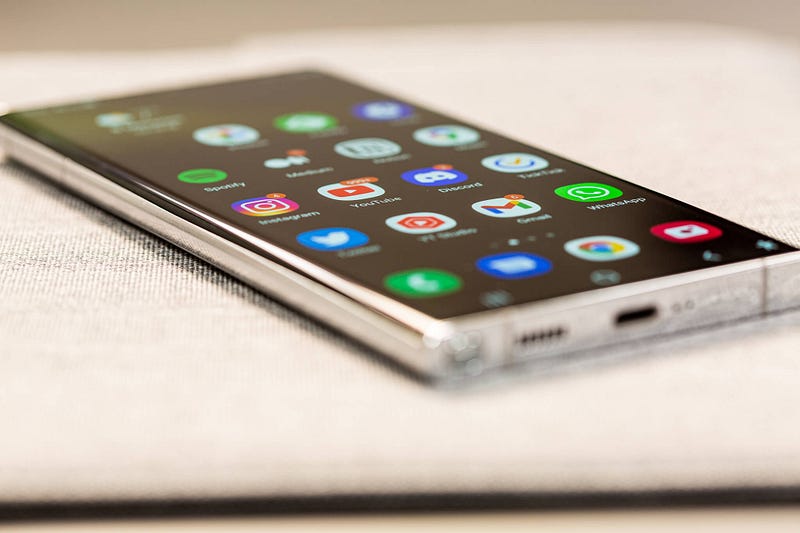
Image courtesy of author

Apple has always beat its chest when it comes to screen quality and performance. And rightly so; iPhones have wonderful displays.

But the display on the S22 Ultra is better. By quite a distance.

This is for two reasons. Firstly, it is the sharpest screen I’ve ever seen on a smartphone. Samsung being Samsung, they offer three different resolutions — HD+ (720p), FHD (1080p), and WQHD+ (1440p). All three are supposed to have varying effects on battery life, but I’ll get to that later.

The difference between FHD and WQHD+ is marginal but noticeable. Cranked up to that max setting, this phone is the most pixel-free device I own.

The second reason I love the display so much is because it is the brightest I’ve used. Samsung has implemented something called ‘Vision Boost’, which is an untoggleable feature designed to boost brightness in direct sunlight. And boy does it work. There isn’t anywhere or any setting in which you can’t see this screen perfectly.

The S22 Ultra also has a variable 120Hz refresh rate — just like Apple’s ProMotion. It behaves identically and I must admit that I am now a full convert to high refresh rate smartphone screens; something I had previously brushed under the carpet as being gimmicky. It makes the device feel faster than it is and perfectly compliments the all-encompassing nature of the S22 Ultra’s screen.

On that note, I do like the width offered by the absence of side bezels on this phone. While the slight roll-off on either side of the display doesn’t quite do it for me (it results in less than stellar uniformity on white backgrounds), the screen estate it affords makes this an immersive smartphone experience.

The only thing I miss from the iPhone is True Tone. If you place a True Toned iPhone next to the S22 Ultra, the latter looks laughably blue. The hilariously named ‘Eye Vision Shield’ setting comes close, but that simply adjusts the warmth of the screen as the day ages — it isn’t quite the clever computational stuff going on within the iPhone.

It’s curious that Samsung hasn’t attempted to match Apple’s awesome screen correction feature, but the brilliance of the S22 Ultra’s screen in every other area more than makes up for it.

Biometric security

Samsung offers two forms of biometric security on the S22 Ultra. Because, of course it does.

The first is facial recondition, which works just as well as Face ID, if a little slower at times. The second is a fingerprint sensor buried beneath the screen. You can’t see it or feel it, but it’s there, and it works flawlessly.

You can have both of these forms of biometric security switched on at the same time, and while it isn’t particularly obvious which one the S22 Ultra prioritises, I find myself using the fingerprint sensor more than I thought I would.

This is the way the iPhone needs to go, Tim. And I think all signs point to that being an inevitability. As convenient as Face ID is, Apple’s admirable stance on privacy forces them to make the best version of facial recognition possible, which results in that notch.

I’m not a notch hater, but the pinhole camera on the S22 Ultra (and, indeed, most of the iPhone’s competition) reveals how debilitating Apple’s stubbornness can be. If you can’t create a form of facial recognition that meets your high standards without resorting to headline-making compromises, stick an ultrasonic fingerprint reader beneath the screen and be done with it.

One UI and performance

It turns out that Samsung dishes out different chips for its S line of smartphones, depending on where you live.

If you’re in North America, Australia, India, and a few other locations, you’ll get the Snapdragon 8 Gen 1 in your S22 Ultra. If, like me, you’re in the UK or Europe, you’ll receive Samsung’s own Exynos 2200 chip.
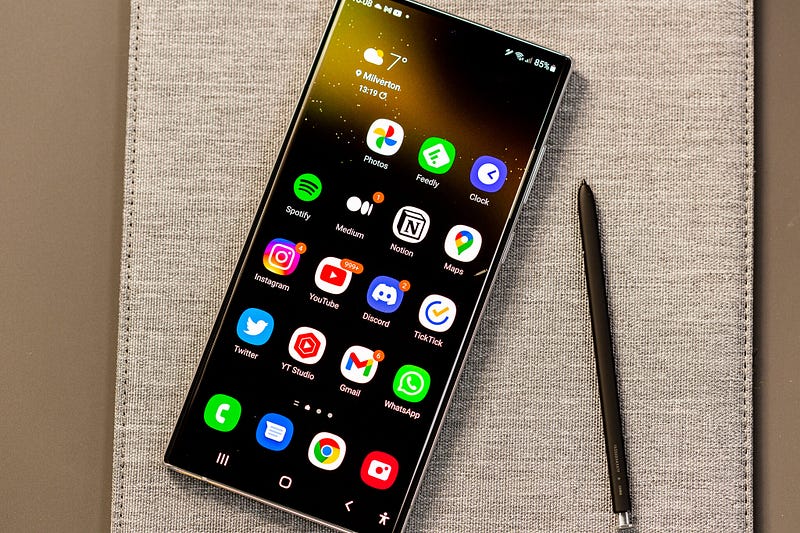
Image courtesy of author

I have no idea what the difference is between these two chips or why Samsung deems it fit to distribute different versions of its phones, but I do know that the Exynos is generally considered to be a bit crap compared to the Snapdragon.

I’m not the person to come to for benchmarks or comparisons, I’m afraid, but I can give you my high-level experience of the base spec S22 Ultra with 8GB of RAM.

It performs perfectly acceptably for normal smartphone tasks. This is aided by the 120Hz screen, but it never really feels like it’s struggling. There’s occasionally a bit of slow down or a judder as you close an app, but it doesn’t really get in the way of the user experience.

If you want a more in-depth look at the performance of this phone, I’d like to hand you over to the brilliant Tom, The Tech Chap.

One UI is Samsung’s take on Android. It’s a far less butchered version compared to past efforts, but there are some tweaks that threw me, to begin with. They all relate to the way Samsung expects you to navigate the OS, and they’re really frustrating if you’re coming from an iPhone or stock Android experience.

Samsung phones still rely on the bottom navigation bar. This used to be three physical buttons (home, back, and app switcher), which is now ever-present on the screen in digital form. Thankfully, you can turn it off and switch on the ability to swipe up to return home and swipe right from the edge of the screen to head backwards.

That’s pretty much the only frustration I’ve had with One UI, though. The rest of it feels satisfyingly like stock Android, and you can easily delete all of the Samsung apps that are automatically installed in favour of Google’s awesome mobile app suite.

It’s also an enjoyable device to use and customise thanks to tweakability that is hidden well enough so as to not get in the way but made discoverable for anyone who wants to make adjustments.

There are two wonderful iOS-beating features, though. The first is the swipe-right from the home screen to access the Google News feed, which never fails to give me a relevant list of articles and is a joy to digest on that big, bright screen. The second is the ease with which you can rearrange your home screens.

Jiggle Mode is one of Apple’s greatest failures. It comes close to ruining the iOS experience. Want to rearrange your apps? Get ready for a needless world of hair-pulling frustration.

Want to rearrange your apps on the S22 Ultra? Enjoy. It’s so easy — cathartic, even.

Indeed, One UI continues Android’s trend of making iOS look increasingly dated. I’m a big fan.

S22 Ultra battery life

It is superb.

Even with the screen set to its maximum sharpness and a fair degree of constant brightness, I managed to sail through the weekend without needing to place it on a charger until late Sunday evening.

The 5,000 mAH battery in the S22 ultra is a stellar performer and charges super fast. That’s all you need to know.

The S Pen

One of the main reasons why I’ve always wanted a Galaxy Note is because of the S Pen. The idea of having a stylus with which to write notes and annotate screenshots was quite a pull for this hardened iPhone fan.

In reality, it does feel a bit gimmicky. Don’t get me wrong — the ability to whip it out and quickly jot down a shopping list or random thought is rather nice, and it performs brilliantly — but I think that’s about all the S Pen is useful for.
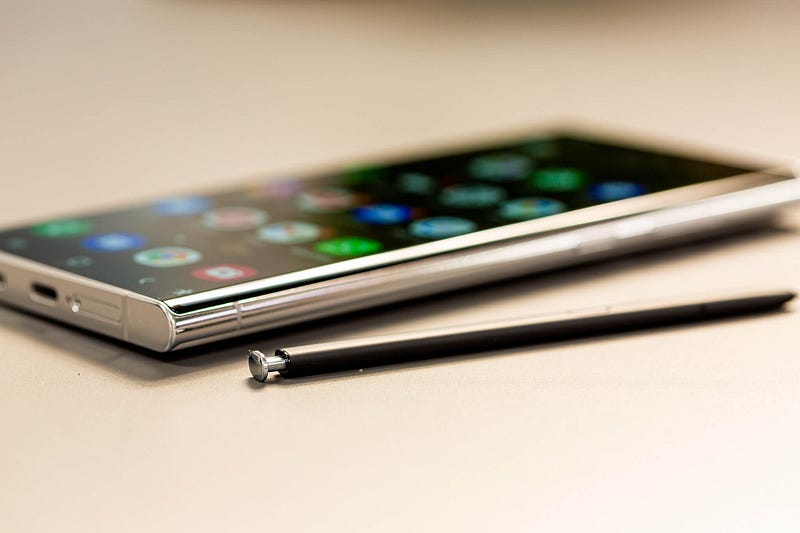
Image courtesy of author

The other issue — for me, at least — is the fact that you need to have pretty decent handwriting skills to make it an enjoyable writing tool. My handwriting is dreadful, therefore having to write with the phone placed in one hand, police officer style, results in some rather messy notes. Certainly, it isn’t going to steal the iPad mini’s crown when it comes to my digital note-taking needs.

I need longer with the S Pen to give it my full appraisal and confirm whether or not Apple is missing a trick, but initial impressions suggest that it might remain stowed away far more regularly than I’d expected.

S22 Ultra camera performance

I’ll be offering a more detailed camera comparison between the S22 Ultra and the iPhone 13 Pro Max in due course, but I do have some initial thoughts and examples.

The S22 Ultra features four lenses. They range from a 22mm, 108-megapixel main camera to a 13mm ultra-wide. It can also shoot 8K footage at 24fps, but it’s worth noting that there is a huge crop factor if you choose that resolution.

I decided to shoot a few comparison stills between the S22 Ultra and the iPhone 13 mini. The latter features the best smartphone camera I’ve used, so it’s a fair battle, in my book.

The S22 appears to have a better dynamic range at times, although occasionally suffers from noisier shadows. However, personally, I’ll take the latter if it results in an instantly useable photo.
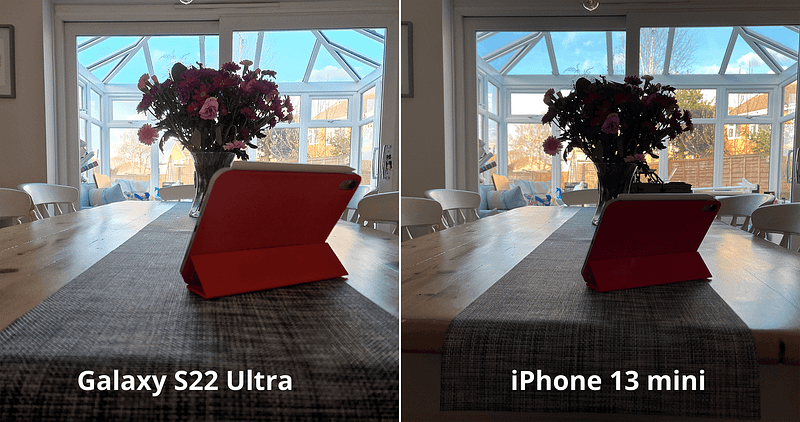
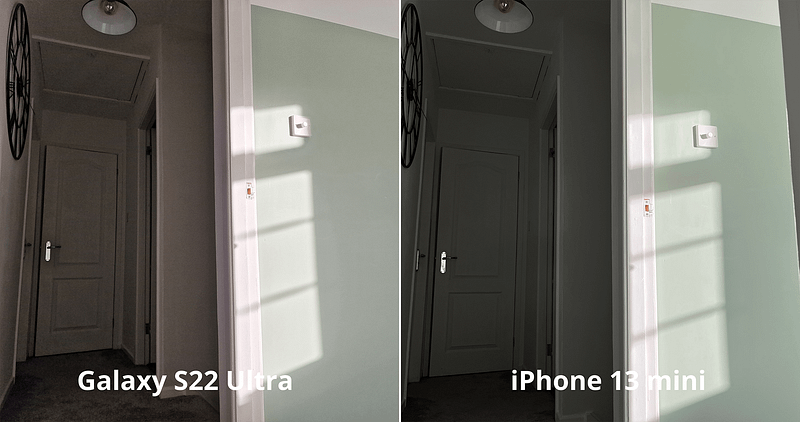
Image courtesy of author

The 40-megapixel selfie camera on the S22 Ultra appears to produce more natural and sharper images, but again, it’s a little noisier than the iPhone.
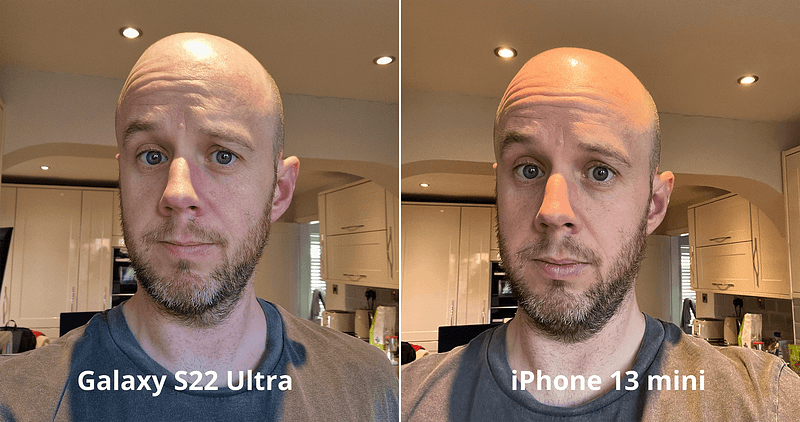
Image courtesy of author

Samsung has historically oversaturated its photos, knowing that doing so plays on our innate human instinct to be immediately wowed by such exuberance. But the S22 Ultra reveals a far gentler approach to photography. Indeed, during these initial test shots, Samsung’s flagship seemed to do far better with its white balance and faithful colour reproduction.
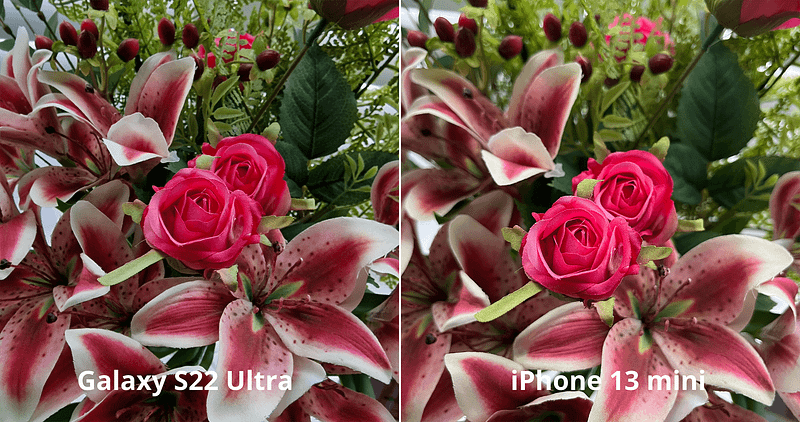
Image courtesy of author

It consistently delivers more detail in the highlights, too — check out the sky in the shot below.
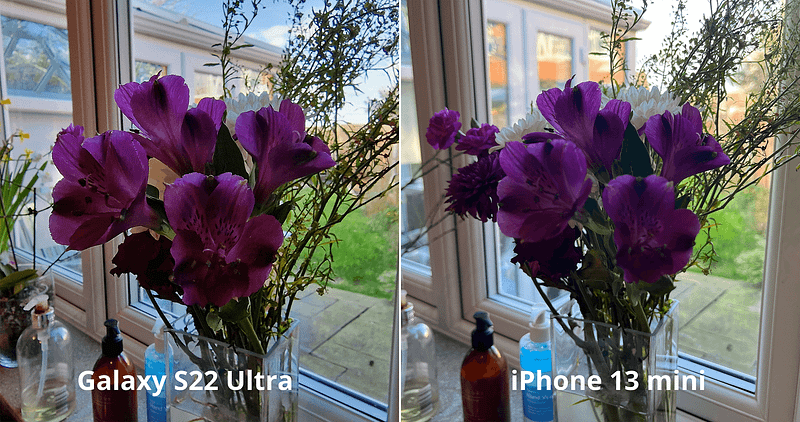
Image courtesy of author

Things get even worse for the iPhone when pitched against the S22 Ultra’s portrait mode. Check out this comparison with a tricky subject.
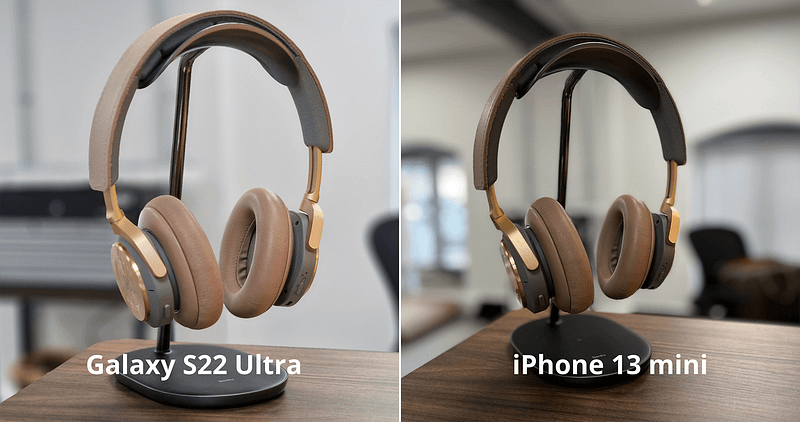
Image courtesy of author

Now, admittedly, the iPhone 13 mini portrait photo is taken without the 3x punch-in offered by the S22 Ultra (you can only do that on the 13 Pro Max), but it’s the edge detection and separation I’m impressed with on the S22 Ultra’s effort. Sure, there’s a questionable lack of focus fall-off on the table compared to the iPhone image, but I can forgive that due to the more natural feeling of the S22 Ultra snap. Just look at how it deals with the rounded edges of those headphone earcups!

Camera performance is a hugely subjective topic but, once again — and just like my experience with the brilliant Pixel 4a — this Android phone beats the iPhone into a cocked hat when it comes to photography.

Conclusion

The Galaxy S22 Ultra is a superb phone. But I knew it would be.

Samsung has upped its game in practically every area to the point where its S line is on par with the iPhone. In some respects, it beats the iPhone, hands down.
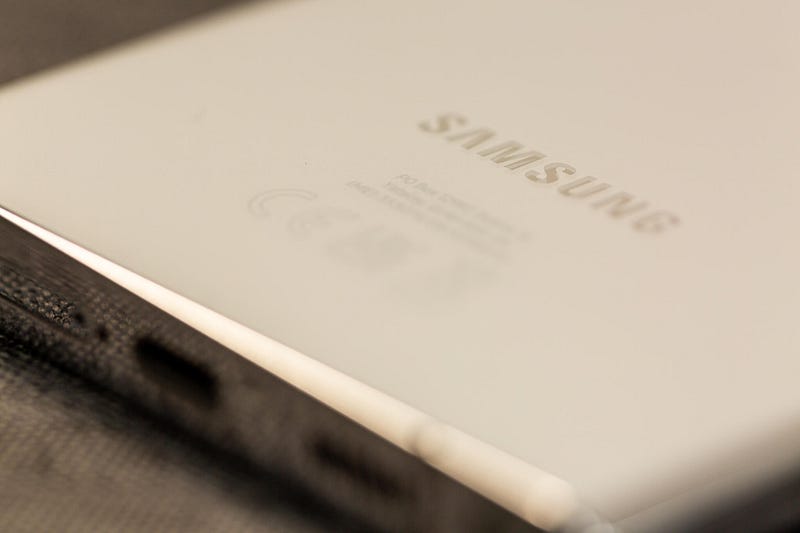
The camera performance, no-holds-barred screen, and sensible approach to biometric security make this a serious challenger to the iPhone’s crown for even the most staunch Apple supporter.

One UI feels far more polished than Samsung’s previous attempts, and the configurability, although at times laughable (does ‘charging information’ really need to be a setting you can turn off?!), is hidden well enough to make it only discoverable by power users.

For Samsung fans who want the absolute best, the S22 Ultra is a home run. For iPhone users who, like me, have been keen to make the switch, you’re not going to feel short-changed at all.

Before you go

Join my behind-the-scenes mailing list

If you enjoy my writing, it’s only a snippet of what’s on Medium. I’m a paying member myself and highly recommend joining. Click here to join (a portion of your membership fee will be sent my way and therefore directly support my work!).

Originally published at https://markellisreviews.com on February 28, 2022.

Apple
Samsung
iOS
iPhone
Technology
Recommended from ReadMedium