
HELLO WORLD!
An Illustrated Guide to the Stack, the Heap, and Pointers
How modern programming keeps your code safe
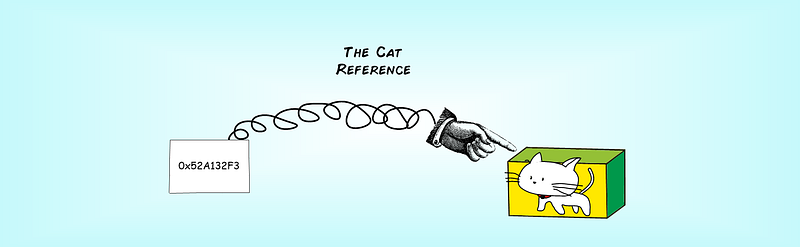
In the dark ages, when strange beasts roamed the land, computer programming was much different than it is now. Serious programmers were expected to be hands-on and manage the way their programs used memory. How did they do it? And why is life so different today? In this article you’ll dig deeper into the way code uses memory.
The stack and the heap
The story starts with the early caveman programmers, who were the first to learn the difference between two important memory locations: the stack and the heap.
The stack is a temporary storage space. The name comes from the fact that the information you store here is stacked up, with the oldest data on the bottom and the newer data on top. You can imagine the stack as a pile of neatly ordered books. Your programming language maintains the stack for you, automatically.
Here’s a snippet of ordinary C code that sticks three values on the stack. First it creates an integer, which goes at the bottom of the stack. Then it stores a double-precision floating point number on top of that. Finally, it creates a boolean value, which goes at the top of the stack.
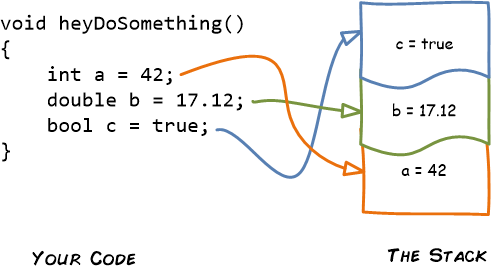
When the heyDoSomething function ends, all the values on the stack are tossed away.
The stack is great for raw speed. Computers can push values on the stack and pull them off very quickly. In fact, even the oldest CPU chips are optimized for exactly this sort of operation.
However, there are complications:
- There’s only so much space on the stack. Big objects don’t belong here.
- You can’t expand a memory slot on the stack if you need more space.
- You can’t selectively remove something in the middle of the stack to get your memory back.
- To grab a value in the middle of the stack, the computer needs to dig through everything on top first.
To solve these problems, programming languages also use a heap. The heap is a big pool of memory where you can store all the data that doesn’t belong on the stack. The name is fitting, because the heap doesn’t organize data. It just leaves everything scattered around in a loose pile.
To understand how data ends up in the heap, you need to step back for a moment and learn a little more about how different programming languages handle memory.
Pointing to the heap in C/C++
Some languages, like classic C, put you in charge of your program’s memory management. If you want to put something on the heap, you need to speak up and put it there. You also need to keep track of your data using a pointer.
A pointer is a memory address. In C/C++, you use an asterisk * to create a pointer. Here’s an example that defines one:
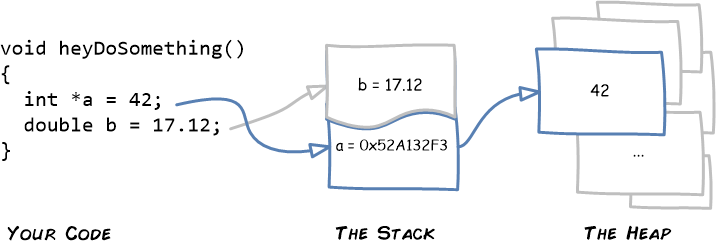
In this code, *a is an integer, like you’d expect (and it stores the value 42). But a (with no asterisk) is a pointer — a kind of numeric code that records the memory address where the value 42 is stored.
This example uses a pointer to put an ordinary number on the heap, but you can stuff arrays and big objects there too. If you need more space, the heap grows to fit your needs. It’s slower and less efficient than the stack, but far more flexible.
When you need to find your data on the heap, you use the pointer. It’s a bit like following a numeric code at the library to find the shelf that has the book you want. Or following a postal address to get to the stash house that has your goods.
The problem with pointers
Here’s where things get tricky. It turns out that a memory address is a very powerful piece of information to have. Often, it’s too powerful.
In prehistoric days, C/C++ programmers had to worry about treating their pointers with supreme respect. If they wanted to store some data, they needed to set aside a block of space in memory. When they were finished, they need to release that space. And if they weren’t careful, they could make a critical mistake, like trying to use memory before they initialized it (or after they released it).
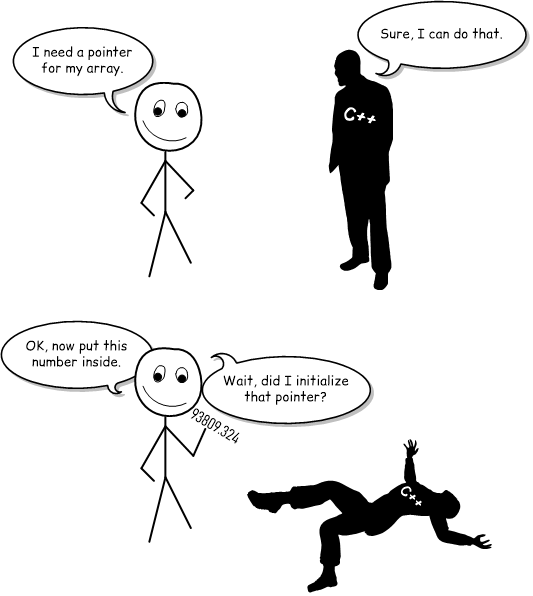
Memory problems are Very Bad. They are notoriously nasty to find and fix. They might not appear until the program has been running a long time. (A memory leak is often like a slow leak in a car tire. Leave it a few hours, and there’s no sign of a problem. Leave it a week, and your car is grounded.) And sometimes memory leaks don’t appear in development at all. For example, if you use memory after you’ve released it, your code might still work most of the time because the data still happens to be in the same place, where your code expects to find it. But when it fails, your code will fail catastrophically.
Some memory problems cause problems even worse than crashes. They can open up gaping security holes by letting excess data spill over into a place it doesn’t belong (a problem that’s called a buffer overflow).

References in C#: pointers made safe
When people got tired of pricking themselves with pointy needles, they invented safety pins. Similarly, when people got tired of banging their heads into colossal memory problems over and over again, smart programmers added extra features that made memory mistakes impossible. And because computers were now hundreds of thousands of times faster than they used to be, they could add these sort of features without making their code unreasonably slow.
Under the new way of doing things, you aren’t allowed to access a location in memory directly. You don’t have to keep track of what part of memory you’re using, how big your data is, or whether your objects are alive or dead. Instead, you just create the object you wanted. You let the runtime environment allocate space on the heap and create the pointer behind the scenes. You never see the actual memory address.
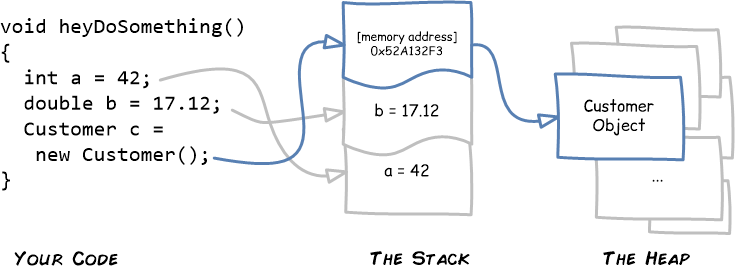
Here’s a snippet of code that demonstrates how things work in modern C# (although things look pretty much the same in Java or JavaScript). The code creates an integer (on the stack), a double-precision floating-point number (also on the stack), and a Customer object. The memory address for Customer object gets pushed onto the stack, but the object itself is created in the ocean of memory called the heap.
You might wonder why you should know about the stack, the heap, and memory references when the implementation is tucked behind the scenes. But it turns out that these details answer some riddles than turn up from time to time in ordinary code. Here are just a few quirky examples that references can explain:
- When you assign an object reference to another variable, you don’t end up copying the object. Instead, you get two variables pointing to the same object.
Customer custA = new Customer();
Customer custB = custA;
// custA and custB are two handles attached to the same suitcase!- If you assign a new object to a variable, you haven’t necessarily destroyed the object. It depends if some other part of your code has a reference.
Customer custNew = new Customer();
custOld = custNew;
// Is the old version of custOld still alive on the heap?
// If there's another variable pointing to it somewhere, then yes!- Most languages use pass-by-value parameters, which means that parameters are copied before they’re handed to a function. But when you pass an object to a function, you get a copy of the reference — and that copy still points to the live version of the original object.
void changeStuff(int number, Customer cust)
{
    // This has no effect on the original variable.
    // number is a copy that only exists here, on the stack.
    number = 12;
// But this changes the real customer object.
cust.FirstName = "Joe";
}You also need to understand memory references to understand garbage collection, which is the way modern languages reclaim space from the heap to keep your code ticking away. But that’s a topic for another story.
Have a suggestion for a future programming topic you’d like to see illustrated? Drop a comment below! And if you don’t want to miss the next Hello World! article on Garbage Collection, subscribe here.


