
HELLO WORLD!
An Illustrated Guide to Memory Management and Garbage Collection
How modern programming languages keep your memory clean

Long ago, almost programming languages made a crucial decision. They decided that memory management was too important to leave in the hands of programmers.
There are a few exceptions (C++ programmers, please stand up). But in most modern programming environments, you don’t need to think about grabbing a block of memory, allocating chunks of space, and cleaning up when you’re done. This deprives programmers of the joy of debugging memory leaks, which used to be one of our most important jobs. But whatever. We’ve learned to adapt.

Because memory errors are easy to make but difficult to debug, most people agree that automatic memory management is a Very Good Idea. However, as is the case with anything that “just works,” sometimes life gets a bit messy behind the scenes. Let’s look at how modern languages make it happen.
The challenge: Removing dead objects
As you already know, most programming languages use something called the heap — basically, a giant in-memory storage space—to hold objects. (If you don’t already know about the stack and the heap, you can fill in the gaps over here.)
When you want an object, you make it. Here’s how that looks in C# (or Java):
Cat myPetCat = new Cat();Your programming language follows your orders, and allocates whatever space it needs.
When you’re finished, it’s easy to let go of an object:
myPetCat = null;Time for your runtime environment to destroy the object and take back the memory, right?
Not so fast.
It turns out that automatic memory management isn’t as straightforward as it seems. Yes, you’ve tossed away the myPetCat reference in your code. But what if there’s another reference, somewhere else in your code, pointing to the same in-memory object? There are plenty of ways for that to happen. Maybe you’ve stored a reference in another object. Or maybe you’ve passed a reference to a function that’s about to end.
Imagine you have an application like this, with two Cat objects:
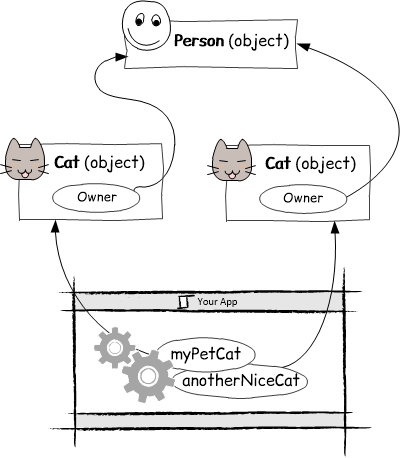
Here each Cat object has an Owner property, and both cats are connected to the same owner.
// Let's create an owner.
Person theBoss = new Person();
// This person owns both cats.
myPetCat.Owner = theBoss;
anotherNiceCat.Owner = theBoss;That makes sense, but what happens when it’s time for one cat to get a new owner?
// There's a new boss on the scene.
Person newOwner = newPerson();
anotherNiceCat.Owner = newPerson;
When you assign the new owner, you sever the connection to the old owner, and release the reference. (It’s exactly the same as if you set the Owner property to null and then set a new reference.) But here’s the problem — even though you released the reference, it’s not time to destroy the old Person object, because it’s still being used by another Cat object (myPetCat).
Clearly, there’s more work to be done before a runtime environment can figure out which objects are really ready to be destroyed. Let’s consider some possible solutions.
Reference counting
If you had to invent a system to reclaim the memory from dead objects, your first try would probably use some sort of reference counting. The idea is simple: keep track of how many people are using an object. As soon as everyone stops using the object, release the memory.
The tricky part is how you keep track of object use. Reference counting keeps a separate count for every object. When you first create the object, there’s one reference. If someone else refers to it, there are two references.
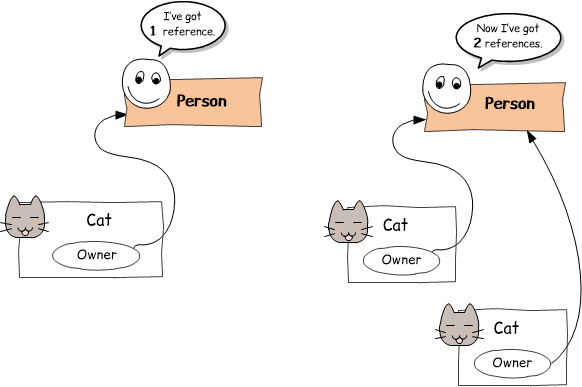
When one of these references goes away, we’re back to one reference. And so on. When the reference count finally drops to zero, it’s safe to kill the object.
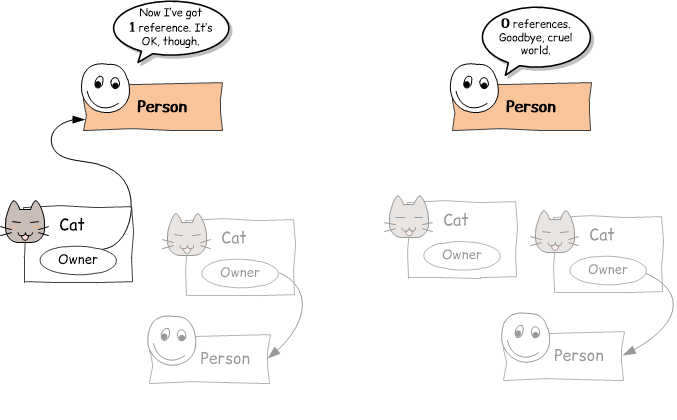
But reference counting has its own problems. The most obvious issue is circular references. This is the situation that occurs when a few objects are linked together, but cut off from the rest of your program. For example, imagine a Person object that has a Pets collection to hold all their cats.
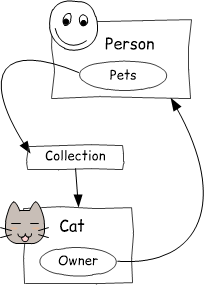
Even though you’re not using any of these objects anymore, they still have live references to each other, which means they aren’t going to be destroyed… ever.
Despite this limitation, reference counting is still out there. It was used in older languages like VB 6, ancient versions of Python, and Microsoft’s COM technology (a key piece of Windows infrastructure). It’s still used in Swift and in the “smart pointer” systems that some people add on top of C++. Some of these implementations get around the circular reference problem with something called weak references, but that’s a story for another day.
Simple garbage collection
Today, most languages — including C#, Java, Python, JavaScript, and many more — find dead objects using a process called garbage collection.
The idea behind garbage is simple. Let programs use all the memory they want. Then, every once in a while, send someone around to look for discarded objects. These are objects that have no references pointing to them. Basically, they’re drifting in the void, unreachable to anyone. They might have references to each other (like the circular reference example shown earlier), but they aren’t reachable from the main program. They’re just lingering in a zombie state, hogging up memory.
To do its work, the garbage collector needs to pause execution, and trace the references through your entire program to build an object graph (a sort of map of objects, and how they connect). For example, consider a very simple application with a bunch of objects floating around in memory:
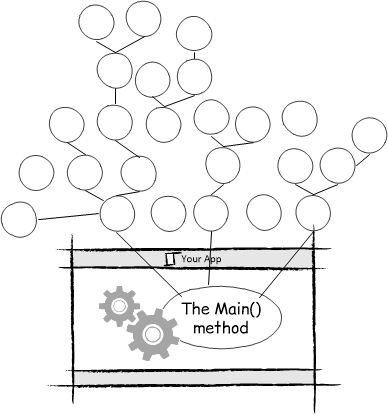
The garbage collector starts at the root of your application (in this diagram, that’s the Main() method at the bottom). If follows all the references there, then it follows their references, and so on, until it’s found everything. When it’s complete, it has something like this:
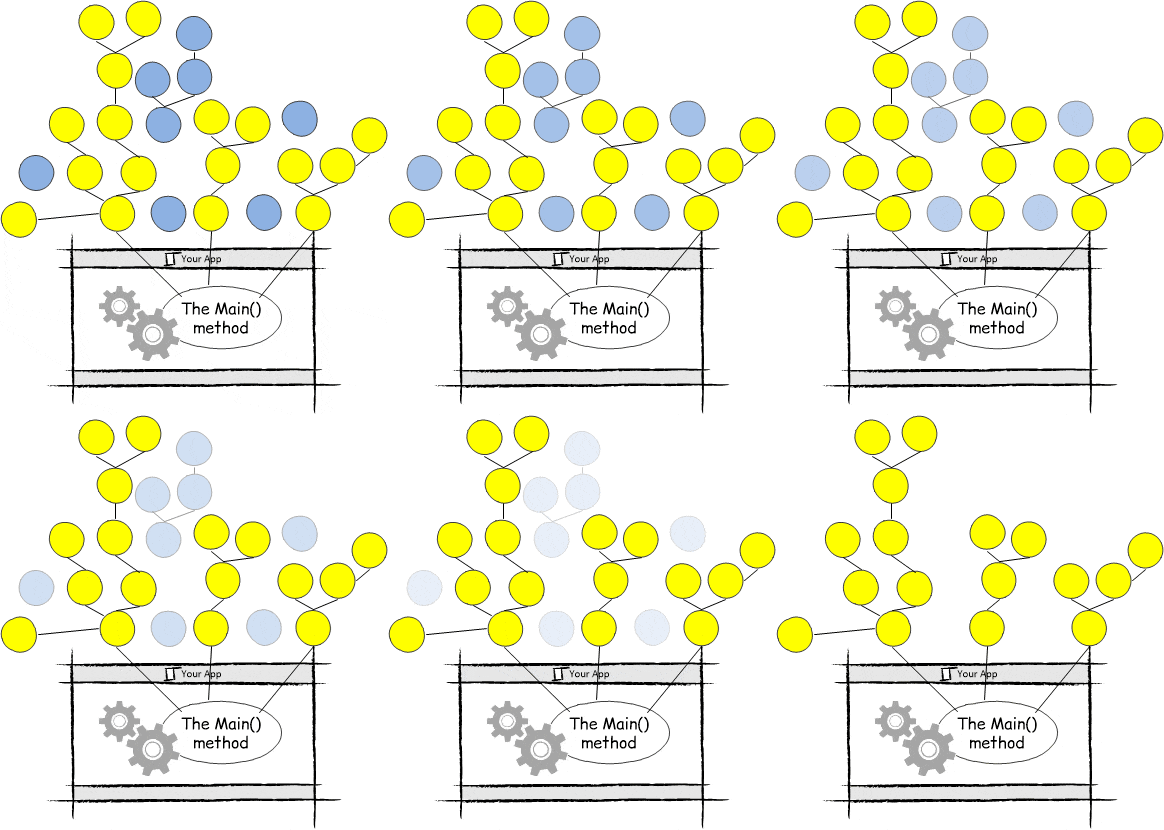
Here, the yellow circles are all the objects the garbage collector found during its trace. The blue circles are all the objects that aren’t connected to the rest of the application, and can be safely destroyed.
Better garbage collection with generations
Garbage collection is a nearly flawless way to get back unused memory. But there’s still a big problem — performance. Walking through all the references in an application takes time. You don’t want to interrupt your super cool app with boring memory house cleaning.
So big-brained language designers have built a number of optimizations. They do garbage collection on another thread, when possible. They get the runtime to tweak the garbage collector on the fly, based on how fast garbage collection is working and how much memory is available. And they use generations to reduce the amount of work the garbage collector needs to do.
Here’s how generations work. When an object is created, it starts as generation 0 (because nothing makes you a better programmer than knowing to start counting at 0). If an object survives a garbage collection because it’s still being used, it’s promoted to generation 1. If it survives another pass, it becomes generation 2, and so on.
So how does this bookkeeping help anything? Most of the time, objects fall into two broad categories: ones you keep for a very long time, and ones you use quickly and then discard. The longer an object sticks around, the more likely it is to keep sticking around. Most of what a garbage collector collects is new stuff.
So to enhance performance, a garbage collector may decide to check only certain generations. For example, maybe it decides to check generation 0 and 1, but not bother going down the branches with generation 3 objects, because your program is probably still using all of that stuff. Even better, a garbage collector can self-tune itself. It decides what generations to check based on how the application seems to be using memory.
Incidentally, you can take direct control over the garbage collector in many languages. In C#, you use a method called GC.Collect(), which even lets you pick how many generations to check. In Java you can call System.gc(), but it’s actually more of a request than a command. Either way, you almost never want to be this heavy handed, for two reasons. First, your runtime is usually smarter than you at assessing the current memory requirements and figuring out how to keep everything ticking along smoothly. And second, if you’re trying to fix something or increase performance by manually sweeping out your memory, it’s probably a sign that you’ve made a very bad decision somewhere else in your design.
Have a suggestion for a future programming topic you’d like to see illustrated? Drop a comment below! And if you liked this article and want a once-a-month newsletter with links to our best new content, why not subscribe to the Young Coder newsletter?