avatarJeff the Content Profit Coach

Free AI web copilot to create summaries, insights and extended knowledge, download it at here

1274

Abstract

rought more than enough high-quality free traffic.</p><p id="9f9b"><b>So now I’m going to walk you through</b> how I use an article a day to drive so much high-quality free traffic that I couldn’t stop it even if I wanted to. And I assure you, I don’t want to. Neither will you.</p><p id="03e4"><b>Medium:</b> For me, after my blog, it starts with <a href="https://jeffherring.medium.com/membership">Medium.com</a>. I’ve been doing this a long time, and Medium is the best resource I’ve ever found for daily high-quality free traffic.</p><p id="2f19"><b>Enter the Medium Republishing Tool</b></p><p id="66c5"><b>After you hit the publish button</b> on Medium a fun little box pops up that looks like this:</p><figure id="559e"><img src="https://cdn-images-1.readmedium.com/v2/resize:fit:800/1*Vv8J2-rUvfbQx-XiJItbBg.png"><figcaption>Author Screen Shot</figcaption></figure><p id="ced6"><b>This allows you to automatically repurpose</b> to Facebook, Twitter, and LinkedIn, <i>(and hopefully more are coming soon!)</i>. Here’s how I do it:</p><p id="5c83"><b>Facebook:</b> I post title, link and graphic to my profile and story, and then to at least 3 groups. 5 streams of traffic per article right there.</p><p id="d628"><b>Twitter:</b> Then I post the title, link, and graph

Options

ic as a tweet. Another stream of traffic per article.</p><p id="aea7"><b>LinkedIn:</b> Then I post the title, link, and graphic as a LinkedIn update, adding the appropriate hashtags. Another stream of traffic per article.</p><p id="1264"><b>And then I add:</b></p><p id="e602"><b>Pinterest: </b>Then I take each graphic (usually 2) and create a pin for each graphic, title for the article, brief teaser, and link. At least 2 more streams of traffic per article.</p><p id="49c6">20 minutes worth of work for 8 streams of high-quality free traffic. Not too shabby.</p><p id="9f66">And this is really just scratching the surface of all the many ways you can drive streams of high-quality free traffic with the article a day strategy.</p><p id="f613"><b>Bonus Tip:</b> <a href="https://jkherring.samcart.com/products/custom-genius-templates">Custom Content Creation Genius Templates</a> really help with this process too…</p><figure id="578e"><img src="https://cdn-images-1.readmedium.com/v2/resize:fit:800/0*2oXRBC-lnmWJgrOi"><figcaption>Photo by <a href="https://unsplash.com/@jacktthunter?utm_source=medium&amp;utm_medium=referral">Jack Hunter</a> on <a href="https://unsplash.com?utm_source=medium&amp;utm_medium=referral">Unsplash</a></figcaption></figure></article></body>

Profitable Free Traffic Tips

An Article a Day Sends Traffic Your Way

If you want daily high quality free traffic, that is ;-)

Photo by Westwind Air Service on Unsplash

In our most recent episode, you discovered how to use an article a day to get found on a crowded internet. Check it out here.

Today you’re going to discover how an article a day sends high-quality free traffic your way. Let’s get started…

In a recent conversation with a mentor/friend he said:

“Wait a minute! You mean you’ve done all this with free traffic!?!”

My answer was yes, for 17 years now. And I’m not against paid traffic, in fact, that’s big on my list for this year. It’s just that an article a day the right way has always brought more than enough high-quality free traffic.

So now I’m going to walk you through how I use an article a day to drive so much high-quality free traffic that I couldn’t stop it even if I wanted to. And I assure you, I don’t want to. Neither will you.

Medium: For me, after my blog, it starts with Medium.com. I’ve been doing this a long time, and Medium is the best resource I’ve ever found for daily high-quality free traffic.

Enter the Medium Republishing Tool

After you hit the publish button on Medium a fun little box pops up that looks like this:
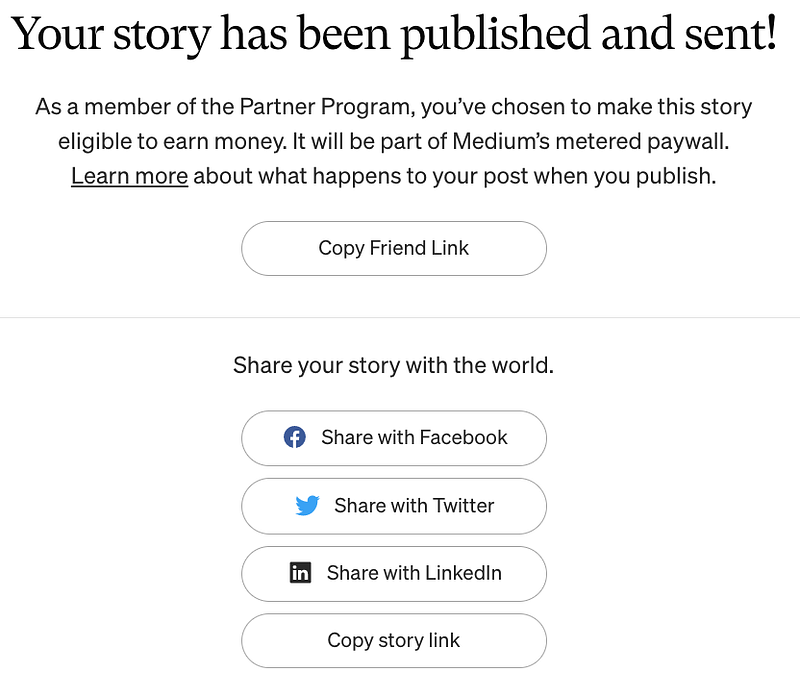
Author Screen Shot

This allows you to automatically repurpose to Facebook, Twitter, and LinkedIn, (and hopefully more are coming soon!). Here’s how I do it:

Facebook: I post title, link and graphic to my profile and story, and then to at least 3 groups. 5 streams of traffic per article right there.

Twitter: Then I post the title, link, and graphic as a tweet. Another stream of traffic per article.

LinkedIn: Then I post the title, link, and graphic as a LinkedIn update, adding the appropriate hashtags. Another stream of traffic per article.

And then I add:

Pinterest: Then I take each graphic (usually 2) and create a pin for each graphic, title for the article, brief teaser, and link. At least 2 more streams of traffic per article.

20 minutes worth of work for 8 streams of high-quality free traffic. Not too shabby.

And this is really just scratching the surface of all the many ways you can drive streams of high-quality free traffic with the article a day strategy.

Bonus Tip: Custom Content Creation Genius Templates really help with this process too…

Photo by Jack Hunter on Unsplash
Articles
Article Writing
Content Creation
Writing
Content Marketing
Recommended from ReadMedium