All you need to know about yfinance : Yahoo! Finance Library
A complete step-by-step tutorial on how to use Yahoo Finance Package for python- yfinance, to obtain share price and other financial data for free
Introduction
Getting data for financial analysis is the major roadblock someone faces when planning to perform some stock analysis. Not anymore! The new Yahoo finance API- yfinance has got your back! yfinance package not just helps to to access the share-price details, it also provides myriad of other financial and non-financial data pertaining to all companies listed in the United States.
yfinance can also be used to obtain data related of bonds, stock indices (S&P 500, Nasdaq, Dow 30 etc.), Commodities (Crude Oil , Gold, Silver etc.), Currencies (EUR/USD, GBP/USD, USD/JPY etc.), International Markets (FTSE 100, Nikkei 225 etc.) and even bitcoin and crypto-currency index.
Install package
Yahoo! Finance market data downloader package can be installed by using pip install command.
pip install yfinanceRequirements for yfinance are available in footnotes.
Once the package is imported, yfinance library has to be imported to the working notebook.
import yfinance as yfGetting information about a company using Ticker module
Information about any company can be obtained by providing the ticker name into the Ticker module. Information of Tesla can be obtained by providing the the ticker of Tesla Motors-”TSLA” into the Ticker module.
tsla = yf.Ticker("TSLA")tsla.infoTicker.info would return a vast amount of data about the company in dictionary format including the sector, employee strength, business summary, address of the company, website, contact details, shares outstanding, average volume, book value, shares short, earnings per share, daily high and low, ex-dividend rate, logo url etc.
Full list of info available is listed in the footnotes.
Any specific information like market cap, employee strength or brief summary of the business can be obtained by using the relevant key as follows.
print(f"Market Cap : {tsla.info['marketCap']}\n")
print(f"Employees : {tsla.info['fullTimeEmployees']}\n")
print(f"Business Summary : \n{tsla.info['longBusinessSummary']}")
Output
Market Cap : 664123015168
Employees : 70757
Business Summary :
Tesla, Inc. designs, develops, manufactures, leases, and sells electric vehicles, and energy generation and storage systems in the United States, China, and internationally. The company operates in two segments, Automotive, and Energy Generation and Storage. The Automotive segment offers electric vehicles, as well as sells automotive regulatory credits. It provides sedans and sport utility vehicles through direct and used vehicle sales, a network of Tesla Superchargers, and in-app upgrades; and purchase financing and leasing services. This segment is also involved in the provision of non-warranty after-sales vehicle services, sale of used vehicles, retail merchandise, and vehicle insurance, as well as sale of products through its subsidiaries to third party customers; services for electric vehicles through its company-owned service locations, and Tesla mobile service technicians; and vehicle limited warranties and extended service plans. The Energy Generation and Storage segment engages in the design, manufacture, installation, sale, and leasing of solar energy generation and energy storage products, and related services to residential, commercial, and industrial customers and utilities through its website, stores, and galleries, as well as through a network of channel partners. This segment also offers service and repairs to its energy product customers, including under warranty; and various financing options to its solar customers. The company was formerly known as Tesla Motors, Inc. and changed its name to Tesla, Inc. in February 2017. Tesla, Inc. was founded in 2003 and is headquartered in Palo Alto, California.Getting historical market data
Getting Data for Specific Period
Historical OHLCV (Open High Low Close Volume) data can be obtained by using Ticker.history(). The period can be provided to the function as argument. The default period is one month : ‘1mo’ Data for 5 days can be obtained as follows:
tsla.history(period='5d')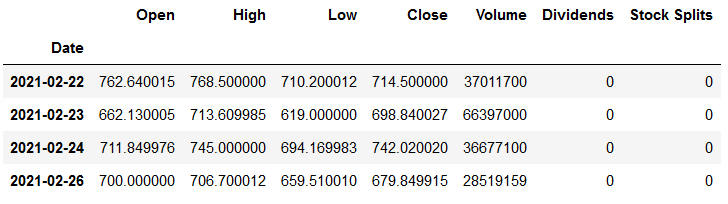
We can see that, in addition to OHLCV data, the output also includes other details- dividends and Stock-splits. If we are not interested in these data, it can be turned off by setting actions parameter to False.
tsla.history(period='5d', actions=False)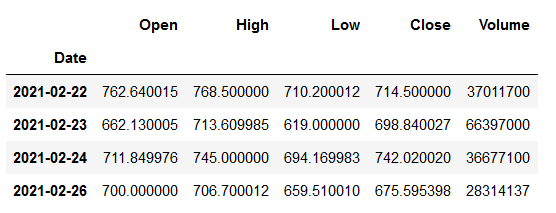
Data from the date of IPO can be accessed by setting period = ‘max’ Valid inputs for period are: Days : 1d,5d Months : 1mo,3mo,6mo Years : 1y,2y,5y,10y Year-to-date (current year): ytd
The period of the data can also be specified using start and end dates. The dates have to be provided in (in YYYY-MM-DD format).
tsla.history(start=’2021–01–22', end=’2021–01–31', actions=False)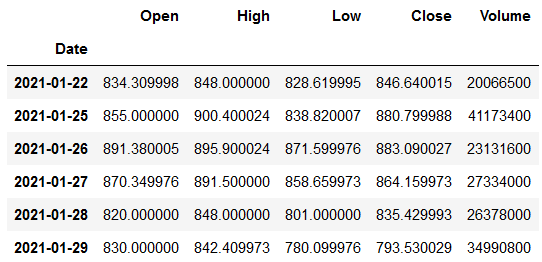
If the end date is not specified, latest date will be considered as the end date.
Selecting appropriate interval
You must have already observed that the data is available on a daily frequency. In the world of investing/trading, the time-frame is very important. Some purposes may require monthly or quarterly data whereas some might require shorter time-frame. For example, a day trader might be interested in short time intervals maybe even seconds, daily data might not serve his purpose. While analyzing long term trends spanning years, monthly or weekly data might be more relevant.
Valid inputs for interval are: Minutes : 1m,2m,5m,15m,30m,60m,90m Hours : 1h Days : 1d,5d Weeks : 1wk Months : 1mo,3mo
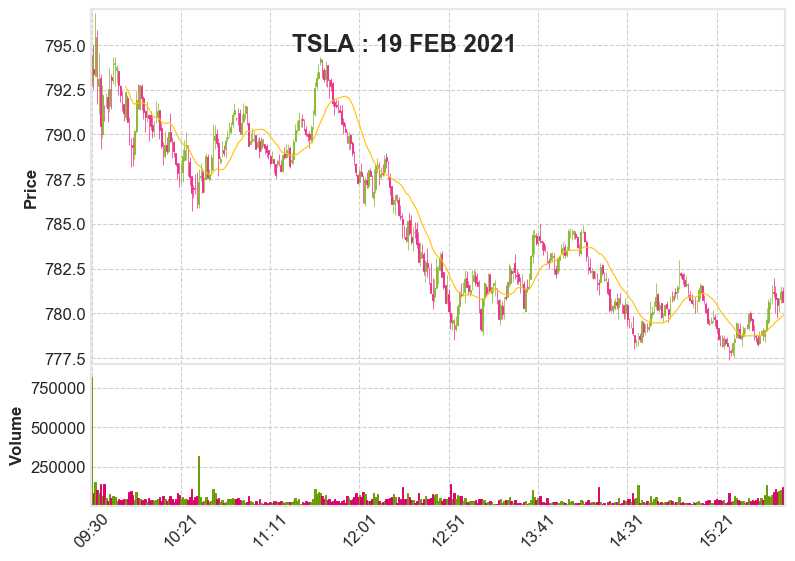
Minute-by-minute variation in Tesla share price on 19th February 2021 can be obtained by using the following command.
hist=tsla.history(start='2021-02-19', end='2021-02-20',
                  interval='1m', actions=False)
The above data can be visualized as candle-stick chart using mplfinance package as below, which looks similar to the trading app screen.
Fetching data for multiple tickers
Data from multiple tickers can be obtained using download method.
The following command can be used to download historical share prices of Apple, Amazon and Tesla at once.
data = yf.download("AMZN AAPL TSLA", period="ytd",
        group_by='ticker', actions=False)
amzn=data["AMZN"]
aapl=data["AAPL"]
By default the data is ordered as OHLCV followed by actions. To easily separate data pertaining to each ticker, the data has to be grouped by ‘ticker’.
Saving the downloaded data
The data downloaded can be saved as a csv file or any other format by using pandas library just like saving any dataframe.
amzn.to_csv('amzn.csv')          # save as csv file
aapl.to_excel('aapl.xlsx')       # save as excel file
Other functions in Ticker module
We have explored getting basic company information and historical share prices using Ticker module.
Actions
Ticker.actions can give the details of actions associated with shares- dividends and share-splits. The latest 5 actions pertaining to Apple can be obtained as follows:
aapl=yf.Ticker('AAPL')
aapl.actions.tail(5)Output:Date Dividends Stock Splits 2020-05-08 0.205 0.0
2020-08-07 0.205 0.0
2020-08-31 0.000 4.0
2020-11-06 0.205 0.0
2021-02-05 0.205 0.0Dividends or splits specifically can be obtained by using Ticker.dividends or Ticker.splits.
aapl.dividends
aapl.splits
Share-holding pattern
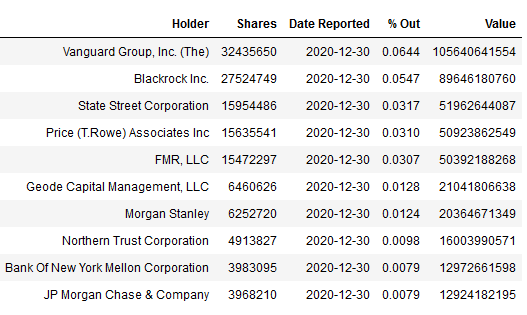
Ticker.major_holders and Ticker.institutional_holders can be used to get details of shareholding of the company. major_holders : shows how much of the shares and float are held by the insiders and institutions
amzn=yf.Ticker('AMZN')amzn.major_holders
Output :
0       14.56%       % of Shares Held by All Insider                 1       58.66%       % of Shares Held by Institutions                 2       68.66%       % of Float Held by Institutions                 3       4408       Number of Institutions Holding Shares
Ticker.institutional_holders provides the details of major institutioal shareholding.
amzn.institutional_holders
Corporate Sustainability
Corporate sustainability related information can be obtained by using Ticker.sustainability
amzn.sustainability
Analysts Recommendations
The lastest recommendations of major analysts about a stock can be obtained by using Ticker.recommendations. Latest outlook of analysts about ‘AMZN’ shares can be obtained as follows:
amzn.recommendations.tail(5)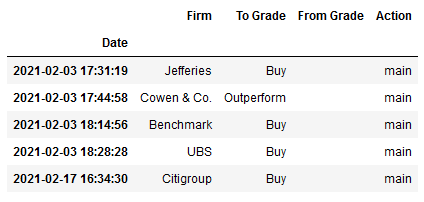
Show the upcoming events
Ticker.calendar provides the date of upcoming events of shareholders interest
amzn.calendar
Output:

Earnings Date       2021-04-28 00:00:00       2021-05-03 00:00:00                 Earnings Average       9.4       9.4
Earnings Low       6.41       6.41
Earnings High       12       12
Revenue Average       104472000000       104472000000                 Revenue Low       100459000000       100459000000                 Revenue High       107474000000       107474000000
Show ISIN code
The International Securities Identification Number (ISIN code) is a 12-character alphanumeric code that serves for uniform identification of a security through normalization of the assigned National Number, where one exists, at trading and settlement. Its structure is defined in ISO 6166. ISIN code of a security can be obtained by Ticker.isin
aapl.isin
Output:
'US0378331005'
Options Related Data
All available option expiration dates can be listed using Ticker.options
aapl.optionsOutput:
('2021-02-26',
'2021-03-05',
'2021-03-12',
'2021-03-19',
'2021-03-26',
'2021-04-01',
'2021-04-09',
'2021-04-16',
'2021-05-21',
'2021-06-18',
'2021-07-16',
'2021-09-17',
'2021-10-15',
'2022-01-21',
'2022-06-17',
'2022-09-16',
'2023-01-20',
'2023-03-17')Get option chain for specific expiration
Option chain for any of the above mentioned dates can be obtained through Ticker.option_chain(‘YYYY-MM-DD’)
Call and put option chain can be obtained by adding .calls or .puts to the above command.
#All options of AAPL expiring on 26th February 2021
aapl.option_chain(‘2021–02–26’)aapl.option_chain(‘2021–02–26’).puts # Put options only
aapl.option_chain('2021-02-26').calls # Call options onlyIn addition to the above, yfinance package also proposes to include Quartarly and Annual statements of the following. i. Balance sheets ii. Finacials iii. Earnings iv. Cashflows
The above functionality is currently not active. The blog would be updated as soon as these functionalities are live.
The notebook for the article is available is available in my GitHub Repo.
If you are interested in video format, you can check out my YouTube video
Become a Member
I hope you like the article, I would highly recommend signing up for Medium Membership to read more articles by me or stories by thousands of other authors on variety of topics. Your membership fee directly supports me and other writers you read. You’ll also get full access to every story on Medium.
Footnotes
The following packages are the requirements for yfinance:
Pandas (tested to work with >=0.23.1) Numpy >= 1.11.1 requests >= 2.14.2 lxml >= 4.5.1
Full list of info available using ticker.info
'zip', 'sector', 'fullTimeEmployees', 'longBusinessSummary', 'city', 'phone', 'state', 'country', 'companyOfficers', 'website', 'maxAge', 'address1', 'industry', 'previousClose', 'regularMarketOpen', 'twoHundredDayAverage', 'trailingAnnualDividendYield', 'payoutRatio', 'volume24Hr', 'regularMarketDayHigh', 'navPrice', 'averageDailyVolume10Day', 'totalAssets', 'regularMarketPreviousClose', 'fiftyDayAverage', 'trailingAnnualDividendRate', 'open', 'toCurrency', 'averageVolume10days', 'expireDate', 'yield', 'algorithm', 'dividendRate', 'exDividendDate', 'beta', 'circulatingSupply', 'startDate', 'regularMarketDayLow', 'priceHint', 'currency', 'trailingPE', 'regularMarketVolume', 'lastMarket', 'maxSupply', 'openInterest', 'marketCap', 'volumeAllCurrencies', 'strikePrice', 'averageVolume', 'priceToSalesTrailing12Months', 'dayLow', 'ask', 'ytdReturn', 'askSize', 'volume', 'fiftyTwoWeekHigh', 'forwardPE', 'fromCurrency', 'fiveYearAvgDividendYield', 'fiftyTwoWeekLow', 'bid', 'tradeable', 'dividendYield', 'bidSize', 'dayHigh', 'exchange', 'shortName', 'longName', 'exchangeTimezoneName', 'exchangeTimezoneShortName', 'isEsgPopulated', 'gmtOffSetMilliseconds', 'quoteType', 'symbol', 'messageBoardId', 'market', 'annualHoldingsTurnover', 'enterpriseToRevenue', 'beta3Year', 'profitMargins', 'enterpriseToEbitda', '52WeekChange', 'morningStarRiskRating', 'forwardEps', 'revenueQuarterlyGrowth', 'sharesOutstanding', 'fundInceptionDate', 'annualReportExpenseRatio', 'bookValue', 'sharesShort', 'sharesPercentSharesOut', 'fundFamily', 'lastFiscalYearEnd', 'heldPercentInstitutions', 'netIncomeToCommon', 'trailingEps', 'lastDividendValue', 'SandP52WeekChange', 'priceToBook', 'heldPercentInsiders', 'nextFiscalYearEnd', 'mostRecentQuarter', 'shortRatio', 'sharesShortPreviousMonthDate', 'floatShares', 'enterpriseValue', 'threeYearAverageReturn', 'lastSplitDate', 'lastSplitFactor', 'legalType', 'lastDividendDate', 'morningStarOverallRating', 'earningsQuarterlyGrowth', 'dateShortInterest', 'pegRatio', 'lastCapGain', 'shortPercentOfFloat', 'sharesShortPriorMonth', 'impliedSharesOutstanding', 'category', 'fiveYearAverageReturn', 'regularMarketPrice', 'logo_url'