avatarMarco Antonio Ghiani

Free AI web copilot to create summaries, insights and extended knowledge, download it at here

2657

Abstract

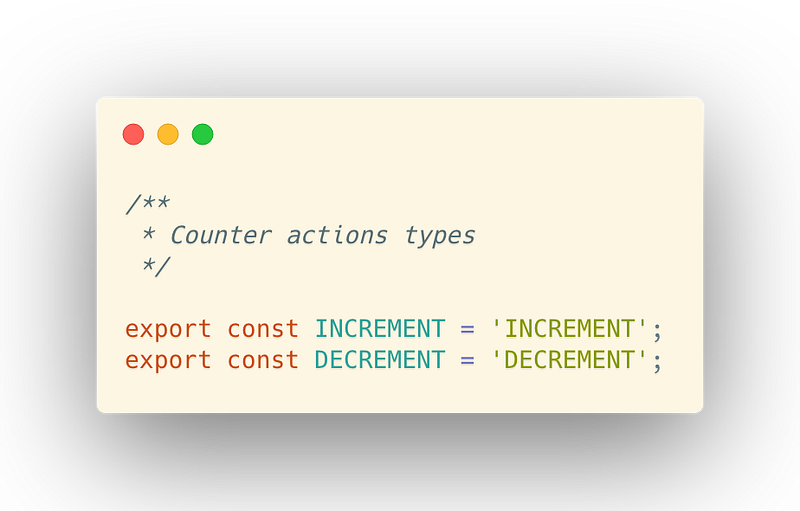
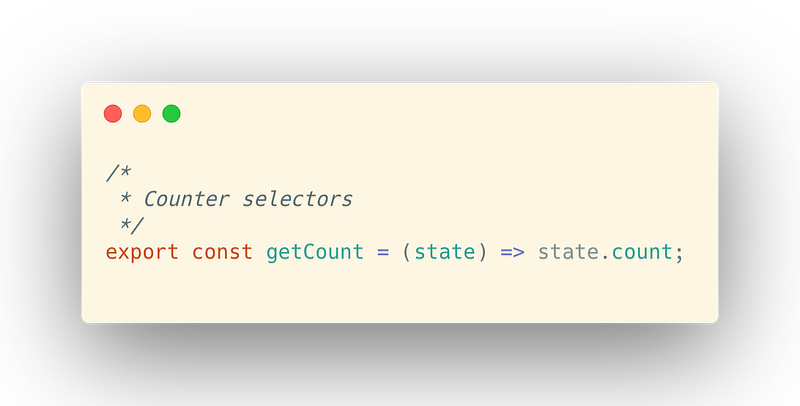
n <a href="https://github.com/reduxjs/redux/tree/master/examples/counter/src"><i>Counter example</i></a><i>.</i></p><blockquote id="48dc"><p>Disclaimer: For this example, the proposed boilerplate is over-structured, but as your app grows is important to keep organized this logic.</p></blockquote><figure id="07f4"><img src="https://cdn-images-1.readmedium.com/v2/resize:fit:800/1*d3g9uf2MSQhuKSzbRa9ptw.png"><figcaption></figcaption></figure><figure id="70cd"><img src="https://cdn-images-1.readmedium.com/v2/resize:fit:800/1*Cj659OFGD0MnLfjJbxOEIQ.png"><figcaption></figcaption></figure><figure id="e4ee"><img src="https://cdn-images-1.readmedium.com/v2/resize:fit:800/1*wl_qXxo48ZiS9p9Ec-8GWg.png"><figcaption></figcaption></figure><figure id="43fa"><img src="https://cdn-images-1.readmedium.com/v2/resize:fit:800/1*q55FO7_Zjp7JuWyrCXnOFQ.png"><figcaption></figcaption></figure><h1 id="5087">3. Combine your reducers.</h1><p id="ee36">If your app is pretty simple and you only work with a single reducer function you may not need to combine them, but in case you defined multiple reducers functions, it is good to require them and combine them all together using the <code><b>combineReducers</b></code><b><i> </i></b>function provided by the Redux package:</p><figure id="f756"><img src="https://cdn-images-1.readmedium.com/v2/resize:fit:800/1*nXelFGJwsICm37DFf_ZlTw.png"><figcaption>index.js file into the reducers folder</figcaption></figure><p id="1fb7">As you can notice, the combination of our reducers is what will be imported in case we require the <i>reducers</i> folder.</p><h1 id="49c0">4. Middlewares or not middlewares?</h1><p id="7536">The focus of this exercise is not on middlewares implementation, so I’ll assume you know how they work and what is their role in a store, but I promise I will also create a guide on their implementation 🚀</p><h1 id="8f44">5. Finally, the store configuration.</h1><p id="2c99">Now that we have reducers and middlewares ready, its time to create our redux store creator — a function that allows us to create a new store with some optional parameters:</p><figure id="5740"><img src="https://cdn-images-1.readmedium.com/v2/resize:fit:800/1*yBGP5ngWWoADrDdEbdkxvA.png"><figcaption>index.js file into the store folder</figcaption></figure><p id="c88e">To recap what’s happening in this file:</p><ul><li>We create a list of <i>must-have </i>middlewares.</li><li>If in development mode, we apply an extra configuration, such as the logger middleware.</li><li>We define (and export!) a <code><b>configureStore</b></code><b><i> </i></b>function which creates a new store and, based on options received as an argume

Options

nt, set an initial state and optionally caches the state.</li></ul><h1 id="476d">Summary</h1><p id="09a0">Well, dear readers, now you can import from your store folder a function able to create your store easily, and in case you need to expand your state with new logic you have a template-by-feature easy to follow and work on!</p><p id="ff33">Comments, shares, and discussion about the topic are always well accepted and I’ll be glad to answer any of your questions!</p><blockquote id="7149"><p><b>Feel free to contact me on Linkedin:</b> <a href="https://www.linkedin.com/in/marcoantonioghiani/"><b><i>https://www.linkedin.com/in/marcoantonioghiani/</i></b></a></p></blockquote><p id="933a"><b><i>Here you can find some of my articles:</i></b></p><div id="9bd0" class="link-block"> <a href="https://readmedium.com/how-i-became-a-fast-learner-changing-my-habits-5e8f125ce42f"> <div> <div> <h2>How I Became a Fast Learner Changing My Habits.</h2> <div><h3>9 effective habits to learn faster and increase your productivity.</h3></div> <div><p>medium.com</p></div> </div> <div> <div style="background-image: url(https://miro.readmedium.com/v2/resize:fit:320/0*coqb9q6UhjpBUpHg)"></div> </div> </div> </a> </div><div id="63cc" class="link-block"> <a href="https://hackernoon.com/how-to-write-clean-react-components-following-best-practices-c952242126ee"> <div> <div> <h2>How To Write Clean React Components</h2> <div><h3>5 rules to write efficient and readable React components using best practices</h3></div> <div><p>hackernoon.com</p></div> </div> <div> <div style="background-image: url(https://miro.readmedium.com/v2/resize:fit:320/0*Fyw4kFfXiHbQDjGS)"></div> </div> </div> </a> </div><div id="0e59" class="link-block"> <a href="https://readmedium.com/advanced-koa-js-boilerplate-bda90c9abe24"> <div> <div> <h2>Advanced Koa.js boilerplate</h2> <div><h3>An advanced proposal to organize your code using Create Koa Application.</h3></div> <div><p>medium.com</p></div> </div> <div> <div style="background-image: url(https://miro.readmedium.com/v2/resize:fit:320/1*7QFVaaFQY-93LMv8KzA5Bw.png)"></div> </div> </div> </a> </div></article></body>

Redux Store Setup for Your React Application

A quick and concise configuration to add a Redux store to a React application.

While working on a React application, often we end up with the need to introduce a state manager into the project to help us to manage all the states and to easily share data across the app.

Usually, a good candidate is Redux. It is a powerful and flexible option to manage your global state and centralize most of your data logic.

Redux is a predictable state container for JavaScript apps.

But when adding Redux to your React app, are you sure you did it properly? Here we’ll see how to integrate it into our app following a good file structure and configuration setup. Let’s start!

1. The store skeleton.

Before starting looking at the code, let’s define together how we want to organize the files and integrate it into the React codebase.

The general idea is to create a “store” directory that will contain all our logic and store configuration so that we can simply import our store setup and pass it to a Provider in our app.

  1. Create the store folder into the MyApp/src.
  2. Create an index.js file to export our store creator. Also, add two folders: middlewares and reducers.
  3. Within the middlewares folder, create a file for each Redux middleware (e.g. api, logger).
  4. Within the reducers folder, create an index.js file to combine together all the reducers. Also, add a folder for each reducer.
  5. For each reducer folder, create four files:
  • actions.js: contains the action creators for actions related to this reducer.
  • reducer.js: contains the reducer function.
  • selectors.js: contains the state selectors.
  • types.js: contains the actions’ type definition.

2. Add the first reducer.

Since every app is different and you could need different states, for simplicity I’ll write the well-known Counter example.

Disclaimer: For this example, the proposed boilerplate is over-structured, but as your app grows is important to keep organized this logic.

3. Combine your reducers.

If your app is pretty simple and you only work with a single reducer function you may not need to combine them, but in case you defined multiple reducers functions, it is good to require them and combine them all together using the combineReducers function provided by the Redux package:
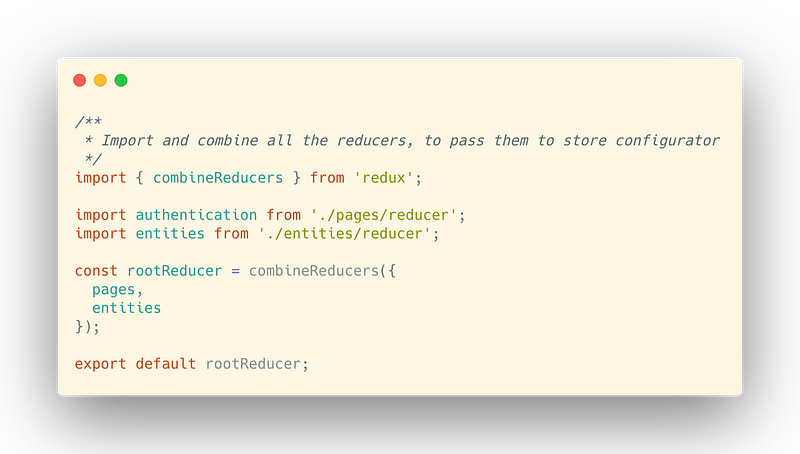
index.js file into the reducers folder

As you can notice, the combination of our reducers is what will be imported in case we require the reducers folder.

4. Middlewares or not middlewares?

The focus of this exercise is not on middlewares implementation, so I’ll assume you know how they work and what is their role in a store, but I promise I will also create a guide on their implementation 🚀

5. Finally, the store configuration.

Now that we have reducers and middlewares ready, its time to create our redux store creator — a function that allows us to create a new store with some optional parameters:
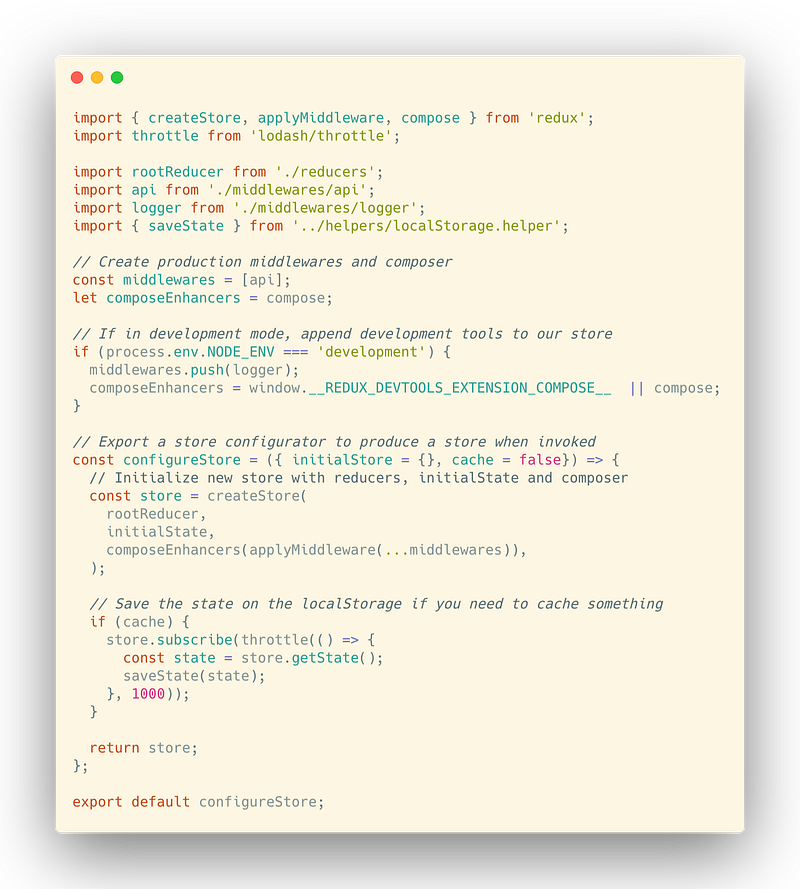
index.js file into the store folder

To recap what’s happening in this file:

  • We create a list of must-have middlewares.
  • If in development mode, we apply an extra configuration, such as the logger middleware.
  • We define (and export!) a configureStore function which creates a new store and, based on options received as an argument, set an initial state and optionally caches the state.

Summary

Well, dear readers, now you can import from your store folder a function able to create your store easily, and in case you need to expand your state with new logic you have a template-by-feature easy to follow and work on!

Comments, shares, and discussion about the topic are always well accepted and I’ll be glad to answer any of your questions!

Feel free to contact me on Linkedin: https://www.linkedin.com/in/marcoantonioghiani/

Here you can find some of my articles:

React
Redux
JavaScript
Web Development
Productivity
Recommended from ReadMedium