avatarMarco Antonio Ghiani

Free AI web copilot to create summaries, insights and extended knowledge, download it at here

4314

Abstract

he core idea of this boilerplate is to save time setting up the development environment for your app, that will be immediately initialized with:</p><ul><li><a href="https://www.npmjs.com/package/eslint"><b>eslint</b></a><b> </b>configuration to follow clean code conventions and keep it readable.</li><li><a href="https://www.npmjs.com/package/prettier"><b>prettier</b></a><b> </b>configuration to fastly format your code, applying good styling rules.</li><li><a href="https://www.npmjs.com/package/jest"><b>jest</b></a><b> </b>installation and script to run your test suite.</li><li><a href="https://www.npmjs.com/package/husky"><b>husky</b></a><b> </b>to easily add your git hooks.</li><li><b>environment variables </b>compatibility, to make your app follow the best coding practice for configuration files.</li></ul><p id="624c">In the creation step, create-koa-application copies the template, updates the dependencies (e.g. updates your project name in the packaje.json, etc.), installs them and creates a new git repository if not exist, adding a commit with the new files.</p><p id="7aba">After the installation ends well, your project is ready to use! You can immediately launch your app using one of the scripts already declared in the <i>package.json</i>:</p><ul><li><b>npm start: </b>Start your Koa application, listening for incoming requests.</li><li><b>npm run dev: </b>Start your Koa application in development mode. It uses <a href="https://www.npmjs.com/package/nodemon"><i>nodemon</i></a> to refresh your app every time you save changes on your files, perfect to increase the development speed of your project.</li><li><b>npm run format: </b>Format your code following the prettier rules.</li><li><b>npm run lint: </b>Lint your code to find style errors.</li><li><b>npm run check: </b>Run format and lint scripts.</li><li><b>npm test: </b>Run your test suites.</li></ul><h2 id="b93c">The folder structure</h2><p id="5129">The boilerplate proposes a model based on a <b><i>feature-encapsulation pattern</i></b> (at least, I like to call it so! 😂)which uses a folder for every <b>RESTful API </b>you decide to implement in your app.</p><div id="a97f"><pre><project-name> ├── node_modules ├── index<span class="hljs-selector-class">.js</span> ├── server<span class="hljs-selector-class">.js</span> ├── package<span class="hljs-selector-class">.json</span> ├── package-lock<span class="hljs-selector-class">.json</span> ├── README<span class="hljs-selector-class">.md</span> ├── <span class="hljs-selector-class">.env</span><span class="hljs-selector-class">.example</span> ├── <span class="hljs-selector-class">.eslintrc</span><span class="hljs-selector-class">.js</span> ├── <span class="hljs-selector-class">.eslintignore</span> ├── <span class="hljs-selector-class">.gitignore</span> ├── <span class="hljs-selector-class">.huskyrc</span> ├── <span class="hljs-selector-class">.prettierrc</span> ├── <span class="hljs-selector-class">.prettierignore</span> ├── api │ ├── users │ │ ├── index<span class="hljs-selector-class">.js</span> │ │ ├── user<span class="hljs-selector-class">.routes</span><span class="hljs-selector-class">.js</span> │ │ └── user<span class="hljs-selector-class">.controller</span><span class="hljs-selector-class">.js</span> │ ├── otherApiFolder │ ├── ... │ └── index<span class="hljs-selector-class">.js</span> ├── config │ ├── components │ │ ├── database<span class="hljs-selector-class">.config</span><span class="hljs-selector-class">.js</span> │ │ └── server<span class="hljs-selector-class">.config</span><span class="hljs-selector-class">.js</span> │ └── index<span class="hljs-selector-class">.js</span> └── middleware └── error<span class="hljs-selector-class">.middleware</span><span class="hljs-selector-class">.js</span> └── utils └── generateId<span class="hljs-selector-class">.util</span>.js</pre></div><p id="573a">The main folders you see on this structure are:</p><ul><li><b>api: </b>it contains an <i>index.js</i> file and a folder for each API. For example, if you want to create an API for users, define your endpoints in the <i>user.routes.js</i> file:</li></ul><p id="8335">User endpoints</p><p id="d69e">It exports a function which receives the Router module, creates a new sub-router and declares the

Options

routes with the related controllers, returning finally the generated instance.</p><p id="9bab">This function will be automatically imported and added to the existing main router by the <i>index.js</i> file in the API folder:</p><p id="3def">Index file to aggregate all the sub-router</p><p id="a600">In the end, when required from the <i>server.js</i> file that creates our app, the <i>applyApiMiddleware </i>function applies all the API created and divided by feature. Now you can add a RESTful API for each entity of your project.</p><ul><li><b>config: </b>this folder includes all the configuration files used throughout the whole app. Thanks to <a href="https://www.npmjs.com/package/joi"><b><i>joi</i></b></a><b><i>, </i></b>an<i> o</i>bject schema validator for JavaScript objects, it reads and validates the configuration from your environment variables, generating a unique config object. This means that you have to only require the <i>config</i> folder to have access to the entire configuration object.</li><li><b>middleware: </b>in this folder goes the definition of additional middlewares such as an <i>error handler, </i>already implemented, or any other additive middleware you need. For example, here you could add a middleware to validate authenticated users, may be called <i>auth.middleware.js</i>?! 🤓</li><li><b>utils: </b>the <i>utils </i>folder is the one in charge of containing all the utilities the developer need to spread through the controller logic or in any part of the application.</li></ul><h1 id="2176">Wrapping up</h1><p id="f6c2">This project comes with the final purpose of helping developers to work on a boilerplate continuously evolving and following the Node.js best practices, integrating advanced patterns.</p><p id="0411">I hope this resource will be appreciated and I invite all of you with more (or less) experience than me to contribute to this project and make the community around Koa grow faster!</p><blockquote id="3958"><p><b>To contribute to the CLI tool create-koa-application, here the repository on GitHub: <a href="https://github.com/marcoantonioghiani01/create-koa-application"></a></b><a href="https://github.com/marcoantonioghiani01/create-koa-application">https://github.com/marcoantonioghiani01/create-koa-application</a></p></blockquote><blockquote id="13e4"><p><b>To contribute to the boilerplate, here the repository on GitHub: <a href="https://github.com/marcoantonioghiani01/koa-template"></a></b><a href="https://github.com/marcoantonioghiani01/koa-template">https://github.com/marcoantonioghiani01/koa-template</a></p></blockquote><p id="37c1">Comments, shares and discussion about the topic are always well accepted and I’ll be glad to answer any of your questions!</p><blockquote id="7149"><p><b>Feel free to contact me on Linkedin:</b> <a href="https://www.linkedin.com/in/marcoantonioghiani/"><b><i>https://www.linkedin.com/in/marcoantonioghiani/</i></b></a></p></blockquote><p id="aad2"><b><i>Here you can find some of my articles:</i></b></p><div id="9bd0" class="link-block"> <a href="https://readmedium.com/how-i-became-a-fast-learner-changing-my-habits-5e8f125ce42f"> <div> <div> <h2>How I Became a Fast Learner Changing My Habits.</h2> <div><h3>9 effective habits to learn faster and increase your productivity.</h3></div> <div><p>medium.com</p></div> </div> <div> <div style="background-image: url(https://miro.readmedium.com/v2/resize:fit:320/0*coqb9q6UhjpBUpHg)"></div> </div> </div> </a> </div><div id="63cc" class="link-block"> <a href="https://hackernoon.com/how-to-write-clean-react-components-following-best-practices-c952242126ee"> <div> <div> <h2>How To Write Clean React Components</h2> <div><h3>5 rules to write efficient and readable React components using best practices</h3></div> <div><p>hackernoon.com</p></div> </div> <div> <div style="background-image: url(https://miro.readmedium.com/v2/resize:fit:320/0*Fyw4kFfXiHbQDjGS)"></div> </div> </div> </a> </div></article></body>

Create Koa Application: an advanced Koa.js boilerplate creator.

A structured proposal to organize your code using Create Koa Application.
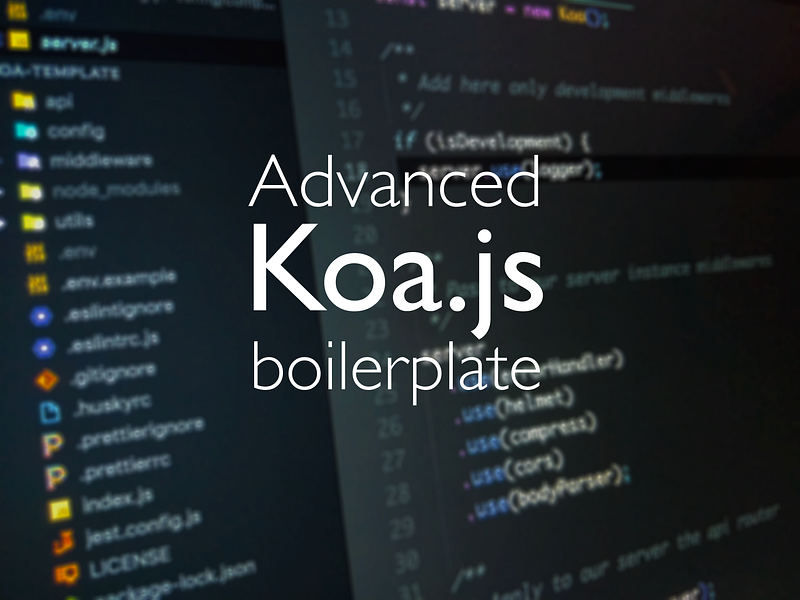
A proposal on how to structure your Koa.js app.

What is Koa???

Over one year and a half ago, I started working with Koa.js at Codeworks, firstly because I really love Node.js and everything around its sphere of concern is interesting to me. Furthermore, I was looking for an alternative to Express.js, in order to replace it with a lighter option. And there I started my path with Koa.js, a framework both powerful and flexible.

Koa is a new web framework designed by the team behind Express, which aims to be a smaller, more expressive, and more robust foundation for web applications and APIs.

Catching up with the Express little brother was not so difficult: they are both based on the middleware pattern and the concept of asynchronous middleware was not really new to me. Moreover, the native ability of Koa of handling them made me very thrilled about this framework.

The problem

After an exciting beginning, I soon realized that something was curious: used to the Express jungle of information available online, every time I was scraping the web for any resource related to Koa, the community was certainly active, but not as much as I expected.

Especially, I struggled to find:

  • Middleware packages able to properly solve the corresponding task which Express owns in its core module.
  • A best practice error handling tutorial for Koa applications.
  • A folder structure to match my idea of scalability.

These are only some of the troubles I encountered starting with Koa, and for anyone obsessed by structural organization like me, the first problem to solve was how to properly build the skeleton of my application.

After reading hundreds of web articles and having inspiration from developers more skilled than me, I came up with my own boilerplate that I currently use to speed up the setup of my Koa applications. So I thought, why shouldn’t I share it with beginners who are probably struggling as I did?

The solution: Create Koa Application

After reviewing my Koa app template (which of course, still need optimizations), I created a command line tool to allow users to download my boilerplate and to initialize a new Koa application on their local machines. Welcome Create Koa Application.
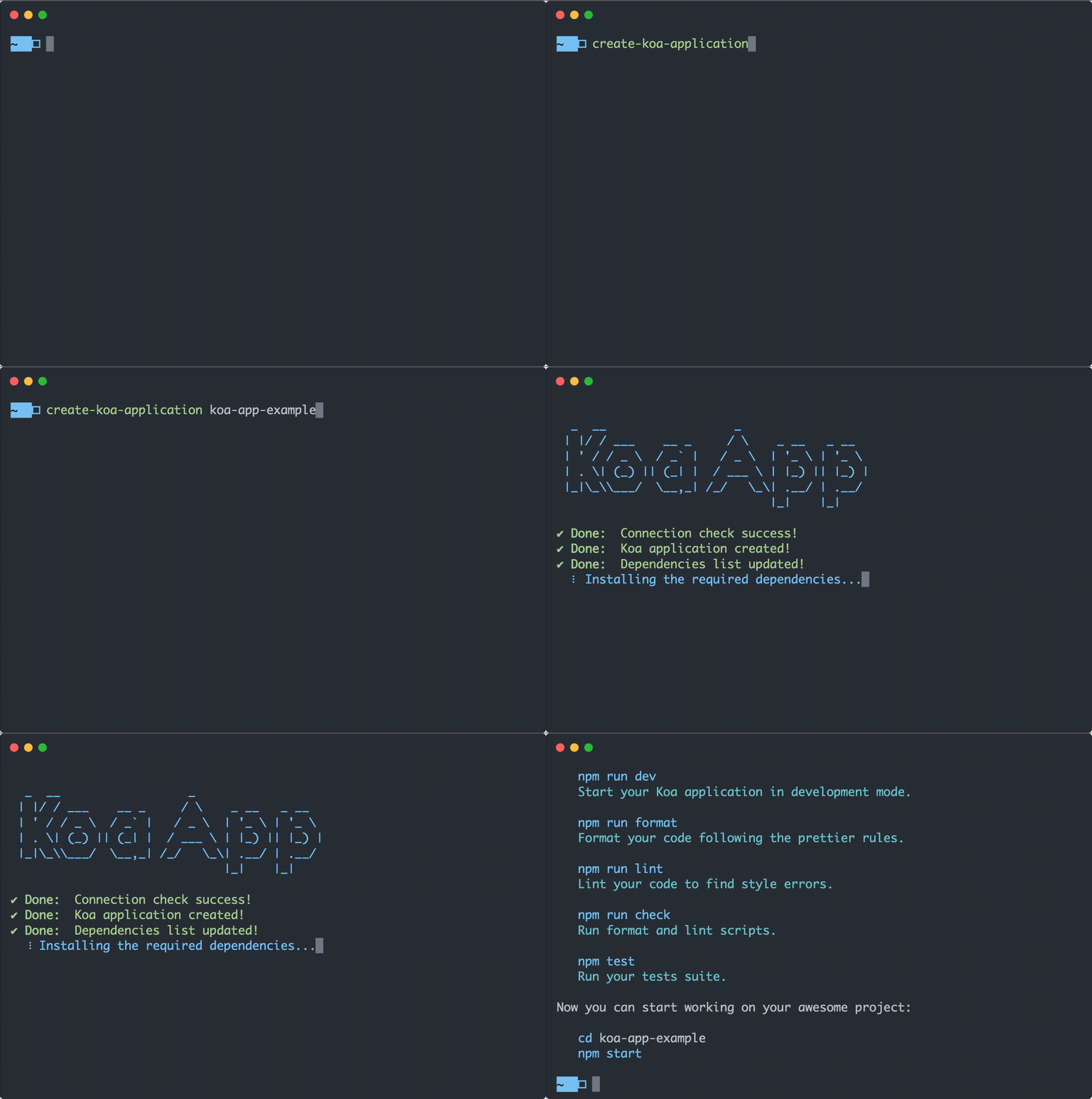
The Create Koa Application CLI tool in action.

create-koa-application

Have a boilerplate to share is nice, but create a CLI tool to download it is even better! Two days after I decided to share it, I finished a command line program to download and make the boilerplate ready to use.

It works similarly to the well-known create-react-app, meaning that you can simply write the name of your project after the command and it will generate a folder with the template.

The tool will automatically download the latest version of the template, maintained and updated on a different open source project (I invite all of you to contribute to making it continuously better!). Therefore, it is not necessary to download or update every time the new version of the CLI.

In case you prefer to not install the tool globally on your local machine, it also works with npx (recommended use!), using the latest version every time you want to create a new project.

The project

The core idea of this boilerplate is to save time setting up the development environment for your app, that will be immediately initialized with:

  • eslint configuration to follow clean code conventions and keep it readable.
  • prettier configuration to fastly format your code, applying good styling rules.
  • jest installation and script to run your test suite.
  • husky to easily add your git hooks.
  • environment variables compatibility, to make your app follow the best coding practice for configuration files.

In the creation step, create-koa-application copies the template, updates the dependencies (e.g. updates your project name in the packaje.json, etc.), installs them and creates a new git repository if not exist, adding a commit with the new files.

After the installation ends well, your project is ready to use! You can immediately launch your app using one of the scripts already declared in the package.json:

  • npm start: Start your Koa application, listening for incoming requests.
  • npm run dev: Start your Koa application in development mode. It uses nodemon to refresh your app every time you save changes on your files, perfect to increase the development speed of your project.
  • npm run format: Format your code following the prettier rules.
  • npm run lint: Lint your code to find style errors.
  • npm run check: Run format and lint scripts.
  • npm test: Run your test suites.

The folder structure

The boilerplate proposes a model based on a feature-encapsulation pattern (at least, I like to call it so! 😂)which uses a folder for every RESTful API you decide to implement in your app.

<project-name>
├── node_modules
├── index.js
├── server.js
├── package.json
├── package-lock.json
├── README.md
├── .env.example
├── .eslintrc.js
├── .eslintignore
├── .gitignore
├── .huskyrc
├── .prettierrc
├── .prettierignore
├── api
│   ├── users
│   │   ├── index.js
│   │   ├── user.routes.js
│   │   └── user.controller.js
│   ├── otherApiFolder
│   ├── ...
│   └── index.js
├── config
│   ├── components
│   │   ├── database.config.js
│   │   └── server.config.js
│   └── index.js
└── middleware
    └── error.middleware.js
└── utils
    └── generateId.util.js

The main folders you see on this structure are:

  • api: it contains an index.js file and a folder for each API. For example, if you want to create an API for users, define your endpoints in the user.routes.js file:

User endpoints

It exports a function which receives the Router module, creates a new sub-router and declares the routes with the related controllers, returning finally the generated instance.

This function will be automatically imported and added to the existing main router by the index.js file in the API folder:

Index file to aggregate all the sub-router

In the end, when required from the server.js file that creates our app, the applyApiMiddleware function applies all the API created and divided by feature. Now you can add a RESTful API for each entity of your project.

  • config: this folder includes all the configuration files used throughout the whole app. Thanks to joi, an object schema validator for JavaScript objects, it reads and validates the configuration from your environment variables, generating a unique config object. This means that you have to only require the config folder to have access to the entire configuration object.
  • middleware: in this folder goes the definition of additional middlewares such as an error handler, already implemented, or any other additive middleware you need. For example, here you could add a middleware to validate authenticated users, may be called auth.middleware.js?! 🤓
  • utils: the utils folder is the one in charge of containing all the utilities the developer need to spread through the controller logic or in any part of the application.

Wrapping up

This project comes with the final purpose of helping developers to work on a boilerplate continuously evolving and following the Node.js best practices, integrating advanced patterns.

I hope this resource will be appreciated and I invite all of you with more (or less) experience than me to contribute to this project and make the community around Koa grow faster!

To contribute to the CLI tool create-koa-application, here the repository on GitHub: https://github.com/marcoantonioghiani01/create-koa-application

To contribute to the boilerplate, here the repository on GitHub: https://github.com/marcoantonioghiani01/koa-template

Comments, shares and discussion about the topic are always well accepted and I’ll be glad to answer any of your questions!

Feel free to contact me on Linkedin: https://www.linkedin.com/in/marcoantonioghiani/

Here you can find some of my articles:

JavaScript
Web Development
Programming
Technology
Tech
Recommended from ReadMedium