
Adding Fn::ForEach to a KMS Key Policy CloudFormation Template
ACM.292 Attempting to use Transforms to allowing multiple AWS Services to use an Encryption key
~~~~~~~~~~~~~~~~~~~~~~~~~~~~~~~~~~~~~~~~~~~~~~~~~~~~~~~
⚙️ Check out my series on Automating Cybersecurity Metrics | Code.
🔒 Related Stories: AWS Security | Application Security | KMS Security
💻 Free Content on Jobs in Cybersecurity | ✉️ Sign up for the Email List
~~~~~~~~~~~~~~~~~~~~~~~~~~~~~~~~~~~~~~~~~~~~~~~~~~~~~~~
In the last post I wrote about deploying a Secret for a Lambda process.
In that post we had to allow the process to use a KMS key. I explained the pros and cons of using a separate encryption key for every single process. I’m using the same KMS key for encryption and decryption, but restricting access to specific resources in the related IAM policy.
TLDR: You can’t use a ForEach for this purpose at this time. Also, I didn’t actually need a ForEach. But this was an interesting exercise. I’ll fix this template in an upcoming post.
Because different processes and deployment activities need to use the key with different services I now need to allow the use of multiple services with the key policy (the resource policy, as opposed to an IAM policy.)
I’ve attempted to reduce the complexity of my key policy in a recent post and now it seems like it’s going to get more complex again.
I wonder if we can use a recent addition to the CloudFormation feature set for this purpose — For::Each.
Let’s try it.
What if I pass in a string comma separated service names that need to use the key? I have already added ECR. Now I need to add Lambda. My deploy script might look like this. (I’m totally making this up as I go.)
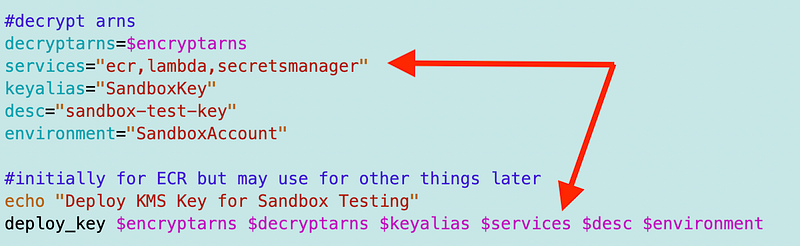
The parameter that receives the input in my CloudFormation Key template is ServiceParam so nothing else really needs to change in the function that deploys the parameter (deploy_key).
But let’s see about the template.
I started to change all my logic. But hang on. We’ve actually got multiple different things going on with AWS services that further adds to the complexity of KMS Key policies.
We have IAM users that we are granting permission to use a KMS key with a service.
Then we have services that we want to grant access to use the KMS key.
Which is it when we specify that service param? Our logic changes depending on the scenario an sometimes we need both. It looks like I need some additional parameters to more accurately handle all scenarios. In a way this simplifies my logic.
I add these parameters.
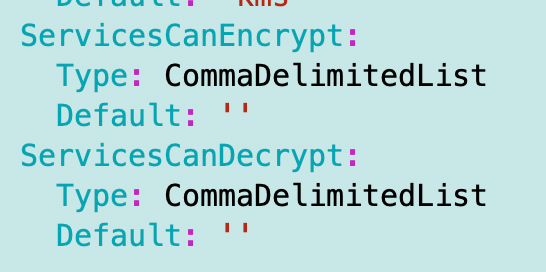
The idea was I could loop through the list and add statements for each of the services to allow encryption or decryption as appropriate.
Long story short (and way too much time spent on this) — it doesn’t work.
The ForEach construct can only create individual resources at this time, not snippets of a template the way it was designed. This limitation is really unfortunate as it has so many more use cases.
It also too way too long to even troubleshoot the errors to the point where I could see and determine the underlying problem. I didn’t really understand the documentation and it was not clear to me that this construct could only create resources on first read.
I got a little help from this blog post on the Fn::ForEach syntax. Then I found some other blog posts with additional syntax since the documentation does not have examples.
I added the line below which adds the LanguageExtensions to the template.
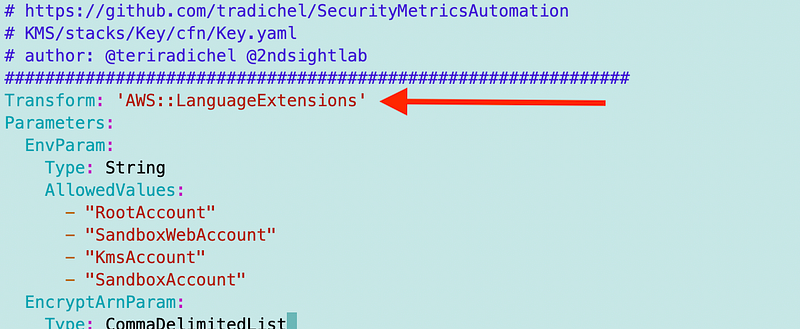
Then I tried to add a ForEach loop to add my statements. I started like this and probably spent a day wading through error messages. I may not be the fastest, but I am persistent at getting to a solid answer. :)
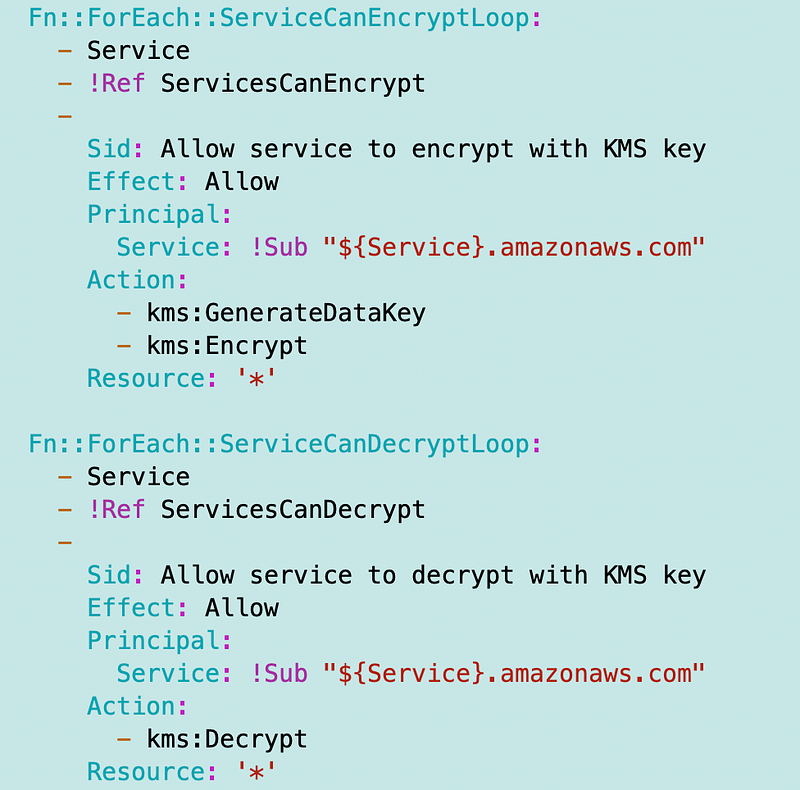
That’s when I hit this error. I don’t love the logic involved in allowing transforms in an IAM Policy but I got it to work. I was discussing online with others that it should probably be the addition of an action, not adding an AWS resource to your policy:
The I went through a whole series of steps to try to figure out what was wrong with the rest of my template:
This is when I came to the conclusion that these transforms have way too many side effects. They also transform error messages from the underlying CloudFormation messages which seems unneccessary. Why not just bubble up the underlying error?
In any case, it didn’t work. Back to the drawing board to decide what I want to do about my key and key policy for my environent (Sandbox, and later Dev, QA, Prod, etc.)
Follow for updates.
Teri Radichel | © 2nd Sight Lab 2023
About Teri Radichel:
~~~~~~~~~~~~~~~~~~~~
⭐️ Author: Cybersecurity Books
⭐️ Presentations: Presentations by Teri Radichel
⭐️ Recognition: SANS Award, AWS Security Hero, IANS Faculty
⭐️ Certifications: SANS ~ GSE 240
⭐️ Education: BA Business, Master of Software Engineering, Master of Infosec
⭐️ Company: Penetration Tests, Assessments, Phone Consulting ~ 2nd Sight Lab
Need Help With Cybersecurity, Cloud, or Application Security?
~~~~~~~~~~~~~~~~~~~~~~~~~~~~~~~~~~~~~~~~~~~~~~~~~~~~~~~~~~~~~
🔒 Request a penetration test or security assessment
🔒 Schedule a consulting call
🔒 Cybersecurity Speaker for PresentationFollow for more stories like this:
~~~~~~~~~~~~~~~~~~~~~~~~~~~~~~~~~~~~~~~~~~~~~~~~~~~~~~~~~~~~~
❤️ Sign Up my Medium Email List
❤️ Twitter: @teriradichel
❤️ LinkedIn: https://www.linkedin.com/in/teriradichel
❤️ Mastodon: @teriradichel@infosec.exchange
❤️ Facebook: 2nd Sight Lab
❤️ YouTube: @2ndsightlab