avatarTeri Radichel

Free AI web copilot to create summaries, insights and extended knowledge, download it at here

7624

Abstract

</div><p id="ba0a">Recall from the put_parameter documentation how we add a KeyId.</p><figure id="94ec"><img src="https://cdn-images-1.readmedium.com/v2/resize:fit:800/1*Aj9YwYGASR69rHuFtAuaDA.png"><figcaption></figcaption></figure><p id="5e86">We need to edit the line of Boto3 Python code in the CloudFormation script that creates the parameter and add the KMS Key ID. Recall that you can get the KMS Key ID from the CloudFormation stack outputs or look it up in the KMS console.</p><p id="0f6b">We could hardcode this key ID into our code, but what’s the problem with that?</p><p id="3ed2">Later when we want to deploy our code to Dev, QA, and Prod environments we’d have to alter the code to deploy it. Even id I wanted to share my code on GitHub I’d have to hardcode and checkin my KMS key ID and then the code would not work in your environment. If you find that you have to alter code to deploy an application, the deployment for the application is not implemented correctly. <i>You should really fix that.</i></p><p id="e74b">In our case, we can retrieve it from the output of the KMS Key stack we just created and insert it into our code. Though I warn customers about unencrypted environment variables in Lambda functions in this case we would be creating an encryption key for the Lambda function to encrypt the the ID of another KMS key. I’m still thinking it over but for the moment I’m going to just add the key ID to an environment variable and reference it in the code.</p><p id="5b0c">You can see where I added the environment variables below, per the Lambda CloudFormation documentation, and how I get the value from the environment variable when the code executes. I also need to import the os package.</p><figure id="014b"><img src="https://cdn-images-1.readmedium.com/v2/resize:fit:800/1*cBNWol1CxprOgZBCVIL3WQ.png"><figcaption></figcaption></figure><p id="0cd8">Re-deploy your Lambda code. Test your Lambda Function.</p><p id="3e03"><b>Inconsistent KMS implementations across AWS Services</b></p><p id="e4da">Here’s where it gets interesting……We get the following error:</p><figure id="6b14"><img src="https://cdn-images-1.readmedium.com/v2/resize:fit:800/1*W1KTx_MG9TDf3Kkmf4CumQ.png"><figcaption></figcaption></figure><p id="6823">If you recall when we implemented this functionality with AWS Secrets manager we had to add Encrypt permissions to both the encryption and decryption ARNs in our policy.</p><div id="6aff" class="link-block">
      <a href="https://readmedium.com/cannot-create-secrets-manager-secret-with-kms-key-without-decrypt-permissions-10952c46055e">
        <div>
          <div>
            <h2>Cannot Create Secrets Manager Secret with KMS key without DECRYPT permissions</h2>
            <div><h3>Should be able to have a role with encrypt only permissions put a secret in Secrets Manager</h3></div>
            <div><p>medium.com</p></div>
          </div>
          <div>
            <div style="background-image: url(https://miro.readmedium.com/v2/resize:fit:320/1*4oxP4LXk8l8c3mpRvO7ejg.png)"></div>
          </div>
        </div>
      </a>
    </div><p id="9ac0">Odd, but OK. Somehow explained away by envelope encryption in some places. However, now I’m not so sure about that explanation given that two similar services handle the same scenario differently.</p><p id="0fd6">Not only that I went on to try to solve the problem by switching out the action when using AWS Secrets manager as follows and hit other inconsistencies.</p><p id="53af">First the easy part.</p><p id="a6c1"><b>An If statement for an IAM Policy Action based on a Condition</b></p><p id="ef49">First of all we we need to know which service we’re deploying the key for so I added a new parameter to indicate the service:</p><figure id="418a"><img src="https://cdn-images-1.readmedium.com/v2/resize:fit:800/1*9y6kQqerUyB3zrOKCQN9HQ.png"><figcaption></figcaption></figure><p id="2965">I want to use the CloudFormation if function. It changes the value included in a template based on whether another value is true or false.</p><div id="2201" class="link-block">
      <a href="https://docs.aws.amazon.com/AWSCloudFormation/latest/UserGuide/intrinsic-function-reference-conditions.html#intrinsic-function-reference-conditions-if">
        <div>
          <div>
            <h2>CloudFormation If Function</h2>
            <div><h3>undefined</h3></div>
            <div><p>undefined</p></div>
          </div>
          <div>
            <div style="background-image: url(https://miro.readmedium.com/v2/resize:fit:320/)"></div>
          </div>
        </div>
      </a>
    </div><p id="815a">Our service name is not a true or false value, so we have to use one other <b>CloudFormation</b> construct before our if statement called a <b>condition </b>(not to be confused with IAM policy conditions). We will need to add a Conditions section to the template similar to Parameters, Resources, Mappings, and Outputs and define our conditions.</p><div id="1541" class="link-block">
      <a href="https://docs.aws.amazon.com/AWSCloudFormation/latest/UserGuide/conditions-section-structure.html">
        <div>
          <div>
            <h2>CloudFormation Conditions</h2>
            <div><h3>undefined</h3></div>
            <div><p>undefined</p></div>
          </div>
          <div>
            <div style="background-image: url(https://miro.readmedium.com/v2/resize:fit:320/0*vNKvqczQkLnWXZQr.)"></div>
          </div>
        </div>
      </a>
    </div><p id="9077">Our condition will evaluate the following:</p><div id="a849"><pre>If the services <span class="hljs-keyword">is</span> <span class="hljs-keyword">not</span> Secrets Manager <span class="hljs-keyword">then</span> the value <span class="hljs-keyword">is</span> <span class="hljs-literal">true</span>, <span class="hljs-keyword">otherwise</span> <span class="hljs-literal">it</span> <span class="hljs-keyword">is</span> <span class="hljs-literal">false</span>.</pre></div><p id="3d84">or in CloudFormation syntax:</p><figure id="c96a"><img src="https://cdn-images-1.readmedium.com/v2/resize:fit:800/1*H91UO4q1y7lCpKlsg-1HBg.png"><figcaption></figcaption></figure><p id="0a32">Then we can use an if statement to change the action in our policy if it’s Secrets Manager:</p><figure id="d759"><img src="https://cdn-images-1.readmedium.com/v2/resize:fit:800/1*PwkP4zMkMAibG7X-LYkOTQ.png"><figcaption></figcaption></figure><p id="7c18">Change the deploy script to pass in the service parameter. Don’t add it to the end of the list. The key description parameter has spaces and issues that are not fully resolved at the time of this writing so we want the key description to be the last parameter.</p><div id="d42a" class="link-block">
      <a href="https://readmedium.com/cannot-pass-spaces-to-aws-cloudformation-deploy-parameter-overrides-d1fb483ae171">
        <div>
          <div>
            <h2>Cannot Pass Spaces to AWS CloudFormation Deploy Parameter-Overrides</h2>
            <div><h3>undefined</h3></div>
            <div><p>undefined</p></div>
          </div>
          <div>
            <div style="background-image: url(https://miro.readmedium.com/v2/resize:fit:320/1*4oxP4LXk8l8c3mpRvO7ejg.png)"></div>
          </div>
        </div>
      </a>
    </div><p id="31ea">Ad the new service name parameter as the second to last parameter we pass into the deploy_key() function in our kms_functions.sh file.</p><p id=

Options

"6953">Then add the parameter to the deploy_key function.</p><figure id="c811"><img src="https://cdn-images-1.readmedium.com/v2/resize:fit:800/1*z-GGq9xtYrZzZ60sJEI0Rg.png"><figcaption></figcaption></figure><p id="52be">Note that I altered the parameters in this file to use the global add_parameter function I wrote about in a prior post:</p><figure id="4c96"><img src="https://cdn-images-1.readmedium.com/v2/resize:fit:800/1*LDc4H-Ug8l6JTJHPXK5TdA.png"><figcaption></figcaption></figure><p id="4e0c">Deploy the keys using the deploy script in the Key folder.</p><div id="d1c5"><pre>./deploy.sh</pre></div><p id="f3fd">Check to see that the two key policies have the correction action.</p><p id="4c0e">Yes. Depending on which service is passed in to the parameter, the action will be Decrypt or Encrypt.</p><p id="afa2"><b>Limiting a key to use with Parameter Store — not possible</b></p><p id="5967">As it turns out, there is additional inconsistency in the way that Secrets Manager and System Manager Parameter Store interact with KMS.</p><p id="8816">I thought we could simply alter this condition to the appropriate service.</p><figure id="a536"><img src="https://cdn-images-1.readmedium.com/v2/resize:fit:800/1*82Wq8Dja4SiF5A-v4ItONA.png"><figcaption></figcaption></figure><p id="0934">I changed the condition to reference the service:</p><figure id="fb67"><img src="https://cdn-images-1.readmedium.com/v2/resize:fit:800/1*xCztOZAjvvNh8o9aPotw1g.png"><figcaption></figcaption></figure><p id="235b"><b>Test…no joy.</b></p><p id="4f2f">When I tested the above, I got an error stating that the IAM Policy for my role did not have the PutParameter permission. Well, it does…so that error message was misleading.</p><p id="5cb0">But I ended up basically removing the resource restriction as follows temporarily to see if this resolved the problem.</p><figure id="4faa"><img src="https://cdn-images-1.readmedium.com/v2/resize:fit:800/1*5gfu0gmxWMLTP2o8cw63gQ.png"><figcaption></figcaption></figure><p id="c69f">After doing that, I was back to the original error above in our post. It says that the resource policy on the key does not allow the Lambda role to encrypt using the KMS key. That would be our Key Policy. That also is a misleading error message because the permission for that action exists, but we have another problem. I suspect it is the condition in the policy.</p><p id="95cd">Over to CloudTrail. Let’s see what the error messages report.</p><p id="0e6f">The error message for the PutParameter call isn’t that helpful:</p><figure id="1ce8"><img src="https://cdn-images-1.readmedium.com/v2/resize:fit:800/1*G5KiZwL2MYEaOHEKAdsPVQ.png"><figcaption></figcaption></figure><p id="b83e">Here’s the error message we get from the attempt to Encrypt the SSM Parameter with the KMS key — this is the one that gets reported in the Lambda function.</p><figure id="99c2"><img src="https://cdn-images-1.readmedium.com/v2/resize:fit:800/1*6JZa5aT0f1N7Ga1eks498Q.png"><figcaption></figcaption></figure><p id="c8c6">About the condition…</p><figure id="6272"><img src="https://cdn-images-1.readmedium.com/v2/resize:fit:800/1*PU31g2Xr2NnwriDdV68qmQ.png"><figcaption></figcaption></figure><p id="4c85">I don’t see the “ViaService” attribute in this request so I guess that is not an option with AWS ParameterStore.</p><p id="87db"><b>Test the policy without the condition to prove our theory</b></p><p id="cf0f">First I removed the condition to ensure that was the problem. It was. My parameter deployed and when I tried to view the value I got a KMS error as expected. My current user does not have permissions to decrypt values created with that key. If I need to view the key I would need to assume the role that has permission to decrypt.</p><figure id="daaf"><img src="https://cdn-images-1.readmedium.com/v2/resize:fit:800/1*sWiC7XETU3404LZgnNVxzA.png"><figcaption></figcaption></figure><p id="3efb">I restore the batch job policy to its original form and tested my Lambda function again and it still worked.</p><p id="8927"><b>Conditionally adding a Policy Condition in CloudFormation</b></p><p id="f733">So now my quandary is how am I going to remove that resource policy condition? I tried many variations and iterations to find syntax that works and would allow me to conditionally. Wow. I couldn’t find anything anywhere about how to do this so it was a trial and error process. After many iterations I came up with this:</p><figure id="f30c"><img src="https://cdn-images-1.readmedium.com/v2/resize:fit:800/1*m-offdY5KZHDFuWKfEuaww.png"><figcaption></figcaption></figure><p id="2434">Looking it it after the fact, it seems so obvious, but trust me it wasn’t.</p><ul><li>I couldn’t use a CloudFormation Condition on the Policy Condition because the Policy Condition doesn’t seem to really be part of the CloudFormation structure (I guess).</li><li>I couldn’t use the AWS::NoValue Pseudo Parameter because once I added the Condition: statement I had to provide something to it.</li><li>The kms:ViaService attribute wasn’t in my key request, so I just found something that was and used that.</li><li>Trying to use two if statements — one for the second line and one for the third line didn’t work. I got the error: <b>unhashable type: ‘dict_node’</b></li><li>I couldn’t use mappings since as discussed in an earlier post we can’t use pseudo parameters in mappings.</li></ul><p id="2cc8">Anyway that worked, the policy updated, and my Lambda Function worked again after that change.</p><p id="43a4"><b>One more change —don’t print out sensitive values unnecessarily</b></p><p id="3c67">One more change. Our Lambda code prints out the value of the batch job ID. That was only for testing and is unnecessary so I removed it.</p><figure id="8a01"><img src="https://cdn-images-1.readmedium.com/v2/resize:fit:800/1*uOsDNGzn9v_aNRY7MmVxyA.png"><figcaption></figcaption></figure><p id="5255">We are still not done securing our Lambda function or its interaction with AWS SSM Parameter store. Follow for more.</p><p id="84fa">Follow for updates.</p><p id="4a3a">Teri Radichel | <i>© <a href="https://2ndsightlab.com/?source=post_page---------------------------">2nd Sight Lab</a> 2022</i></p><div id="8b5f"><pre><span class="hljs-section">About Teri Radichel:

⭐️ Author: Cybersecurity Books
⭐️ Presentations: Presentations by Teri Radichel
⭐️ Recognition: SANS Award, AWS Security Hero, IANS Faculty
⭐️ Certifications: SANS ~ GSE 240
⭐️ Education: BA Business, Master of Software Engineering, Master of Infosec
⭐️ Company: Penetration Tests, Assessments, Phone Consulting ~ 2nd Sight Lab</pre></div><div id="caae"><pre><span class="hljs-section">Need Help With Cybersecurity, Cloud, or Application Security?
~~~~~~~~~~~~~~~~~~~~~~~~~~~~~~~~~~~~~~~~~~~~~~~~~~~~~~~~~~~~~</span>
🔒 Request a penetration test or security assessment
🔒 Schedule a consulting call
🔒 Cybersecurity Speaker for Presentation</pre></div><div id="5a42"><pre>Follow <span class="hljs-keyword">for</span> more stories like <span class="hljs-keyword">this</span>:

❤️ Sign Up my Medium Email List ❤️ Twitter: <span class="hljs-meta">@teriradichel</span> ❤️ LinkedIn: https:<span class="hljs-comment">//www.linkedin.com/in/teriradichel</span> ❤️ Mastodon: <span class="hljs-meta">@teriradichel</span><span class="hljs-meta">@infosec</span>.exchange ❤️ Facebook: 2nd Sight Lab ❤️ YouTube: @2ndsightlab</pre></div><figure id="faf5"><img src="https://cdn-images-1.readmedium.com/v2/resize:fit:800/0*H9Ew1KCl-29nZiPR.jpeg"><figcaption></figcaption></figure></article></body>

Adding a KMS Key Id to AWS SSM Parameter Store

ACM.59 Encrypting our batch job session parameter with a key that a batch job can use to obtain session credentials

Part of my series on Automating Cybersecurity Metrics. IAM. KMS. The Code.

Free Content on Jobs in Cybersecurity | Sign up for the Email List

In the last post we looked at using AWS Lambda with AWS Systems Manager Parameter Store.

We added the ability for our Lambda function that generates a cryptographically secure batch id to store a value in AWS SSM Parameter Store.

When encryption doesn’t save you

Although we used a SecureString we used the default AWS encryption. What does that do for us? It encrypts the data such that the only people with permission to use our AWS account can decrypt the data. So basically, the encryption is not doing that much for us internally. I’m not even sure if that encryption prevents people who work at AWS from seeing the data but I never dug into it because it’s simply not good enough as an encryption solution. I wrote about this in my book and on my blog — the encryption fallacy.

AWS Parameter Store deficiency — No Resource Policy

AWS Parameter store does not offer resource policies. Although Parameter Store has the concept of “policies” it serves a different purpose at this time. We can’t put a policy on a parameter to limit who can access it from the parameter side.

If we want to prevent anyone in our account from creating a batch job session ID parameter with a name starting with “batch-job-” using IAM policies, we would need to add a deny statement to the policy for every user and every role that a user can or other application can assume that denies them from creating a batch job parameter that starts with “batch-job-”, or we can simply deny their access to SSM Parameter store.

KMS to the rescue

There are a few ways to solve the above problems but one of them would be to use a KMS. We can create a KMS key and use it to encrypt our batch job session parameters. We can restrict the ability to encrypt with this KMS key to our Lambda function that kicks off batch jobs. No users can assume that function role because it is restricted by the trust policy to Lambda.

We do face the problem of someone assigning the role to a different Lambda function. I’ll address issues with role assumption in a different post.

Who should encrypt and decrypt our parameter?

It’s pretty clear the Lambda function is going to encrypt the parameter. We’ll pass in its role to our KMS script for the encryption ARN.

Who needs to decrypt the value? Well, our next batch job step is going to use the ID to retrieve the batch job name so it can trigger the appropriate job. That would be our TriggerBatchJob Lambda role we created for the Lambda function we created and tested manually in a prior post. The role was created via CloudFormation so we can reference the outputs of that stack to pass in the decryption ARN to our KMS key template.

Retrieve the ARNs and deploy the key

If you recall we already have a template and deployment script for this purpose. Our deploy script deploys our existing key from a prior post like this:
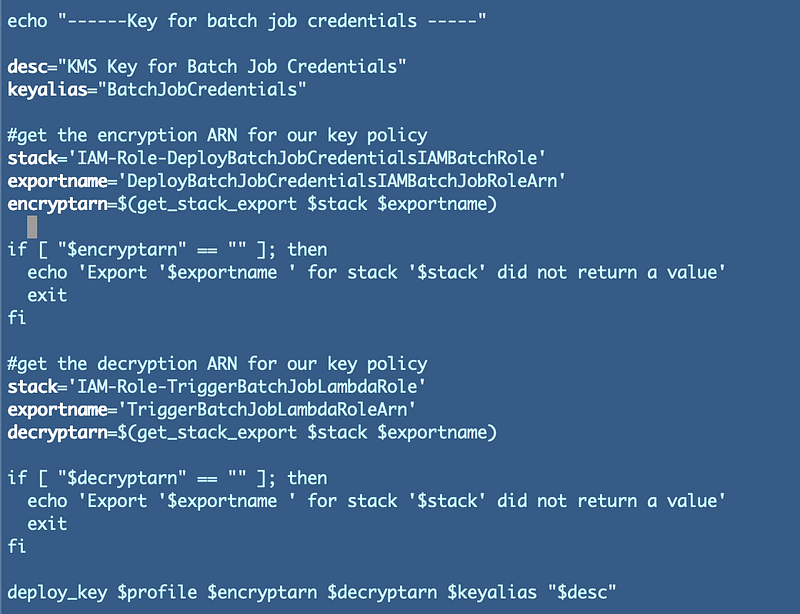
We can just copy the code that deploys our other KMS key and alter the ARNS and name.

With the help of our naming convention we can easily find the Lambda roles in our CloudFormation stack. We need the names of these two stacks for our deploy script.
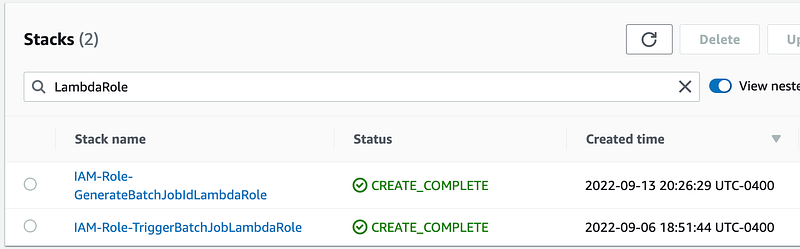
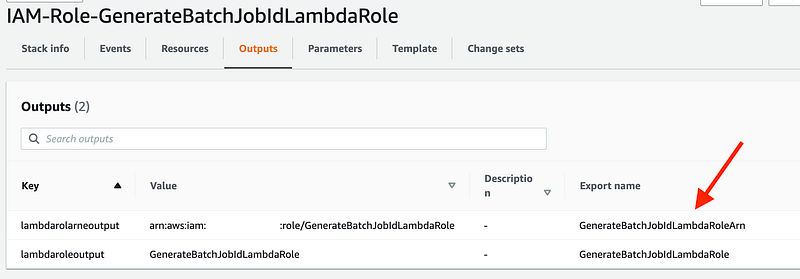
The first is our encryption role. Get the output name to use in our deploy script:
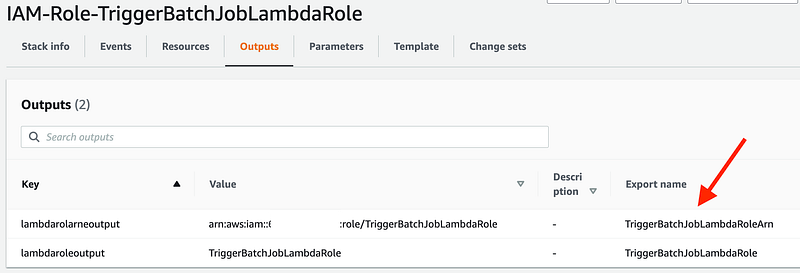
Get the output name for the decryption role:
Update the copied and pasted code for the new key in the deploy.sh script:
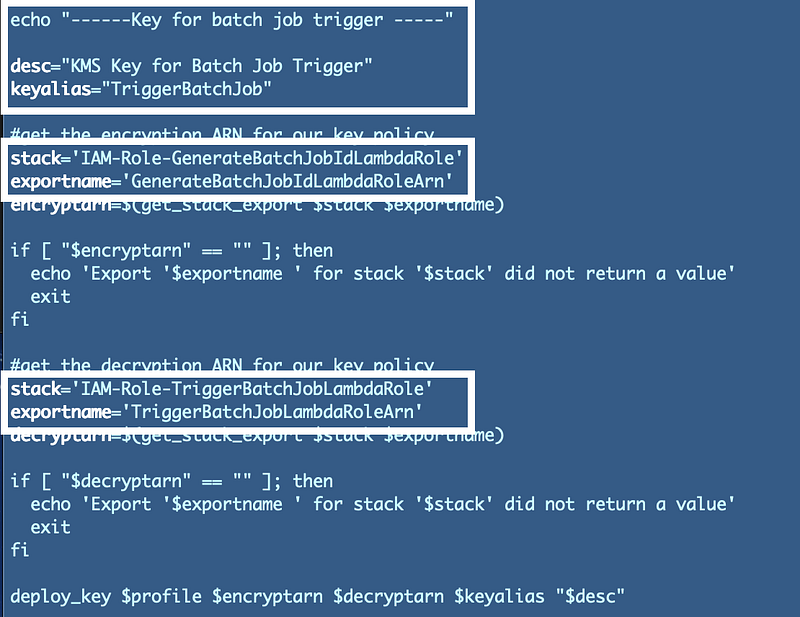
Run the deploy script in the Key folder:

./deploy.sh

Repeat the process above for the KeyAlias/deploy.sh script. Copy the code for the existing alias and edit it to work for the new alias.
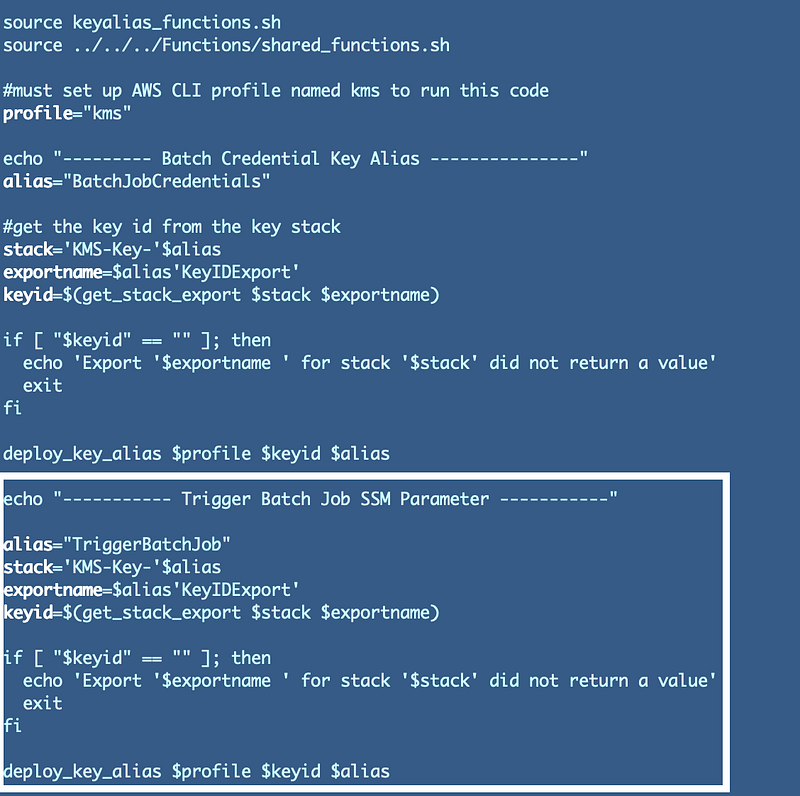
Add the KMS key to the code that creates the SSM Parameter

Return to our Lambda function code from the last post.

Recall from the put_parameter documentation how we add a KeyId.
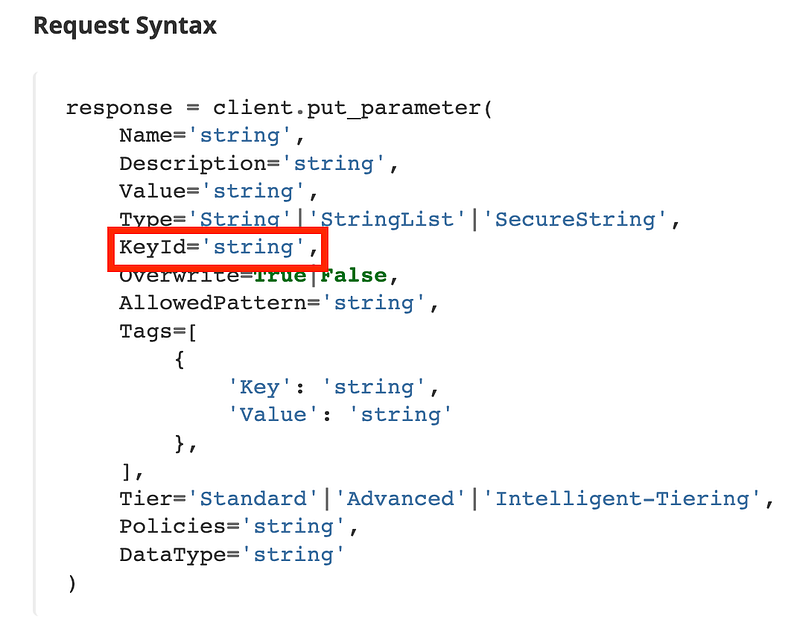
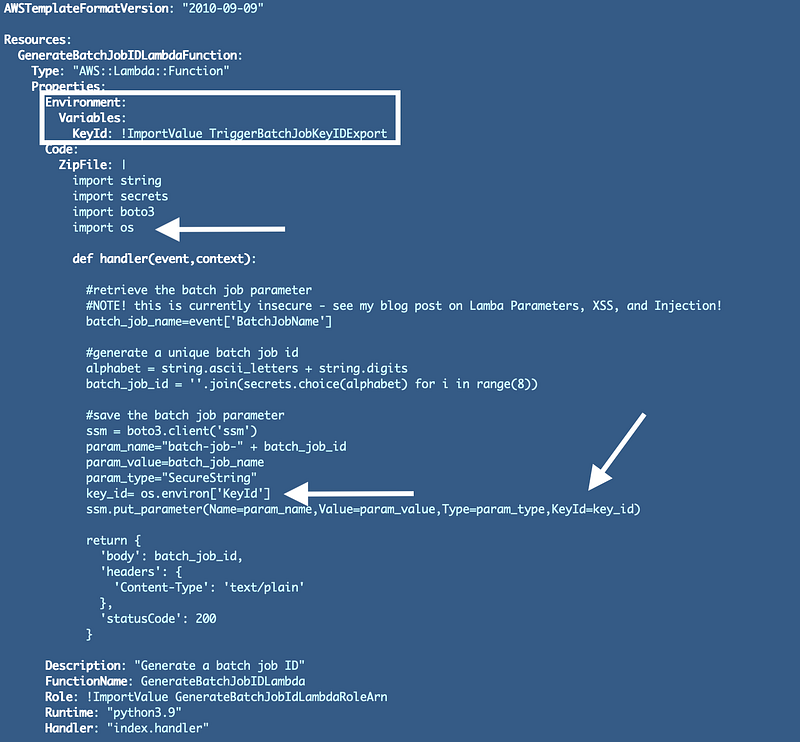
We need to edit the line of Boto3 Python code in the CloudFormation script that creates the parameter and add the KMS Key ID. Recall that you can get the KMS Key ID from the CloudFormation stack outputs or look it up in the KMS console.

We could hardcode this key ID into our code, but what’s the problem with that?

Later when we want to deploy our code to Dev, QA, and Prod environments we’d have to alter the code to deploy it. Even id I wanted to share my code on GitHub I’d have to hardcode and checkin my KMS key ID and then the code would not work in your environment. If you find that you have to alter code to deploy an application, the deployment for the application is not implemented correctly. You should really fix that.

In our case, we can retrieve it from the output of the KMS Key stack we just created and insert it into our code. Though I warn customers about unencrypted environment variables in Lambda functions in this case we would be creating an encryption key for the Lambda function to encrypt the the ID of another KMS key. I’m still thinking it over but for the moment I’m going to just add the key ID to an environment variable and reference it in the code.

You can see where I added the environment variables below, per the Lambda CloudFormation documentation, and how I get the value from the environment variable when the code executes. I also need to import the os package.
Re-deploy your Lambda code. Test your Lambda Function.

Inconsistent KMS implementations across AWS Services

Here’s where it gets interesting……We get the following error:

If you recall when we implemented this functionality with AWS Secrets manager we had to add Encrypt permissions to both the encryption and decryption ARNs in our policy.

Odd, but OK. Somehow explained away by envelope encryption in some places. However, now I’m not so sure about that explanation given that two similar services handle the same scenario differently.

Not only that I went on to try to solve the problem by switching out the action when using AWS Secrets manager as follows and hit other inconsistencies.

First the easy part.

An If statement for an IAM Policy Action based on a Condition

First of all we we need to know which service we’re deploying the key for so I added a new parameter to indicate the service:
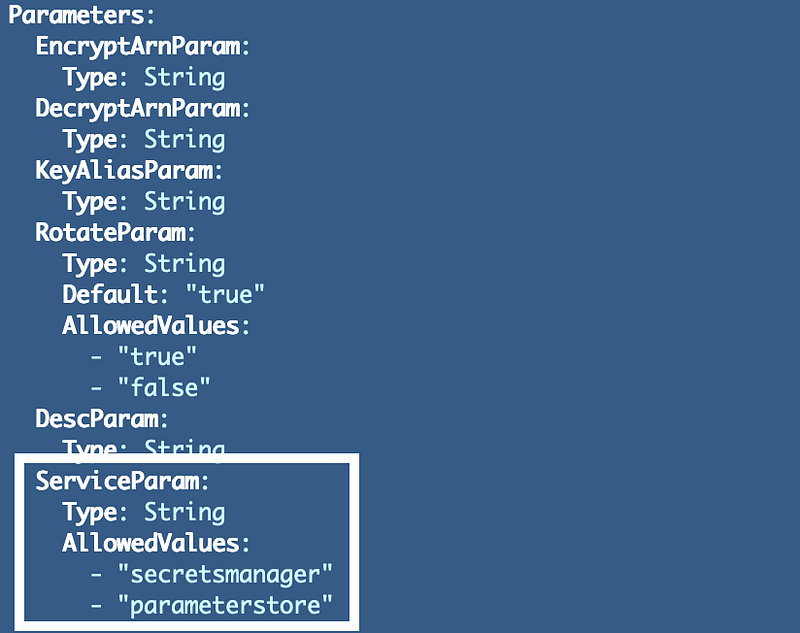
I want to use the CloudFormation if function. It changes the value included in a template based on whether another value is true or false.

Our service name is not a true or false value, so we have to use one other CloudFormation construct before our if statement called a condition (not to be confused with IAM policy conditions). We will need to add a Conditions section to the template similar to Parameters, Resources, Mappings, and Outputs and define our conditions.

Our condition will evaluate the following:

If the services is not Secrets Manager then the value is true, otherwise it is false.

or in CloudFormation syntax:

Then we can use an if statement to change the action in our policy if it’s Secrets Manager:

Change the deploy script to pass in the service parameter. Don’t add it to the end of the list. The key description parameter has spaces and issues that are not fully resolved at the time of this writing so we want the key description to be the last parameter.

Ad the new service name parameter as the second to last parameter we pass into the deploy_key() function in our kms_functions.sh file.

Then add the parameter to the deploy_key function.
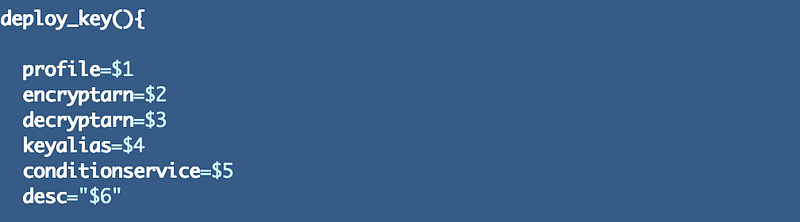
Note that I altered the parameters in this file to use the global add_parameter function I wrote about in a prior post:

Deploy the keys using the deploy script in the Key folder.

./deploy.sh

Check to see that the two key policies have the correction action.

Yes. Depending on which service is passed in to the parameter, the action will be Decrypt or Encrypt.

Limiting a key to use with Parameter Store — not possible

As it turns out, there is additional inconsistency in the way that Secrets Manager and System Manager Parameter Store interact with KMS.

I thought we could simply alter this condition to the appropriate service.

I changed the condition to reference the service:

Test…no joy.

When I tested the above, I got an error stating that the IAM Policy for my role did not have the PutParameter permission. Well, it does…so that error message was misleading.

But I ended up basically removing the resource restriction as follows temporarily to see if this resolved the problem.
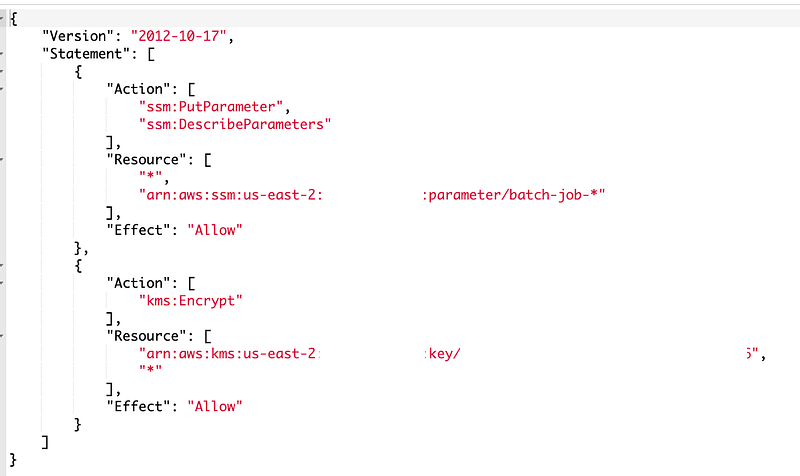
After doing that, I was back to the original error above in our post. It says that the resource policy on the key does not allow the Lambda role to encrypt using the KMS key. That would be our Key Policy. That also is a misleading error message because the permission for that action exists, but we have another problem. I suspect it is the condition in the policy.

Over to CloudTrail. Let’s see what the error messages report.

The error message for the PutParameter call isn’t that helpful:

Here’s the error message we get from the attempt to Encrypt the SSM Parameter with the KMS key — this is the one that gets reported in the Lambda function.

About the condition…

I don’t see the “ViaService” attribute in this request so I guess that is not an option with AWS ParameterStore.

Test the policy without the condition to prove our theory

First I removed the condition to ensure that was the problem. It was. My parameter deployed and when I tried to view the value I got a KMS error as expected. My current user does not have permissions to decrypt values created with that key. If I need to view the key I would need to assume the role that has permission to decrypt.
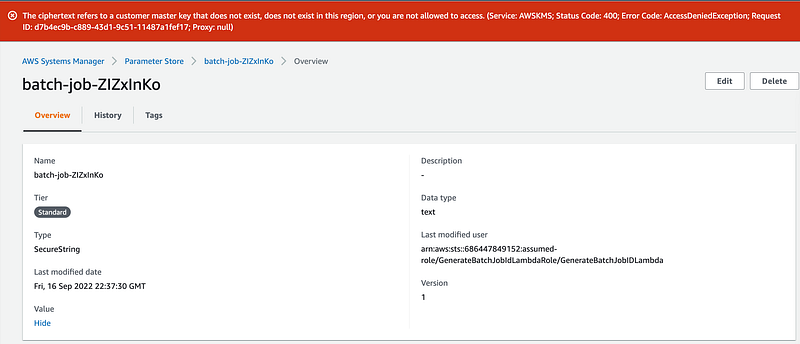
I restore the batch job policy to its original form and tested my Lambda function again and it still worked.

Conditionally adding a Policy Condition in CloudFormation

So now my quandary is how am I going to remove that resource policy condition? I tried many variations and iterations to find syntax that works and would allow me to conditionally. Wow. I couldn’t find anything anywhere about how to do this so it was a trial and error process. After many iterations I came up with this:
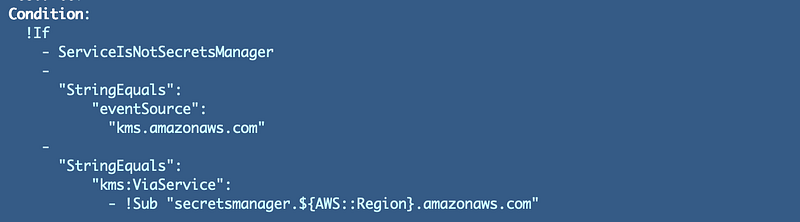
Looking it it after the fact, it seems so obvious, but trust me it wasn’t.

  • I couldn’t use a CloudFormation Condition on the Policy Condition because the Policy Condition doesn’t seem to really be part of the CloudFormation structure (I guess).
  • I couldn’t use the AWS::NoValue Pseudo Parameter because once I added the Condition: statement I had to provide something to it.
  • The kms:ViaService attribute wasn’t in my key request, so I just found something that was and used that.
  • Trying to use two if statements — one for the second line and one for the third line didn’t work. I got the error: unhashable type: ‘dict_node’
  • I couldn’t use mappings since as discussed in an earlier post we can’t use pseudo parameters in mappings.

Anyway that worked, the policy updated, and my Lambda Function worked again after that change.

One more change —don’t print out sensitive values unnecessarily

One more change. Our Lambda code prints out the value of the batch job ID. That was only for testing and is unnecessary so I removed it.

We are still not done securing our Lambda function or its interaction with AWS SSM Parameter store. Follow for more.

Follow for updates.

Teri Radichel | © 2nd Sight Lab 2022

About Teri Radichel:
~~~~~~~~~~~~~~~~~~~~
⭐️ Author: Cybersecurity Books
⭐️ Presentations: Presentations by Teri Radichel
⭐️ Recognition: SANS Award, AWS Security Hero, IANS Faculty
⭐️ Certifications: SANS ~ GSE 240
⭐️ Education: BA Business, Master of Software Engineering, Master of Infosec
⭐️ Company: Penetration Tests, Assessments, Phone Consulting ~ 2nd Sight Lab
Need Help With Cybersecurity, Cloud, or Application Security?
~~~~~~~~~~~~~~~~~~~~~~~~~~~~~~~~~~~~~~~~~~~~~~~~~~~~~~~~~~~~~
🔒 Request a penetration test or security assessment
🔒 Schedule a consulting call
🔒 Cybersecurity Speaker for Presentation
Follow for more stories like this:
~~~~~~~~~~~~~~~~~~~~~~~~~~~~~~~~~~~~~~~~~~~~~~~~~~~~~~~~~~~~~ 
❤️ Sign Up my Medium Email List
❤️ Twitter: @teriradichel
❤️ LinkedIn: https://www.linkedin.com/in/teriradichel
❤️ Mastodon: @teriradichel@infosec.exchange
❤️ Facebook: 2nd Sight Lab
❤️ YouTube: @2ndsightlab

Ssm
Parameter Store
AWS
Systems Manager
Lambda
Recommended from ReadMedium
