
Add These Two Extensions to Chrome to Make Writing Error-free.
What do successful writers do to make their writing polished, grammatically correct, and easy to understand?

You know quality is key to every writing piece. What do successful writers do to make their writing polished, grammatically correct, and easy to understand?
They proofread it until they feel it’s not ready to publish. They pass their pieces to several writing tools that make sure they're written correctly.
Mistakes and errors are humanly possible, and we cannot deny this fact. All writers leverage technology to make their writing better.
Technology and humans, together, can perform better.
Are you a blogger on Medium? Adds these Chrome extensions to make your writing free from grammar errors.
Keep patient; you can thank me later.😉
Let’s uncover:
#1. Grammarly
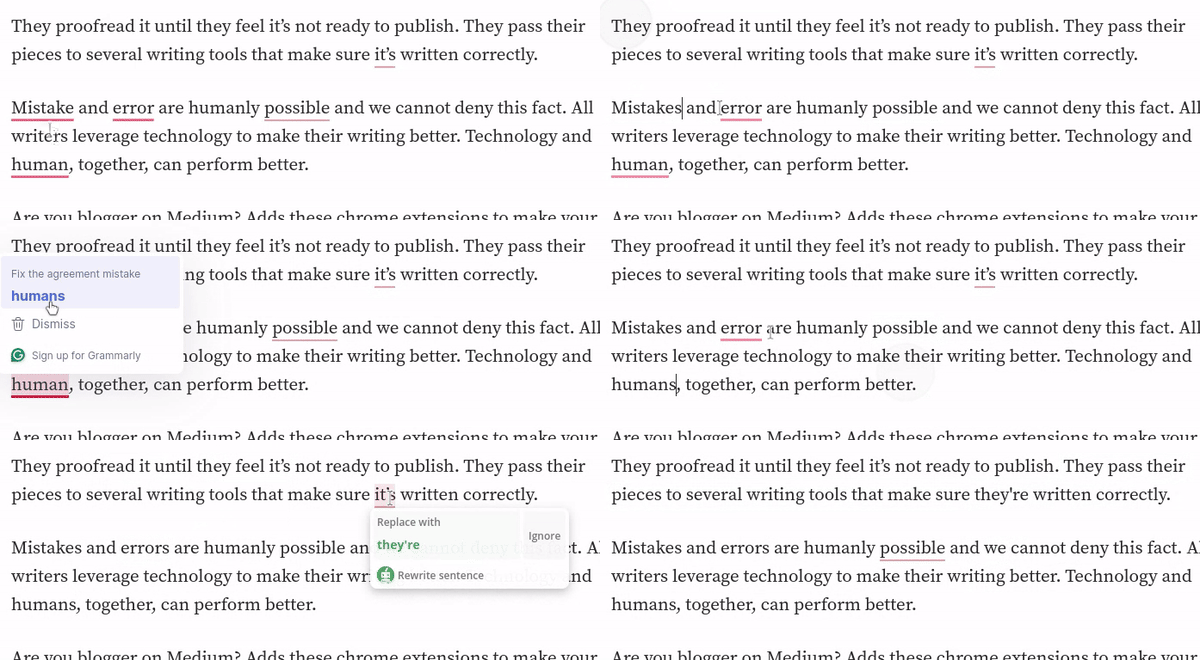
I think nobody is unfamiliar with Grammarly, and it’s the most known tool among writers. If you haven’t used the Grammarly Chrome extension before, you should now.
Why? Because it makes it easy for you to directly remove grammatical errors while being outside of Grammarly. I mean, you do not need to open your Grammarly account for everything.
- You can edit your Medium article directly from the Medium’s screen.
I don't write my Medium stories on Grammarly. I am more comfortable writing directly on Medium.

#2. QuillBot
QuillBot is king. It's far better than Grammarly because it removes grammar errors phenomenally, while Grammarly sometimes does robotic work. Grammarly, always turn your passive voice into an active voice, even if doesn’t make sense. Plus, Grammarly doesn’t keenly clean the text from grammar errors. QuillBot even suggests where to use; dot, comma, semicolon, colon, hyphen, etc; it also corrects the whole sentence phenomenally.
Let me tell you a secret:
- You can also rephrase your text. It is rephrased like a human.
- It is best for academic writing tasks as you can do citations, formatting, and many more.
- It does its job humanly and phenomenally
Flashback: Once I cleaned up my article’s grammar errors with QuillBot and keenly proofread myself as well, my article got curated on Medium. However, the curation was stopped later. QuillBot is amazing, just try it once.
The Chrome extension is free; you can add it from Google at no cost.
Bottom Line
There are several other grammar tools as well, like ProWritingAid, but its Chrome extension is not available. QuillBot is the best of all the grammar tools that I know. It’s all in one package.
Would you like to suggest your favourite grammar tool?
© Mahnoor Chaudhry
Do you enjoy reading and find it helpful? Yes? Then, bother supporting.
Subscribe to our newsletter to directly get all stories in your email at no cost.
More from the Author:


