
Add a Policy to an AWS VPC Endpoint
ACM.109 Combining IAM and network controls to improve cloud security defenses
Part of my series on Automating Cybersecurity Metrics. Network Security. The Code.
Free Content on Jobs in Cybersecurity | Sign up for the Email List
In a prior post we created an AWS VPC Endpoint to use with CloudFormation.
Then we valiated that the traffic traverses a private route.
VPC Endpoint Policy
Now let’s add a policy to our VPC endpoint. A policy on a VCP endpoint is an IAM control. It bases access on the identity of the principal that wants to access the endpoint, rather than the resource’s address on the network.
Principals for our VPC Endpoint Policy
Who do we want to allow to access our CloudFormation endpoint? We have a number of roles, groups, and users that deploy different aspects of our infrastructure in our cloud environment in our current implementation.
Long term, I want to have different roles operate out of different accounts. For now I am going to grant the following roles permission to access the VPC Endpoint, and thereby access CloudFormation to deploy applicaitons using developer credentials:
- AppDeployRole
There are some cross-region limitations with VPC EndPoints but I don’t see limitations with cross-account access in the documentation. We’ll deal with any related problems with this approach when I get around to implementing all that.
Actions in VPC Endpoint Policies
What sort of restrictions might we want to make in regards to actions on the endpoint policy? The documentation doesn’t really say anything about endpoint policy actions.
We can get some hints on what is possible by looking at sample endpoint policies for the API gateway:
We are using our policy for CloudFormation commands that routed to the VPC endpoint for CloudFormation, so I presume the policy applies only to those related commands. I presume other AWS actions taken for some other service rather than CloudFormation would not be affected even if we deny them in our policy, But the documentation is not clear on that point. For now, we will create a policy that gives our roles the same CloudFormation permission that exists in the corresponding IAM Policy.
Who will deploy our VPC endpoint policies?
It does not appear that the policy document can be deployed separately from the VPC endpoint, so our network role will deploy the Policy Document along with the endpoint. The policy document is a resource policy on the endpoint so this kind of makes sense. The network team manages resource policies for network resources.
What is interesting about this approach:
- Now network teams will be handling identity related resource policies, not just network configurations.
- If you want to limit what CloudFormation stacks people can edit, your IAM and network team need to coordinate so both IAM and VPC Endpoint policies align and provide the required permissions.
- With this approach you have a kind of multi-factor policy. Two people on two different teams have to make a change to give someone access to a new resource.
- This is good for security, but you’ll also want to make sure you have this automated and a process for quickly adjusting these policies as needed. If this were to become a road block many executives would order this out of existence or give all the permission to one team to get it done faster.
Set it up, test it, and plan for change, but it is a very good approach to limit mistakes and inadvertent policy changes that grant too much access. Let’s say an attacker stole your IAM administrator’s credentials. They still wouldn’t be able to deploy to stacks they should not since changing the IAM Policy alone would not grant them access.
Our app deployment role restricts actions to certain stacks with particular names, however they do not prevent someone from deploying a resource they shouldn’t within those stacks. You’re still dependent on the IAM Policies for that. But the attacker could not delete and redeploy a stack with a different name such as one that started with Network or IAM so they could not affect existing resources.
Create a VPC Endpoint Policy
It is unfortunate that the VPC Endpoint documentation does not link to an actual policy document structure. Here’s what exists in the documentation for the PolicyDocument property:
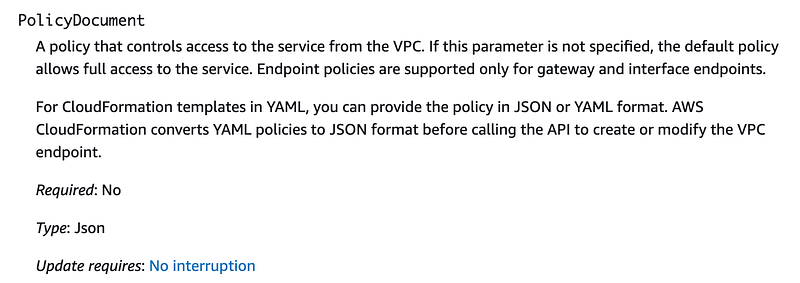
Luckily we can scroll to the bottom to find an example:
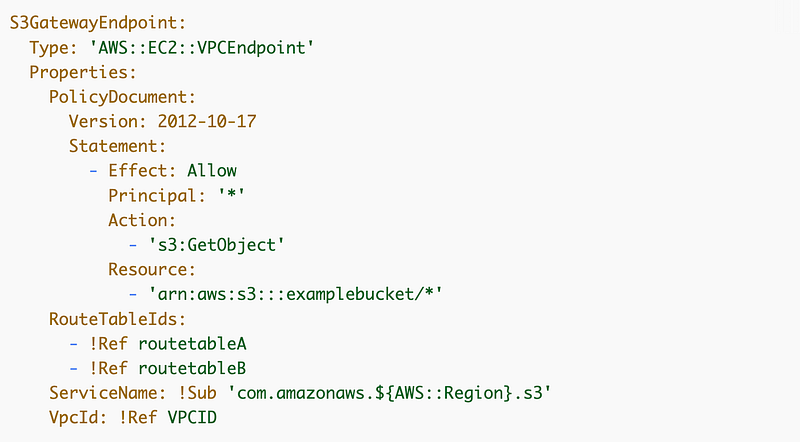
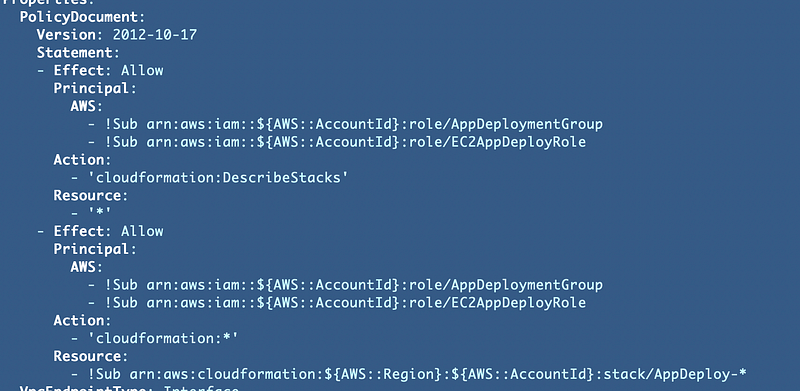
Looks like a standard policy. I can basically copy the relevant portion from the IAM roles and add it to my policy document. Note that I added permission for this role to describe any stack because otherwise the user would need to add a filter to the describe stacks action every time. You may or may not want to do that in your environment.
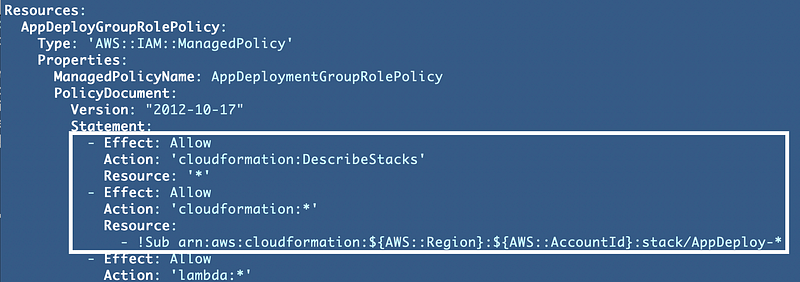
Add the PolicyDocument property to the VPC Endpoint.
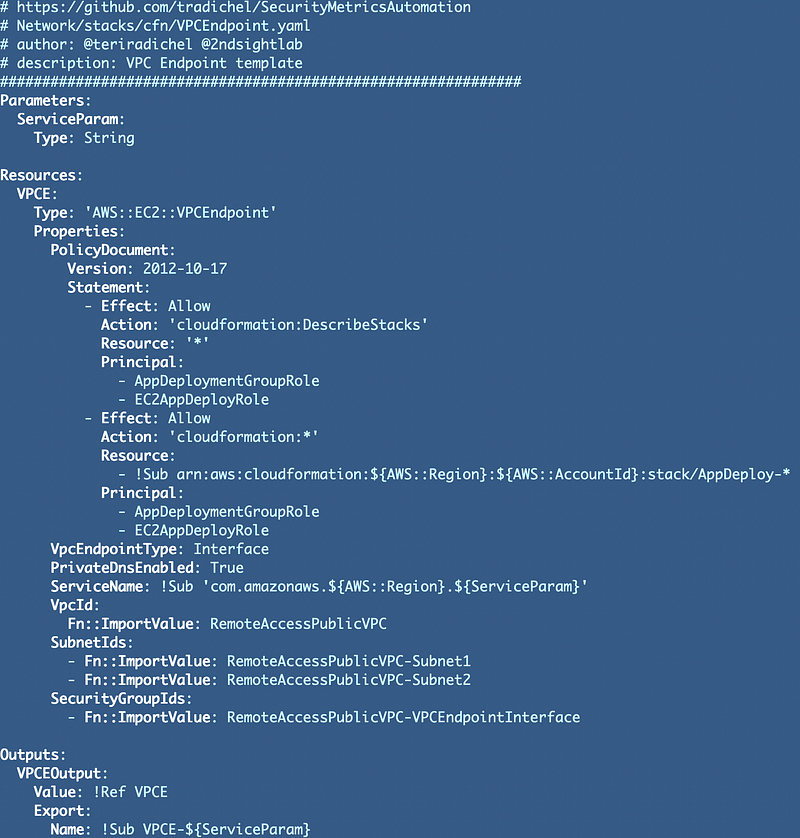
The unfortunate thing about the above is that it our template is no longer generic. We have a PolicyDocument property specific to our endpoint. It has two statements. We could simplify that down to one single simpler either more restrictive or less restrictive statement.It would be better of AWS would just let you create the policy document in a separate stack and reference the output for it in CloudFormation.Redeploy the VPC endpoint.
Well, that didn’t work. The error message doesn’t tell us what is wrong with our policy so it doesn’t help us too much.
Ah, yes, forgot to put AWS: in front of the Principal name, and in fact it should be an ARN.

As a side note while trying to resolve the above problem I found these examples of using an organization ID in a VPC endpoint policy:
Finally — this deploys:
I wrote about how AWS could provide nicer error messages for PolicyDocuments here:
Test the VPC Endpoint
Login into the Developer VM with the role profile assigned to it as we did in this post:
https://readmedium.com/creating-a-role-for-an-ec2-instance-with-cloudformation-b699f39c0e0c
Run the following command to ensure the role assigned to the EC2 instance can still describe stacks:
aws cloudformation describe-stacksThat works.
Now what did we allow this role to do in our account? One thing the AppDeploy role is allowed to do is deploy a developer VM but we don’t want to redeploy the VM we are using. We also allowed this role to deploy Lambda functions. Let’s try to redeploy our Lambda function created in the following post and verify that works.
We need to install git again and while we’re at it update this instance and clone our GitHub repo.
sudo yum update -y
sudo yum install git -y
git clone https://github.com/tradichel/SecurityMetricsAutomation.git
Next what I had to do is move the code to deploy the lambda to a separate script because I also have the AppSec profile in the lambda deploy.sh script. I have a plan to fix that later. The code to deploy my Lambda function:
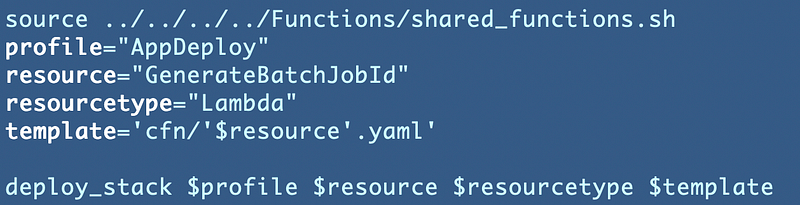
The other problem is that my code needs a profile named “AppDeploy” to deploy the Lambda code. I am using the AWS default profile which is associated with the role that is assigned to the EC2 instance.
I needed to add a new role profile and reference the default profile credentials like this in my ~/.aws/config file:
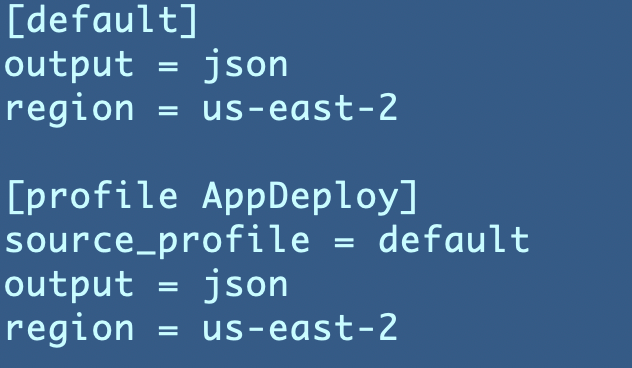
Looks like it works.

Test not only what is allowed, but what is not allowed
To complete testing, you would also need to test the following to make sure you have an effective policy:
- Test deploying a CloudFormation stack without “AppDeploy” in the name.
- Test a CloudFormation deployment with credentials not allowed by the VPC Endpoint.
Maybe you can think of some other bypass cases that you can test to ensure your policies only allow what they should.
In the next post we’re going to take a closer look at the AWS traffic that is still not maintained within our private network.
If you are having problems with your VPC Endpoint check out these posts:
Follow for updates.
Teri Radichel | © 2nd Sight Lab 2022
About Teri Radichel:
~~~~~~~~~~~~~~~~~~~~
⭐️ Author: Cybersecurity Books
⭐️ Presentations: Presentations by Teri Radichel
⭐️ Recognition: SANS Award, AWS Security Hero, IANS Faculty
⭐️ Certifications: SANS ~ GSE 240
⭐️ Education: BA Business, Master of Software Engineering, Master of Infosec
⭐️ Company: Penetration Tests, Assessments, Phone Consulting ~ 2nd Sight Lab
Need Help With Cybersecurity, Cloud, or Application Security?
~~~~~~~~~~~~~~~~~~~~~~~~~~~~~~~~~~~~~~~~~~~~~~~~~~~~~~~~~~~~~
🔒 Request a penetration test or security assessment
🔒 Schedule a consulting call
🔒 Cybersecurity Speaker for PresentationFollow for more stories like this:
~~~~~~~~~~~~~~~~~~~~~~~~~~~~~~~~~~~~~~~~~~~~~~~~~~~~~~~~~~~~~
❤️ Sign Up my Medium Email List
❤️ Twitter: @teriradichel
❤️ LinkedIn: https://www.linkedin.com/in/teriradichel
❤️ Mastodon: @teriradichel@infosec.exchange
❤️ Facebook: 2nd Sight Lab
❤️ YouTube: @2ndsightlab