avatarAndrew Crider

Free AI web copilot to create summaries, insights and extended knowledge, download it at here

2174

Abstract

the other lights in the apartment. So I came up with a plan to reduce that issue:</p><figure id="0b55"><img src="https://cdn-images-1.readmedium.com/v2/resize:fit:800/1*Y3KnZ7XVvKo2MyULHArYWw.jpeg"><figcaption>Original Plan for Ambient Lighting</figcaption></figure><p id="530c">By planning out what I wanted to do, I was able to identify everything that I wanted to build out. This allowed me to make sure I had all the components that I needed and had identified all the tasks.</p><h2 id="b89b">Build</h2><p id="8445">With all my tasks laid out, I set to work with Home Assistant:</p><ol><li>Home Assistant registers the initial button push and sets a helper variable</li><li>Home Assistant dims the lights that are not in the current Hue Entertainment Area</li><li>When the button is pressed again, Home Assistant changes the lights based on the time.</li><li>Alexa gives me a little voice notification.</li></ol><figure id="fab8"><img src="https://cdn-images-1.readmedium.com/v2/resize:fit:800/1*aa8jhRcKmjysMuvbUzV6og.jpeg"><figcaption></figcaption></figure><figure id="ae25"><img src="https://cdn-images-1.readmedium.com/v2/resize:fit:800/1*Zr2wq47_ysfxahTcJ7nZ-Q.jpeg"><figcaption></figcaption></figure><figure id="11c9"><img src="https://cdn-images-1.readmedium.com/v2/resize:fit:800/1*NQWVOkem7OL62GPK6XtrPA.jpeg"><figcaption>Activating The Light Scene, Changing Lights Based on Day, and Alexa Notification</figcaption></figure><h2 id="e1d5">Review</h2><p id="1406">I was enjoying my immersive gaming experience, but it wasn’t quite complete.</p><p id="e54b">I noticed the following issues:</p><ol><li>All lights in the apartment would change at odd times — <i>this was being caused by inadvertent button pushes</i></li><li>I was losing track of time within the immersive experience</li><li>Changing the lights based on the time of day needed to be duplicated across many different automations</li></ol><p id="754b">After my review, I now have a new plan:</p><figure id="6435"><img src="https://cdn-images-1.readmedium.com/v2/resize:fit:800/1*GcI7dUWe1jZ3FpkoqRoT3g.jpeg"><figcaption>Post Review Plan</figcaption></figure><h2 id="e535">Iterate</h2><p id="a5fd">So n

Options

ow I have a new list of tasks (showcased in Dark Blue in the above plan)</p><ul><li><b>Prevent inadvertent button pushes </b><i>I moved the Button from under our coffee table to under a shelf in our bookcase</i>.</li></ul><p id="d970" type="7">Not everything needs to be automated!</p><ul><li><b>I was losing track of time during my game sessions</b><i>I created and implemented a timer that had an audio and visual component</i></li></ul><figure id="f570"><img src="https://cdn-images-1.readmedium.com/v2/resize:fit:800/1*Pt6pqCtH382Bu65_rHwvhQ.jpeg"><figcaption></figcaption></figure><figure id="bb8d"><img src="https://cdn-images-1.readmedium.com/v2/resize:fit:800/1*ki8nDaOL4LMqODXswzLpPg.jpeg"><figcaption>Timers & Alexa Notification</figcaption></figure><ul><li><b>Duplicating time-based light automations — </b><i>I broke the automation into multiple parts so that I can call the light reset from other automations.</i></li></ul><p id="3238">I’ve already enhanced my Pomodoro Timer with the time-based light adjustment so at the end of my work sessions my lights change.</p><div id="2092" class="link-block"> <a href="https://readmedium.com/automate-your-pomodoro-process-today-2ed62d063c33"> <div> <div> <h2>Automate your Pomodoro Process Today</h2> <div><h3>Automate your Pomodoro Process Today with Amazon Alexa, Google Assistant, or Home Assistant.</h3></div> <div><p>medium.com</p></div> </div> <div> <div style="background-image: url(https://miro.readmedium.com/v2/resize:fit:320/0*1tgtVUyoYTlfA3qy.jpg)"></div> </div> </div> </a> </div><p id="a0fd">Automating your environment based on stimuli is the easiest and most enjoyable part of home automation. Approaching your home automation recursively helps to change your mindset.</p><p id="f554" type="7">You are not turning on lights automatically, you are evolving your home.</p><p id="5fe6">Building cycles into your process will allow you to grow your automations so that they get better and more cohesive.</p></article></body>

Recursive Automation

A story of Ambient Lights, Automation, and a Happy Partner

Recursively Enhancing your Home Automation

A couple of weeks ago I created an automation to change the light in my living room for when I played video games.

Lights in my apartment dimmed, ambient lights came up around the television, with only a push of a button!

When I was finished playing, I pushed the button again, and depending on the time of day, my lights returned to their normal status. Alexa also thanked me for playing.

But there were some small nagging issues:

  • My partner was accidentally hitting the button and changing the lights in the middle of the day.
  • I was losing track of time in my gameplay sessions, playing longer than I had intended.

In a previous article, I talked about how to approach our home automation.

By applying a recursive approach, we follow this cycle:
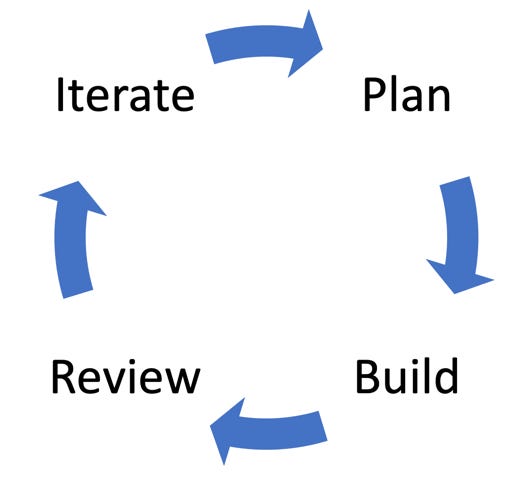
Recursive Automation Cycle

Plan

When I first started playing my video game, I turned on the ambient lights around my TV. However, the lights were washed out by the other lights in the apartment. So I came up with a plan to reduce that issue:
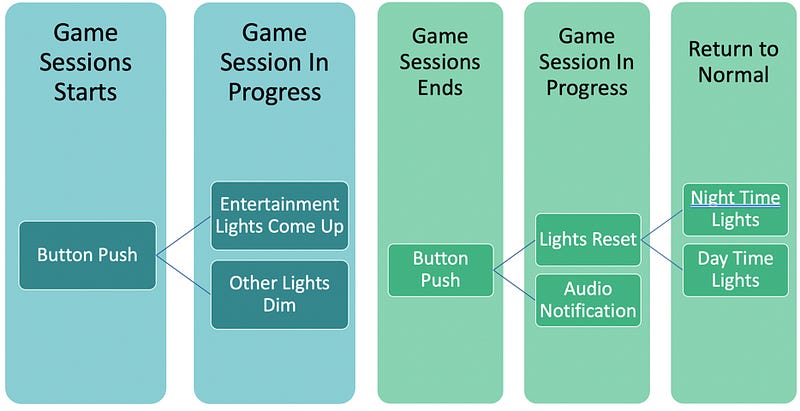
Original Plan for Ambient Lighting

By planning out what I wanted to do, I was able to identify everything that I wanted to build out. This allowed me to make sure I had all the components that I needed and had identified all the tasks.

Build

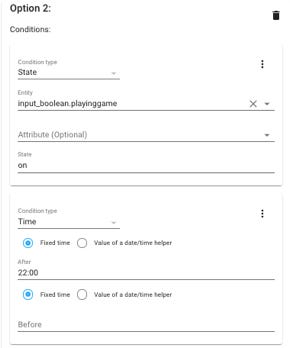
With all my tasks laid out, I set to work with Home Assistant:

  1. Home Assistant registers the initial button push and sets a helper variable
  2. Home Assistant dims the lights that are not in the current Hue Entertainment Area
  3. When the button is pressed again, Home Assistant changes the lights based on the time.
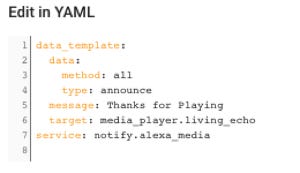
  4. Alexa gives me a little voice notification.
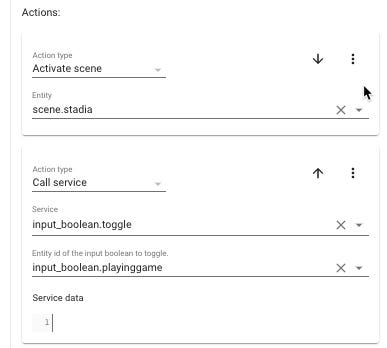
Activating The Light Scene, Changing Lights Based on Day, and Alexa Notification

Review

I was enjoying my immersive gaming experience, but it wasn’t quite complete.

I noticed the following issues:

  1. All lights in the apartment would change at odd times — this was being caused by inadvertent button pushes
  2. I was losing track of time within the immersive experience
  3. Changing the lights based on the time of day needed to be duplicated across many different automations

After my review, I now have a new plan:
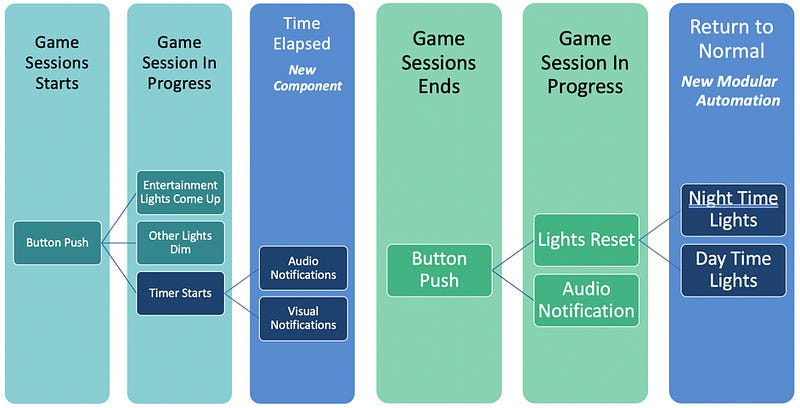
Post Review Plan

Iterate

So now I have a new list of tasks (showcased in Dark Blue in the above plan)

  • Prevent inadvertent button pushes I moved the Button from under our coffee table to under a shelf in our bookcase.

Not everything needs to be automated!

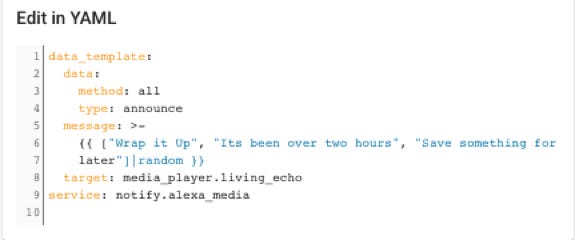
  • I was losing track of time during my game sessionsI created and implemented a timer that had an audio and visual component
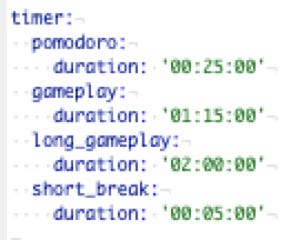
Timers & Alexa Notification
  • Duplicating time-based light automations — I broke the automation into multiple parts so that I can call the light reset from other automations.

I’ve already enhanced my Pomodoro Timer with the time-based light adjustment so at the end of my work sessions my lights change.

Automating your environment based on stimuli is the easiest and most enjoyable part of home automation. Approaching your home automation recursively helps to change your mindset.

You are not turning on lights automatically, you are evolving your home.

Building cycles into your process will allow you to grow your automations so that they get better and more cohesive.

Alexa
Home Assistant
Phillips Hue
Home Automation
Agile
Recommended from ReadMedium