
Create a Smart Study Buddy Using OpenAI, LangChain, and Streamlit
A step-by-step guide to creating a smart study buddy using OpenAI, LangChain and Streamlit.
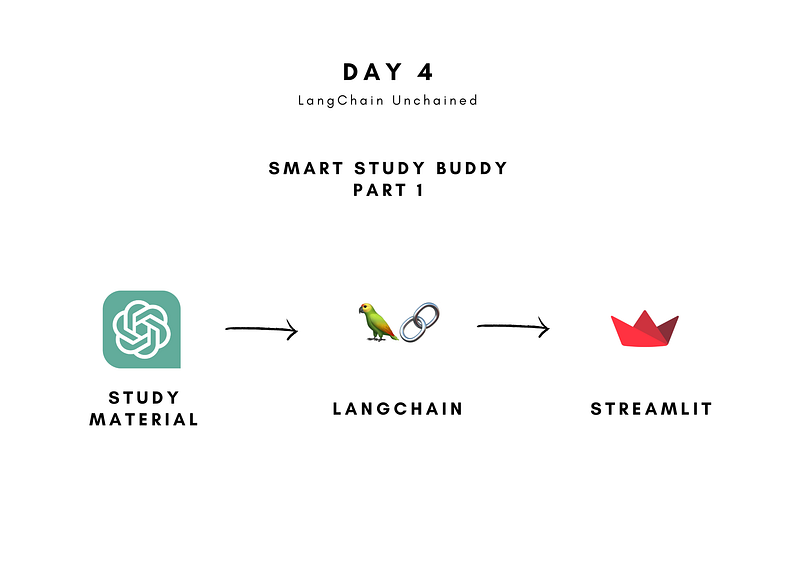
What you’ll be building
Have you ever wanted to create an application similar to ChatGPT but felt it was too difficult? Don’t worry, because this tutorial will show you how to do it easily, even with just basic Python knowledge!
We’ll be building a Smart Study Buddy application using the power of OpenAI’s GPT, harnessed through a user-friendly Python Framework called LangChain. With this Smart Study Buddy, you’ll be able to input your study material and get practice questions and answers as output, all thanks to the advanced AI capabilities of Large Language Models.
GitHub Repo:
What You’ll Learn
Throughout this tutorial, we’ll delve into LangChain’s features for seamlessly integrating large language models into your applications. By the end, you’ll have worked with the following essential concepts:
- PDF Loader: We’ll explore how to load study material from PDFs and make it accessible for AI processing.
- Text splitters: You’ll discover how to split text into smaller chunks to efficiently work with large language models.
- Vector Database: Learn to use vector databases, like Chroma, for efficient text retrieval and question answering.
- RetrievalQA Chain: Uncover the magic of the Retrieval Question Answer Chain, which leverages vector databases for answering questions.
- Summarization Chain: Dive into the power of the Summarization Chain, perfect for generating practice questions from study material.
- Bonus: Tracking with LangSmith: Get a glimpse of the LangSmith tool for insightful model performance tracking and analysis.
With this knowledge in your toolkit, you’ll be well-equipped to build your very own applications with LangChain and OpenAI’s GPT!
Tutorial Structure:
This tutorial consists of two parts, each building upon the other to create a Smart Study Buddy:
Part 1: Constructing the LangChain Implementation
In this initial segment, we’ll delve into the world of LangChain and lay the foundation for our Smart Study Buddy. You’ll learn how to harness the capabilities of Large Language Models (LLM) using LangChain, step by step.
Part 2: Building a Clean Front-End with Streamlit
In the second part, we’ll take the Smart Study Buddy to the next level by implementing a user-friendly front-end with Streamlit. You’ll witness the power of AI come to life as we make the application visually appealing and easy to use.
Part 2: A Step-by-Step Guide to Creating a Smart Study Buddy using OpenAI, LangChain, and Streamlit
Let’s get started!
What Is LangChain?
LangChain is a framework that helps developers integrate artificial intelligence (AI) into their applications, even if they don’t have extensive coding knowledge. It simplifies the process of working with language models, which are AI systems capable of understanding and generating human-like language.
The main benefits of using LangChain are:
- Components: These are pre-built building blocks that handle the complexities of working with language models. They are designed to be easy to use and can be used independently or together with other LangChain features.
- Off-the-shelf chains: LangChain offers ready-made combinations of components called “chains” that solve specific tasks. These pre-arranged chains make it simple for developers to get started quickly without having to build everything from scratch.
Whether you need basic language model integration or want to create advanced and customized AI applications, LangChain provides the tools to make the process straightforward and efficient. It’s a great resource for anyone interested in harnessing the power of language models in their projects.
Tutorial
We’ll walk through the following three seemingly straightforward steps:
- Step 1: Load and split study material from a PDF.
- Step 2: Generating questions.
- Step 3: Generating answers.
At each step, I’ll provide you with additional insights about working with Large Language Models.
Step 0: Prerequisites
Before we start creating our application, we need to install the necessary dependencies for this project.
Do this by running the following command in your terminal:
pip install langchain tiktoken openai pypdf chromadb
For this project, we’ll be using OpenAI’s Large Language Model. In order for you to use this model, you’ll need an OpenAI API Key.
If you don’t have one yet, here’s an article on how to obtain an API key:
How to Get an OpenAI API Key for ChatGPT
Step 1: Load and split your study material
To enable the large language model to generate questions, we need to give it access to the study material. Fortunately, LangChain comes to the rescue with its versatile document loaders, making data access a breeze.
LangChain supports an array of document loaders, allowing you to load data from various sources, including:
- CSV
- Excel
- HTML
- Markdown
And that’s just the beginning! You can even work with more sophisticated loaders, such as YouTube Transcripts, Discord, Email, Dropbox, Notion, GitHub, and many more.
For detailed information about all the different types of document loaders, check out the official documentation: Document Loaders in LangChain.
Step 1.1: Load data with PyPDF Loader
We’ll start by loading the study material from a PDF using the PyPDF Loader. This handy loader leverages the PyPDF library to extract the content from the PDF and organize it into an array of documents. Each document contains the page content along with metadata, such as the page number.
Follow these simple steps to load your study material:
import from langchain.document_loaders import PyPDFLoader

# Set file path
file_path = 'files/eight.pdf'

# Load data from PDF
loader = PyPDFLoader(file_path)
data = loader.load()
After executing the code above, the data variable will hold the extracted study material, neatly organized and ready for further processing.
To optimize the large language model’s efficiency, we’ll use a text splitter to divide the data into smaller, more manageable documents. This step sets the stage for both question generation and answering.
We’ll split the data in two different ways:
- Larger chunks for question generation
- Smaller chunks for question answering
But first, let’s talk about tokens.
Tokens
A Large Language Model (LLM) makes sense of words by transforming regular sentences into numerical representations of the words. In order for it to transform these words, a sentence is split up into tokens. They can represent individual characters, words, or subwords. A helpful rule of thumb is that one token generally corresponds to ~4 characters of text for common English text. This translates to roughly ¾ of a word (so 100 tokens ~= 75 words).
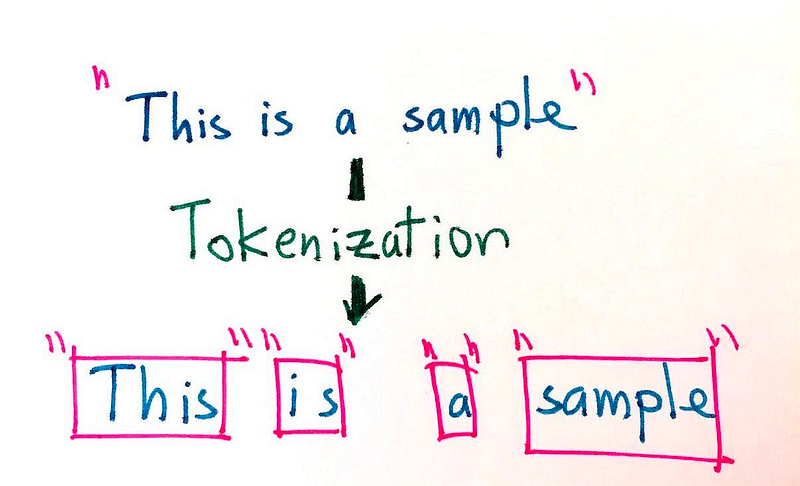
There are two reasons why we need to split our input text into smaller (token) chunks:
- Current models have a limited token input capacity. GPT 3.5 initially had a maximum token capacity of approximately 4,000 tokens. The model we’ll be using today, gpt-3.5-turbo-16k, has a maximum input of 16,000 tokens.
- Each processed token costs a certain amount.
Step 1.2: Split text for question generation
In step 2, you’ll be using a LangChain Summarization Chain in order for the model to generate questions.
We want the LLM to have as much contextual awareness and perform as few operations as possible.
You can do this by increasing the size of the chunks. With the (relatively) new GPT-3.5-Turbo-16k model, you can make these chunks quite large (16k tokens, so approximately 12,000 words!).
When we loaded the data using the PDF Loader, it was automatically divided into pages, making it challenging to create these large chunks directly.
A simple preprocessing step comes to the rescue.
# Combine text from Document into one string for question generation
text_question_gen = ''
for page in data:
    text_question_gen += page.page_content
By executing the code above, all the text from the PDF will be combined into the text_question_gen variable, laying the foundation for generating questions.
I’m using the TokenTextSplitter instead of a character text splitter to get a direct feel for how large the chunks will be.
First, we’ll initialize the text splitter with a chunk size of 10,000 and a chunk overlap of 200.
Chunk size is the maximum number of tokens that can be in one chunk
Chunk overlap is the amount of overlap that occurs for each chunk.
Using chunk overlap is necessary for the model to not lose any context.
The chunks need to be transformed into Documents for later use.
from langchain.text_splitter import TokenTextSplitter
from langchain.docstore.document import Document

# Initialize Text Splitter for question generation
text_splitter_question_gen = TokenTextSplitter(model_name="gpt-3.5-turbo-16k", chunk_size=10000, chunk_overlap=200)

# Split text into chunks for question generation
text_chunks_question_gen = text_splitter_question_gen.split_text(text_question_gen)

# Convert chunks into Documents for question generation
docs_question_gen = [Document(page_content=t) for t in text_chunks_question_gen]
Step 1.3: Split text for question answering
In Step 3 of our tutorial, we’ll use a Retrieval Question Answer Chain to answer the questions we generated.
To achieve cost efficiency, we’ll split the text into smaller chunks.
# Initialize Text Splitter for answer generation
text_splitter_answer_gen = TokenTextSplitter(model_name="gpt-3.5-turbo-16k", chunk_size=1000, chunk_overlap=100)

# Split documents into chunks for answer generation
docs_answer_gen = text_splitter_answer_gen.split_documents(docs_question_gen)
By setting the chunk_size to 1000 and the chunk_overlap to 100, we ensure that the Large Language Model (LLM) works effectively while minimizing resource usage during the answer generation process.
Step 2: Generating Questions
Now it’s time for the model to generate practice questions based on our study material.
Step 2.1: Initializing the Large Language Model
In this step, we’ll set up the Large Language Model (LLM) to generate our practice questions. For this project, we’ll use OpenAI’s GPT-3.5-turbo-16k model. However, you can easily switch to other language models if you prefer, thanks to the flexibility offered by LangChain.
Now, let’s talk about “temperature.”
Temperature is a parameter that influences the creativity of the LLM’s responses:
- Higher temperature (e.g., 1.0): Generates more diverse but potentially nonsensical output.
- Lower temperature (e.g., 0.2): Produces more focused and predictable responses.
We want our questions to be creative yet relevant to the study material. So, we’ll set the temperature to 0.4.
Feel free to experiment with different values to find what suits your preferences best.
from langchain.chat_models import ChatOpenAI

# Initialize Large Language Model for question generation
llm_question_gen = ChatOpenAI(openai_api_key=openai_api_key,temperature=0.4, model="gpt-3.5-turbo-16k")
Step 2.2: Summarization chain for question generation
For more complex tasks, chaining multiple Large Language Models (LLMs) together becomes necessary. LangChain’s “Chain” interface allows us to create these chains of LLMs. In this project, we’ll be working with a summarization chain, specifically the “refine” chain.
Summarization, in general, involves creating a concise summary of longer documents and extracting the core information.
However, in our case, we won’t be using the summarization chain to create summaries. Instead, we’ll leverage it to generate practice questions.
The “refine” chain works iteratively by looping over input documents and updating its answer. For each document, it combines non-document inputs, the current document, and the latest intermediate answer to generate a new answer. The process repeats until the chain provides a final response.
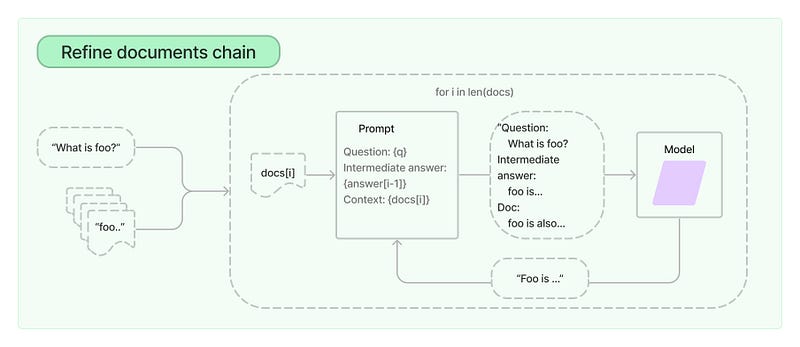
In our case, we don’t want the summarization chain to actually summarize the document, but we want it to generate practice questions. To customize the question generation process, we’ll use custom prompts tailored to our specific needs.
Step 2.2.1: Prompting
A prompt is like an instruction or a guiding question provided to a Large Language Model (LLM) to direct its behavior and guide the output it generates. It plays a critical role in shaping the LLM’s responses, ensuring they are relevant and coherent.
In our project, we are working with the “refine” chain of the summarization chain. The standard prompts for a “refine” chain typically focus on summarizing the text. However, since our goal is to generate questions, we need to create custom prompts that specifically instruct the LLM to generate questions.
The “refine” chain uses two prompts:
- The first prompt is used for question generation for the first chunk of text.
- The second prompt is used for question generation for all subsequent chunks of text (during the refining process).
Both prompts are similar in structure, but in the second prompt, we include the generated questions from the first chunk as part of the input. This allows the LLM to use the initial set of questions to refine and improve its subsequent question generation.
Effective prompting is crucial for achieving the desired results. A well-crafted prompt can significantly impact the quality of the LLM’s responses. Experimenting with different prompts can help you fine-tune the LLM’s behavior and ensure it generates high-quality questions.
So don’t hesitate to try different prompts and see how they influence the outcome of your application.
from langchain.prompts import PromptTemplate

prompt_template_questions = """
You are an expert at creating practice questions based on study material.
Your goal is to prepare a student for their exam.
You do this by asking questions about the text below:

------------
{text}
------------

Create questions that will prepare the student for their exam.
Make sure not to lose any important information.

QUESTIONS:
"""
PROMPT_QUESTIONS = PromptTemplate(template=prompt_template_questions, input_variables=["text"])
refine_template_questions = ("""
You are an expert at creating practice questions based on study material.
Your goal is to help a student prepare for an exam.
We have received some practice questions to a certain extent: {existing_answer}.
We have the option to refine the existing questions or add new ones.
(only if necessary) with some more context below.
------------
{text}
------------
Given the new context, refine the original questions in English.
If the context is not helpful, please provide the original questions.
QUESTIONS:
"""
)
REFINE_PROMPT_QUESTIONS = PromptTemplate(
input_variables=["existing_answer", "text"],
template=refine_template_questions,
)Step 2.2.2: Initializing the summarization chain.
Now, let’s move on to initializing the summarization chain.
This step involves providing five arguments as input to the summarization chain:
- llm: This is the large language model we initialized earlier, such as OpenAI’s GPT-3.5-turbo-16k.
- chain_type: The type of chain we want to use. In our case, that’s ‘refine’.
- question_prompt: The prompt for generating questions for the first chunk
- refine_prompt: The prompt that takes in the initial list of generated questions and a subsequent chunk to ‘refine’ the list of questions.
- verbose (optional): If you set the verbosity to True, it will output the ‘thought’ process of the chain to the terminal, which can be helpful for debugging or understanding the model’s inner workings.
from langchain.chains.summarize import load_summarize_chain

# Initialize question generation chain
question_gen_chain = load_summarize_chain(llm = llm_question_gen, chain_type = "refine", verbose = True, question_prompt=PROMPT_QUESTIONS, refine_prompt=REFINE_PROMPT_QUESTIONS)
Step 2.3: Generating the questions
Now comes the exciting part: running the chain to generate the questions! With the setup complete, we can now utilize the summarization chain to take the created documents as input and generate questions based on the study material.
To do this, you simply need to execute the following code:
# Run question generation chain
questions = question_gen_chain.run(docs_question_gen)
After running the chain, the variablequestions will hold the generated questions based on the study material. These questions will be essential for the next step, where we'll use another type of chain to answer them and complete our Smart Study Buddy application.
Step 3: Generating answers
Now that we have our questions, it’s time to use the Large Language Model to answer them based on the information in the study material. To achieve this, we’ll employ a ‘Retrieval Question Answer Chain’.
The RetrievalQA Chain utilizes a vector database to retrieve answers from input questions. It employs a technique called Semantic Similarity Search, which we’ll delve into more deeply in Step 3.1.
To set up and use the chain, we require three components:
- Retriever: This component performs the semantic similarity search using the vector database.
- Large Language Model: This is nearly the same model we initialized in Step 2.1, which we’ll employ to generate answers.
- List of Questions: The questions we generated in the previous step.
Step 3.1: Setting up the vector database
In the RetrievalQA Chain, we rely on a vector database to retrieve answers from the input questions. A vector database is essentially a collection of vectors, where each vector represents specific elements or concepts. In our case, these vectors are numerical representations of text or tokens generated by the language model, also known as embeddings. These embeddings encapsulate the semantic meaning and context of the corresponding text.
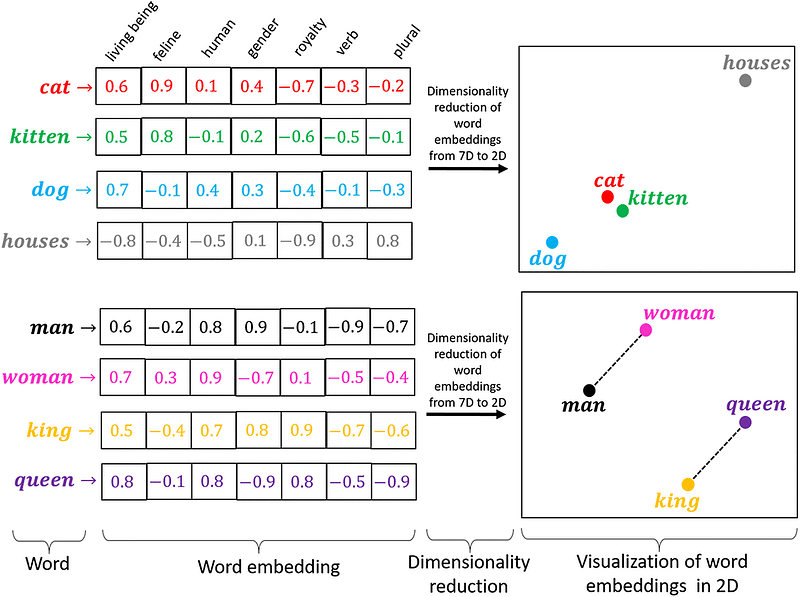
Vector databases play a crucial role in enabling efficient and accurate comparisons of textual data. They are widely used for finding semantically similar documents, text classification, and identifying relevant information in large amounts of unstructured text.
For our project, we’ll utilize Chroma, a local vector database known for its simplicity and ease of use.
To set up a Chroma vector database, you’ll need two components:
- Embeddings: The numerical representations of the study material, which will be generated by OpenAI.
- Documents: The documents that need to be embedded.
from langchain.embeddings.openai import OpenAIEmbeddings
from langchain.vectorstores import Chroma

# Create a vector database for answer generation
embeddings = OpenAIEmbeddings(openai_api_key=openai_api_key)

# Initialize vector store for answer generation
vector_store = Chroma.from_documents(docs_answer_gen, embeddings)
Step 3.2: Initializing the Large Language Model
In this step, we’ll initialize the Large Language Model (LLM) again, similar to what we did in Step 2.1. However, this time we’ll make a slight adjustment to the temperature setting.
The temperature in LLMs controls the creativity of their responses. A higher temperature (e.g., 1.0) makes the model more random and creative, which can lead to generating answers that might be completely fictional. On the other hand, a lower temperature (e.g., 0.1) makes the model more focused and deterministic, resulting in more conservative and predictable responses.
Since we want the LLM to generate accurate answers based solely on the provided study material, we’ll set the temperature to 0.1. This lower temperature reduces the likelihood of the model “hallucinating” and ensures more grounded responses.
# Initialize Large Language Model for answer generation
llm_answer_gen = ChatOpenAI(openai_api_key=openai_api_key,temperature=0.1, model="gpt-3.5-turbo-16k")
Step 3.3: Split questions into a list
In this step, we’ll convert the generated questions from Step 2.3, which are currently stored as a string, into a list format. This conversion is necessary to ensure that the Large Language Model (LLM) can process each question individually.
To achieve this, we’ll use a simple Python function. The function will split the string of questions into a list based on a specified delimiter. Each question will become an element in the resulting list.
Here’s the Python function to perform the conversion:
# Split generated questions into a list of questions
question_list = questions.split("\n")
Step 3.4: Initialize RetrievalQA Chain
Now, with all the necessary components in place, we can initialize the RetrievalQA Chain for answer generation.
Here’s the code to set up the RetrievalQA Chain:
from langchain.chains import RetrievalQA

# Initialize retrieval chain for answer generation
answer_gen_chain = RetrievalQA.from_chain_type(llm=llm_answer_gen, chain_type="stuff", retriever=vector_store.as_retriever())
In this code, we are creating the answer_gen_chain object using the RetrievalQA class from LangChain. We provide the following arguments:
llm=llm_answer_gen: This is the Large Language Model (LLM) initialized earlier in Step 3.2, which will be used to generate answers.chain_type="stuff": This specifies the type of chain we want to use. In this case, it's the "stuff" chain, which is a type of RetrievalQA Chain.retriever=vector_store.as_retriever(): This sets up the vector database (vector_store) as the retriever for the RetrievalQA Chain. The retriever will be responsible for finding the most relevant piece of text from the study material to answer each input question using Semantic Similarity Search.
With the RetrievalQA Chain initialized, we are now ready to run it and generate answers to the questions. Let’s proceed to the final step to complete the process.
Step 3.5: Running the chain
Now it’s time for the final piece of AI magic! We will run the answer_gen_chain on the generated list of questions and save both the questions and their corresponding answers to a simple text file.
Here’s the code to do that:
# Answer each question and save to a file
for question in question_list:
    print("Question: ", question)
    answer = answer_gen_chain.run(question)
    print("Answer: ", answer)
    print("--------------------------------------------------\\n\\n")
    # Save answer to file
    with open("answers.txt", "a") as f:
        f.write("Question: " + question + "\\n")
        f.write("Answer: " + answer + "\\n")
        f.write("--------------------------------------------------\\n\\n")
Now you have successfully generated and saved the questions and answers! You can review the content in the text file and use it as a study resource or for any other purposes you might have in mind.
Bonus Step: Tracking With LangSmith
LangSmith is a platform for building production-grade LLM applications.
It lets you debug, test, evaluate, and monitor chains and intelligent agents built on any LLM framework and seamlessly integrates with LangChain.
LangSmith is developed by LangChain, the company behind the open-source LangChain framework.
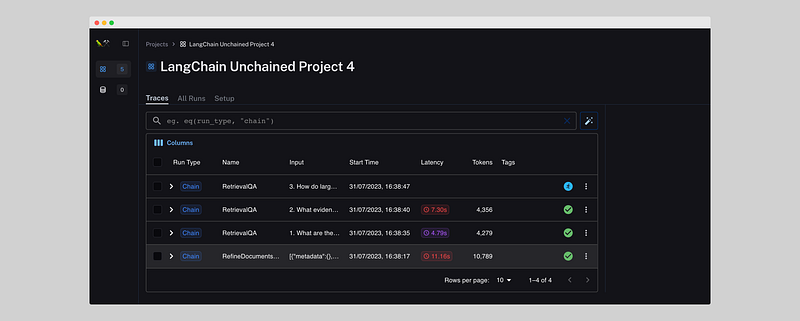
LangSmith is great for tracking the performance of your app and finding bugs.
It shows:
- Latency: Duration of a call to a LLM.
- Tokens: Amount of tokens used for each call
- Input: The data is being used in the call to the LLM.
- Output: Stores the output for all individual calls.
It’s extremely easy to set up. The only thing you need to do is run the following code:
export LANGCHAIN_TRACING_V2=true
export LANGCHAIN_ENDPOINT=https://api.smith.langchain.com
export LANGCHAIN_API_KEY=<your-api-key>
export LANGCHAIN_PROJECT=<your-project>
Next step
Great job completing Part 1 of the tutorial!
You now have all the necessary LangChain functions to create your Smart Study Buddy. In Part 2, you’ll learn how to implement a clean front end using Streamlit, which will make working with different input documents much easier.
Part 2: A Step-by-Step Guide to Creating a Smart Study Buddy using OpenAI, LangChain, and Streamlit
If you liked this tutorial, check out my Twitter (X). I talk a lot about AI and offer short-form tutorials on LangChain and Streamlit.
Have fun building your Smart Study Buddy, and feel free to reach out if you need any further assistance or have any questions along the way. You can easily reach out to me through Twitter (https://twitter.com/JorisTechTalk)
Full code
from langchain.text_splitter import TokenTextSplitter
from langchain.document_loaders import PyPDFLoader
from langchain.docstore.document import Document
from langchain.chat_models import ChatOpenAI
from langchain.chains.summarize import load_summarize_chain
from prompts import PROMPT_QUESTIONS, REFINE_PROMPT_QUESTIONS
from langchain.chains import RetrievalQA
from langchain.embeddings.openai import OpenAIEmbeddings
from langchain.vectorstores import Chroma

# Set OpenAI API key
openai_api_key = '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'

# Set file path
file_path = 'files/eight.pdf'

# Load data from PDF
loader = PyPDFLoader(file_path)
data = loader.load()

# Combine text from Document into one string for question generation
text_question_gen = ''
for page in data:
    text_question_gen += page.page_content

# Initialize Text Splitter for question generation
text_splitter_question_gen = TokenTextSplitter(model_name="gpt-3.5-turbo-16k", chunk_size=10000, chunk_overlap=200)

# Split text into chunks for question generation
text_chunks_question_gen = text_splitter_question_gen.split_text(text_question_gen)

# Convert chunks into Documents for question generation
docs_question_gen = [Document(page_content=t) for t in text_chunks_question_gen]

# Initialize Text Splitter for answer generation
text_splitter_answer_gen = TokenTextSplitter(model_name="gpt-3.5-turbo-16k", chunk_size=1000, chunk_overlap=100)

# Split documents into chunks for answer generation
docs_answer_gen = text_splitter_answer_gen.split_documents(docs_question_gen)

# Initialize Large Language Model for question generation
llm_question_gen = ChatOpenAI(openai_api_key=openai_api_key,temperature=0.4, model="gpt-3.5-turbo-16k")

# Initialize question generation chain
question_gen_chain = load_summarize_chain(llm = llm_question_gen, chain_type = "refine", verbose = True, question_prompt=PROMPT_QUESTIONS, refine_prompt=REFINE_PROMPT_QUESTIONS)

# Run question generation chain
questions = question_gen_chain.run(docs_question_gen)

# Initialize Large Language Model for answer generation
llm_answer_gen = ChatOpenAI(openai_api_key=openai_api_key,temperature=0.1, model="gpt-3.5-turbo-16k")

# Create vector database for answer generation
embeddings = OpenAIEmbeddings(openai_api_key=openai_api_key)

# Initialize vector store for answer generation
vector_store = Chroma.from_documents(docs_answer_gen, embeddings)

# Initialize retrieval chain for answer generation
answer_gen_chain = RetrievalQA.from_chain_type(llm=llm_answer_gen, chain_type="stuff", retriever=vector_store.as_retriever(k=2))

# Split generated questions into a list of questions
question_list = questions.split("\\n")

# Answer each question and save to a file
for question in question_list:
    print("Question: ", question)
    answer = answer_gen_chain.run(question)
    print("Answer: ", answer)
    print("--------------------------------------------------\\n\\n")
    # Save answer to file
    with open("answers.txt", "a") as f:
        f.write("Question: " + question + "\\n")
        f.write("Answer: " + answer + "\\n")
        f.write("--------------------------------------------------\\n\\n")
Thank you for reading until the end. Visit Stackademic to see how we are democratising free programming education around the world.


