avatarJoris de Jong | JorisTechTalk

Free AI web copilot to create summaries, insights and extended knowledge, download it at here

1459

Abstract

ained models with the API saves time and resources, as you don’t have to train AI models from scratch.</li></ol><h1 id="8cd7">How to Obtain Your OpenAI API Key</h1><p id="5576">Follow these steps to get your own OpenAI API Key:</p><ol><li><b>Create an OpenAI Account</b>: If you don’t already have an OpenAI account, visit the OpenAI website (<a href="https://openai.com/">https://openai.com/</a>) and click the “Sign Up” button. Fill in your details to create an account.</li><li><b>Verify Your Account</b>: After signing up, check your email for a verification link from OpenAI and click on it to confirm your account.</li><li><b>Log Into Your Account</b>: Return to the OpenAI website and log in using the username and password you used during sign-up.</li><li><b>Navigate to the API Section</b>: In the top right corner of the screen, click on the icon with your account name to access the dropdown menu. Then, select “View API keys” from the options.</li></ol><figure id="4a2d"><img src="https://cdn-images-1.readmedium.com/v2/resize:fit:800/1*dE8t0t6NiDpERgESO8UrRw.png"><figcaption></figcaption></figure><p id="45de"><b>5. Generate a New API Key</b>: In the API keys section, click the “Create new secret key” button. Give your key a name to identify its purpose and click “Create secret key.”</p><figure id="33fc"><img src="https://cdn-images-1.readmedium.com/v2/resize:fit:800/1*wmc811cFkDMQN-_8DBaHlg.png"><figcaption></figcaption></figure><p id="db3

Options

6"><b>6. Save Your API Key</b>: The generated secret key will be displayed. Copy this key and securely save it, as you won’t be able to retrieve it later. This key will be used to authenticate your applications with OpenAI’s services.</p><figure id="9858"><img src="https://cdn-images-1.readmedium.com/v2/resize:fit:800/1*wIKMmwYgpYKm_TJIrqnEpA.png"><figcaption></figcaption></figure><p id="037d"><b>7. Set Up Billing</b>: OpenAI charges for API usage, so you’ll need to set up a payment method for billing. Go to the “Billing” section on the left menu and click “Payment methods.” Enter your credit card and billing details, then click “Submit.”</p><figure id="451c"><img src="https://cdn-images-1.readmedium.com/v2/resize:fit:800/1*ccmMePzNzQL3H8vPGbi18g.png"><figcaption></figcaption></figure><figure id="9366"><img src="https://cdn-images-1.readmedium.com/v2/resize:fit:800/1*8xfDPHRd7QjJEe7w4Pq7Kg.png"><figcaption></figcaption></figure><figure id="db24"><img src="https://cdn-images-1.readmedium.com/v2/resize:fit:800/1*DdaE6opeTscbXvVdczIM6g.png"><figcaption></figcaption></figure><p id="d010">With these steps completed, you now have your OpenAI API Key and are ready to integrate OpenAI’s language models into your applications. Remember to use this key responsibly and securely to ensure a smooth and effective AI-powered experience.</p><p id="34a8">Enjoy building amazing applications with the power of OpenAI’s language models!</p></article></body>

How to Get an OpenAI API Key for ChatGPT

How to Get an OpenAI API Key for ChatGPT

An OpenAI API Key is your gateway to leveraging the powerful capabilities of OpenAI’s advanced language models, such as GPT-3. With this key, you can integrate AI functionalities into your applications, enabling natural language understanding, code writing, translation, and much more. In this tutorial, we’ll guide you through the process of obtaining your own OpenAI API Key.

Benefits of Having an OpenAI API Key

Having an OpenAI API Key offers several advantages, including:

  1. Access to advanced AI models: You can tap into cutting-edge AI models like GPT-3 and Codex to perform complex language-related tasks.
  2. Intelligent application development: Incorporate AI capabilities into your applications, making them smarter and more interactive.
  3. Easy integration: The OpenAI API is designed for seamless integration, allowing developers to add AI functionalities to their existing systems effortlessly.
  4. Up-to-date models: With an API key, you can always access the latest versions of OpenAI’s models, ensuring you’re leveraging the most advanced AI technologies.
  5. Scalability: The API is designed to handle requests at scale, making it suitable for both startups and established companies.
  6. Cost and time efficiency: Utilizing pre-trained models with the API saves time and resources, as you don’t have to train AI models from scratch.

How to Obtain Your OpenAI API Key

Follow these steps to get your own OpenAI API Key:

  1. Create an OpenAI Account: If you don’t already have an OpenAI account, visit the OpenAI website (https://openai.com/) and click the “Sign Up” button. Fill in your details to create an account.
  2. Verify Your Account: After signing up, check your email for a verification link from OpenAI and click on it to confirm your account.
  3. Log Into Your Account: Return to the OpenAI website and log in using the username and password you used during sign-up.
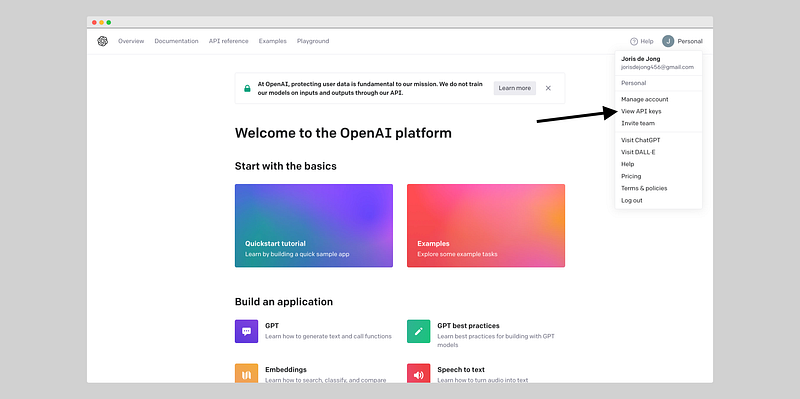
  4. Navigate to the API Section: In the top right corner of the screen, click on the icon with your account name to access the dropdown menu. Then, select “View API keys” from the options.
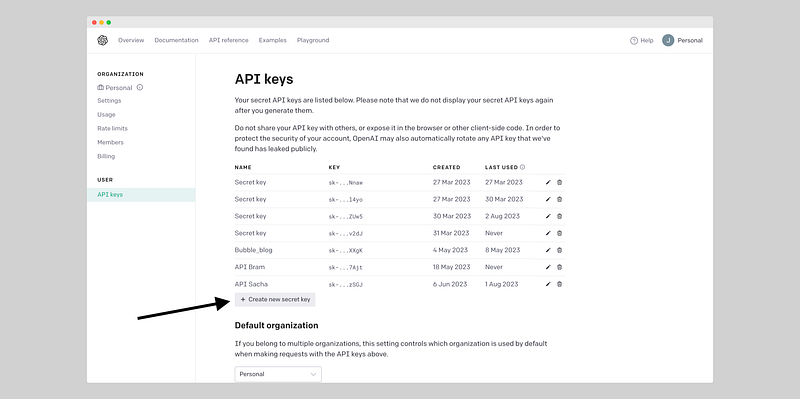
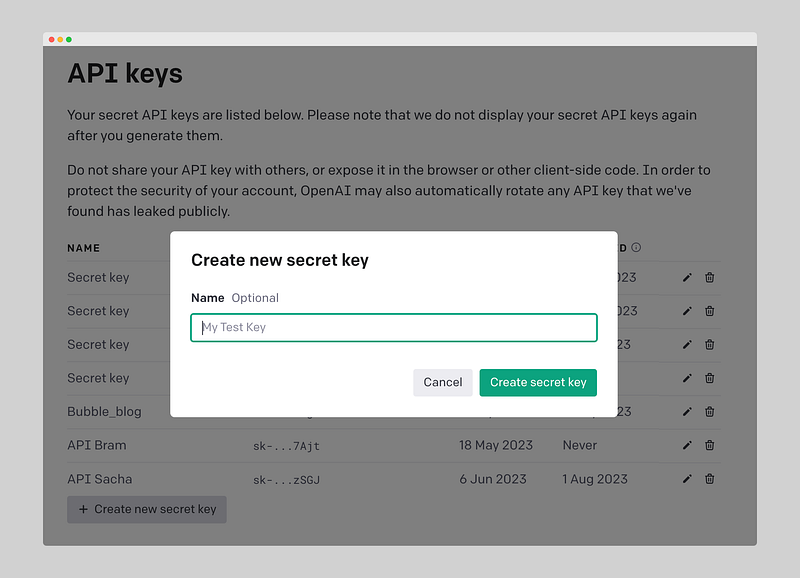
5. Generate a New API Key: In the API keys section, click the “Create new secret key” button. Give your key a name to identify its purpose and click “Create secret key.”
6. Save Your API Key: The generated secret key will be displayed. Copy this key and securely save it, as you won’t be able to retrieve it later. This key will be used to authenticate your applications with OpenAI’s services.
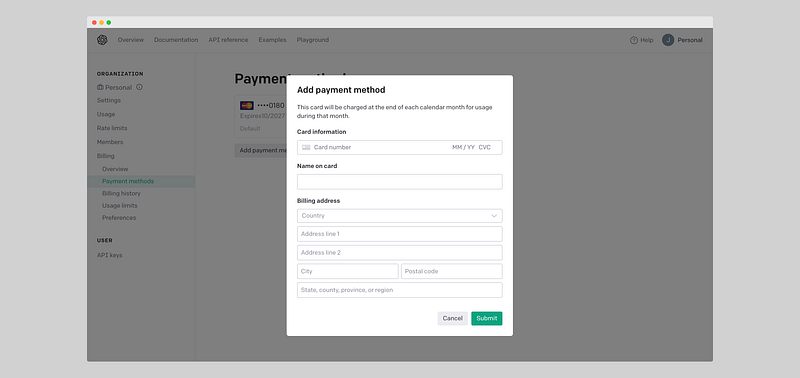
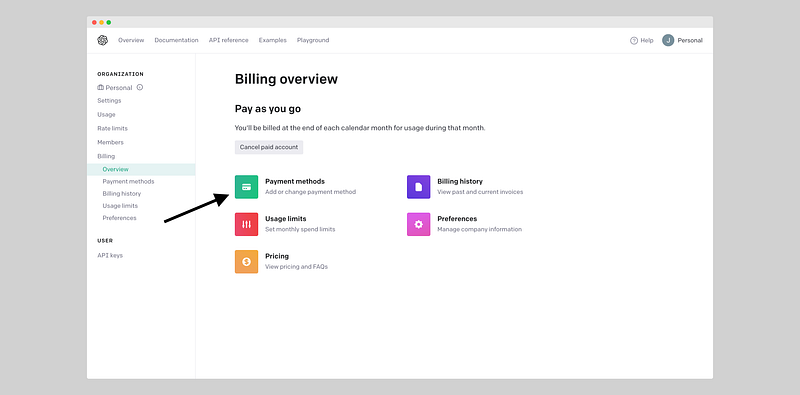
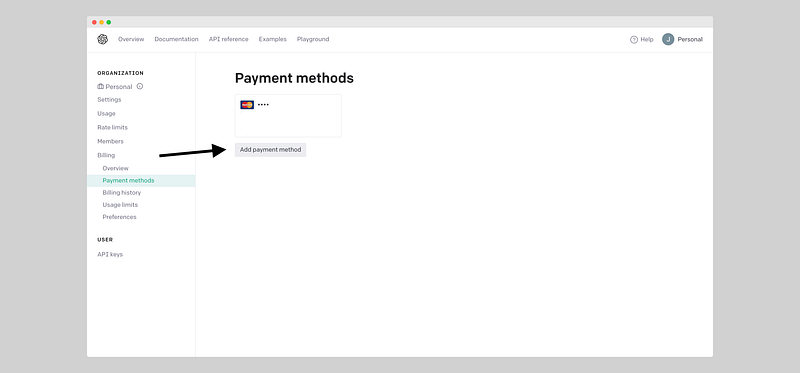
7. Set Up Billing: OpenAI charges for API usage, so you’ll need to set up a payment method for billing. Go to the “Billing” section on the left menu and click “Payment methods.” Enter your credit card and billing details, then click “Submit.”
With these steps completed, you now have your OpenAI API Key and are ready to integrate OpenAI’s language models into your applications. Remember to use this key responsibly and securely to ensure a smooth and effective AI-powered experience.

Enjoy building amazing applications with the power of OpenAI’s language models!

OpenAI
Artificial Intelligence
ChatGPT
Software Development
Recommended from ReadMedium