
A PySpark Example for Dealing with Larger than Memory Datasets
A step-by-step tutorial on how to use Spark to perform exploratory data analysis on larger than memory datasets.
Analyzing datasets that are larger than the available RAM memory using Jupyter notebooks and Pandas Data Frames is a challenging issue. This problem has already been addressed (for instance here or here) but my objective here is different. I will be presenting a method for performing exploratory analysis on a large data set with the purpose of identifying and filtering out unnecessary data. The hope is that in the end the filtered data set can be handled by Pandas for the rest of the computations.
The idea for this article came from one of my latest projects involving the analysis of the Open Food Facts database. It contains nutritional information about products sold all around the world and at the time of writing the csv export they provide is 4.2 GB. This was larger than the 3 GB of RAM memory I had on my Ubuntu VM. However, by using PySpark I was able to run some analysis and select only the information that was of interest from my project.
I took the following steps in order to set up my environment on Ubuntu :
- Install Anaconda
- Install Java openJDK 11: sudo apt-get install openjdk-11-jdk. The Java version is important as Spark only works with Java 8 or 11
- Install Apache Spark (version 3.1.2 for Hadoop 2.7 here) and configure the Spark environment (add SPARK_HOME variable to PATH). If all went well you should be able to launch spark-shell in your terminal
- Install pyspark: conda install -c conda-forge pyspark
If you are interested in reading about Spark’s core concepts this is a good start. If not, you can dive right in by opening a Jupyter Notebook, importing the pyspark.sql module and creating a local SparkSession :
I read the data from my large csv file inside my SparkSession using sc.read. Trying to load a 4.2 GB file on a VM with only 3 GB of RAM does not issue any error as Spark does not actually attempt to read the data unless some type of computation is required.
The result is a pyspark.sql.dataframe variable. It is important to keep in mind that, at this point, the data is not actually loaded into the RAM memory. Data is only loaded when an action is called on the pyspark data frame, an action that needs to return a computed value. If I ask for instance for a count of the number of products in the data set, Spark is smart enough not to try and load the whole 4.2 GB of data in order to compute this value (almost 2 million products).
I start by using the printSchema function from pyspark in order to get some information about the structure of the data: the columns and their associated type :
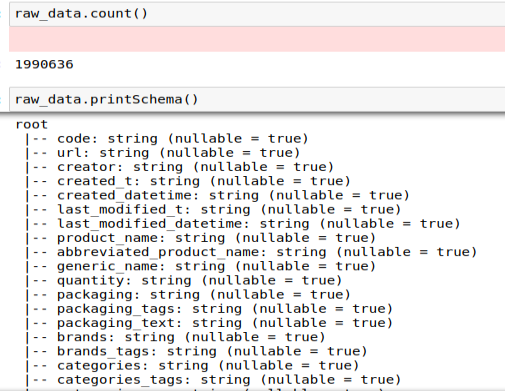
To start the exploratory analysis, I computed the number of products per country to get an idea of the database composition :
The result of this operation, BDD_countries, is also a pyspark data frame and has the following structure :
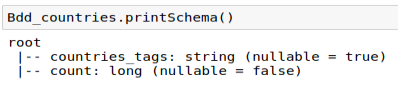
I can filter this new data frame to keep only the countries that have at least 5000 products recorded in the database and plot the result :
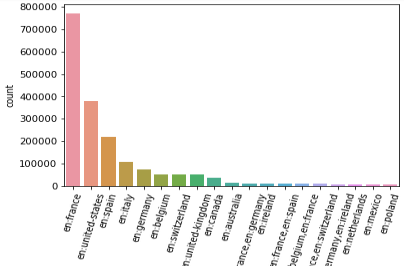
From here I can for instance filter out all the products that are not available in France and perform the rest of the analysis on a smaller, easier-to-handle data set.
This article presented a method for dealing with larger than memory data sets in Python. By reading the data using a Spark Session, it is possible to perform basic exploratory analysis computations without actually trying to load the complete data set into memory. This type of approach can be useful when we want to be able to get a first impression of the data and search for ways to identify and filter out unnecessary information.
To go further you can check out my post about the core concepts in Apache Spark or my post about the Spark History Server, or any of the other ressources and tutorials out there. Happy learning!


