
A Productivity Template for Organizing a Busy Life and Getting Things Done
This is especially applicable for busy people with lots on their plates.
During high-school, things were simple. You were given your schedule, told when to play sports, and had everything neatly packaged into hour-long sessions one after the other.
You hardly had to think about what to do next. Decision fatigue certainly wasn’t a thing.
Fast forward a few years and it feels like suddenly you’re juggling a hundred balls, none of which can afford to be dropped. Life has got to be a little bit more complex.
That was certainly the case for me during the first few years of my entrepreneurial journey. My days were mayhem. I’d jump around from task to task — extremely busy, working long hours — and I’d lie in bed at night and reflect on what I’d achieved, and often it was very little.
I’d made no progress towards my goals and ambitions. But, how? I’d just put in a solid fourteen-hour day.
Then, one day, I decided to take the mayhem that was my day and be more pro-active with how I spent my time.
This is how I did just that.
Ever heard of the jar of life?
The TL;DR of it is if you picture your day (or life) as an empty jar, the space inside it is the allotted time you have available in your day — 18 hours (if you sleep for 6). In it, you have to fit large pebbles, some smaller stones, and beach sand.
The pebbles are the important things in your life: family, health, goals, and ambitions.
The stones are nice-to-have’s, but things you could live without, i.e., money, possessions, hobbies, etc.
The sand is the mundane tasks that don’t add much value: social media, shopping, errands, etc.
How you fill the jar is up to you. But if you put all the sand in first, it's likely that most of the stones and pebbles are not going to fit.
This productivity method is based on shaping your days to match your goals and ambitions. When you’re finished implementing this, you’ll be proactive with how you fill your jar, not reactive to the day to day distractions that pull us in every direction except the one that matters.
Idea Capturing
You know the feeling — you’re on the treadmill at the gym or driving in the car, and a bright idea pops into your head. You think, I should definitely look into that later when I have a moment. The reality is, life almost always gets in the way, and our brain becomes preoccupied with other tasks.
Sometimes you forget the idea altogether, and sometimes it comes back to you a few days later.
To make sure I’m never losing out on missed opportunities, I keep track of everything that comes into my head.
Think of this as the ‘top of the funnel’. Nothing gets filtered here. Write down anything and everything.
Tool: Google Keep
I used Google Keep because I use the google environment for almost everything — Pixel 4, Drive, Sheets & Docs, Photos, etc. Keep just works for me.
Try and use something that is quick, easy to open and use, and is basically just a blank sheet. Most importantly — it should be with you all the time.
How?
Every time an idea pops into your head, open the app and jot it down in an ‘Ideas’ sheet. Write as much detail as necessary so that when you open the app a few days later, you’ll know what you’re talking about.
Alternatives:
- Notes
- Evernote (A great note-taking app)
- Voice Recordings (Just your native recordings app on your phone)
- Hard-copy notebook (Not great for those who exercise a lot or can’t carry around a notebook all the time)
Segmenting
Okay, so you’ve got a place to jot your ideas down. As a successful entrepreneur, you know that a brilliant idea is not worth anything unless its actioned. To action your ideas effectively, you need to make time for it in your schedule.
Before we get there, though, you need to separate the wheat from the chaff. Let’s face it, not all of our ideas are fantastic.
I have time (usually half an hour) once a week where I review my idea’s list. I go through every idea I’ve written down sequentially. Some of them are new business ideas, some are ideas for writing topics, some are ideas for improving business processes, and some are even ideas for a great dinner date.
I go through each one and review it thoroughly. Here’s a question I ask myself: Is this really going to add value to my life, the lives of people I care about or create significant change in the world? If the answer to that question is mostly no, it gets discarded.
Sometimes a bit of investigation is required. If it’s a business idea, for example, some brief market scoping happens. The extent of this is mainly checking for feasibility — is there anything out there which does what I want to do, can I do it better, and is it even possible given my current situation and resources?
Once you’ve removed the time-wasters, you’ll be sitting with a list of idea’s that need to be acted upon. That’s where Notion comes in.
Tool: Notion
The Notion app was one of my great finds of 2019. Notion is a powerful life-organisation tool. It is as sophisticated or as simple as you want it to be. For busy people, with multiple projects on the go, I can highly recommend it. I use it for everything from goal-setting, to project planning, to journaling.
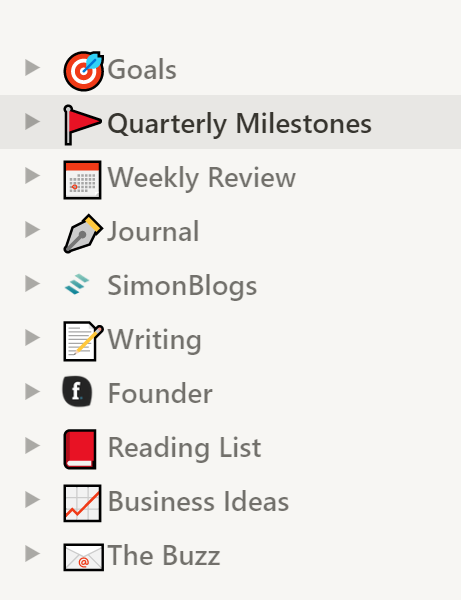
Here’s what my menu looks like:
How?
I make my way through the list of ideas in Keep and put them into their respective project folders.
If it’s a writing idea, it goes into Writing under the appropriate sub-header.
If it’s a business idea, it goes into Business Ideas and is put into one of; ‘Someday projects’, ‘Should do projects’ or ‘Immediately actionable projects’.
If it’s directly related to a project I’m busy on, like SimonBlogs or my Weekly Buzz, it goes in there under the appropriate heading.
As I launch new projects which warrant their own folder, like the eBook I’m launching on an effective goal-setting process, I create one and flesh them out into segments in there.
I do this until my list is empty for the week ahead.
Alternatives
- Roam (Another extremely powerful note-taking app. The only reason I don’t use it is that I’m in the Notion groove, and changing over would take time.)
- Evernote (The OG of note-taking apps. I use Notion out of personal preference)
- Microsoft OneNote (Not quite as powerful, nor as portable)
- Trello (Very popular for project tracking. More of a project management tool.)
Scheduling & Planning
Great, so you’ve captured your ideas, allocated them to the appropriate projects, and now its time to schedule those into your life.
A quick note: This is only helpful in making you more productive and organized if you actually use it. For me, that means my calendar is always the first thing I look at when I use my phone in the morning. Not email, not messages — calendar.
The intention behind this is being proactive about how your day goes. Take control, before anyone demands your attention. Know what you have to accomplish during the day for yourself before anyone else takes up your time.
Tool: Todoist & Google Calendar
Todoist is literally that: A to-do list. It’s useful for breaking down your projects into actionable steps you can complete every day.
Google Calendar needs no introduction. Again, I just use it because I use the Google product stack.
Simply, Todoist works like this: You can assign items to do per project, give them a deadline, and then shows you where you didn’t meet your deadlines. There are some cool gamification elements that appeal to me, too.
My planning and scheduling flow go like this:
- I review my calendar for any commitments that were prior scheduled for the week. I update/cancel/move where necessary. This gives me a gauge for how much free time I will have.
- For each project, I have tasks laid out which are going to get me to my next milestone. I then choose the tasks I want to tackle for the week and put them into the free slots in my calendar.
- I then add a task for each of them in Todoist. It seems redundant, but I like the fact that it keeps track of everything I’ve done, and notifies me when a task is overdue. It also separates commitments from tasks. The only reason tasks are in the calendar is because they take up time, and scheduling time for them means I won’t get distracted during that period.
Alternatives
- I haven’t ever used any other productivity apps. Here’s a list from AlternativeTo.
- Calendar apps are easy to come by, almost always free. It's down to personal preference.
Other Productivity Tips & Tricks
Here are a few other useful tools I’ve used to get important things done and achieve my goals.
- If you have a difficult task that you’ve been putting off, commit to just starting for 5 minutes. Starting is often the biggest point of friction, once you’re passed it, continuing is much easier.
- Focus on the things that matter. Use the 80/20 rule to schedule the 20% of tasks that produce 80% of the outcomes. If you aren’t sure what they are, spend some time figuring them out.
- Be precious about your time — it’s your most valuable resource. Everyone wants it, make sure there’s a good reason that you’re giving it to them.
- Turn off distractions. Phones, emails, and messages are excuses to stop the difficult, important work you’re doing. Remove the temptation altogether.
- Do tasks in batches. If there are similar things you can do one after the other, do them together while you have everything in place to make it happen.
- Self-care helps keep your mind clear so you can do important tasks. Regular meditating, journaling and exercise helps me do this.
Hopefully, this process will help you become more productive and get the things that matter to you done.
I need your help!
My writing backlog is growing. I’m generating more ideas than I can get to. Please help me by letting me know what you’d like to read next (It’s completely up to you, and takes two clicks to vote).