
A Practical Pre-Publish Stories Checklist
List of checks that your story should pass before you click the publish button.
Introduction
As a new writer, I decided to create a list of checks that my story should go through before I publish it. In this way, I guarantee that it satisfies good articles standards.
To create this list, I read several Medium tips stories and several “write for us” stories from several famous publications. After that, I summarized the most important points in these stories (I will keep updating the story whenever I find a new useful tip).
To make the checklist easy to follow, I divided it into 4 main sections where are:
Now, let us move on to see the checks that are related to each one of these sections.
1. Title and Subtitle
- Each article should have a title.
- The article title should follow AP style for title capitalization (Use the following tool titlecaseconverter)
- Each article should have a subtitle.
- The title and subtitle should answer the readers what your article is about or why they should read it.
- You have to set the SEO title and keep in mind that Google will truncate your SEO title if you enter more than 60 characters.
2. Story Body
- The story should have a featured image and make sure the image is at least 1200 pixels in width.
- The story should have a clickable table of contents for easy navigation. Refer to Figure 1.
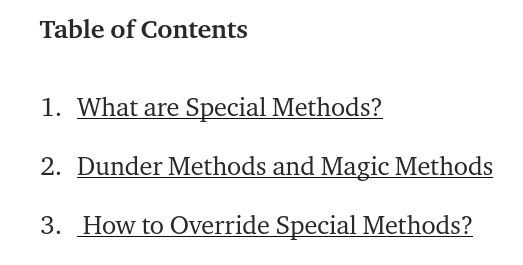
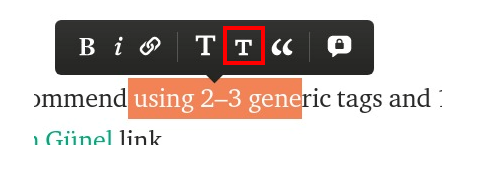
- Use small T in the medium editor to format sections titles. Refer to Figure 2.
- The story should be free of spelling, punctuation, and grammatical mistakes (You can use the following tools grammarly and hemingwayapp)
- It is not recommended to super-capitalize the first letter of any paragraph.
- If the story is already behind the paywall, it is not necessary to add referred membership links — as Medium already shows a default popup of your membership page.
- You have to set the SEO description and keep in mind that Google will truncate SEO descriptions that have more than 156 characters.
- It is good to add links to your other posts where relevant because Google gives more visibility to articles that many other pages on the web are linking to.
- NO Plagiarism. Make sure to add all of the references at the end of your article and it is good to use one format (the following is Toward Data Science) publication format:
[X] N. Name, Title (Year), Source
For example, your first reference should look like this:
[1] A. Pesah, A. Wehenkel and G. Louppe, Recurrent Machines for Likelihood-Free Inference (2018), NeurIPS 2018 Workshop on Meta-Learning
- If you do not add the references below, you can quote the copied and pasted text and mention its source. Example:
“Announced in 2014, the Swift programming language has quickly become one of the fastest growing languages in history. Swift makes it easy to write software that is incredibly fast and safe by design,” according to Apple’s Swift.org.
- You can use the following tool to detect any Plagiarism in your story plagiarismdetector
3. Code
- No screenshots
- Use one of these two solutions instead of screenshots:
- Medium’s native code blocks & inline code
- Embed GitHub gists
- In order to create a gist, you have to add (this is my own standard):
- Description: story title
- Filename: code.py
- You have to add the source of the code in case it is copied from another source.
- Variable names, file paths, URLs, directory names, class names, and values should be
code formatted like this. - When an article has code, the article should:
- Show the execution results of the presented codes.
- Include everything that the reader needs to execute the code again and reproduce the results.
4. Images
- Websites for free images nappy pexels pixabay unsplash genderphotos
- You have to add alt text to the images to help visually impaired people.
- You should cite the source of your images.
- You can use (Image by Author) if you are the image creator.
- You can use (Screenshot by Author [include the link]) if you take a screenshot.
- If the image is lightly inspired by an existing image, use (Image by Author, inspired by source[include the link])
- If you’ve edited an existing image, please make sure you have the right to use and edit that image and include the caption (Image by source[include the link], edited with permission by the author).
- Use one formatting style for all of the images’ captions (They should not be bolded or italicized). Examples:
For dummy images: Photo by Chris Ried on Unsplash
Figure 1: Explanation of the image (Image by Author)
Figure 2: Explanation of the image (Image by XYZ [URL])
5. Tables
- You should cite the source of any added table.
- If the added table is yours, you can type (Table by Author).
- In Medium, there is no direct way to create tables. Refer to the following article for an alternative solution.
6. Tags
- “I recommend using 2–3 generic tags and 1–2 that are more specific.” by Sinem Günel link
That’s it! I hope you find this list useful and I hope it helps you improve your next story before hitting the publish button.
P.S.: A million thanks for your time reading my story. Before you leave let me mention quickly two points:
- First, to get my posts in your inbox directly, would you please subscribe here.
- Second, writers made thousands of $$ on Medium. To get unlimited access to Medium stories and start earning, sign up now for Medium membership which only costs $5 per month. By signing up with this link, you can directly support me at no extra cost to you.
References
[1] https://towardsdatascience.com/questions-96667b06af5
[2] https://betterprogramming.pub/write-for-us-5c4bcba59397
[3] https://betterprogramming.pub/how-to-properly-cite-your-sources-in-a-technical-article-309411029306
[4] https://blog.devgenius.io/write-for-us-6b370f49a493
[5] https://bettermarketing.pub/write-for-better-marketing-fc7eb4a3346a
[7] https://betterprogramming.pub/better-programming-styleguide-suggestions-eada98e35150


