
A hands-on guide for creating a production-ready React app
Create React App and the Production Build

Create React App is an integrated toolchain for the best user and developer experience. It has many things out of the box that we can jump onto and start coding immediately.
After finishing development, we need to make a production build and deploy it to a server. In this article, we walk through the build and deploy process.
Run Create React App in Development Mode
Install Create React App, and run it out of box:
npx create-react-app my-app
cd my-app
npm start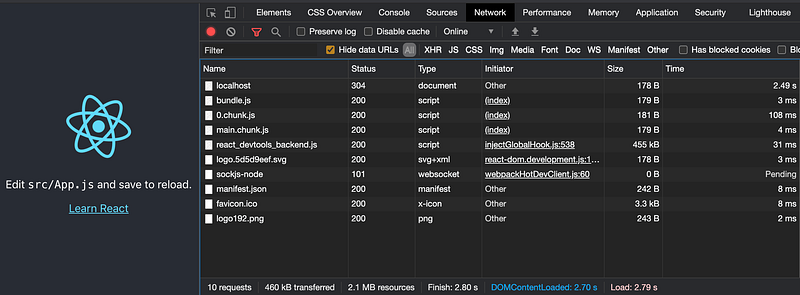
Form the Network tab, we see 10 requests in the development mode:
localhost: the main entryindex.htmlfor the root directorybundle.js: the Webpack bundle file0.chunk.jsandmain.chunk.js: the split code filesreact_devtools_backend.js: the source code ofreact-devtoolslogo.5d5d9eef.svg: the logo SVG file with the hashed namesockjs-node: the custom web socket path for hot module reloadingmanifest.json: the app metadata in the JSON formatfavicon.ico: the website iconlogo192.png: the logo image file
Make a Static Server With Serve
After finishing the development, we need to make a production build. React document states that the easiest way is to use serve and let it handle the rest. Preferably, serve is installed globally: npm i serve -g.
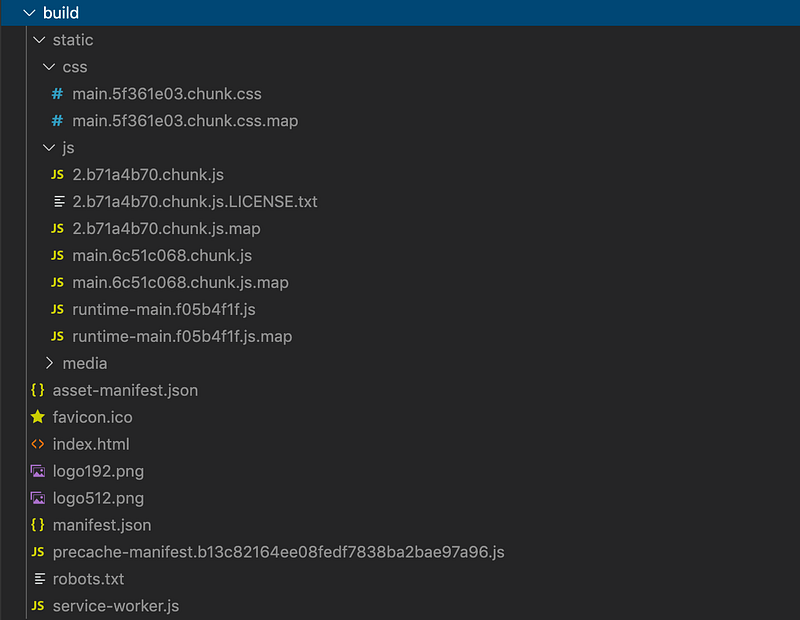
Here is the output by executing npm run build:
$ npm run build> react-app1@0.1.0 build /Users/fuje/app/react-app1
> react-scripts buildCreating an optimized production build... Compiled successfully.
File sizes after gzip:39.39 KB build/static/js/2.b71a4b70.chunk.js
774 B build/static/js/runtime-main.f05b4f1f.js
648 B build/static/js/main.6c51c068.chunk.js
547 B build/static/css/main.5f361e03.chunk.cssThe project was built assuming it is hosted at /.
You can control this with the homepage field in your package.json.The build folder is ready to be deployed.
You may serve it with a static server:serve -s buildFind out more about deployment here:bit.ly/CRA-deploy
The build command generates the build directory to be deployed.
Execute the serve command to run the production build:
$ serve -s build
   ┌───────────────────────────────────────────────────┐
   │                                                   │
   │   Serving!                                        │
   │                                                   │
   │   - Local:            http://localhost:5000       │
   │   - On Your Network:  http://192.168.1.213:5000   │
   │                                                   │
   │   Copied local address to clipboard!              │
   │                                                   │
   └───────────────────────────────────────────────────┘
Go to http://localhost:5000 or http://192.168.1.213:5000 and verify that Create React App runs properly.
By default, the production build runs at port 5000. But the port number is configurable: serve -s build -l <port number>.
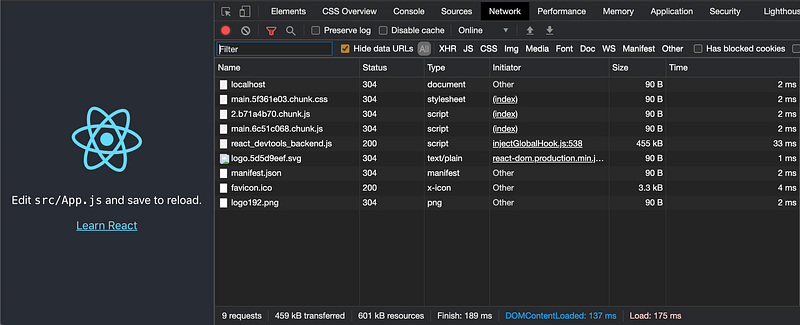
Form the Network tab, we see 9 requests in the production mode. As we have expected, sockjs-node, the custom web socket path for hot module reloading, is not needed. The bundles are split with different hashed names and there is a file called main.5f361e03.chunk.css.
Sometimes we see less than 9 requests since some requests use cached data. Empty Cache and Hard Reload will always end up with 9 requests.
Deploy the Production Build With Express
Express is a minimal and flexible Node.js web app framework for web and mobile applications. Express server is a popular choice to deploy the production build.
Since Express is part of Create React App, there is no need to install it again.
Set up a configuration file for the Express server in server/index.js:
app.use() at line 4 mounts the specified middleware functions at the specified path. The function has a signature as app.use([path,] callback [, callback…]). Since path defaults to “/”, middleware mounted without a path will be executed for every request to the app.
Middleware functions are executed sequentially, therefore the order of middleware inclusion is important. If the middleware has been executed, the remaining routes will not be executed.
express.static() at line 4 is a built-in middleware function that serves static files such as images, CSS files, and JavaScript files. The function has a signature as express.static(root, [options]), where the root argument specifies the root directory from which to serve static assets.
The path set to the express.static() function is relative to the directory from where the node process is launched. Since Express can be launched from anywhere, it is safer to use an absolute path. __dirname is the absolute path to the directory containing the source file. Then, either path.join(__dirname, "../build") or path.resolve(__dirname, "../build") will end up with the absolution path to the build directory.
Run node server and verify that Create React App runs properly.
If we print out the request from line 4, we can see 9 requests:
Request URL = /static/css/main.5f361e03.chunk.css
Request URL = /static/media/logo.5d5d9eef.svg
Request URL = /static/js/2.bc7ff9af.chunk.js
Request URL = /static/js/main.47e3d1e1.chunk.js
Request URL = /static/css/main.5f361e03.chunk.css.map
Request URL = /static/js/2.bc7ff9af.chunk.js.map
Request URL = /static/js/main.47e3d1e1.chunk.js.map
Request URL = /manifest.json
Request URL = /logo192.png
Occasionally, if the node process crashed or did not exit properly, we may encounter the following error:
Error: listen EADDRINUSE: address already in use :::8080We can use the lsof (list open files) command to report all open files and the processes that opened them:
$ lsof -i tcp:8080
COMMAND PID USER FD TYPE DEVICE SIZE/OFF NODE NAME
node 46666 fuje 23u IPv6 0xeecea4b504853bd9 0t0 TCP *:http-alt (LISTEN)
Then use kill to send a signal to end the process:
$ kill -9 46666So far so good.
We install npm i react-router-dom, and modify src/App.js as follows:
This page defines 3 routes, the root route, first-page, and second-page. Execute npm run build, and restart node server. Go to http://localhost:8080, we see the following page:

Click the First Page link. The page transits to the first-page route:

Then we refresh the page and see the following error:
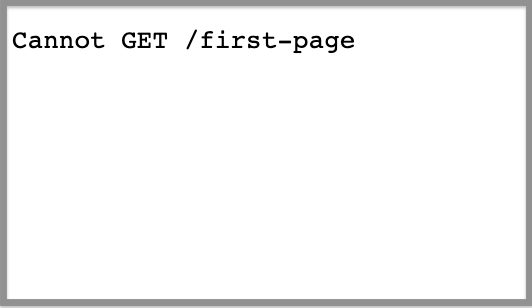
What happened?
Refreshing the page goes to http://localhost:8080/first-page, which looks for index.html under the file structure build/first-page and cannot get it.
The above code uses React Router, which calls the HTML5 pushState history API under the hood. The server needs to be configured to respond to a request to /first-page or any non-root route by serving index.html.
The fix is to add app.get() function (lines 6 - 8), which routes HTTP GET requests to the specified path with the specified callback functions. The function has a signature as app.get(path, callback [, callback …]), where path is the matched routes and callbacks are a list of middleware functions.
Since we use the wildcard for the matched routes, any routes will end up with index.html.
Restart node server and refresh http://localhost:8080/first-page. Now the page shows up correctly.
Is it too much a hassle to restart node server?
We can use nodemon that automatically restarts the node application when file changes in the directory.
Install once npm i nodemon -g, and start Express by running nodemon server.
Use ES Module for the Production Build
We have used CommonJS (CJS) format to write the server code for the production build. ES Modules (ESM) become the official standard used in JavaScript since ES2015, and is widely used in JavaScript client development. It is also adopted by TypeScript that is a superset with additional types. Here is the ESM version of server/index.mjs:
__dirname is a CJS variable, which is not available in ES modules. It can be replicated via import.meta.url (line 5).
Referring to the explanation of ES modules, it can be executed with nodemon server/index.mjs.
Make Use of process.env
How do we programmably know whether it is a production build?
process.env is handy to tell the state of the system environment. It is a global variable, injected by the Node at runtime.
Line 33 is added to print out process.env.NODE_ENV, which can be different values in different cases:
development: if executingnpm start.production: if executingnodemon server.test: if executing test cases.
It is common practice to code different execution branches based on the execution environment, for example, only printing out console.log if process.env.NODE_ENV === ‘development’.
Conclusion
We have demonstrated how to run a production build. If the application fetches APIs from a backend, it is important that the app server and APIs are served from the same place (origin). Otherwise, we may encounter CORS issues.
Creating a production build is a stepping stone for Server-Side Rendering.
Thanks for reading. I hope this was helpful. You can see my other Medium publications here.
Further Reading
More content at PlainEnglish.io. Sign up for our free weekly newsletter. Follow us on Twitter, LinkedIn, YouTube, and Discord. Interested in Growth Hacking? Check out Circuit.


