
A Hands-on Guide for a Server-Side Rendering React 18 App
Exploring SSR with React 18, Create React App 5, and React Router 6

We have written an article on A hands-on guide for a Server-Side Rendering React app. It has been two years, and server-side rendering (SSR) has changed since React 18. This article is a rewrite for SSR, with React 18, Create React App 5, and React Router 6.
A hands-on guide for creating a production-ready React app has described how to make a production build and deploy it to a server. Naturally, the next step is the server-side rendering. We are going to walk through the process by converting Create React App to a SSR application.
Node.js can be used to start the server. Alternatively, nodemon is used in this article. It is a tool that helps to develop Node.js applications by automatically restarting the application when file changes are detected.
Here is the command to install nodemon globally.
% npm install -g nodemonTerminologies
What is client-side rendering (CSR)?
It is a technology that a browser downloads the minimal HTML page, which uses JavaScript to render and fills the content.
CSR may take longer for the initial page loading, but the subsequent loading would be faster. It off-loads the server and relies on the power of JavaScript libraries. However, it is hard for Search Engine Optimization (SEO) as there is no static content to be crawled upon.
What is server-side rendering (SSR)?
It is a technology that a browser downloads the complete HTML page, which has been rendered by the server.
The advantage of SSR is for SEO. The initial page loading is faster. But it needs the full page reloading for the subsequent changes. This may overload the server.
What is single-page application (SPA)?
It is a an application that uses the client-side rendering. Instead of having a different HTML page per route, it renders each route dynamically and directly in the browser.
What is universal (isomorphic) JavaScript?
It is a Javascript application that runs on both the client and the server. It renders HTML on the client as SPA, and it also renders the same HTML on the server-side and then sends it to the browser to display.
We write React code for CSR. The same code base can be used for SSR. React is universal JavaScript.
SSR exists before CSR. Today, it is revived with universal JavaScript. When SSR is mentioned today, it likely means SSR with universal JavaScript.
Create React App and CSR
Install Create React App:
% yarn create react-app react-ssr
% cd react-ssr
Run npm start.
From the Elements tab, it shows the JavaScript rendered HTML (JSX) for the spinning logo and some text information.
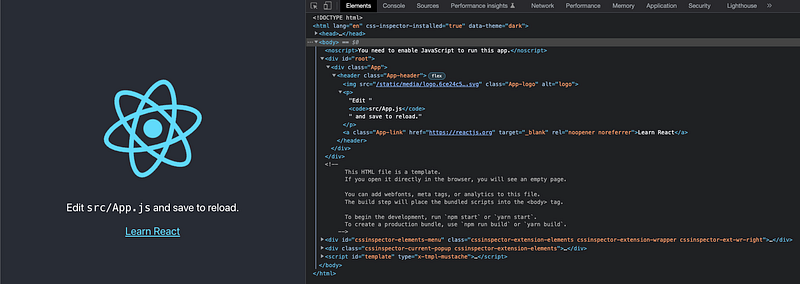
This is a typical CSR, where HTML content is rendered by JavaScript. From the Network tab, we can read what is downloaded from the server.
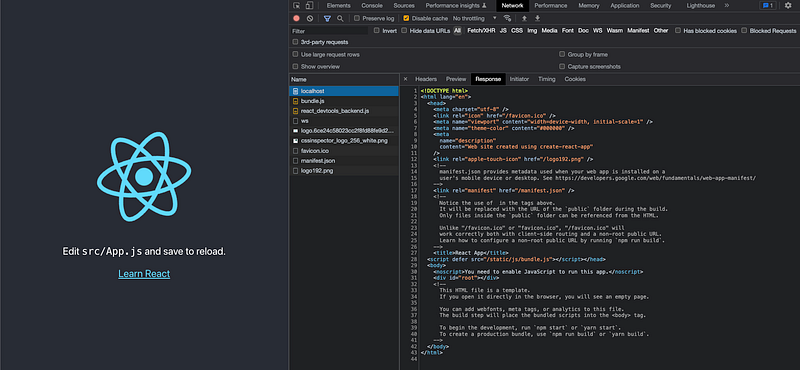
The HTML’s body has a JavaScript bundle, but no actual content. It is hard for SEO to get any meaningful information.
Here is the HTML code:
Deploy the Production Build With Express
In order for SSR to work, we need to deploy a production build.
A hands-on guide for creating a production-ready React app sets up the foundation work for server-side rendering. We need to create a server to serve the compiled React code.
Here is CJS-format file, server/index.js:
Alternative, here is ESM-format file, server/index.mjs:
Execute npm run build to create a production build. Then run nodemon server or nodemon server/index.mjs to deploy it with the Express server.
From the Network tab, it shows what is retrieved from the server:
There is one JavaScript bundle (line 12) with the empty markup content (line 17). Hence, it is CSR.
Build SSR Inside the Express Server
It takes 3 steps to build SSR inside the Express server.
Step 1: Use ReactDOM.hydrateRoot() to display the server-rendered markup.
ReactDOM.hydrateRoot() is similar toReactDOM.createRoot(). It is used to hydrate a container whose HTML contents have been rendered by the ReactDOMServer object. Its syntax is hydrateRoot(container, element[, options]), similar to createRoot(container[, options]).
Since ReactDOM.hydrateRoot() is called on a node that already has the server-rendered markup, React will preserve it and only attach event handlers. This makes the initial load performant.
ReactDOM.hydrateRoot() (line 7) is used in src/index.js:
Step 2: Use ReactDOMServer object to render components to static markup.
React provides the ReactDOMServer object to render components to static markup. It sends to the browser a page that has been populated with data.
React code is universal JavaScript, which runs on both the client and the server.
There are different packages and approaches to achieve SSR. @babel/register is one of the simple ways.
Install @babel/register and babel-plugin-transform-assets.
% yarn add -D @babel/register
% yarn add -D babel-plugin-transform-assets
They become part of devDependencies.
"devDependencies": {
  "@babel/register": "^7.18.9",
  "babel-plugin-transform-assets": "^1.0.2"
}
@babel/register automatically compiles files on the fly. We can configure it to transform JSX and assets. However, it does not support compiling native Node.js ES modules on the fly, since currently there is no stable API for intercepting ES modules loading. Therefore, we will use CJS-format files to explore SSR.
From React 18, renderToString still works but with limited Suspense support. React 18 revamps server-side APIs and put them in react-dom/server. These new APIs, including renderToPipeableStream, fully support Suspense on the server and Streaming SSR.
Here is the modified server/index.js, with SSR capability:
At lines 1–15, we set up Babel through the require hook, which automatically compiles files on the fly.
At line 2, we set up two presets:
@babel/preset-env, a smart preset that uses the latest JavaScript without needing to micromanage which syntax transforms are needed for the target environments.@babel/preset-react, a smart preset that automatically imports the functions that JSX transpiles to.
Lines 3–14 are plugins for babel-plugin-transform-assets. It sets up rules on how to transform static media files. Without this, it throws SyntaxError: Unexpected token ‘<’ for the svg tag.
At line 16, React is required.
At line 17, ReactDOMServer is required.
At line 18, the default export of src/App.js is required.
app.use() (line 47) is executed after app.get() (lines 25 - 45). Otherwise, app.use() will serve the static files, including index.html, for the root route, and the execution will not have a chance to reach the app.get() middleware.
Line 26 displays the request URL that is invoked. For Create React App, they are listed as follows:
Request URL = /
Request URL = /static/js/main.b92cc87b.js
Request URL = /static/css/main.073c9b0a.css
Request URL = /static/media/logo.06e73328.svg
Request URL = /static/css/main.073c9b0a.css.map
Request URL = /static/js/main.b92cc87b.js.map
Request URL = /static/media/logo.6ce24c58023cc2f8fd88fe9d219db6c6.svg
Request URL = /favicon.ico
Request URL = /manifest.json
Request URL = /logo192.png
Lines 27–29 ensures only the root route is rendered by app.get(). The static assets will skip to the next middleware, which is at line 47.
At line 30, ReactDOMServer.renderToString(element) is used to generate HTML on the server. From theory, it could be written as ReactDOMServer.renderToString(<App />), but that would require JSX code to be included in a separate file from where @babel-register is configured.
Line 31 displays the server rendered markup code:
<div class="App"><header class="App-header"><img src="static/media/logo.06e73328.svg" class="App-logo" alt="logo"/><p>Edit <code>src/App.js</code> and save to reload.</p><a class="App-link" href="https://reactjs.org" target="_blank" rel="noopener noreferrer">Learn React</a></header></div>Line 33 loads the production index.html.
Lines 34–44 read the content of index.html. If there is no error, the server generated markup (line 42) is rendered to the root tag, and then the final index.html responds to the initial loading.
Execute nodemon server. From the Network tab, the downloaded script shows a server rendered markup.
The body content (lines 17–27) has the full content, which can be used by SEO to get meaningful information.
Go to chrome://settings/content/javascript, you can turn off JavaScript.
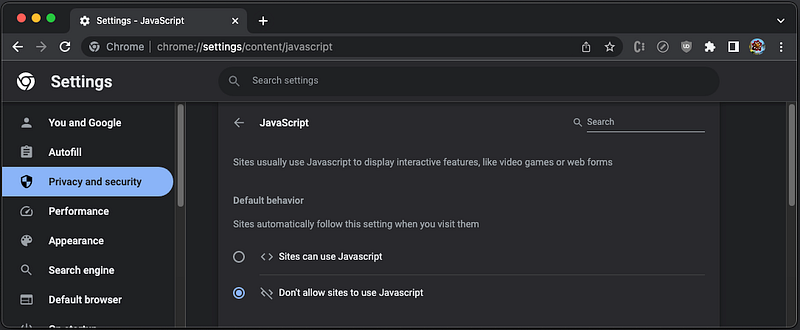
Without JavaScript, the code continues working.
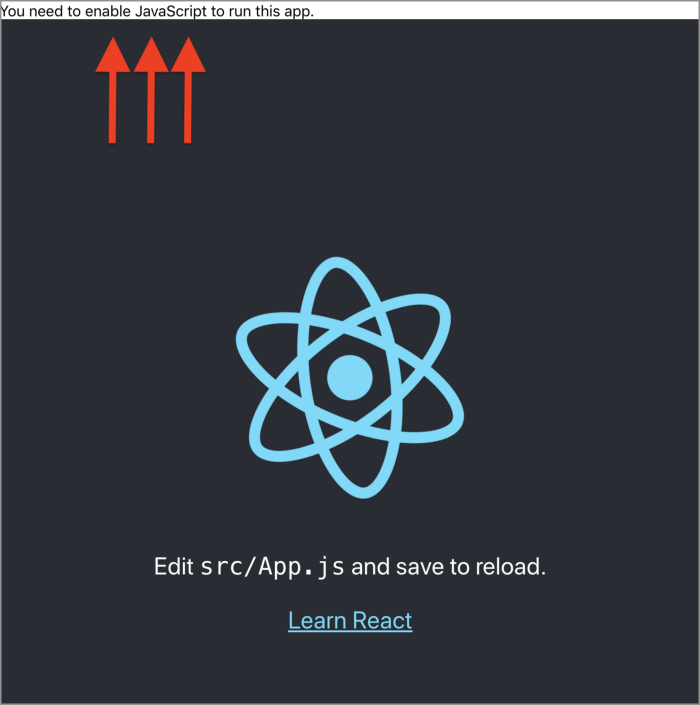
This is SSR.
This example is located at this repository.
Step 3: Handle page specific requirements.
We made one-page React app work. How about an app with multiple routes?
First, install react-router-dom.
% yarn add react-router-domIt becomes part of dependencies.
"dependencies": {
  "react-router-dom": "^6.11.2"
}
Modify src/App.js as follows:
At line 1, React is imported, which is needed for SSR.
At line 2, MemoryRouter is imported, instead of BrowserRoute. BrowserRoute uses the HTML5 pushState history API under the hood, which is not supported by Node.js. MemoryRouter keeps the URL history in memory (does not read or write to the address bar). It is useful in tests and non-browser environments. Another option is { StaticRouter } from "react-router-dom/server". However, it is not for writing complicated routes.
Lines 34–40 use MemoryRouter.
Execute npm run build, and then run nodemon server. Go to http://localhost:8080, we see the following page:

SSR works, although URL in the address bar will not update.
This example is located at this repository.
Use SSR With an Existing Framework/Library
Routing works with a caveat. There are also other things to be taken care of, such as data fetching, Redux, etc. The work at the server side is not as straightforward as the client side. Each page may need specific care based on its requirements.
How can we handle so much complication?
Well, we don’t have to. There are existing frameworks and libraries that have builtin SSR capability.
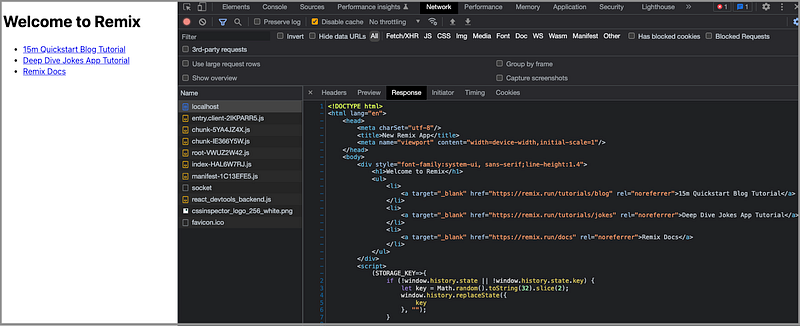
Remix is a full-stack web framework that focuses on the user interface and works back through web fundamentals. It includes SSR and other features out of box, boilerplate-free.
Here is Remix’s client code, which uses hydrateRoot at line 4 in the code below:
Here is Remix’s server code, which uses renderToPipeableStream at line 4 in the code below:
renderToPipeableStream(element, options) is introduced in React 18. It renders a React element to its initial HTML, and returns a stream with a pipe(res) method to pipe the output and abort() to abort the request. It fully supports Suspense and streaming of HTML with “delayed” content blocking “popping in” via inline <script> tags later.
From the Network tab, we can see the index page’s body has the full content of the page. It is SSR.
Gatsby, Next.js, NuxtJS, Quasar, and SvelteKit all provide SSR and other features out of box, boilerplate-free, although they may define SSR slightly differently.
Here is the Network tab for Gatsby’s index page, and obviously, the body has the full content of the page.
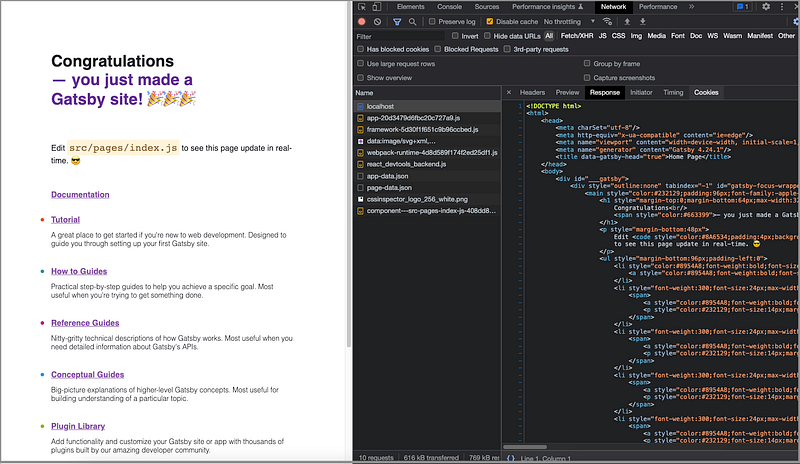
Gatsby is a robust and fast static site generator. It uses React to render static content on the web. It allows to alter the content of static HTML files as they are being SSRed.
If a page includes only static data, the static rendering is faster. However, if the response is dynamic, SSR is a better choice. Sometimes, a hybrid approach may be best for the situation. SSR happens on-demand when a file is requested. A static rendering happens once at build time. Both of them are SEO friendly, while both HTML’s body contents have the full content.
Conclusion
We have showed how to set up SSR for Create React App. These are the steps:
- Use
ReactDOM.hydrateRoot()to display the server-rendered markup. - Use
ReactDOMServerobject to render components to static markup. - Handle page specific requirements
We use ReactDOMServer object to render components to static markup. Its APIs can be used in SSR and static rendering.
For a real project, the best choice is to use an existing framework or library.
Thanks for reading.
Want to Connect?

If you are interested, check out my directory of web development articles.
More content at PlainEnglish.io. Sign up for our free weekly newsletter. Follow us on Twitter, LinkedIn, YouTube, and Discord. Interested in Growth Hacking? Check out Circuit.


