
C++/TIPS
A guide to JSON using C++
Best C++ Open-source Libraries For Parsing JSON
JSON stands for JavaScript Object Notation, the preferred way to store and transfer structured data across the web. JSON is a lightweight text-based representation that is easy to read and write. A JSON object consists of key-value pairs, as shown in the figure:
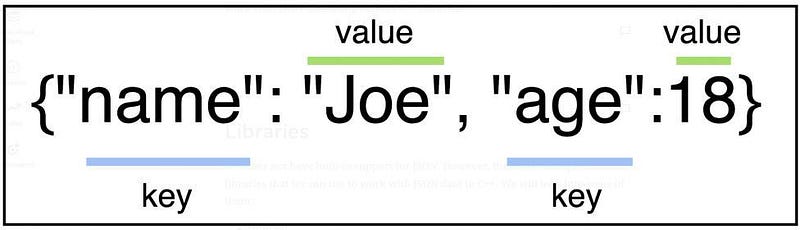
This tutorial will teach us to work with JSON data using various C++ libraries. We will use the above JSON object as an example.
You can also check this series that address the implementation of Machine learning algorithms in C++.
- When Should You Learn Machine Learning using C++?
- Data Preprocessing And Visualization In C++.
- Machine Learning Data Manipulation Using C++.
- Naive Bayes From Scratch using C++.
- Linear Regression Implementation In C++.
- The 8 Books Each C++ Developer Must Read.
- The 9 Books Each Machine Learning Developer Must Read.
JSON with C++
As indicated by the name, JSON is based on JavaScript object syntax. Since C++ came way before JavaScript, it does not have any built-in support to work with JSON data. However, we can use multiple libraries, mainly open-sourced, to work with JSON data in C++.
Libraries
We will look into the following libraries in this tutorial:
- JsonCpp
- nlohman/json
- RapidJSON
- taoJSON
Let’s discuss these libraries one by one.
JsonCpp
JsonCpp is perhaps the most popular C++ library to work with JSON data. For example, suppose that we have a file named data.json that contains JSON data shown below:
{“name”: “Joe”,“grade”: “A”}
Here is how we can parse this JSON data in C++ using JsonCpp:
#include <iostream>
#include <fstream>
// including JsonCpp header file
#include <jsoncpp/json/json.h>
using namespace std;
int main() {
// read file
ifstream file(“data.json”);
// json reader
Json::Reader reader;
// this will contain complete JSON data
Json::Value completeJsonData;
// reader reads the data and stores it in completeJsonData
reader.parse(file, completeJsonData);
// complete JSON data
cout << “Complete JSON data: “ << endl << completeJsGrade << endl;
// get the value associated with name key
cout << “Name: “ << completeJsonData[“name”] << endl;
// get the value associated with grade key
cout << “Grade: “ << completeJsonData[“grade”] << endl;
}Upon compiling and running, the code gives the following output:
Complete JSON data
{
“name”: “Joe”,
“grade”; “A”
}
Name: “Joe”
Grade: “A”
nlohman/json
This is another library that allows manipulating JSON data in C++. It contains all the code in a single header file, making integrating the library hassle-free.
json.hpp is the single required file to be downloaded. You need to add the following line.
#include <nlohmann/json.hpp>You may also need to use the following line for convenience to the files you want to process JSON and set the necessary switches to enable C++11 (e.g., -std=c++11 for GCC and Clang).
using json = nlohmann::json;Here is an example of parsing JSON data using nlohman/json:
#include <iostream>
#include <fstream>
#include <nlohmann/json.hpp>
using namespace std;
using json = nlohmann::json;int main()
{
std::ifstream f(“data.json”);
json data = json::parse(f);
// Access the values existing in JSON data
string name = data.value(“name”, “not found”);
string grade = data.value(“grade”, “not found”);
// Access a value that does not exist in the JSON data
string email = data.value(“email”, “not found”);
// Print the values
cout << “Name: “ << name << endl;
cout << “Grade: “ << grade << endl;
cout << “Email: “ << email << endl;
return 0;}
The .value() function takes two parameters. The first parameter is the key to be searched for in the JSON data, and the second is the message displayed if the key does not exist.
Compiling and running the above code yields the following output:
Name: Joe
Grade: A
Email: not found
RapidJSON
RapidJSON is another header-only JSON library developed for C++. All you need to download is the rapidjson folder and add it to your project.
There are two primary steps involved in parsing a JSON string using RapidJSON:
- Parsing the JSON string into a document (DOM).
- Stringifying the DOM
Here is an example:
#include <iostream>// including RapidJSON header files#include “rapidjson/document.h”#include “rapidjson/stringbuffer.h”
#include “rapidjson/writer.h”using namespace rapidjson;
int main() {
// JSON string
const char *json = “{\”name\”:\”Joe\”,\”grade\”:\”A\”}”;
// Parsing the JSON string into DOM.
Document DOM;
DOM.Parse(json);
// Stringifying the DOM
StringBuffer buffer;
Writer<StringBuffer> writer(buffer);
DOM.Accept(writer);
std::string completeJsonData = buffer.GetString();
std::cout << completeJsonData << std::endl;
return 0;
}Compiling and running this code produces the following output:
{“name”:”Joe”,”grade”:”A”}taoJSON
Yet another library for handling JSON data in C++ is taoJSON, which happens to be small and fast. This is also a header-only library and hence easy to integrate into any project.
taoJSON can include APIs to convert from and to other libraries like nlohman JSON library.
Check the official Github page for the list of features.
Let’s look at an example of parsing a string using taoJSON:
#include <iostream>
// Including taoJSON header files
#include <tao/json.hpp>
#include <tao/json/contrib/traits.hpp>
using namespace std;
int main() {
// Parsing string
const tao::json::value parsedJson = tao::json::from_string(“{ \”name\”: \”Joe\”, \”grade\”: \”A\” }”);
cout << parsedJson << endl;
return 0;}
Compiling and running this piece of code gives the following output:
{“grade”:”A”,”name”:”Joe”}Comparison
So, this tutorial showed how we could work with JSON data in C++ using four different libraries.
Here is a quick guide on how to decide which library to use:
- If code readability and cleanliness are the significant concerns, nlohman/json is the best option to opt for because of its Python-like API. taoJSON also has a user-friendly interface. However, both of these libraries are not very efficient.
- If speed and efficiency are the primary concerns, RapidJSON and JsonCpp are both excellent choices, with RapidJSON being in the first place.
- taoJSOn contains a way for converting to and from other libraries like nlohman/json.
There are many more libraries out there, thanks to the open-source contributors. Each library has pros and cons; some are easier to use, some faster than others, some more efficient than others, etc. Hence, the choice of which library to use really depends upon the situation.
Conclusion
JSON is becoming an increasingly popular data interchange format and rapidly replacing XML. While C++ does not provide native support for handling JSON, several libraries can be used to achieve that task. In this tutorial, we looked at four such libraries with examples. The decision of which library to use should be based on whether one is looking for efficiency or code readability and ease. Efficiency benchmarks can be used to help choose a library based on efficiency.
Hope you find this article useful. Please follow to get notified when a new article in this series is released.
Check my latest articles:


