
A designer’s guide to the Figma API
Part 4 of 7 — Making a request.
You can find the code for this tutorial here:
In Part 3 we setup our Figma file as well as some stuff we need for authentication against Figma’s servers. In this part we are going to start making requests to the API.
Step 4: Make a request.
The first step in this process is to make a request to the GET file endpoint. This endpoint will return our file structure as a JSON object. We can worry about what we do with that JSON object a bit later.
We need to write a function that the server can execute to fetch the data. That function needs to do a few things:
- Make a request to the Figma endpoint with our API key for authentication.
- Wait for that request to resolve and parse it into JSON, just to make sure it’s in the correct format.
figmaFileFetch() is the function we need. Go ahead and copy it into server.js
A few things to note about our function:
- It’s an asynchronous function, hence the
asyncin front of it. In oversimplified terms, this means we are expecting the result to take a while, so we are telling the code that depends on this function that the result will eventually resolve but might not be ready when it first asks. You can see this on line8and15, where we use the keywordawaitto indicate that this value might not be available immediately. - Our function takes one argument, which is just the unique file ID from our file. Passing this in as an argument means we can re-use this function with other files if we want, just with a different file ID.
- Notice how we had to import
var fetch = require('isomorphic-fetch')? This is a poly-fill that allows us to use thefetch()function. It’s a bit complicated butfetch()allows us to fetch things from a specified path. In this case we actually construct our url by appending ourprojectIdto the endpoint url. - The second argument we pass to
fetch()is an object that contains our authentication token as a header and the GET method. This is all stuff the Figma endpoint will need to process our request, but don’t stress too much about understanding that.
This type of function is called Middleware because it sort of sits between the two applications.
Before we can do anything else we need to tell the server when it should run this function. We do this by adding the following code near the end of our server.js:
app.use tells the server to mount the middleware we just wrote when we navigate to a specific url. This is how it works:
- The first argument it takes is the path. When our server gets a request on that path, it’ll fire off our middleware. In this case
/means it must fire on the route url. Basically the home page. - The second argument is the middleware we want to mount. In this case we are wrapping our
figmaFileFetch()in anotherasyncfunction because we want to make sure it can resolve. After it has resolved we parse the response into a string(so we can read it) and send it off as a response.
Now if you go into your terminal, run npm start and go to http://localhost:3001/ in your browser, you should see this:
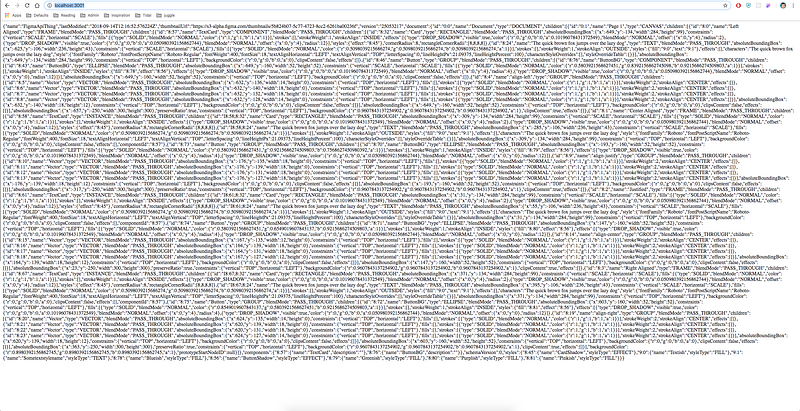
Believe it or not, this is a success. That’s the structure of our file, described in JSON. This means that our server is successfully making a request to the Figma endpoint and returning a result.
In Part 5, we are going to process this response to pull out the parts we need and make another request to a different endpoint.


