
A Comprehensive Guide: Writing Your Own Airflow Operator
Step-by-Step Tutorial with Examples to Make Your First Airflow Operator Creation Effortless
Welcome to this guide designed for beginners, where we will delve into the process of writing your own Airflow operator. If you’re new to Airflow or want to improve your skills, this tutorial will give you a thorough introduction and practical examples. By the end, you will feel confident in your ability to create custom operators that are specifically designed to meet your unique requirements.
Table of contents
· Understanding Airflow Operators · Creating Your Custom Operator · Using Your Custom Operator · Custom Operator with custom HttpHook in action ∘ Notion Employee Database Schema ∘ InsertPandasDFToNotionDBOperator ∘ The Operator in action
Understanding Airflow Operators
AnOperator is essentially a blueprint for a pre-definedTask that you can simply define within your DAG using a declarative approach.
Airflow has a very extensive set of operators available, with some built-in to the core or pre-installed providers. Some popular operators from Core include:
- BashOperator — executes a bash command
- PythonOperator — calls an arbitrary Python function
- EmailOperator — sends an email
If the operator you require is not included in the default installation of Airflow, you can likely find it among the extensive collection of community provider packages. Some popular operators from here include:
- S3FileTransformOperator
- SlackAPIOperator
- e.t.c
If your use case is not satisfied by any of the existing community-developed operators, it’s time that you learn how to create your own airflow operator from scratch. Ref
Creating Your Custom Operator
Each operator performs a specific task within the workflow. For our custom operator, we will create a Hello World! PythonOperator, which will print the parameter passed to it. Create a file custom_operator.py in theoperators Python package. Make sure theOperators package is mounted as volumes. Airflow setup has a lot of variety, but the point that I am trying to make is that wherever you are writing the operator, it should be accessible to your Dag.
# Import the necessary modules
from airflow.models import BaseOperator
from airflow.utils.decorators import apply_defaults

# Define your custom operator class:
class MyCustomOperator(BaseOperator):
    # We can set default arguments for our operator by using the @apply_defaults decorator.
    # In this example, we need to provide my_param as a mandatory parameter.
    @apply_defaults
    def __init__(self, my_param, *args, **kwargs):
        super(MyCustomOperator, self).__init__(*args, **kwargs)
        self.my_param = my_param

    def execute(self, context):
        # The execute method is where your custom logic will reside.
        # You can perform any operations or computations you need within this function.
        print(f'Executing MyCustomOperator with my_param: {self.my_param}')
In the code snippet above, we define our own operator class called MyCustomOperator. It extends the BaseOperator class and overrides the execute method. This method will include the logic that you desire your operator to execute.
Using Your Custom Operator
Now that we have our custom operator prepared, let’s explore how it can be utilized in a workflow. We can create a basic Airflow DAG to make use of our operator.
Create a new Python file, e.g., my_workflow.pyand add the following code:
from airflow import DAG
from datetime import datetime

# Here operators is package and custom_operator is module. The point I was trying to make.
from operators.custom_operator import MyCustomOperator

# Define your DAG
dag = DAG(
    'my_workflow',
    description='My custom workflow',
    start_date=datetime(2023, 1, 1),
    catchup=False,
    schedule_interval="@daily"
)

# Create an instance of your custom operator
my_task = MyCustomOperator(
    task_id='my_task',
    my_param='Hello Airflow!',
    dag=dag
)
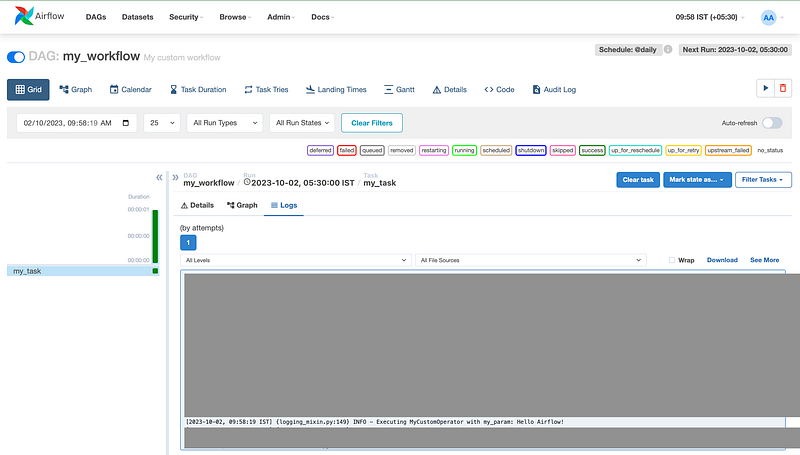
Output
Custom Operator with custom HttpHook in action
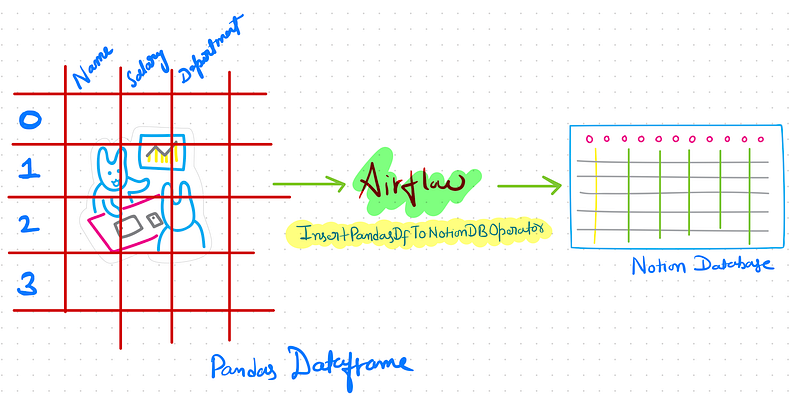
In this example, we will use NotionHook from the previous blog and build a custom Operator that inserts a given Pandas DataFrame into the Notion Database.
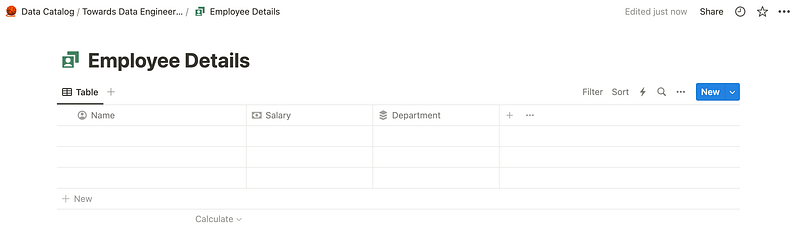
Notion Employee Database Schema
InsertPandasDFToNotionDBOperator
from airflow.models import BaseOperator
from airflow.utils.decorators import apply_defaults
from hooks.notion import NotionHook


class InsertPandasDFToNotionDBOperator(BaseOperator):
    @apply_defaults
    def __init__(self, df, *args, **kwargs):
        super(InsertPandasDFToNotionDBOperator, self).__init__(*args, **kwargs)
        self.df = df

    def execute(self, context):
        """
        Creates a NotionHook Object and uses it's method add_page_to_db to add records to Notion DB
        conn_id="personal_notion_secret_token" (Check previous blog to create the connection in Notion UI)
        """
        notion_hook = NotionHook(conn_id="notion_conn_default")

        for index, row in self.df.iterrows():
            page = {
                "Name": {
                    "type": "title",
                    "title": [{"text": {"content": row["Name"]}}]
                },
                "Salary": {
                    "type": "number",
                    "number": row["Salary"]
                },
                "Department": {
                    "type": "rich_text",
                    "rich_text": [{"text": {"content": row["Department"]}}]
                },
            }

            notion_hook.add_page_to_db(page, "d30a2315a23848e************")
The Operator in action
from airflow import DAG
from datetime import datetime
import pandas as pd

from operators import InsertPandasDFToNotionDBOperator


def get_employee_df():
    data = {
        'Name': ['John', 'Emily', 'Michael', 'Jessica', 'David'],
        'Salary': [700000, 700000, 700000, 700000, 700000],
        'Department': ['HR', 'Finance', 'IT', 'Marketing', 'Sales']
    }

    return pd.DataFrame(data)


dag = DAG(
    'Notion.Data.Ingestion',
    description='Ingest pandas dataframe to any Notion DB provided a valid schema',
    start_date=datetime(2023, 1, 1),
    catchup=False,
    schedule_interval="@daily"
)

# Create an instance of your custom operator
my_task = InsertPandasDFToNotionDBOperator(
    task_id='Insert.Employee.Details.To.Notion',
    df=get_employee_df(),
    dag=dag
)

my_task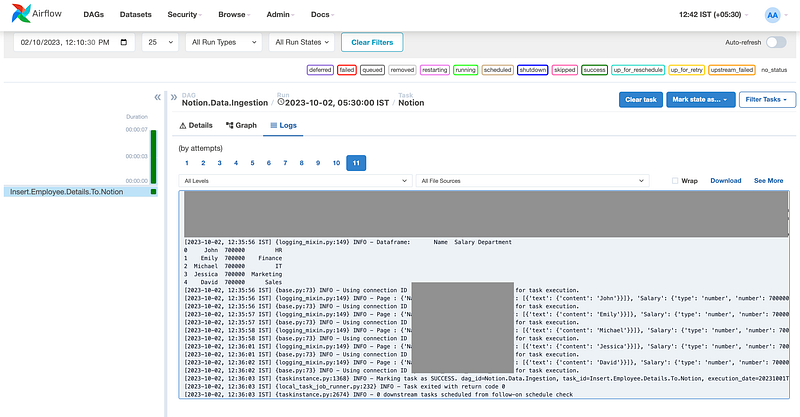
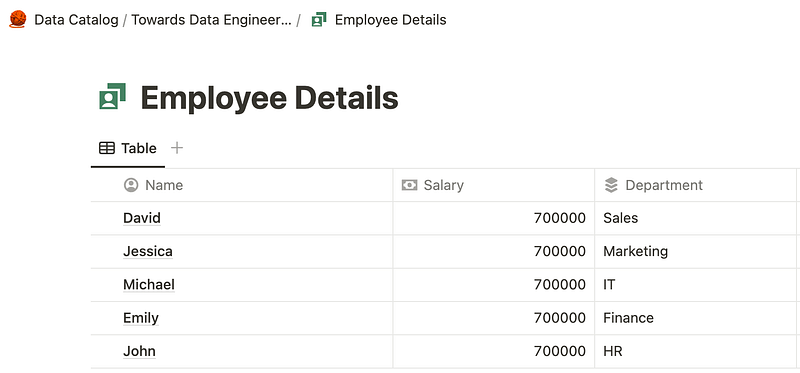
This example is merely an example of how you can think in the right direction when writing your own operator. Your operator should be dynamic enough to be reusable in more than one scenario and should do what it says. The above operator is fixed to a given schema, and the database_id is tied to the operator; hence, it doesn’t justify the true purpose of being an Operator.
Conclusion
In this guide, we discussed the basics of building your own Airflow operator. We began by understanding various types of Airflow operators and then proceeded to go through the process of creating a custom operator, explaining each step along the way. By becoming proficient in the skill of writing custom operators, you will have the ability to manage intricate workflows, seamlessly connect with external systems, and automate tasks that are tailored to your specific needs. By harnessing Airflow’s flexibility and applying this knowledge, you will be able to effectively optimize your data pipelines and orchestration processes.
Thanks for spending time on this article! Before you go:
- 📰 Subscribe to my upcoming blogs: Subscribe
- 👏 Applaud this article 🚀
- 🔔 Follow me on Medium, Linkedin, and Twitter
