
Mastering Airflow Hooks: A Comprehensive Guide to Abstracting API Calls
Getting started with writing Custom HttpHook with two examples
Welcome to the comprehensive guide to creating your own airflow hooks! In this tutorial, we will delve into the concept of Airflow Hooks and how they will transform the way you manage API calls in your Airflow Dags. Whether you are a beginner or an experienced Airflow user, this step-by-step guide will provide you with the knowledge and tools to seamlessly integrate REST APIs into your workflows in an Airflow-native way.
Table of Contents:
· What is a REST API? · How can you call a REST API in your Dag? ∘ Advantages of Airflow Hooks ∘ Disadvantages of Airflow Hooks · What is an airflow hook? · How can you write your own airflow hook? · Two Examples of Custom HttpHook ∘ Amplitude Taxonomy API Custom HttpHook ∘ Notion API Airflow Custom HttpHook · Conclusion
What is a REST API?
A REST API, also known as a Representational State Transfer API, consists of a collection of rules and conventions that facilitate communication between various software systems via the internet. This enables clients to request and manipulate data from a server using standard HTTP methods such as GET, POST, PUT, and DELETE. For instance, a weather API can offer up-to-date weather information to a mobile application, enabling users to access the current weather conditions for their specific location.
How can you call a REST API in your Dag?
In the above blog, we discussed HttpOperator, PythonOperator, and BashOperator to call an API endpoint. Each has its own strengths and weaknesses, so you can choose the most suitable method based on your specific requirements. However, there is a airflow native way of achieving the same: the Hook. Before we dig deeper into Hooks, let’s first understand the pros and cons of using it.
Advantages of Airflow Hooks
- Offers a more advanced way to interact with external systems.
- Provides native support for a wide range of systems, including databases, cloud services, and APIs.
- It simplifies the process of authentication, managing connections, and handling errors.
Disadvantages of Airflow Hooks
- Restricted to the systems that are supported by Airflow hooks.
- Specific API endpoints may require additional configuration.
- Using lower-level libraries directly provides more flexibility than using higher-level libraries.
What is an airflow hook?
A Hook is a convenient way to communicate with an external platform without the need to write complex code that directly interacts with their API or utilizes specific libraries. It provides a user-friendly interface for seamless integration. They are also frequently used as the fundamental components for constructing Operators.
They integrate with Connections to gather credentials, and many have a default conn_id; for example, the PostgresHook by default looks for the Connection with conn_id=postgres_default if you don’t pass one in. Ref
How can you write your own airflow hook?
To get started with writing an Airflow Hook, you can follow the example of the custom hook provided below.
from airflow.providers.http.hooks.http import HttpHook
from airflow.exceptions import AirflowException

# Make sure not to include "https://www.". Start directly with the domain name.
GET_ENDPOINT = "xyz.com/get"


# This defines a new class, CustomHook, that extends the HttpHook class.
class CustomHook(HttpHook):
    # This is the constructor method of the CustomHook class.
    def __init__(self, conn_id=None, *args, **kwargs):
        self.conn_id = conn_id
        self.notion_token = self._get_token()
        self.headers = {
            "Authorization": f"Basic {self.notion_token}",
            "Content-Type": "application/json",
        }

        # This calls the constructor of the parent HttpHook class, passing the connection ID, HTTP method, and any additional arguments.
        super(CustomHook, self).__init__(
            http_conn_id=self.conn_id, method="GET", *args, **kwargs
        )

    # This is a helper method to retrieve the Notion token from the connection.
    def _get_token(self):
        try:
            return HttpHook.get_connection(self.conn_id).password
        except Exception as e:
            raise AirflowException(
                f"Error fetching connection details for {self.conn_id}: {e}"
            )

    def get_call(self):
        # This calls the run() method of the parent HttpHook class, passing the endpoint URL and headers.
        return super(CustomHook, self).run(
            endpoint=GET_ENDPOINT,
            headers=self.headers
        )
Two Examples of Custom HttpHook
Amplitude Taxonomy API Custom HttpHook
Amplitude is a digital analytics platform and experimentation tool used for click stream event tracking.
Notion API Airflow Custom HttpHook
Notion is a web application for productivity and note-taking. It provides tools for organization such as managing tasks, tracking projects, creating to-do lists, and bookmarking using the notion database.
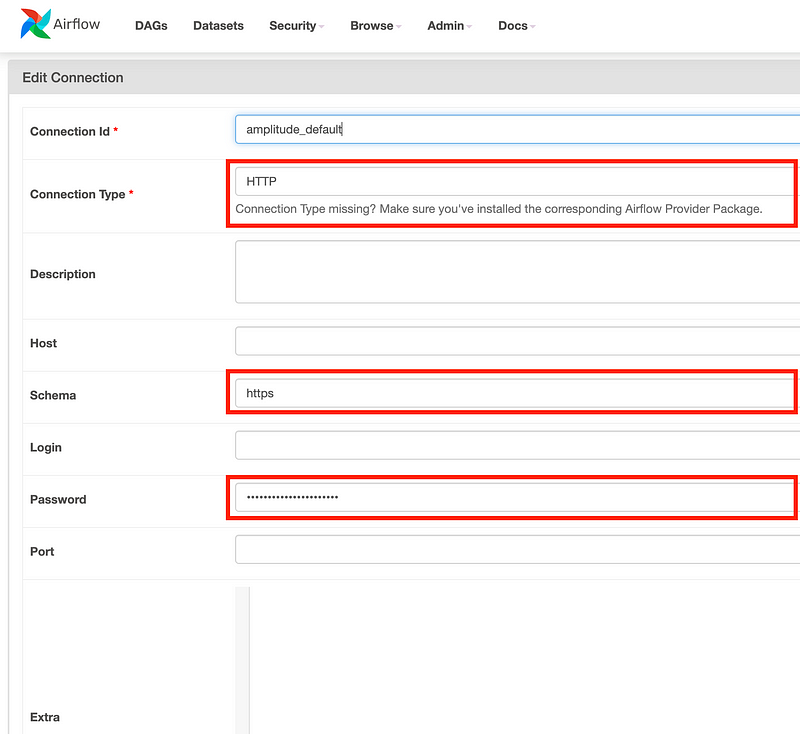
Creating Airflow connection for using above Hooks
- Give a connection name; you need to pass this while making a hook object in your operator.
- Choose Connection Type as:
HTTP - Schema:
https - Password:
SECRET_KEYorToken, whichever is required to be passed in your request header.
📣 Checkout: Here is yet another article where I have discussed how you can write an advance custom Hook that is reliable and dynamic enough to handle failures🔥 and take care of rate limits ⚙️ and timeouts ⏲.
Conclusion
Congratulations! Congratulations! You have now become proficient in the art of creating your own Airflow hooks and abstracting API calls. By utilizing the capabilities of Airflow Hooks, you can effortlessly incorporate external APIs into your workflows, opening up a wide range of opportunities. By offering advantages over Python operators, such as improved reusability and maintainability, they allow you to streamline your data pipelines and increase your productivity. Go ahead and put into practice what you have learned, and take your airflow skills to a whole new level. Have a great time coding!
Thanks for spending time on this article! Before you go:
- 📰 Subscribe to my upcoming blogs: Subscribe
- 👏 Applaud this article 🚀
- 🔔 Follow me on Medium, Linkedin, and Twitter



