
A brief insight into Networks
Networks have become indispensable in today’s world. They connect computers with each other help to build digital structures. But what types of networks exist? How do they behave? What terms should you know? In this article I will explain a few common technical terms in more detail.

This article itself covers only the most minimal knowledge and only explains a few technical terms to help you find your way around the net better.
If you want to learn more about networks and how data is transmitted, please read my article: Send & Receive — The 7-Layer-OSI-Model
Content
- What is a Network?
- Network Topologies
- IPv4 & IPv6
- Internet Services
- Conclusion
What is a Network?
A network is an association of two or more computers or other electronic devices that enables the exchange of data and the use of shared resources. The simplest network is the peer-to-peer network, in which two computers are connected by cables.
The main task of a network is to offer the participants a platform for exchanging data and sharing resources. This task is of such central importance that large parts of today’s everyday life and the modern working world are no longer imaginable without networks.
Networks are differentiated according to the type of transmission (cable or radio) and their range. Depending on the range, networks are referred to as PAN, LAN, MAN, WAN or GAN.
- PAN/WPAN — (Wireless) Personal Area Network: e.g. Bluetooth, IrDA, WLAN; USB, FireWire; connects electronic devices near the user.
- LAN/W-LAN — (Wireless) Local Area Network: e.g. Computer, Laptops, Printer; describes a network that is limited to a local area in terms of its spatial extent.
- MAN/WMAN — (Wireless) Metropolitan Area Network: e.g. Cities, Universities, office buildings; A regional broadband telecommunications network that connects multiple LANs.
- WAN — Wide Are Network: e.g. internet, connection to several company offices; large-scale networks that span countries and even continents. They do not connect individual computers, but other networks such as LAN or MAN with each other
- GAN — Global Area Network: e.g. Networking of global locations of an international company; Network that can connect multiple wide area networks over unlimited geographic distances
Network Topologies
In a computer network, the topology describes the structure of the connections between several devices in order to ensure shared data exchange. The topology of a network is also decisive for its fail-safety.
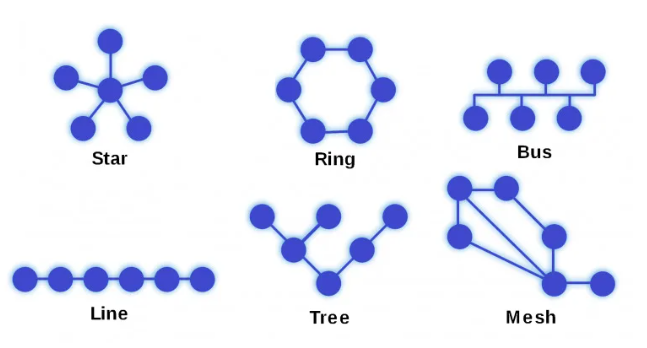
Star:
- Communication participants wired in a star configuration around a central hub.
- most common cabling topology
+ easy networking + simple extension + high reliability + high transfer rates when the network node is a switch - high cabling effort - Mains failure in case of failure or Hub overload - Low transfer rate at many hosts if a hub is used
Ring:
- Each end device is connected to exactly two others
- Inner ring in opposite direction can prevent total failure
- information is passed from participant to participant until it reaches its destination.
+ distributed control + large network extent + guaranteed transmission bandwidth + All computers have the same access options - time-consuming troubleshooting - in the event of faults, mains failure - high cabling effort
Bus/Line:
- 1 central cable
- like bus stops
- separate connection cable per computer
+ easy installation + low cabling effort + low costs - Limited performance length - Difficult troubleshooting - Frequent data collision (since only 1 cable) - Complete power failure when the bus is interrupted
Tree:
- Each end device is connected to the distributor, the distributors are connected to each other
- have a root (the first or upper node) from which one or more edges emanate
+ The failure of a terminal device has no consequences + Structural extensibility + Large distances possible (combination) + Good suitability for search and sorting algorithms - complete failure if root fails - worse latency as size increases
Mesh:
- decentralized network in which all network nodes are arbitrarily connected to each other
- Connection takes the shortest route
- if connection is disrupted, it is still maintained with a small detour
+ decentralized control + infinite network extension + high reliability - complex administration - expensive and high-quality Networking
IPv4 & IPv6
IPv4
IPv4 is the name of the Internet protocol that is currently still used for IP addresses of domains. These IP addresses are assigned automatically when a domain is registered. IPv4 uses 32-bit addresses of up to 12 characters in four blocks of three characters each
IPv6
An IPv6 address is 128 bits long and consists of eight 16-bit fields separated by colons. Each field must contain a hexadecimal number, as opposed to the split decimal notation of IPv4 addresses.
Difference
“IP stands for Internet Protocol, and in general it refers to a device’s specific location on a network. But that term can be confusing because there are two types of IPs — IPv4, which was created in 1981; and IPv6, which was only fully implemented recently. If you’ve got a device connected to your home router or office computer system, chances are you’re using an IPv4 IP address.
That being said, both versions actually fall under one category — in other words, they’re both IP addresses. The main difference between them is their size (IPv4 is 32 bits long and IPv6 is 128 bits long), but that doesn’t have much practical use for consumers yet; typically IP addresses will just look like strings of numbers separated by dots. Since most computers now support both protocols, it might not matter which type you use when browsing online.” (https://interlir.com/blog/2022/04/06/what-is-an-ipv4-address/)
Internet Services
DNS — Domain Name System
It represents a database that establishes a connection between the speaking names of the URL and the associated IP address. A DNS server carries out the DNS client queries as recursive queries on behalf of its DNS clients and on behalf of DNS servers. The result is temporarily stored locally by DNS caching.
DHCP, Dynamic Host Configuration Protocol
The IP address can be assigned automatically or manually. A separate protocol — DHCP- is required for automatic assignment. The host must contact the DHCP server to get an IP address by the following process:
- the end station sends a request to the DHCP server
- DHCP server selects an address from a pre-configured pool of available addresses and allocates it to the host for a specified period of time. This period is variable, can be configured
Traceroute
It records the path a package takes on the network. It consists of a sequence of IP addresses of the intermediate nodes and additional time information.
Ping
It sends a ICMP package echo over the network to the specified IP address and waits for an answer in the form of an echo reply
Conclusion
In summary, networks can be very complex. In order to understand how networks really work, it is necessary to learn more about the respective protocols and to gain a basic understanding of data transmission via bytes. This article shows which network topologies are in use, how IPv4 and IPv6 differ and what well-known technical terms actually mean. More articles about software development and network technology will follow in the future. Thank you for reading my article an If you want to learn more, please follow me on medium.
Please check out my other articles:
- LINQ — How to avoid nested loops in C#
- .Net C# — Clean Architecture & Dependency-Inversion-Principle
- Programming paradigms — a brief introduction
- C# — Object-Oriented Programming (OOP)
- C# — Single-Responsibility easily explained
- OCP — What really matters
- Top 8 tips to improve your motivation as programmer
- Send & Receive — The 7-Layer-OSI-Model
- 7-Layer Network Protocols easily explained