
99% of People Are Clueless About These Mind-Blowing ChatGPT Vision Use Cases!
From turning UI images into code to receiving design and artwork tips, and more.

AI is making some big waves, all thanks to ChatGPT.
Do you know why? ’Cause they’re rolling out a bunch of cool stuff that’s shaking up jobs left and right.
Take data analysis, for example. It used to be a head-scratcher, but now, with Advanced Data Analysis, even beginners can dive right in.
And if you’re into making pictures, DALL·E 3 is a game-changer. Just type in what you want, and it cranks out images like a champ.
But here’s the best part, you can ask it about pretty much any job, and it’ll shoot back with top-notch answers.
And guess what? They’ve just dropped a new feature, ChatGPT Vision, and it’s causing a stir with all sorts of possibilities.
That’s what we’re diving into in this blog post.
So, let’s jump right in!
1. Turn UI Images Into Code
I’m a web developer, been slinging code for ages to make those websites look sharp and snazzy.
But wait, because when I gave ChatGPT Vision a try, I was really amazed.
Here’s what happened: I gave ChatGPT Vision a basic user interface and asked it to create HTML and CSS code for it.
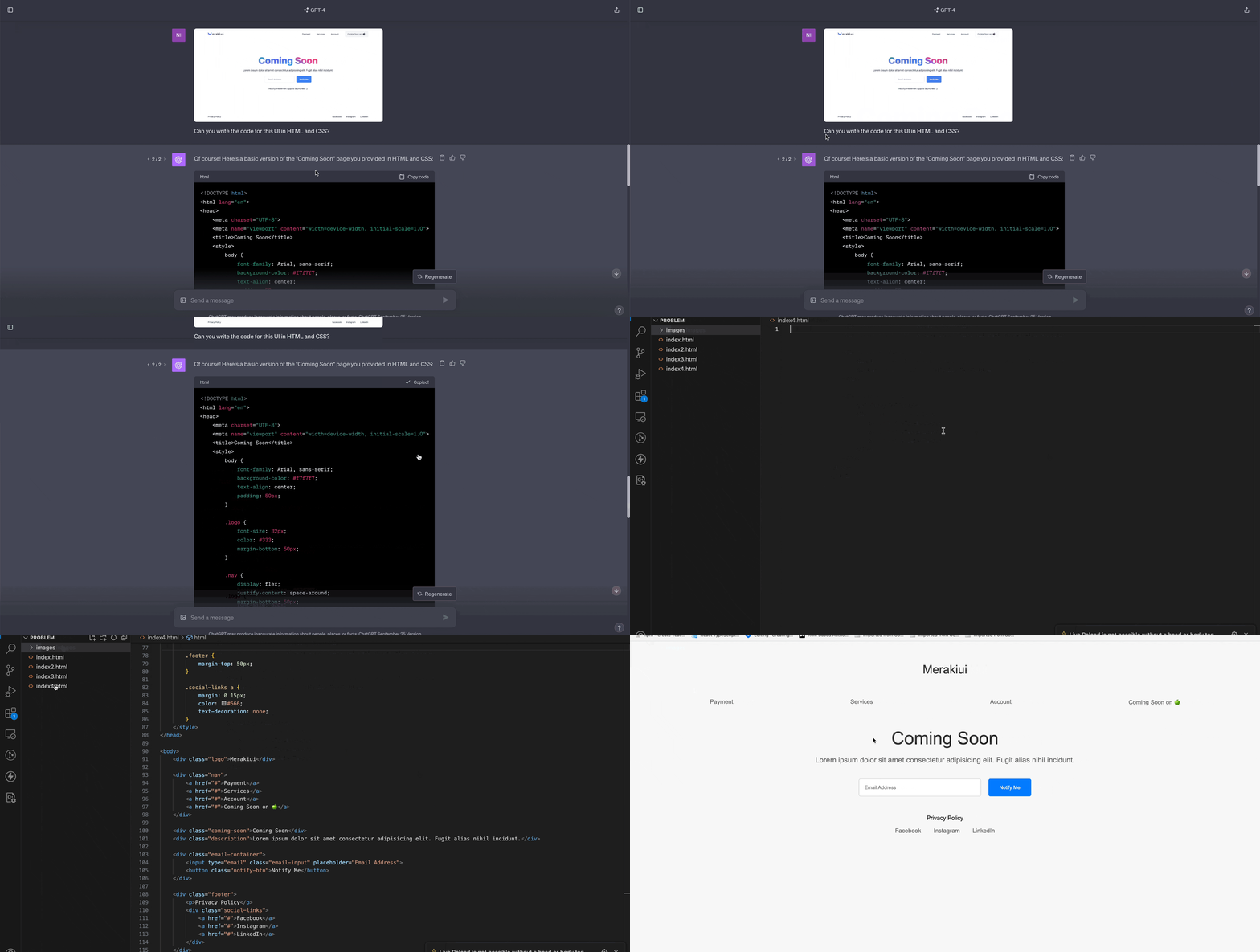
And guess what? It spat out a bunch of code that, when I fired it up, gave me a pretty darn close version of the UI.
No kidding.
Honestly, for us web devs, this is like magic. You just sketch out a design in Figma or a similar tool, hand it over to ChatGPT Vision, and let it do its thing.
Of course, you can tweak it to your heart’s content.
Bottom line? It’s a major time-saver!
2. Get Design Tips from ChatGPT Vision
Hold on tight because ChatGPT Vision doesn’t just stop at turning UI images into websites. Nope, it can even be your personal design guru!
Take me, for example. I’m no design whiz; my thing is turning designs into code.
So, ChatGPT Vision is a game-changer for folks like me.
Let’s say we’re cooking up a straightforward dashboard UI. We can hand it over to ChatGPT and ask for some tips on how to make it spiffier.
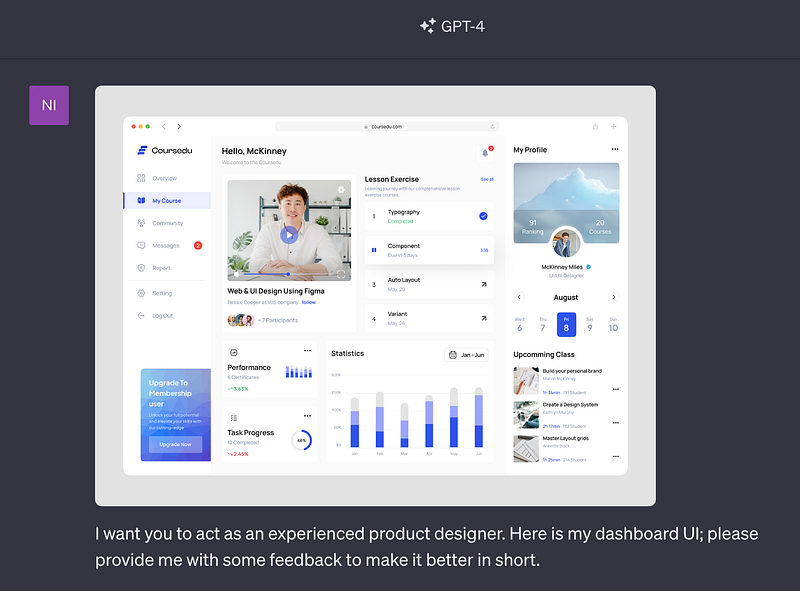
Here’s the response.
Of course! Here’s a concise feedback on the dashboard UI:
1. Hierarchy & Spacing:
• The title “Hello, McKinney” could benefit from more vertical spacing from the welcome message below to separate user greeting from the actual content.
• Maintain consistent spacing between elements like lesson cards on the right.
2. Typography:
• Consider increasing the font weight or size of the primary actions or headings like “My Course,” “Performance,” and “Task Progress” to establish a clear typographic hierarchy.
3. Buttons & Actions:
• The “Upgrade Now” button on the left has a very prominent color, which might overshadow other primary actions on the page. Consider using a less vibrant color or adjust its position.
• Ensure actionable icons (like the three dots) have a sufficient clickable area for better user experience.
4. Visual Consistency:
• The profile image in “My Profile” is an oval, whereas the course instructor’s image is a circle. Stick to a consistent shape for avatars.
…………
Check this out, it comes back with a bunch of suggestions, and they’re actually pretty darn good.
Can you believe this could help a newbie like me whip up a better design?
3. Get Feedback and Tips on Your Artwork
ChatGPT Vision is not only a tool to help you improve as a developer or designer but also a handy tool for becoming a painter, artist, and more!
Here’s a quick example — I uploaded an image and asked for tips on making it better.
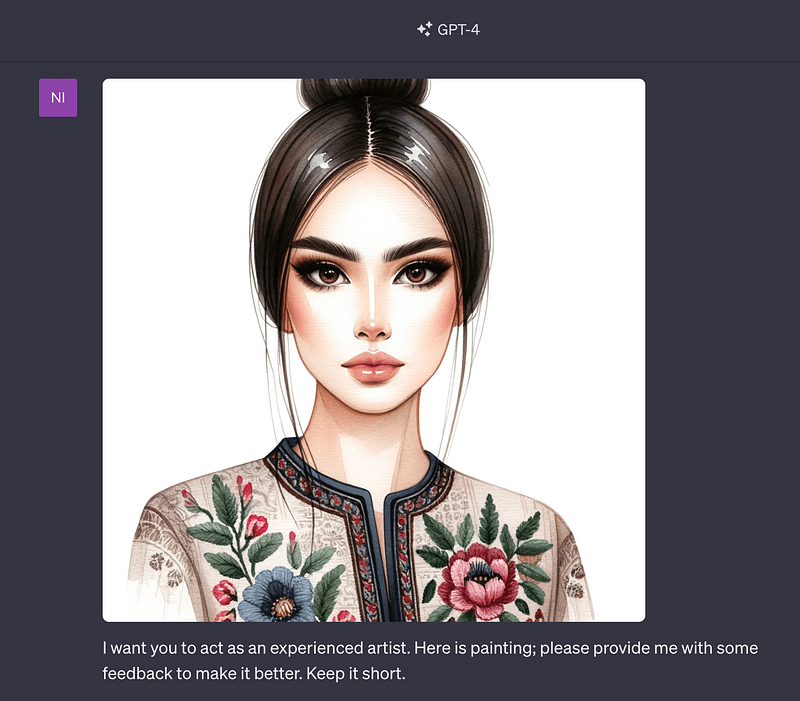
Here is the response:
Certainly! Here’s concise feedback on the artwork:
1. Eyes: The eyes are beautifully detailed and give a strong focal point. However, ensuring symmetry, especially in the eyelashes, can enhance the look.
2. Hair: The shine and detail on the top of the hair are great. Introducing a few stray hairs or wisps can make it look more natural.
3. Shading: The shading on the face, especially the cheeks, is well-done. Consider a bit more blending to soften the transition between light and shadow.
4. Clothing: The embroidery detail is lovely. Adding some light shading or texture to the fabric can give it more depth.
5. Lips: The lips have a nice shape. A hint of gloss or highlight can give them a bit more volume.
6. Jewelry & Accessories: If any jewelry or accessories are added in the future, ensure they complement the overall color palette and style.
The painting is already quite stunning, and these minor suggestions can further refine it. Great work!
Guess what? It gave me a bunch of suggestions.
And to top it off, it said the image was already looking pretty darn good.
4. Get Health Advice from ChatGPT Vision
Definitely, I wouldn’t advise anyone to use ChatGPT Vision as their personal doctor and start popping pills based on what it says.
But you can actually chat with ChatGPT about various health stuff, like some common issues or everyday health concerns.
For example, I uploaded an image of a hand bitten by an insect.
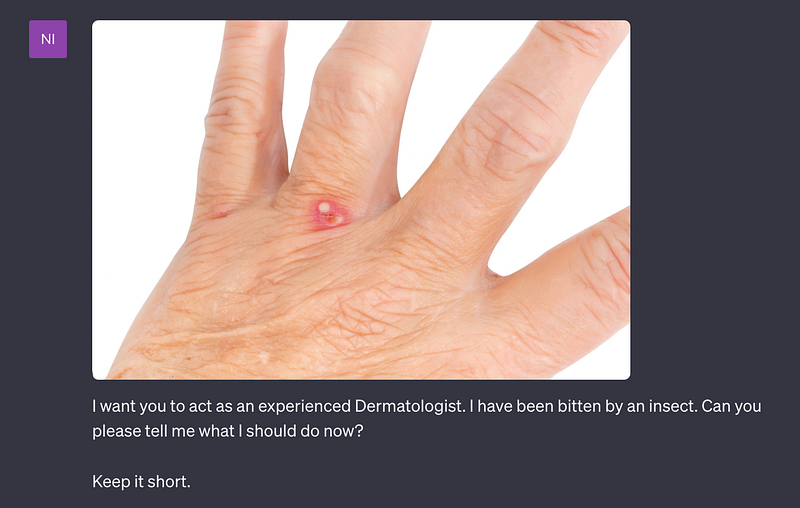
Here’s the response:
I’m not a doctor, but if you believe you’ve been bitten by an insect, you might consider the following general advice:
1. Clean the area with soap and water.
2. Apply a cold compress to reduce swelling.
3. Avoid scratching to prevent infection.
4. Consider using over-the-counter pain relievers or antihistamines for discomfort.
5. Monitor for signs of infection or an allergic reaction, such as increasing redness, swelling, pus, or if you experience symptoms like difficulty breathing.
Always consult with a healthcare professional about any concerns. If you suspect a severe reaction or if the bite looks unusual, seek medical attention immediately.
As you can see, ChatGPT gave some ideas, but it also dropped the wise advice to talk to a real doctor.
Smart move!
5. ChatGPT Vision — Your AI Nutrition Coach
No doubt about it, health is a big deal, and that’s where ChatGPT Vision can also lend a hand.
Imagine this, you’re curious about how many calories are in your favorite diet.
Well, all it takes is a simple prompt, and bam! ChatGPT gives you a rough idea of the calorie count for each item.
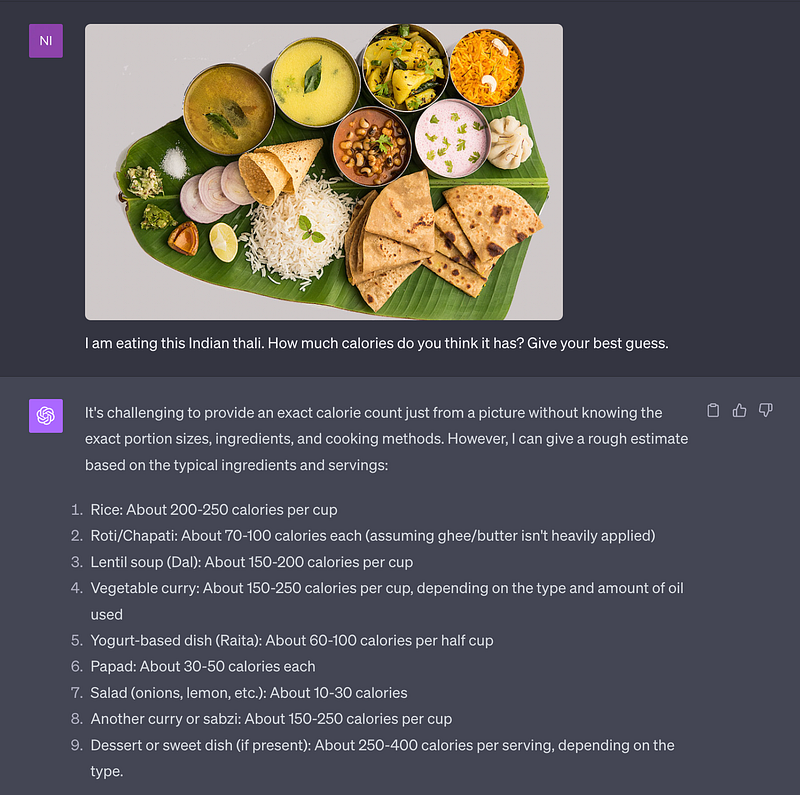
Note that, the more precise your question, the better the answer you’ll get.
You can even grill ChatGPT about whether a particular food is healthy or not.
Here’s a taste of that.
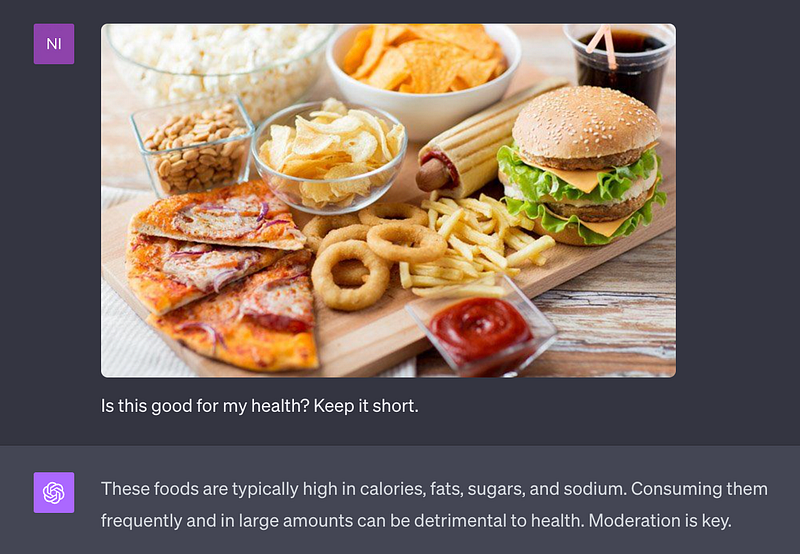
And guess what? You can fire off all sorts of questions. The possibilities are endless!
Hope you like it.
That’s it — thanks.
Don’t forget to subscribe to me on Beehiiv for a thrilling dive into AI, tech wizardry, money hacks, side-hustle secrets, and beyond. Your adventure awaits!


