
Comments in Python: Python Complete Course — Part 9

Before we start let me tell you that:
- This article is a part of Python Complete Beginner to Expert Course which you can find it here.
- All resources are available in the “Resources” section below.
- This article is also available as a YouTube video here.
Introduction
Have you ever thought about the way that developers use it in order to remind their self about what each part of their code does? or to explain to each other what the goal of each code snippet of their code when they are sharing codes between them?
In this article you are going to learn about how to document your code for future reference.
This article will cover the following outlines:
1. What Is a Comment?
The comment is an explanation or annotation written in the English language in the computer program’s source code. Usually, comments work as hints to highlight what the source code does in the place in which they are written. However, they are totally ignored by compilers and interpreters. In other words, when you run your program, they will not change the normal behavior of your program.

Now, let us see together why comments are important.
2. Why Comments Are Important?
Usually when I want to talk about comments importance, I like to share this meme.
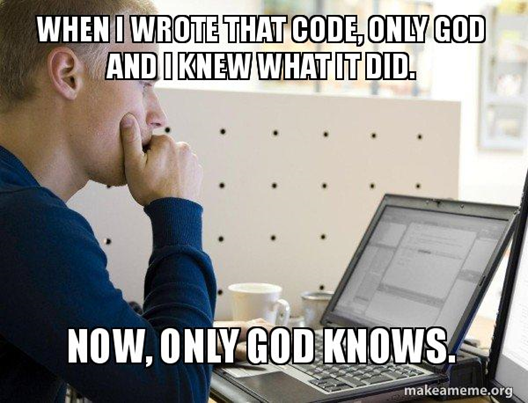
From this meme, you can understand that if you come back to your code after one year, for example, it’s very hard to memorize what you have done and here comments come to the scene to remind you about what your code does. Also, comments are useful when you want to share your program with other people. So it’s going to be easier for them to read your code and understand what do you mean by each part of your code.
3. Comments Types
Mainly, Python supports two types of comments:
- Single-line comment:
You can write this comment only in one line. In order to write this comment, the line should start with the hash sign #.
For Example:
# These variables refer to student name & agename = 'Huda'age = 25print('name is :', name,', age is :', age)Output:
name is : Huda , age is : 25You can understand from the result that the line, which starts with a hash sign, is totally ignored by the interpreter, and it works as a comment only.
💡If you want to write another line, you have to put # again, or you can use triple quotes to write multi-line comment.
- Multi-line comment:
Triple quotes """ are used to write these comments and most often these comments are written at the beginning of functions, modules, and classes.
For Example:
"""Comments:Line 1Line 2Line 3"""course = 'Python programming language'print('Our course is for : ', course)Output:
Our course is for : Python programming languageAs you see “Python programming language” has been printed and nothing has happened because you have added these comments and this is expected because, as it has been mentioned before, comments are totally ignored by the interpreter. Also, you can conclude that you are able to write more than one line of comments without any problem because you used triple quotes.
Now, let us summarize what we have learned in this article:

- Comments are descriptions of what the source code does.
- Comments are very important to memorize later on what has been implemented.
- The available types of comments in Python are:
- Single-Line Comment using the hash sign
#— Multi-Line Comment using the triple quotes"""
P.S.: A million thanks for your time reading my story. Before you leave let me mention quickly two points:
- First, to get my posts in your inbox directly, would you please subscribe here, and you can follow me here.
- Second, writers made thousands of $$ on Medium. To get unlimited access to Medium stories and start earning, sign up now for Medium membership which only costs $5 per month. By signing up with this link, you can directly support me at no extra cost to you.
To get back to the previous article, you can use the following link:
To move on to the next article, you can use the following link:
Part 10:Introduction to Variables, Data Structures and Operators
Resources:
- GitHub here.


