
Python Identifiers: Python Complete Course — Part 8

Before we start let me tell you that:
- This article is a part of Python Complete Beginner to Expert Course which you can find it here.
- All resources are available in the “Resources” section below.
- This article is also available as a YouTube video here.
Introduction
After you have learned how to install Python and take your first step in Python by running the ‘hello world’ program, now is the time to learn how you can identify variables in Python.
So, this article will cover the following outlines:
1. What an Identifier Is
The identifier is a name used to identify a variable, a function, a class, a module, or any other object in Python. In other words, we can say the identifier is the object ID.

However, to be able to run your code without any problem, you have to respect some rules when you want to give your variable a name. Otherwise, the interpreter will raise an exception and you will not be able to run your code.
So, what are the identifier naming rules?
2. Identifier Naming Rules
- An identifier should start with a letter A to Z or a to z or an underscore (_) followed by zero or more letters, underscores, or digits (0 to 9).
- Python does not allow punctuation characters such as ( #, @, $, %), to be used in the identifiers.
- Python is a case-sensitive programming language. Thus, Manpower ( with a capital M) and manpower (with a small m) are different identifiers.
Note:
You CANNOT start your identifier name with digits.

Another point that you have to be careful of is the reserved Keywords. So, what are the Keywords?
3. Reserved Keywords
Keywords are reserved words that have a special meaning (function) in Python like (if, for, else) and so on…
keep in mind that these keywords cannot be used as identifiers. Otherwise, you will have some trouble.
The following table shows a complete list of all the reserved keywords in Python. Refer to Table 1.
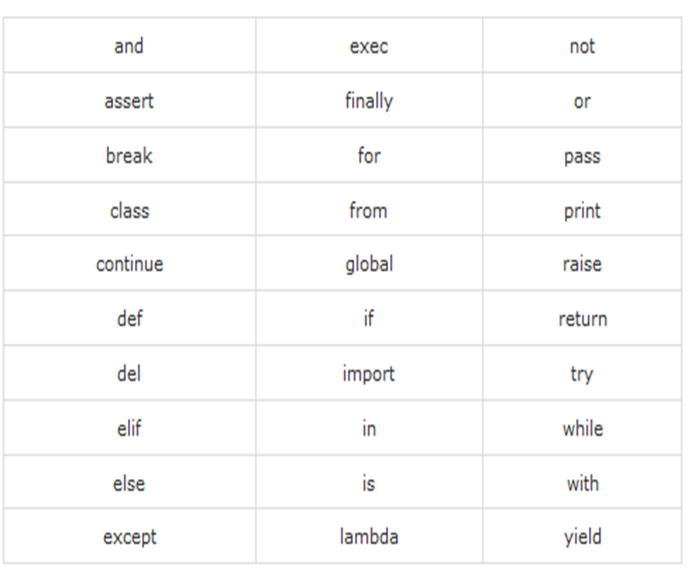
Now, let us move on and take some practical examples about defining variables in Python.

Define a variable with the name a, its value equal to 10 and print its value on the screen.
Hint to help you:
To define a new variable, type the variable name (a) then equal sign (=) then its value (10)
Solution Input:
a = 10

print(a)
Output:
10
Define three variables a, b, and c and make their value equal to 1 in one line of code, then print their value on the screen.
Hint to help you:
- To define multiple variables with the same values in one line of code, type the variables’ names and separate between them using equal signs (a = b = c) because they are equal to each other and finally type the value.
(a = b = c = 10).
- To print more than one variable using one print statement type print and between the brackets type the variables' names that you want to print and separate between them using commas.
Solution Input:
a = b = c = 1

print(a , b, c)
Output:
1 1 1Let us make the example more advanced by defining three variables a, b, c but now with different values, and make their values 1, 2, 3 in one line of code, then print their values on the screen.
Hint to help you:
You can assign different values to your variables by using commas between the variables' names and between the values.
Solution Input:
a, b, c = 1, 2, 3

print(a, b, c)
Output:
1 2 3Now, to be sure that Python is case sensitive define two variables A, a then give them different values for example 1, 2 and print both of them what do you get?
Solution Input:
a = 1

A = 2

print(a, A)
Output:
1 2Great, till now everything is clear and simple as I guess. What about trying to add digits to your variables' names, what would you get?
Solution Input:
a0 = 1

A1 = 2

print(a0, A1)
Output:
1 2After we see different ways to create identifiers, let us take examples of some cases that would raise exceptions or errors in order to avoid them in your code later.
First, let us try to start the variable name with a digit.
For example:
0a = 5Output:
SyntaxError: invalid syntaxSecond, Let us use the keyword if as the variable name.
Input:
if = 5Output:
SyntaxError: invalid syntaxThird, define a variable with the name ‘hello’ and try to print the variable with the name ‘Hello’
Input:
hello = 5

print(Hello)
Output:
NameError: name ‘Hello’ is not definedFourth, use @, a punctuation character, in the variable name.
Input:
c@ = 4Output:
SyntaxError: invalid syntaxIt is simple, right? So far you have tried 4 use cases in making different mistakes during defining your variables and see how the interpreter will raise an exception with different messages.

Now, let us summarize what we have learned in this article:

In this article you have learned the following:
- Python identifier: is a name for a function, a class, a variable, or a module.
- An Identifier name should start with (A-Z or a-z or _) and then you can add (A-Z or a-z or _ or 0–9), but punctuation characters like #, @, % and &... Are not allowed.
- Python is a case-sensitive language.
- DO NOT use keywords as identifiers.
P.S.: A million thanks for your time reading my story. Before you leave let me mention quickly two points:
- First, to get my posts in your inbox directly, would you please subscribe here, and you can follow me here.
- Second, writers made thousands of $$ on Medium. To get unlimited access to Medium stories and start earning, sign up now for Medium membership which only costs $5 per month. By signing up with this link, you can directly support me at no extra cost to you.
To get back to the previous article, you can use the following link:
Part 7:Run the First Program in Python
To move on to the next article, you can use the following link:
Resources:
- GitHub here.


