
Property in Python: Python OOP Complete Course — Part 7

Before we start let me tell you that:
- This article is a part of The Complete Course in Object Oriented Programming in Python which you can find it here.
- All resources are available in the “Resources” section below.
- This article is also available as a YouTube video Part 1- Part 2- Part 3.
Introduction
So far, you have learned all types of methods and attributes in Python OOp and this is a great job. Now it is time to upgrade your knowledge a bit. Assume you have an instance attribute it is named “age” and you try to initialize the value of this attribute by a negative value like “-10”.
If you use just a simple instance attribute, the value will be accepted, but it doesn’t make sense to have a negative value for the age.
The question here: How can we preprocess the attribute value before setting or getting the value?
To answer this question this article has been prepared. In this article, you will learn a new concept in Python OOP which is “Property”.
So this article will cover the following outlines:
Before you dive deeply into this article, I want to tell you that if you are studying the Property in Python OOP for the first time, this concept is a bit confusing and do not worry if you find it difficult to be understood. Be patient till you reach the code example then everything will be clear and easy to understand.
1. What is a Property?
Property () is a built-in function in Python, which means you don’t define this function by yourself. Usually, it creates and returns a Property object. So, when you say I have an object, you can just imagine that this is an object from a predefined class for you.
There are three methods related to the Property object which are getter, setter, and deleter where:
- getter is used to define the logic that you want to be executed when you get an instance attribute value.
- setter is used to define the logic that you want to be executed when you want to set the instance attribute value.
- deleter is used if you want to delete the instance attribute, in other words, convert its value into null.
Now we agree that the property is an object with three methods getter, setter, and deleter. The question now is why you have to use the Property?
2. Why do you have to use Property?
Simply Property is used to add any kind of preprocessing or logic when you want to set, get, or delete an attribute value. Like the “age” attribute value that I started with this article. So, If anybody tried to initialize the age value with a negative value, your code should throw an exception and the object should not be created in this case. Otherwise, the object will have invalid values for some attributes.
The question now is how you can through this exception or validate this value?
You have to define a setter method and inside it, you will do all the kinds of validation that you want. If there is any problem, you can throw exceptions and the process of initializing your object will not continue.
At last, most probably during your work, you will use getter or setter methods, and it’s very uncommon to use a deleter method in your class.
Now, let us see how you can define a Property in Python?
3. Property syntax
To define a Property:
- First of all the function “property” is used.
- After that, between the brackets three other functions “fget, fset, fdel” is passed which are referring to what you want to execute when you get, set, or delete an attribute’s value.
- Finally, you have “doc” an optional argument you can pass if you want to add some documentation string, or simply ignore it.
This property function will return a Property object, you can store it in a variable like Property_name as follows:
Property_name = property(fget, fset, fdel, doc)
Now let us see in action how to create a property within a class, and in Python, there are two ways to do that.
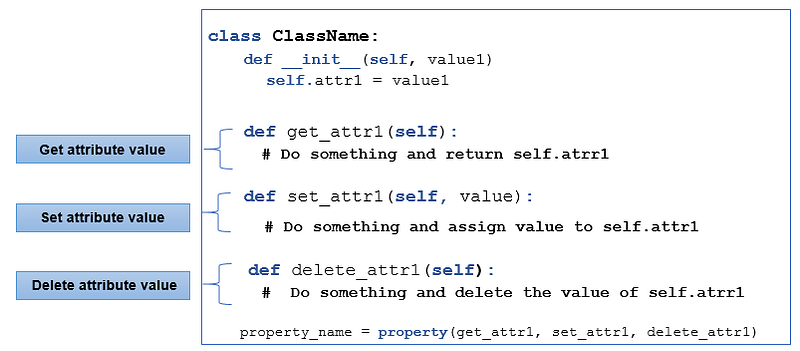
First way: Using property function as follows:
- A class should be defined and let us name it ClassName.
- Next, let us define the constructor method __init__ with two parameters self (the first one) and value1. Inside the __init__ method, let us define an instance attribute self.attr1 = value1.
- Finally, three methods are defined:
- get_attr1: specify the logic that should be executed when you want to get the attribute’s value.
- set_attr1: specify the logic that should be executed when you want to set this attribute’s value. Keep in mind that you have to specify the value that you want to assign to that attribute, so you will make your method accept one parameter as your attribute value.
- delete_attr1: specify what you want to do when you want to delete the attribute’s value.
class ClassName: def __init__(self, value1)
self.attr1 = value1 def get_attr1(self):
# Do something and return self.atrr1 def set_attr1(self, value):
# Do something and assign value to self.attr1
def delete_attr1(self):
# Do something and delete the value of self.atrr1Once all of these three methods have been defined, you can define your property.
Note: In this case, the property is just a class attribute and this class attribute has the value of the object that the property function returns. Refer to the property_name class attribute that has been defined at the end of the following code snippet.
class ClassName:
    def __init__(self, value1)
         self.attr1 = value1
def get_attr1(self):
# Do something and return self.atrr1 def set_attr1(self, value):
# Do something and assign value to self.attr1
def delete_attr1(self):
# Do something and delete the value of self.atrr1 property_name = property(get_attr1, set_attr1, delete_attr1)As it has been mentioned before about the property function you should specify three methods to get, set, and delete your attribute’s value.

I know that the property concept is a little weird, do not worry everything will be clear after we apply it in the code example, let us see…

Going back to the Student example which has been implemented in the previous articles. Where it has
- Multiple class and instance attributes.
- One instance method, two class methods, and one static method, as follows:
from datetime import datetimeclass Student: num_undergraduates = 0
num_ postgraduates = 0 undergraduates_age_range = range(19, 24)
postgraduates_age_range = range(24, 30) def __init__(self, _id, first_name, last_name, age): self.id = _id
self.first_name = first_name
self.last_name = last_name
self.full_name = self.first_name + " " + self.last_name
self.age = age if self.age in Student.undergraduates_age_range:
Student.num_undergraduates += 1 elif self.age in Student.postgraduates_age_range:
Student.num_postgraduates += 1 else:
raise Exception('Invalid Age') self.classes = [] def enrol(self, class_name):
print(self.full_name)
self.classes.append(class_name) @classmethod
def get_undergraduates_percentage(cls):
num_students = cls.num_undergraduates +
cls.num_postgraduates return cls.num_undergraduates / num_students @classmethod
def create_student_from_birthday(cls, student_id, first_name,
last_name,birthday):
age = round((datetime.now() - birthday).days / 365)
return cls(student_id, first_name, last_name, age) @staticmethod
def is_passed(cgpa):
if cgpa > 50:
return True
else:
return FalseAs you see the Student class has an instance attribute called full_name which has been defined to take its value from the other two instance attributes first_name and last_name. Now, what will happen if you try to update the value of the instance attribute full_name only without making any changes to its value sources as has been mentioned before first_name and last_name? Does this update keep the data consistent or not. Let us try that together.
- Define a Student object its name student1 with initial values of its instance attributes: id_ =1, first_name = ‘Jac’, last_name = ‘John’, age = 25
- Print its first_name, last_name, full_name on the screen
- Try to update its full_name to be equal to ‘Jack John’
- Again print its first_name, last_name, and full_name on the screen, what do you find? Does the result make sense to you?
Solution Input:
student1 = Student(1, 'Jac', 'John', 25)
print(student1.full_name)
print(student1.first_name)
print(student1.last_name)print()student1.full_name = 'Jack John'
print(student1.full_name)
print(student1.first_name)
print(student1.last_name)Output
Jac John
Jac
JohnJack John
Jac
JohnAs you can see, the data inside the object isn’t consistent and this happened because there is a relationship between (first name, last name, and the full name) in which the full_name is a combination between first_name, and last_name.
Therefore: If you update one of (first name, last name, or full name), you have to change or update the other.
This way of defining attributes is going to make some mistakes. So what is the proper way to define the object's full name in this case?

First step apply the following changes to your class:
- Remove the full_name instance attribute.
- Add a new instance attribute called first_name_first with a default value equal to True: the goal behind using this attribute is to know in which order the user wants to get the object full name later on:
- fisrt_name_first = True >>object full name = first_name + last_name.
- first_name_first = False >>object full name = last_name + first_name.
- Define a new instance method get_full_name (refer to the last method in the following code snippet) which has one parameter self and returns the full name of an object after testing the value of the instance attribute first_name_first as it has been mentioned in the previous point.
Note: you can remove the previous instance, class and static methods because you are not going to use them right now
Solution Input:
from datetime import datetimeclass Student: num_undergraduates = 0
num_postgraduates = 0 undergraduates_age_range = range(19, 24)
postgraduates_age_range = range(24, 30) def __init__(self, _id, first_name, last_name, age,
first_name_first=True): self.id = _id
self.first_name = first_name
self.last_name = last_name
self.first_name_first = first_name_first
self.age = age if self.age in Student.undergraduates_age_range:
Student.num_undergraduates += 1 elif self.age in Student.postgraduates_age_range:
Student.num_postgraduates += 1 else:
raise Exception('Invalid Age') self.classes = [] def get_full_name(self):
if self.first_name_first:
return self.first_name + ' ' + self.last_name
else:
return self.last_name + ' ' + self.first_nameTest your code by:
- Defining a Student object its name student1 with initial values of its instance attributes: id_ =1, first_name = ‘Jack’, last_name = ‘John’, age = 25, first_name_first = False.
- Then call the get_full_name method.
student1 = Student(1, 'Jack', 'Ma', 25, first_name_first=False)
student1.get_full_name()Output
'Ma Jack'
So far, you don’t have a property, and you just have an instance method that returns the object's full name as you wish.
Now, let us use this method as a getter function for the property, by:
- Defining a class attribute its name full_name (refer to the last line in the following code snippet), which is equal to the property object which will be returned by property function full_name = property()
- property() function needs 3 parameters to be passed to it, in this case, pass:
- get_full_name method: as a getter method.
- None, None: for both setter and deleter methods because you have not defined them yet.
Solution Input:
from datetime import datetimeclass Student: num_undergraduates = 0
num_postgraduates = 0 undergraduates_age_range = range(19, 24)
postgraduates_age_range = range(24, 30) def __init__(self, _id, first_name, last_name, age,
first_name_first=True): self.id = _id
self.first_name = first_name
self.last_name = last_name
self.first_name_first = first_name_first
self.age = age if self.age in Student.undergraduates_age_range:
Student.num_undergraduates += 1 elif self.age in Student.postgraduates_age_range:
Student.num_postgraduates += 1 else:
raise Exception('Invalid Age') self.classes = [] def get_full_name(self):
if self.first_name_first:
return self.first_name + ' ' + self.last_name else:
return self.last_name + ' ' + self.first_name full_name = property(get_full_name, None, None)Cool right? now test your code by:
- Defining a Student object its name student1 with initial values of its instance attributes: id_ =1, first_name = ‘Jack’, last_name = ‘John’, age = 25, first_name_first = False.
- Call the get_full_name method and print the result
- Call the full_name attribute and print the result
Solution Input:
student1 = Student(1, 'Jack', 'Ma', 25, first_name_first=False)
print(student1.get_full_name())print(student1.full_name)Output
Ma Jack
Ma JackIn both cases, you got the same results.
Note: when you call the class attribute “student1.full_name”, you are getting a full_name value and because it’s a property, automatically the method “get_full_name” will be called.

Now, let us upgrade our class by defining a property setter method:
- Define a new instance method set_full_name (refer to the last method in the following code snippet) which:
- Accepts two parameters self and full_name value.
- Splits the parameter full_name into two parts first_name and last_name and updates the value of your instance attributes first_name and last_name according to the value attribute first_name_first to get the correct order.
- Do not forget full_name variable is a string usually containing two names and one space between them so to get these two names one by one, so you should use the split function.
- Update property function to use the setter method: property(get_full_name, set_full_name, None)
Note: Split is a function for a string that gives us in this case a list of two strings in which we assign these two strings into two variables.
Solution Input:
from datetime import datetimeclass Student: num_undergraduates = 0
num_postgraduates = 0 undergraduates_age_range = range(19, 24)
postgraduates_age_range = range(24, 30) def __init__(self, _id, first_name, last_name, age,
first_name_first=True):
self.id = _id
self.first_name = first_name
self.last_name = last_name
self.first_name_first = first_name_first
self.age = age
if self.age in Student.undergraduates_age_range:
Student.num_undergraduates += 1
elif self.age in Student.postgraduates_age_range:
Student.num_postgraduates += 1
else:
raise Exception('Invalid Age')
self.classes = [] def get_full_name(self):
if self.first_name_first:
return self.first_name + ' ' + self.last_name
else:
return self.last_name + ' ' + self.first_name
def set_full_name(self, full_name):
if self.first_name_first:
self.first_name, self.last_name = full_name.split()
else:
self.last_name, self.first_name = full_name.split()
full_name = property(get_full_name, set_full_name, None)After the setter method has been defined, let us use the property setter:
- Define a Student object its name student2 with initial values of its instance attributes: id_ =1, first_name = ‘Jac’, last_name = ‘John’, age = 25, first_name_first = False.
- Print student2 full_name, first_name and last_name
- Update student2 full_name to be equal to full_name = ‘Jack John’
- Again print student2 full_name, first_name and last_name, what do you get? is your student2 info consistent right now?
Solution Input:
student2 = Student(1, 'Jac', 'John', 25, first_name_first=True)print('Before ...')
print(student2.first_name)
print(student2.last_name)
print(student2.full_name)print('\nAfter ...')
student2.full_name = 'Jack John'
print(student2.first_name)
print(student2.last_name)
print(student2.full_name)Output
Before ...
Jac
John
Jac JohnAfter ...
Jack
John
Jack JohnAs you saw, the first_name has been updated after the updating of full_name. In this case, you have consistent data because the first _name and last_name matched the complete name.
Finally, the property setter function, in this case, has solved the previously mentioned issue in which when you have updated only the full_name, the first_name has not been changed and vice versa.

Finally, let us define a property deleter:
- Define a new instance method delete_full_name (refer to the last method in the following code snippet) which accepts only self as a parameter.
- delete_full_name: will delete the full_name by clearing the value of first_name and last_name.
- Pass delete_full_name into the property function.
property(get_full_name, set_full_name, delete_full_name)
Note: To be sure that the deleter method delete_full_name has been called when you want to delete full_name you can print any sentence that you want inside it.
Solution Input:
from datetime import datetimeclass Student: num_undergraduates = 0
num_postgraduates = 0 undergraduates_age_range = range(19, 24)
postgraduates_age_range = range(24, 30) def __init__(self, _id, first_name, last_name, age,
first_name_first=True):
self.id = _id
self.first_name = first_name
self.last_name = last_name
self.first_name_first = first_name_first
self.age = age
if self.age in Student.undergraduates_age_range:
Student.num_undergraduates += 1
elif self.age in Student.postgraduates_age_range:
Student.num_postgraduates += 1
else:
raise Exception('Invalid Age')
self.classes = []
def get_full_name(self):
if self.first_name_first:
return self.first_name + ' ' + self.last_name
else:
return self.last_name + ' ' + self.first_name
def set_full_name(self, full_name):
if self.first_name_first:
self.first_name, self.last_name = full_name.split()
else:
self.last_name, self.first_name = full_name.split()
def delete_full_name(self):
print('I am deleter')
self.first_name = None
self.last_name = None full_name = property(get_full_name, set_full_name,
delete_full_name)After deleter method has been defined, let us use the property deleter:
- Define a Student object its name student2 with initial values of its instance attributes: id_ =1, first_name = ‘Jac’, last_name = ‘John’, age = 25, first_name_first = False.
- Print student2 full_name, first_name and last_name
- Use the keyword del to delete full_name, which behind the scene will call your deleter method.
- Again try to print student2 full_name, first_name and last_name
Note: del is a keyword and it’s already predefined in Python. We use del to delete items from a list or items from a dictionary or if I want to delete the list itself. Also, when you use del with one attribute of an object from a class, this means that you want to call the deleter method from your property.
Solution Input:
student2 = Student(1, 'Jac', 'John', 25,first_name_first = False)print('Before ...')
print(student2.first_name)
print(student2.last_name)
print(student2.full_name)print('\nAfter ...')
del student2.full_name
print(student2.first_name)
print(student2.last_name)
print(student2.full_name)Output
Before ...
Jac
John
Jac JohnAfter ...
I am deleter
None
NoneTypeError: unsupported operand type(s) for +: 'NoneType' and 'str'As a result, you got None for first_name and last_name and for the last print statement you got a TypeError unsupported operand type for full_name after it has been deleted because:
- The last print statement tries to print the full_name
- To get the full_name, get_full_name method will be called and applied to return self.first_name + ‘ ‘ + self.last_name .
- But your code has already cleared the value of first_name and last_name. In other words, it made them None.
- However, adding a string to a None value isn’t defined in Python.
For this reason, you got a TypeError.

As a reminder, to define a property:
- You have to define a method for getting, setting, and deleting. Usually, you define what you need, so not every time all the methods will be defined.
- Once you have defined the methods for the deletter, getter and setter, you have to define a property object by using the property function.
I hope now that the concept of property is clearer, especially after you have seen a real example.
Great, let us move on to the second way of defining a Property in Python.
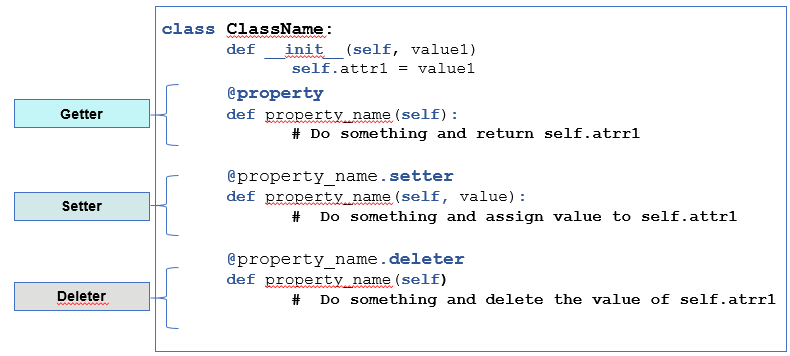
Second way: Using property decorator as follows:
- First, a class should be defined and let us name it ClassName.
- Next, let us define the __init__ method (constructor method)with two parameters self (the first one) and value1. Inside the __init__ method let us define an instance attribute self.attr1 = value1
- Then three methods are defined with the same name property_name but they will be different in their decorators as follows:
- @property: the decorator of the first method which is the getter method. Where it just takes self as its parameter.
- @property_name.setter: the decorator of the second method which is the setter method.
- @property_name.deleter: the decorator of the last method which is the deleter method.
class ClassName:
   def __init__(self, value1)
self.attr1 = value1 @property
def property_name(self):
# Do something and return self.atrr1 @property_name.setter
def property_name(self, value):
# Do something and assign value to self.attr1 @property_name.deleter
def property_name(self)
# Do something and delete the value of self.atrr1Defining a property in any way will give you a property in the end. Therefore, It is up to you to choose the way that you are more comfortable with. I will leave using property decorator as a challenge for you to apply it in a real example. Please do not hesitate to ask me if you face any problems while you apply it.
Now, let us summarize what we have learned in this article:

In this article we have talkd about:
- property(): is a built-in function that creates and returns a property object.
- Usually, we define and use property to add any kind of logic when we want to set, get, or delete an attribute value.
- To define a property, we can use property() function or property decorators.
- If you want to use a property function, you have to define three methods (one for getter, one for setter, and one for deletter). Then you have to define a property object and you assign the object to a property name. Refer to Figure 1.
- If you want to use property decorators you have to use @property for the getter, @property_name.setter for the setter method, and @property_name.deleter for the deleter. Refer to Figure 2.
P.S.: A million thanks for your time reading my story. Before you leave let me mention quickly two points:
- First, to get my posts in your inbox directly, would you please subscribe here, and you can follow me here.
- Second, writers made thousands of $$ on Medium. To get unlimited access to Medium stories and start earning, sign up now for Medium membership which only costs $5 per month. By signing up with this link, you can directly support me at no extra cost to you.
To get back to the previous article, you can use the following link:
To move on to the next article, you can use the following link:
Part 8: Abstraction and Encapsulation
Resources:
- GitHub here.


