avatarMaria Milojković, MA

Free AI web copilot to create summaries, insights and extended knowledge, download it at here

4710

Abstract

st/">Ubersuggest</a> is a free tool to help you rank better on Google. It’s easy to use and doesn’t need great SEO knowledge. Type in a keyword or a key phrase and click the Search button.</p><figure id="1505"><img src="https://cdn-images-1.readmedium.com/v2/resize:fit:800/1*6kibmsXTrVSs_v7ee66DkA.png"><figcaption>How to use Ubersuggest for headlines (Image provided by the author)</figcaption></figure><p id="ad89">If you type “How to write a title,” you’ll get the numbers telling you how easy it is to rank for it on Google. Pay attention to the <b>search volume</b>. It shows how often people search for the phrase per month (1,000 times). The higher the number, the better. Another number is <b>SEO difficulty</b>. The lower the number, the weaker the competition in organic search (6 is very low; the number often has two digits).</p><p id="4737">The numbers up here are very good. Look for everything above 200 for the search volume, and EASY for the SEO difficulty. This way people who google the answer can come across your Medium post.</p><p id="6926">Here you can also see the trend of the word for the last 12 months on mobile and desktop, as well as the searchers’ ages.</p><h1 id="eb91">3. CoSchedule</h1><p id="9a03"><a href="https://coschedule.com/headline-analyzer">CoSchedule</a> helps you obey Medium rules but improve the effectiveness of your headline.</p><figure id="895b"><img src="https://cdn-images-1.readmedium.com/v2/resize:fit:800/1*AsJ_LGLQ7RG3cMdSL2P7yQ.png"><figcaption>How to use CoSchedule for catchy headlines (Image provided by the author)</figcaption></figure><p id="f510">Type in the headline you are considering, such as “How to write a title.” You’ll get a score of how powerful it is (this one is 66). Aim for the green circle, which starts from 70 upward.</p><p id="e918">Below is a small analysis of different components of your headline:</p><ul><li>What percentage of <b>common words</b> you used (<i>a</i>, <i>how</i>, <i>to</i>),</li><li>if you used any <b>uncommon words</b> to draw special attention (0%),</li><li>if any of the words have an <b>emotional effect </b>on the reader (<i>how to</i>),</li><li>and what <b>power words</b> trigger the reader to action (0%).</li></ul><figure id="6cce"><img src="https://cdn-images-1.readmedium.com/v2/resize:fit:800/1*Vyk8EmG9LL8AzhtF5xBJcQ.png"><figcaption>CoSchedule analyzes the word balance of your headline (Image provided by the author)</figcaption></figure><p id="f5b2">Usually you can’t have them all in their ideal percentage. Still, the tool can help you upgrade the clickability of your headline.</p><p id="ff8a">You also get the type of your title and its sentiment (positive, negative, or neutral). The number of words and characters show the click-through rate and SEO readability.</p><p id="200f">On the CoSchedule site, you can also find the list of <a href="https://media.coschedule.com/uploads/write-emotional-headlines-power-words-copy.pdf"><b>Power Words in PDF</b></a><b>. </b>They<b> </b>help you write emotional headlines. It’s useful, but be careful not to go too clickbaity with it.</p><h1 id="e18e">4. WordCounter</h1><p id="416b"><a href="https://wordcounter.net/">WordCounter</a> is a simple tool to see if you fit into Medium’s length rule. In previews, the headline and the subtitle must be 100 characters at most. Otherwise, Medium will clip them and they’ll lose their power.</p><figure id="04db"><img src="https://cdn-images-1.readmedium.com/v2/resize:fit:800/1*IUY_yxpu7gKdpEf3I_X51w.png"><figcaption>WordCounter helps you check your headline length (Image provided by the author)</figcaption></figure><p id="eb6a">Paste the whole piece. WordCounter will show you the top ten keywords and the keyword density of your article. This can help you not use certain words too often and check how you distributed them throughout the text. It also has an anti-plagiarism check.</p><h1 id="5af9">5. Excel Sheet No. 2 — A List of Headlines You Clicked On</h1><p id="1cb6">I started keeping a list of the titles I clicked on. I write down the following information:</p><ul><li>the headline</li><li>its form (how-to, a surprising statement, “X skills that helped me get…”)</li><li>the reason I clicked on it (I was interested in the topic, or it was awfully clickbaity, etc.)</li><li>a column for my impression of the piece</li></ul><p id="6a34">This way you can look to other successful writers and get the best of their writing. You see the patterns that occur the most and the topics that go well. I intend to get back to the list after a while and see what I react to the most.</p><figure id="d310"><img src="https://cdn-images-1.readmedium.com/v2/resize:fit:800/1*UPHnMviwY1E4cJwlQy2Cwg.png"

Options

<figcaption>An excel sheet with the list of headlines I clicked on (Image provided by the author)</figcaption></figure><h1 id="d0ab">6. Title Case Converter</h1><p id="2dfd"><a href="https://titlecaseconverter.com/">Title Case Converter</a> is another tool you can use to format your title. Some publications insist on a specific title format. This converter does the formatting for you. Type in the headline and choose the style below: APA, Chicago, NY Times, Wikipedia, etc.</p><figure id="27f2"><img src="https://cdn-images-1.readmedium.com/v2/resize:fit:800/1*8d9n3bvr5iETESUUvBQpgQ.png"><figcaption>Title Case Converter helps you capitalize your headline | Image provided by the author</figcaption></figure><p id="7404">Click on the blue Convert button and you’ll see how your headline should look. You’ll also get explanations for the style you chose.</p><figure id="0d6c"><img src="https://cdn-images-1.readmedium.com/v2/resize:fit:800/1*KlfY61hbSsFQwMGgXrjyIQ.png"><figcaption>Explanation of what Title Case is on <a href="https://titlecaseconverter.com/">Title Converter</a></figcaption></figure><h1 id="88d4">7. Headline Analyzer</h1><p id="81d1"><a href="https://www.aminstitute.com/headline/">Headline Analyzer</a> is a tool for the emotional marketing value of your words.</p><figure id="0059"><img src="https://cdn-images-1.readmedium.com/v2/resize:fit:800/1*gwW35evn9QP9yxU8FJf5fQ.png"><figcaption>Check your headline with Headline Analyzer (Image provided by the author)</figcaption></figure><p id="493c">Again, type in the headline you have in mind and press the blue button at the bottom.</p><p id="0afc">If a copywriter wants to reach their prospects, they will go for emotional marketing. The tool analyzes the number of emotional words you put compared to their total number in the headline. You’ll also get which emotion the title influences the most.</p><p id="0ed2">Below the headline, you’ll see its total emotional marketing value (EMV). The words can have three different effects:</p><ul><li><b>intellectual</b>, which is useful when making decisions</li><li><b>empathetic</b>, which brings deep positive reactions</li><li><b>spiritual</b>, which influences people at an emotional level</li></ul><p id="e593">You’ll also have an explanation of your score and whom your headline resonates with the most.</p><figure id="a1c6"><img src="https://cdn-images-1.readmedium.com/v2/resize:fit:800/1*JcWghgPkdaj5w4xp-7R8Qg.png"><figcaption>The analysis of your headline on Headline Analyzer (Image provided by the author)</figcaption></figure><h1 id="595b">Conclusion</h1><p id="e244">Writing a headline is confusing at first. Too many rules, yet it’s too unclear how to find the right one. But the more you do it, the better you become. These tools can help you improve your titles:</p><ul><li>the summary of <a href="https://blog.medium.com/how-to-write-a-headline-a72ab3449150">Medium staff’s tips</a></li><li><a href="https://neilpatel.com/ubersuggest/">Ubersuggest</a> for better SEO ranking</li><li><a href="https://coschedule.com/headline-analyzer">CoSchedule</a> to write more powerful headlines</li><li><a href="https://wordcounter.net/">WordCounter</a> so your title doesn’t get clipped</li><li>The list of other writers’ headlines you clicked on</li><li><a href="https://titlecaseconverter.com/">Title Case Converter</a> for title formatting</li><li><a href="https://www.aminstitute.com/headline/">Headline Analyzer</a> to check the emotional marketing value</li></ul><p id="8f7b">You don’t have to use any of them but the first. Still, each will definitely improve your writing. The headline is the tool that will make or break your piece. An attractive title helps you stick out among thousands of authors. Give your headline some time to simmer before you serve it to the audience. In the meantime, you may find a better option. Hell, I found 15 before I chose this one.</p><p id="05b5"><i>I’ve created <b>a 5-day free course on writing </b>that you can read on Medium. Check it out:</i></p><div id="3245" class="link-block">
      <a href="https://readmedium.com/how-to-write-a-high-quality-post-for-medium-and-not-get-embarrassed-at-what-youve-written-75be7b8f3a0f">
        <div>
          <div>
            <h2>How to Write a High-Quality Post for Medium and Not Get Embarrassed at What You’ve Written</h2>
            <div><h3>A free course</h3></div>
            <div><p>medium.com</p></div>
          </div>
          <div>
            <div style="background-image: url(https://miro.readmedium.com/v2/resize:fit:320/0*KTplIhhnoKIOctL1.jpeg)"></div>
          </div>
        </div>
      </a>
    </div></article></body>

7 Free Tools for Simple but Catchy Headlines

The sweet spot between clickable and clickbaity

Photo by Victor Garcia on Unsplash

When I started writing, I focused on how to deliver a message. Then I realized people with superficial pieces had more views than me. They had better headlines, and I never paid much attention to them. It was time to fix this carelessness. Now I use online tools to polish my headlines. I spend 15–30 minutes thinking up different titles until I find the best one.

I’m not a title guru but my progress is visible. Here are seven simple tools that help me get the right headline for my piece.

1. Excel Sheet No. 1 — Tips From Medium Staff

I have this Excel table. It has different pieces of information on writing, including my published posts. Do the same. On one sheet, I jotted down the Medium staff’s main guidelines so I don’t get back to the article every time I write.

If you don’t play by the rules, you don’t get curated. For writers with over 10K followers, it’s not that big a deal. The rest of us have to go by the book. Let’s see what the Medium staff’s tips are on writing a good headline:

You may want to manipulate people to click on your title. Such headlines worked in the past, but now it’s all about moderation. The headline mustn’t play with readers’ emotions. It can’t be vague or mysterious. Also, you can’t exaggerate or overpromise the solution. Here are a few bad choices:

  • “The secret to…”
  • ”You’ll never guess…”
  • ”The only thing you need for success is…”

A headline must be so clear and specific that readers only ask themselves, “do I want to read this story?” As you write it, do your best to deliver the promise from the title. Of course, if you offer a quick fix to a serious challenge, you’ll lose your credibility with readers.
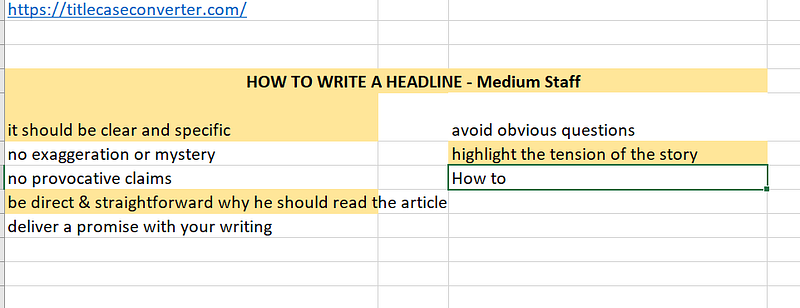
A part of my excel sheet with the Medium Staff’s rules on how to write a headline

There is no space for provocative claims:

  • “Only an idiot can do this”
  • “5 hacks you can do right now to change your life immediately”
  • “How to get better at… It’s not what you think”

Stay away from playing with the readers’ insecurities. Don’t grab them by their fear, sense of inadequacy, or desire. These choices are too manipulative and far from journalism. Medium is very clear:

“If it exploits the reader’s emotions and insecurities, it is likely clickbait.”

Once I wrote a nice piece on the effects of kindness on your body and mind. I spent days writing it. I backed it up with reliable medical sources, but it didn’t get curated. The title of the draft looked too generic: “You can get addicted to charity work.” I changed it toCharity work can get you hooked like a junkie.” This spice made it too clickbaity, so Medium didn’t curate the piece.

When writing a headline, you should also stay away from obvious questions:

  • “Do you want to make $2,000 with an online side hustle?”
  • “What 5 things do you need to get people to read your articles?”
  • “Are you happy with your life?”

How-tos always go well. They have an appeal to people’s emotions because you are providing the answer to what they want to learn.

If possible, it’s good to bring out the tension in the story, like this:

  • “Should Non-Native Speakers Write on Medium at All?” (This piece was my reaction to a blogger who claimed non-native speakers’ English is bad. I claimed the opposite.)
  • “Happiness Lies in Accepting Your Limitations” (Self-help gurus often tell you ain’t no mountain high enough. I don’t think so.)
  • “Indecisiveness Can Help You Make Better Decisions” (People see indecisiveness as a shortcoming. I am claiming the opposite.)

Always bear in mind these Medium rules when shaping the headline. Now you know what’s acceptable, let’s make it more attractive to readers.

2. Ubersuggest

Neil Patel’s Ubersuggest is a free tool to help you rank better on Google. It’s easy to use and doesn’t need great SEO knowledge. Type in a keyword or a key phrase and click the Search button.
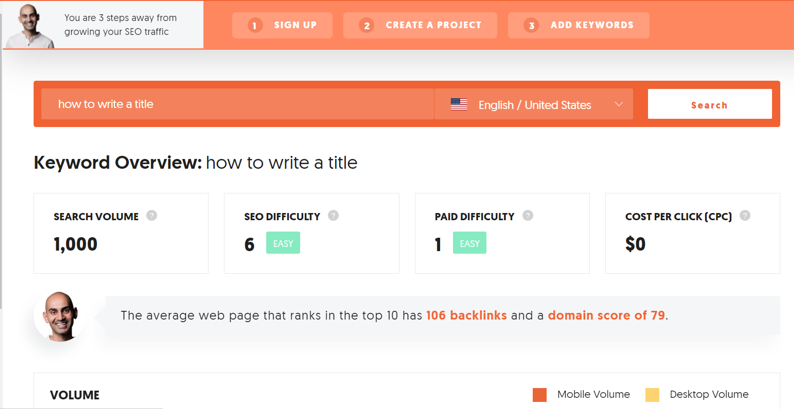
How to use Ubersuggest for headlines (Image provided by the author)

If you type “How to write a title,” you’ll get the numbers telling you how easy it is to rank for it on Google. Pay attention to the search volume. It shows how often people search for the phrase per month (1,000 times). The higher the number, the better. Another number is SEO difficulty. The lower the number, the weaker the competition in organic search (6 is very low; the number often has two digits).

The numbers up here are very good. Look for everything above 200 for the search volume, and EASY for the SEO difficulty. This way people who google the answer can come across your Medium post.

Here you can also see the trend of the word for the last 12 months on mobile and desktop, as well as the searchers’ ages.

3. CoSchedule

CoSchedule helps you obey Medium rules but improve the effectiveness of your headline.
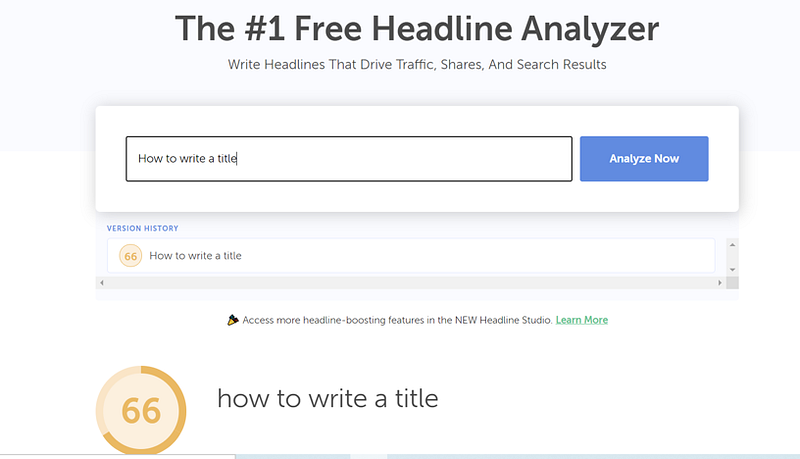
How to use CoSchedule for catchy headlines (Image provided by the author)

Type in the headline you are considering, such as “How to write a title.” You’ll get a score of how powerful it is (this one is 66). Aim for the green circle, which starts from 70 upward.

Below is a small analysis of different components of your headline:

  • What percentage of common words you used (a, how, to),
  • if you used any uncommon words to draw special attention (0%),
  • if any of the words have an emotional effect on the reader (how to),
  • and what power words trigger the reader to action (0%).
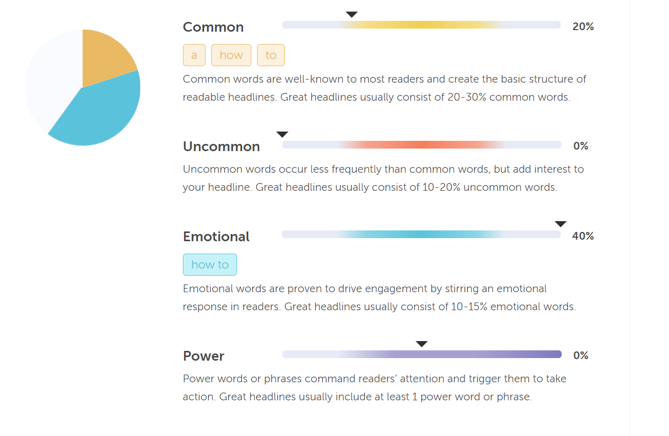
CoSchedule analyzes the word balance of your headline (Image provided by the author)

Usually you can’t have them all in their ideal percentage. Still, the tool can help you upgrade the clickability of your headline.

You also get the type of your title and its sentiment (positive, negative, or neutral). The number of words and characters show the click-through rate and SEO readability.

On the CoSchedule site, you can also find the list of Power Words in PDF. They help you write emotional headlines. It’s useful, but be careful not to go too clickbaity with it.

4. WordCounter

WordCounter is a simple tool to see if you fit into Medium’s length rule. In previews, the headline and the subtitle must be 100 characters at most. Otherwise, Medium will clip them and they’ll lose their power.
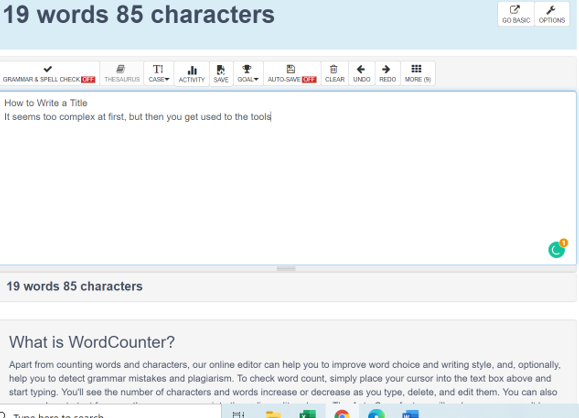
WordCounter helps you check your headline length (Image provided by the author)

Paste the whole piece. WordCounter will show you the top ten keywords and the keyword density of your article. This can help you not use certain words too often and check how you distributed them throughout the text. It also has an anti-plagiarism check.

5. Excel Sheet No. 2 — A List of Headlines You Clicked On

I started keeping a list of the titles I clicked on. I write down the following information:

  • the headline
  • its form (how-to, a surprising statement, “X skills that helped me get…”)
  • the reason I clicked on it (I was interested in the topic, or it was awfully clickbaity, etc.)
  • a column for my impression of the piece

This way you can look to other successful writers and get the best of their writing. You see the patterns that occur the most and the topics that go well. I intend to get back to the list after a while and see what I react to the most.
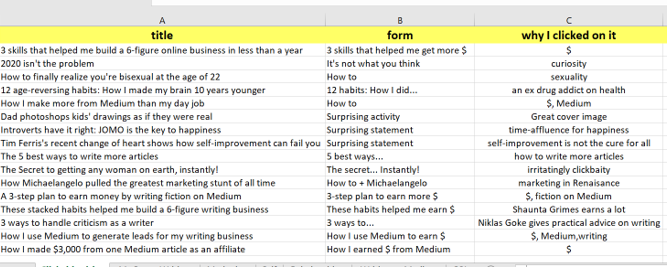
An excel sheet with the list of headlines I clicked on (Image provided by the author)

6. Title Case Converter

Title Case Converter is another tool you can use to format your title. Some publications insist on a specific title format. This converter does the formatting for you. Type in the headline and choose the style below: APA, Chicago, NY Times, Wikipedia, etc.
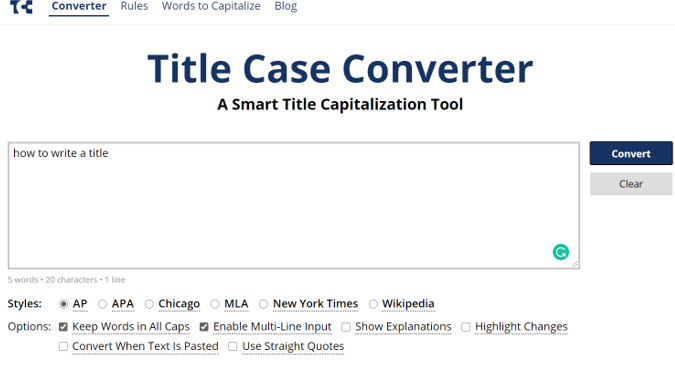
Title Case Converter helps you capitalize your headline | Image provided by the author

Click on the blue Convert button and you’ll see how your headline should look. You’ll also get explanations for the style you chose.
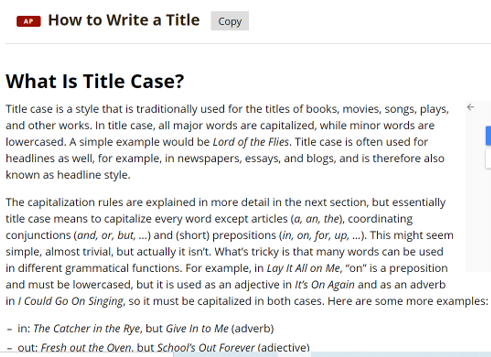
Explanation of what Title Case is on Title Converter

7. Headline Analyzer

Headline Analyzer is a tool for the emotional marketing value of your words.
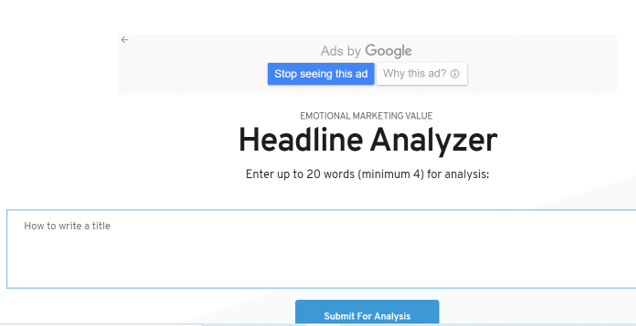
Check your headline with Headline Analyzer (Image provided by the author)

Again, type in the headline you have in mind and press the blue button at the bottom.

If a copywriter wants to reach their prospects, they will go for emotional marketing. The tool analyzes the number of emotional words you put compared to their total number in the headline. You’ll also get which emotion the title influences the most.

Below the headline, you’ll see its total emotional marketing value (EMV). The words can have three different effects:

  • intellectual, which is useful when making decisions
  • empathetic, which brings deep positive reactions
  • spiritual, which influences people at an emotional level

You’ll also have an explanation of your score and whom your headline resonates with the most.
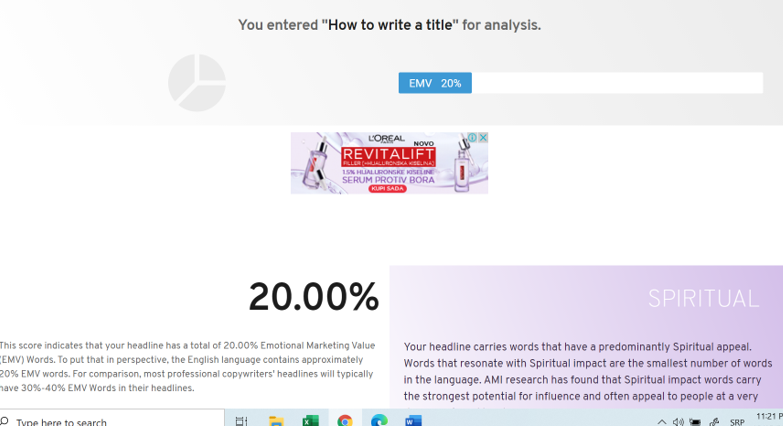
The analysis of your headline on Headline Analyzer (Image provided by the author)

Conclusion

Writing a headline is confusing at first. Too many rules, yet it’s too unclear how to find the right one. But the more you do it, the better you become. These tools can help you improve your titles:

You don’t have to use any of them but the first. Still, each will definitely improve your writing. The headline is the tool that will make or break your piece. An attractive title helps you stick out among thousands of authors. Give your headline some time to simmer before you serve it to the audience. In the meantime, you may find a better option. Hell, I found 15 before I chose this one.

I’ve created a 5-day free course on writing that you can read on Medium. Check it out:

Writing
Productivity
Creativity
Language
Self Improvement
Recommended from ReadMedium